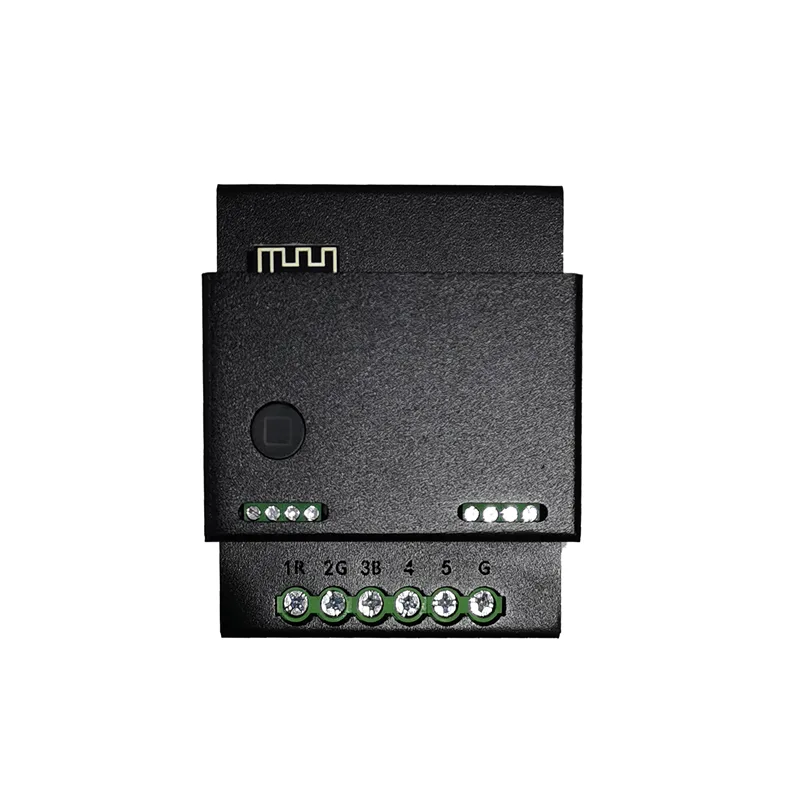
Product Overview
The MD03 0-10V dimming module is an intelligent control device that outputs 0-10V pure voltage analog signals. It can accurately control 5 channels of 0-10V output signals through Modbus RTU protocol, achieving high-quality dimming atmosphere lighting. This product is widely used in various places that require intelligent lighting control, such as homes, office buildings, hotels, hospitals, schools, etc.
Product Specifications
Basic Parameters
- Model: MD03
- Output channels: 5 channels with 0-10V dimming output
- Product weight: 0.35kg
- Appearance size: 69 × 57 × 87mm
- Shell material: metal
- Installation method: Distributed placement installation or DN35 guide rail installation
Technical Specifications
- Communication protocol: Modbus RTU
- Baud rate: default 9600 (modifiable), 8 data bits, no checksum, 1 stop bit (8N1)
- Operating temperature: -10 ℃~50 ℃
- Power supply voltage: DC 12-60V
- Driving capability: ≤ 50mA/channel
- Output voltage range: 0-10V
- Dimming accuracy: 255 level digital infinite dimming
Product features
- Multi device driver: Multiple 0-10V dimming drivers can be connected within the current range
- Smooth dimming3] Group control
- group control Support branch group control, quickly achieve personalized scenario control
- Dimming curveSupports 25 dimming curves and adapts to various lighting characteristics
- industrial standardSupports Modbus RTU industrial control protocol for easy system integration
Detailed explanation of Modbus communication protocol
1. Basic communication parameters
- Protocol type: Modbus RTU
- Default slave address: 103 (modifiable)
- Default baud rate: 9600bps (can be modified to 4800/9600/19200/38400/57600/115200)
- Data format: 8-bit data bits, no checksum, 1-bit stop bit (8N1)
2. Register Mapping Table
| register address | Name | data type | Value range | Explanation |
|---|---|---|---|---|
| 0x0001 | Device Address AD | 16 bit no match | 1-247 | Device Modbus Address |
| 0x0002 | Baud rate BAUD | 16 bit no match | 1-6 | 1:4800,2:9600,3:19200,4:38400,5:57600,6:115200 |
| 0x0003 | Power on status 1R | 16 bit no match | 0-1 | Channel 1 power on status (0: off, 1: on) |
| 0x0004 | Power on status 2G | 16 bit no match | 0-1 | Channel 2 power on status |
| 0x0005 | Power on status 3B | 16 bit no match | 0-1 | Channel 3 Power On Status |
| 0x0006 | Power On Status 4 | 16 Bit Unmatched | 0-1 | Channel 4 Power On Status |
| 0x0007 | Power On Status 5 | 16 Bit Unmatched | 0-1 | Channel 5 Power On Status |
| 0x0008 | Output Brightness 1R | 16 Bit Unmatched | 0-255 | Channel 1 brightness value (0-255 corresponds to 0-10V) |
| 0x0009 | Output brightness 2G | 16 bit unsigned | 0-255 | Channel 2 brightness value |
| 0x000A | Output brightness 3B | 16 bit unsigned | 0-255 | Channel 3 brightness value |
| 0x000B | Output brightness 4 | 16 bit unsigned | 0-255 | Channel 4 Brightness Value |
| 0x000C | Output Brightness 5 | 16 Bit Unmatched | 0-255 | Channel 5 Brightness Value |
3. Function Code Description
Function Code 03H: Read and Hold Register
- Request Format:
从站地址 | 功能码(0x03) | 起始地址高字节 | 起始地址低字节 | 寄存器数量高字节 | 寄存器数量低字节 | CRC16低字节 | CRC16高字节- Response Format:
从站地址 | 功能码(0x03) | 字节数 | 数据1高字节 | 数据1低字节 | ... | CRC16低字节 | CRC16高字节Function Code 06H: Write to Single Register
- Request Format:
从站地址 | 功能码(0x06) | 寄存器地址高字节 | 寄存器地址低字节 | 数据高字节 | 数据低字节 | CRC16低字节 | CRC16高字节- Response Format: Same as Request
Function code 10H: Write multiple registers
- Request format:
从站地址 | 功能码(0x10) | 起始地址高字节 | 起始地址低字节 | 寄存器数量高字节 | 寄存器数量低字节 | 字节数 | 数据1高字节 | 数据1低字节 | ... | CRC16低字节 | CRC16高字节- Response format:
从站地址 | 功能码(0x10) | 起始地址高字节 | 起始地址低字节 | 寄存器数量高字节 | 寄存器数量低字节 | CRC16低字节 | CRC16高字节4. Communication example
Example 1: Read brightness values of channels 1-5
- Request:
67 03 00 08 00 05 1D C9- Slave address: 0x67 (103)
- Function code: 0x03 (Read hold register)
- Start address: 0x0008
- Number of registers: 0x0005
- CRC16:0xC91D
- Response:
67 03 0A FF 00 FF 00 FF 00 FF 00 00 00 XX XX- Slave Address: 0x67
- Function Code: 0x03
- Byte Count: 0x0A (10 bytes)
- Data: Channel 1=255 (0x00FF), Channel 2=0 (0x0000), Channel 3=255, Channel 4=0, Channel 5=0
- CRC16: XX XX
Example 2: Set Channel 1 Brightness to 128
- Request:
67 06 00 08 00 80 1C 3A- Slave Address: 0x67
- Function Code: 0x06 (Write Single Register)
- Register Address: 0x0008
- Data: 0x0088 0 (128)
- CRC16:0x3A1C
- Response: Same as Request
Wiring Instructions
- Power Wiring:
- Power Supply: DC 12-60V
- Connected to Module Power Input Terminal
- 0-10V Output Wiring:
- 5-way 0-10V Output Terminals Connected to Dimming Drive Control Input Terminal
- Maximum Drive Capacity of 50mA per Channel
- Communication Wiring:
- RS485 Interface: A (+), B (-)
- It is recommended to use twisted pair shielded wire, with 120 Ω terminal resistance at both ends of the bus
- Typical Wiring Diagram:
   [VGA]---[调光驱动1]---[灯具1]
   [B]-----[调光驱动2]---[灯具2]
   [IR]----[调光驱动3]---[灯具3]
   [2G]----[调光驱动4]---[灯具4]
   [3B]----[调光驱动5]---[灯具5]
Application Scenarios
- Smart Home: Implementing whole house lighting scene control
- Commercial lighting: Intelligent dimming for shopping malls, hotels, office buildings, and other places
- Industrial lighting: Large area lighting control for factories, warehouses, and other places
- Professional places: Museums, galleries, theaters, and other places that require precise light control
Product link:https://item.taobao.com/item.htm?ft=t&id=903183289960


Leave a Reply