
Preface
In the previous chapters, I introduced how to handle JSON and XML data in Node-RED. However, some readers subsequently asked me,
how to handle YAML and CSV data in Node-RED. YAML data has become increasingly popular in recent years due to its elegant format, which eliminates the need for square brackets, making it a favorite among developers. Resource definitions in cloud-native environments can all be defined using YAML files. CSV format is a comma-separated text file that can be converted to and from data in Excel.
YAML Data Handling
The main node used for handlingyamlformat data is the YAML node. This node can convert between YAML-formatted strings and their corresponding JavaScript objects, which are in JSON data format.
Input:
payload object | string
JavaScript object or YAML string.
Output:
payload object | string
● If the input is a YAML string, it will attempt to parse it into a JavaScript object.
● If the input is a JavaScript object, it will create a YAML string.
Here is an example:
You can convert a YAML string to a JSON object
For example, if a string variable{"a":1, "b":[1,2,3]}is converted to YAML, it becomes
a: 1
b:
  - 1
  - 2
  - 3
The complete data flow
[{"id":"f231967.0251a68","type":"inject","z":"64133d39.bb0394","name":"YAML String","topic":"","payload":"{"a":1}","payloadType":"str","repeat":"","crontab":"","once":false,"onceDelay":0.1,"x":110,"y":320,"wires":[["a0110756.ecfa48"]]},
{"id":"8f8f31b7.1f916","type":"debug","z":"64133d39.bb0394","name":"","active":true,"tosidebar":true,"console":false,"tostatus":false,"complete":"false","x":590,"y":320,"wires":[]},
{"id":"5138ba3.c972444","type":"inject","z":"64133d39.bb0394","name":"Object","topic":"","payload":"{"a":1, "b":[1,2,3]}","payloadType":"json","repeat":"","crontab":"","once":false,"onceDelay":0.1,"x":90,"y":360,"wires":[["2fa653cc.60d3dc"]]},
{"id":"50f2f4c.4a6e60c","type":"debug","z":"64133d39.bb0394","name":"","active":true,"tosidebar":true,"console":false,"tostatus":false,"complete":"false","x":430,"y":360,"wires":[]},
{"id":"a0110756.ecfa48","type":"template","z":"64133d39.bb0394","name":"","field":"payload","fieldType":"msg","format":"yaml","syntax":"plain","template":"a: 1nb:n  - 1n  - 2n  - 3","output":"str","x":280,"y":320,"wires":[["104b80e2.51068f"]]},
{"id":"2fa653cc.60d3dc","type":"yaml","z":"64133d39.bb0394","property":"payload","name":"","x":250,"y":360,"wires":[["50f2f4c.4a6e60c"]]},
{"id":"104b80e2.51068f","type":"yaml","z":"64133d39.bb0394","property":"payload","name":"","x":430,"y":320,"wires":[["8f8f31b7.1f916"]]}]
Data processing in CSV format
For CSV format, one is to output CSV-formatted data, where each row is separated by commas. Data processing in CSV format cannot be separated from the built-in CSV node in node-red.
Convert between CSV-formatted strings and their JavaScript object representations.
Input:
payload object | array | string
JavaScript object, array, or CSV string.
Output:
payload object | array | string
- If the input is a string, it will attempt to parse it as CSV and create a JavaScript object with key/value pairs for each row. Then the node will send a message for each row, or send a message containing an array of objects.
- If the input is a JavaScript object, it will attempt to build a CSV string.
- If the input is an array of simple values, a single-row CSV string will be built.
- If the input is an array of arrays or an array of objects, a multi-row CSV string will be created.
The column template can contain an ordered list of column names. When converting CSV to an object, the column names will be used as property names. Alternatively, the column names can also be obtained from the first row of the CSV.
When converting to CSV, the column template is used to identify the properties extracted from the object and the order of extraction.
If the input is an array, the column template is only used to selectively generate a row of column headers.
As long as thepartsproperty is set correctly, the node can accept multiple inputs.
If multiple messages are output, their settings will be setpartsAttributes and form a complete message sequence.
Note:Column templates must be separated by commas, even if there are other separators in the data.
The configuration page of the CSV node
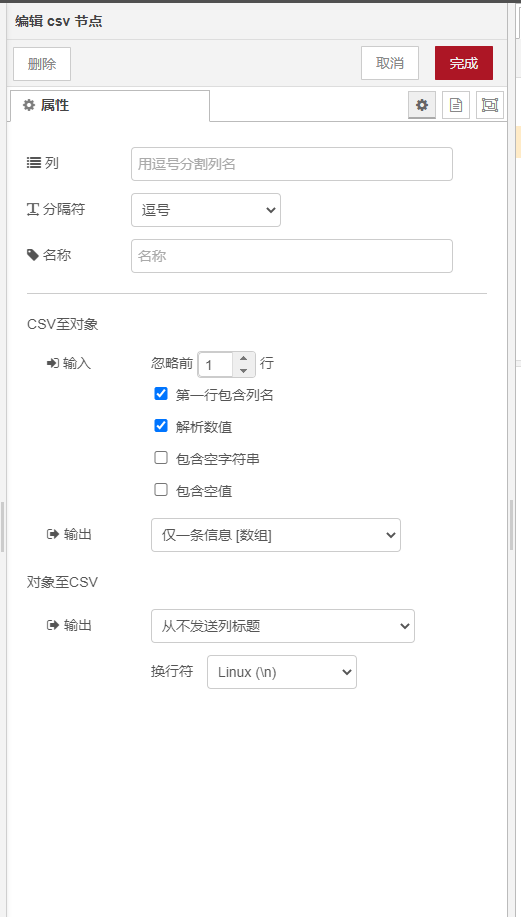
The CSV node can convert JSON data format into a string.
As
{
   a: 10,
   b: 20,
   c: 30
}
You can also convert through CSV to"10,20,30n"
You can also use it to convert arrays
such as the following array,
[
    { a: 80, b: 18, c: 2},
    { a: 52, b: 36, c: 10},
    { a: 91, b: 18, c: 61},
    { a: 32, b: 47, c: 65},
]
through CSV can be converted into
a,b,c
80,18,2
52,36,10
91,18,61
32,47,65
Complete example flow code
[{"id":"457d9ad6.b737b4","type":"inject","z":"64133d39.bb0394","name":"single","topic":"","payload":"","payloadType":"date","repeat":"","crontab":"","once":false,"onceDelay":0.1,"x":90,"y":640,"wires":[["1e05fafd.887b05"]]},{"id":"1e05fafd.887b05","type":"change","z":"64133d39.bb0394","name":"Generate single payload","rules":[{"t":"set","p":"payload","pt":"msg","to":"{ "a":$floor(100*$random()),"b":$floor(100*$random()),"c":$floor(100*$random())}","tot":"jsonata"}],"action":"","property":"","from":"","to":"","reg":false,"x":270,"y":640,"wires":[["e9546682.b39898"]]},
{"id":"e9546682.b39898","type":"csv","z":"64133d39.bb0394","name":"","sep":",","hdrin":"","hdrout":false,"multi":"one","ret":"n","temp":"a,b,c","skip":"0","x":450,"y":640,"wires":[["f83ad3b0.78d32"]]},
{"id":"f83ad3b0.78d32","type":"debug","z":"64133d39.bb0394","name":"","active":true,"tosidebar":true,"console":false,"tostatus":false,"complete":"false","x":590,"y":640,"wires":[]},
{"id":"ae242f2c.d1c8a","type":"inject","z":"64133d39.bb0394","name":"array","topic":"","payload":"","payloadType":"date","repeat":"","crontab":"","once":false,"onceDelay":0.1,"x":90,"y":700,"wires":[["7535f521.4a88bc"]]},
{"id":"7535f521.4a88bc","type":"change","z":"64133d39.bb0394","name":"Generate array payload","rules":[{"t":"set","p":"payload","pt":"msg","to":"[t    { "a":$floor(100*$random()),"b":$floor(100*$random()),"c":$floor(100*$random())},t    { "a":$floor(100*$random()),"b":$floor(100*$random()),"c":$floor(100*$random())},t    { "a":$floor(100*$random()),"b":$floor(100*$random()),"c":$floor(100*$random())},t    { "a":$floor(100*$random()),"b":$floor(100*$random()),"c":$floor(100*$random())}t]","tot":"jsonata"}],"action":"","property":"","from":"","to":"","reg":false,"x":270,"y":700,"wires":[["f4e0465f.ef0338"]]},
{"id":"f4e0465f.ef0338","type":"csv","z":"64133d39.bb0394","name":"","sep":",","hdrin":"","hdrout":true,"multi":"one","ret":"n","temp":"a,b,c","skip":"0","x":450,"y":700,"wires":[["6eb67fdf.58626"]]},
{"id":"6eb67fdf.58626","type":"debug","z":"64133d39.bb0394","name":"","active":true,"tosidebar":true,"console":false,"tostatus":false,"complete":"false","x":590,"y":700,"wires":[]}]
csv to json
In addition, the CSV node can also convert CSV format data into JSON data.
This is data in CSV format
a,b,c
80,18,2
52,36,10
91,18,61
32,47,65
which can be converted into a standard JSON format through the CSV node

[
    { a: 80, b: 18, c: 2},
    { a: 52, b: 36, c: 10},
    { a: 91, b: 18, c: 61},
    { a: 32, b: 47, c: 65},
]

Leave a Reply