
MThings, the Mole Messenger, pioneers a unique approach to device access. Unlike traditional host computer software, it eliminates the need for separate device driver files for various devices (such as PLCs). Instead, MThings offers a universal protocol data configuration function, providing users with unprecedented flexibility while enabling easy sharing and migration of device protocols.
Introduction to Device Data Configuration
Device data configuration can be seen as a bridge between the MODBUS data protocol definition and MThings configuration. After configuration, users can avoid cumbersome manual packet assembly and data conversion. With just a few button clicks, they can easily initiate polling, batch read/write, and individual read/write operations. MThings' visualization feature makes protocol data information clear at a glance, greatly enhancing debugging efficiency.
How to Perform Data Configuration
- Adding a New Data Configuration
- Method 1:
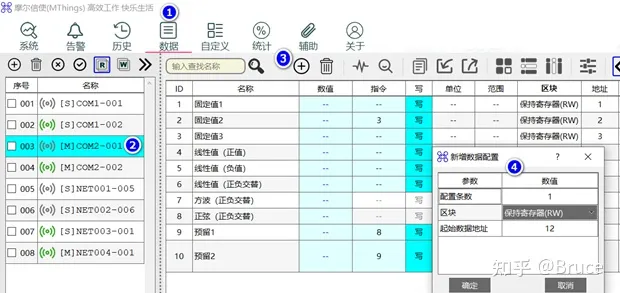
- Click the "Data" menu.
- Select the device name that needs to be configured.
- Click the "Add" button.
- On the pop-up "Add Data Configuration" page, adjust the number of configurations, blocks, and starting data addresses as needed.
- Method 2:
- Simply drag and drop existing data configuration entries, starting from the "Block" cell.
- After dragging, the new configuration will be automatically inserted.
- Delete data configuration
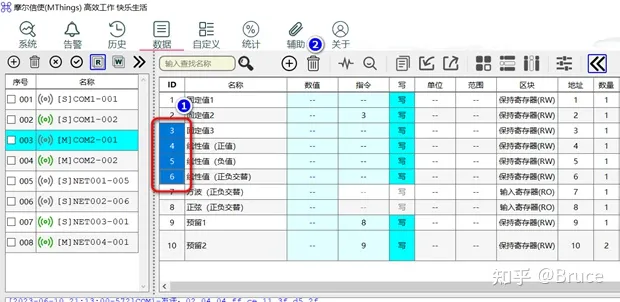
- Click the ID column to select the data configuration you want to delete; double-click the "ID" header to select all or cancel all selections.
- Click the "Delete" button to delete.
Important reminder: After deleting data and saving the configuration file, these data configuration information cannot be restored. Please ensure the safety of your data before proceeding!


怎么下载的?没有下载连接吗?
666