
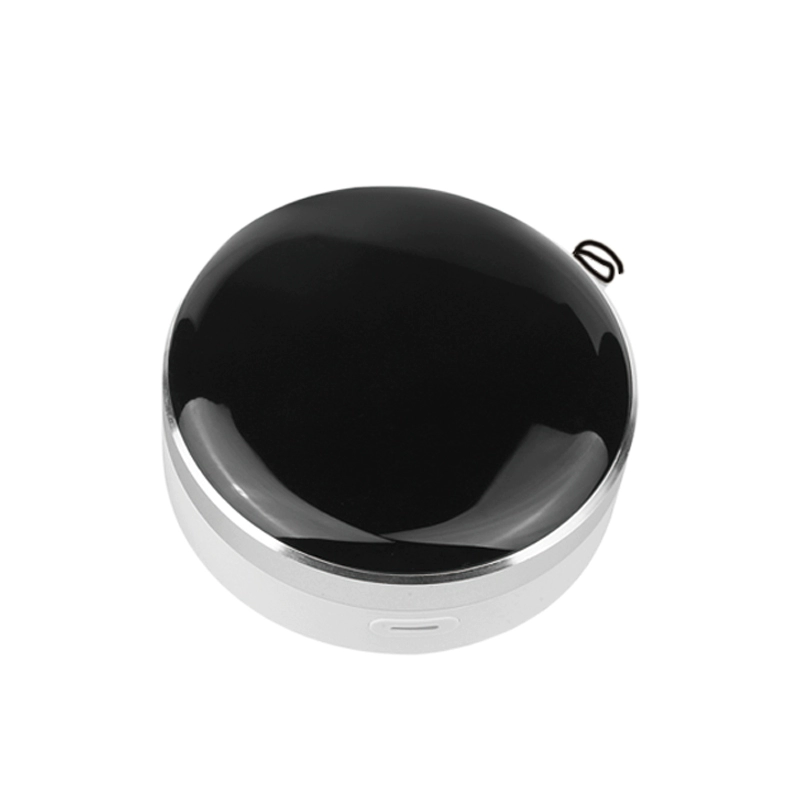
I. Product Overview
The universal remote control infrared RF RS485 three in one is a multifunctional intelligent control device that integrates infrared, RF, and RS485 bus control, supporting unified control of multiple household appliances. Through mobile apps, voice assistants, or timed settings, users can remotely or locally manage household appliances, solving the problem of numerous remote controls and complex operations, and achieving intelligent linkage throughout the house.
Module Version Comparison Table
| Model Name | Support protocols/functions | Additional components | Gateway support | Applicable scenarios |
|---|---|---|---|---|
| RF17 module (basic version) | Basic RF control | None | not supported | Simple device remote control |
| RF17-MESH version | MESH network protocol | None | does not support | multi node smart home networking |
| RF17-485 bus version | RS485 bus protocol | None | does not support | industrial control, intelligent building |
| MESH to 485 module (independent module) | MESH to 485 protocol conversion | external MESH to 485 module | needs to be paired with a gateway | Cross protocol device integration |
| RF17-485 Graffiti Gateway Edition | RS485 Bus Protocol+Graffiti Cloud Platform | None | Support (Graffiti Gateway) | Remote management of industrial equipment |
| RF17-MESH Graffiti Gateway Edition | MESH Network Protocol+Graffiti Cloud Platform | None | Support (Graffiti Gateway) | Smart home centralized control |
| RF17-MESH Graffiti Gateway Edition (including external MESH to 485 conversion) | MESH network protocol+Graffiti cloud platform+RS485 extension | External MESH to 485 module | Support (Graffiti Gateway) | Cross protocol control in complex scenarios (such as smart home+industrial) |
Key Instructions
- Protocol support:
- MESH networkSuitable for multi device self-organizing networks, enhancing signal coverage and stability.
- RS485 busSupports industrial grade communication with long-distance and high anti-interference capabilities.
- Graffiti Cloud Platform: Provides remote control, data statistics, and scene linkage functions.
- Additional Component:
- External MESH to 485 Module: To achieve protocol conversion between MESH network and RS485 devices, independent installation is required.
- Applicable scenarios:
- Home/Business: The MESH version is suitable for smart homes; The 485 version is suitable for building automation.
- Industrial: The 485 bus version is compatible with the Graffiti Gateway version for factory equipment monitoring.
- Compatibility:
- Version with external module supports mixed protocol control (such as managing MESH lamps and 485 motors simultaneously).
Note:: The above models can be customized with combination functions according to needs. For specific technical parameters, please refer to the product manual or contact customer service.
II. Core Advantages
- Three in One Technology Integration
- Supports infrared, radio frequency (300-450MHz), and RS485 bus protocols, covering mainstream household appliances in the market.
- Massive code library compatible with Gree, Haier, Midea TCL, Brands such as Skyworth and Panasonic.
- Diversified intelligent control
- Supports APP remote control, voice assistants (Tmall Genie, Xiaoai Classmate, etc.), and scene linkage.
- Custom timer switch, device sharing (collaborative control among family members).
- High compatibility and ease of use
- Hybrid 9-frequency automatic recognition (310/315/330/350/390/418/430/433/450MHz).
- supports generating remote control codes and customizing infrared to 485 learning functions.
- Stable and reliable
- Aluminum alloy+ABS material body, built-in soft antenna to enhance signal strength.
- Supports automatic recovery when the network is disconnected, with simple and fast configuration.
III. Technical Parameters
| Project | Specification |
|---|---|
| Power Parameters | DC 5V/2A (Micro USB interface) |
| RF Range | 300MHz~450MHz (OOK modulation) |
| Infrared Frequency | 38kHz (compatible with mainstream infrared devices) |
| Size | 80mm × 38mm (lightweight and portable) |
| Material | Aluminum Alloy Body+ABS Panel |
| Support Protocol | Infrared, RF, RS485 bus |
| Adapt to smart speakers | Tmall Genie, Xiaodu Speaker, Xiaoai Classmate, Google Home, Amazon Echo, etc |
4, Applicable scenarios
- Home appliancesAir conditioning, TV, fan, set-top box, projector, lighting, etc.
- Smart Home: Curtains, drying racks, rolling shutter doors, turnstiles, garage doors.
- Commercial Electronic Control: Projection Screen, Office Equipment, Security System.
V. Instructions for Use
1. Equipment Installation
- Power Connection: Use a Micro USB cable to connect to a 5V power adapter.
- Antenna Adjustment: Straighten the side soft antenna to enhance RF signal strength.
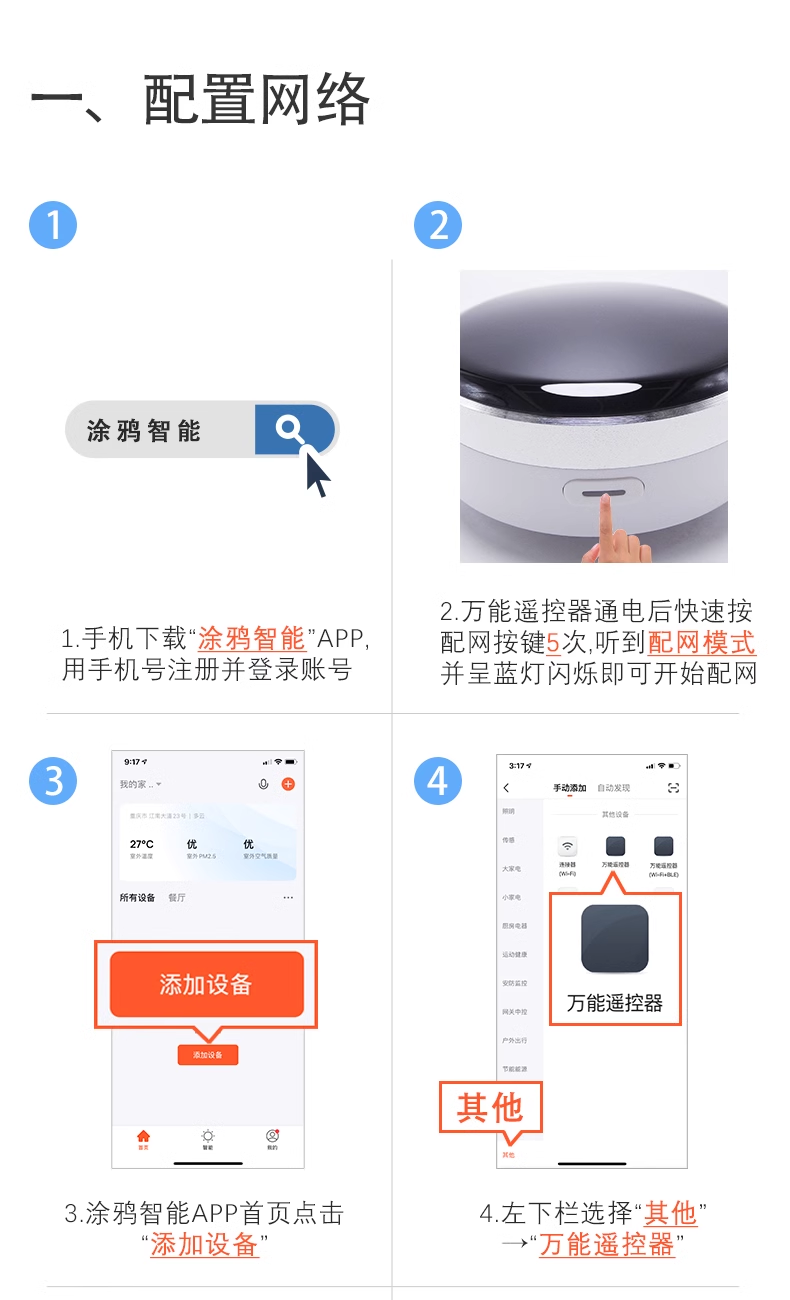
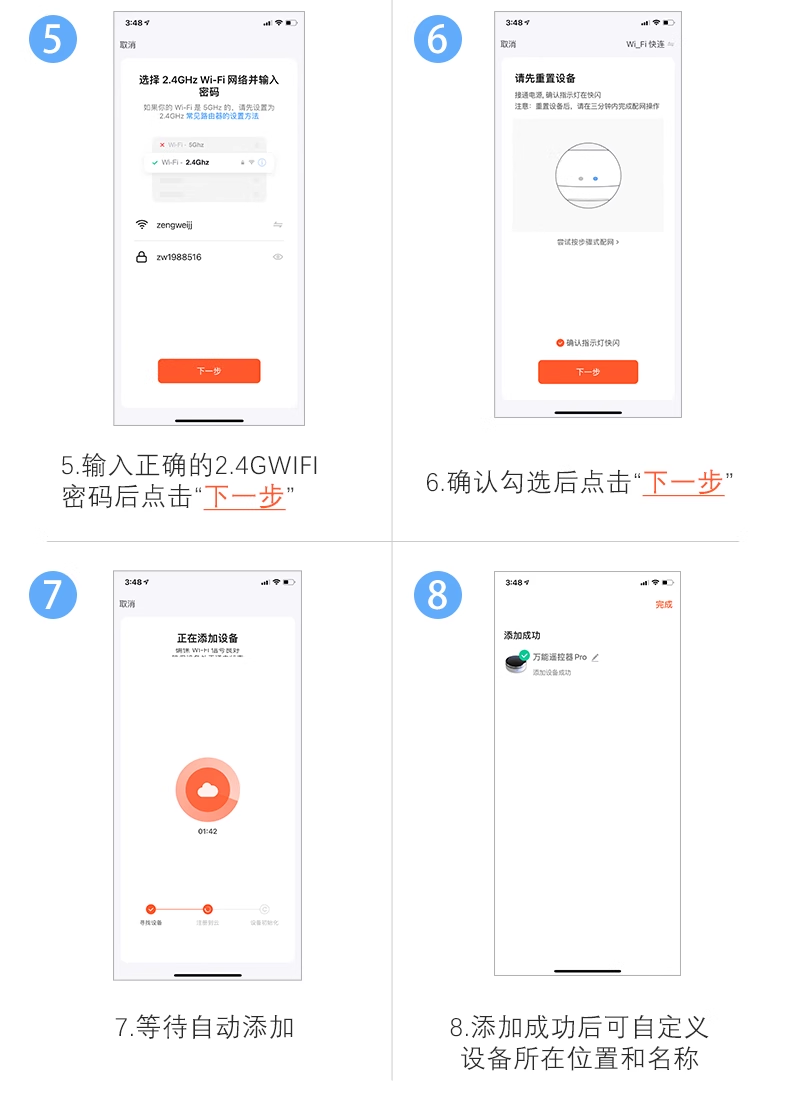
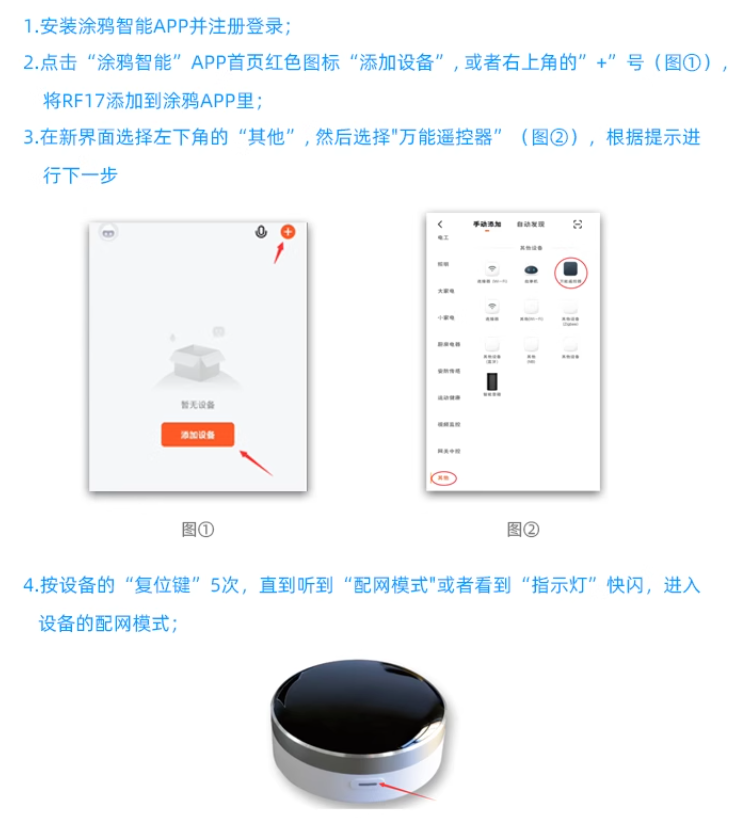
2. APP Configuration (Graffiti Intelligence)
- Download the "Graffiti Intelligence" APP and register an account.
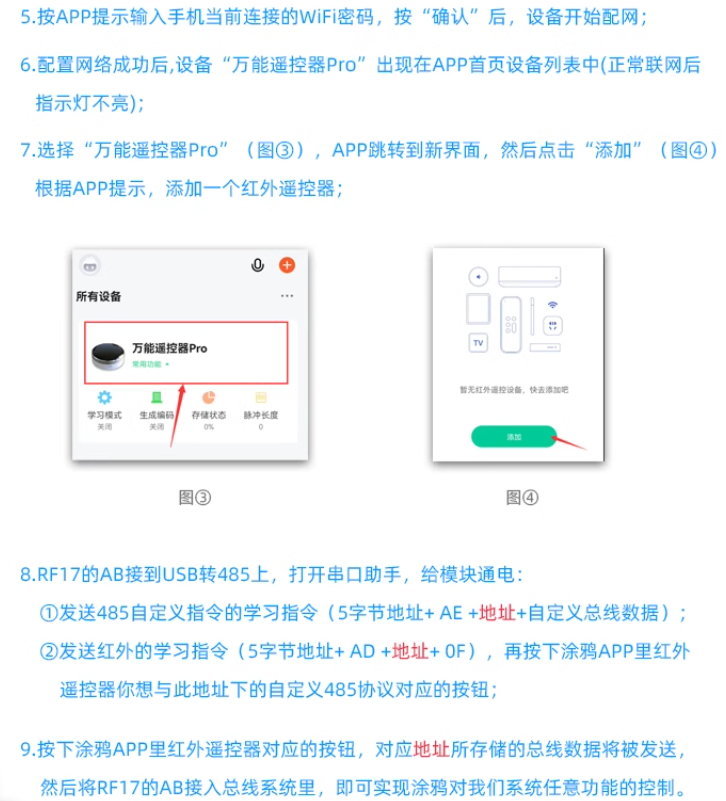
- Press and hold the device reset button for 3 seconds, and the indicator light will flash before entering the distribution network mode.
- Select the 2.4GHz WiFi network (does not support 5GHz or hidden SSID), enter the password to complete the connection.
- Add family members and share device control permissions.
3. Voice Control Configuration
- Bind the "Graffiti Smart" account in the smart speaker app and synchronize the device for voice control.
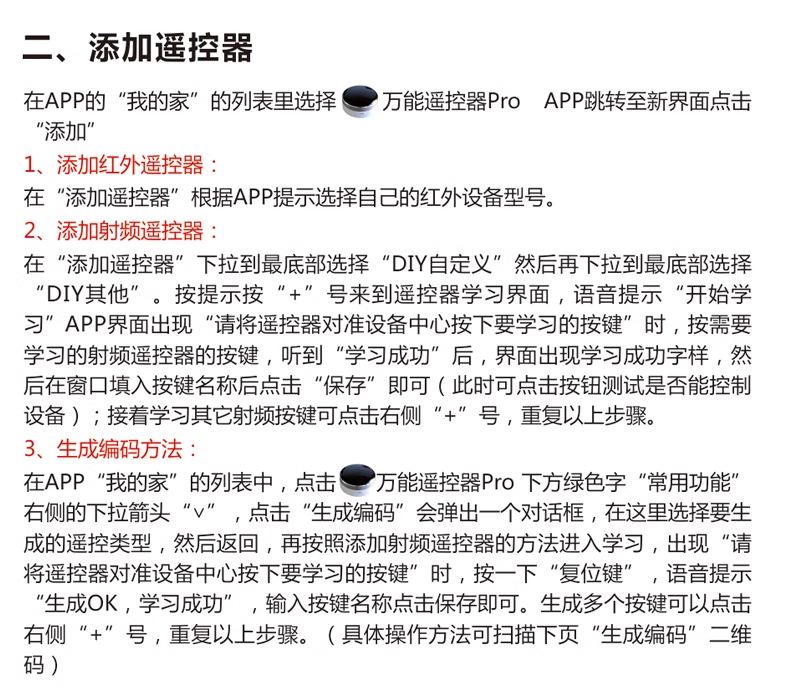
4. Remote Control Learning Function
Infrared Learning: Aim the original remote control at the device and record button signals according to the APP prompts.
RF Learning: Supports rolling code/fixed code learning, and the corresponding mode needs to be selected according to the device type.
RS485 Control: Connect to smart home systems through bus protocols and customize control logic.
VI. Compatible Brand List
- Air Conditioner: Gree, Midea, Haier, Zhigao, Panasonic ..
- TV: TCL, Skyworth, Konka, Hisense, Changhong ..
- Other: AUX, Meiling, Rongshida, Sharp 7. Common Problems and Solutions
7, Common problems and solutions
| Problem | Solution |
|---|---|
| Unable to obtain WiFi name | Grant location permission to the "Graffiti Smart" app in phone settings and restart the app. |
| Networking failure (password correct) | Check router settings: disable AP isolation, enable 11b/g hybrid mode, disable MAC filtering, and use 2.4GHz network. |
| The indicator light does not light up | It is normal for it to not light up during normal standby and flash during operation. |
| The indicator light stays on | The device is disconnected from the network. Check the status of the router or reconfigure the network. |
| RF control unresponsive | Straighten the antenna and check the compatibility of the remote control chip. |
8. Precautions
- Do not use in high temperature or humid environments. When configuring, it is necessary to ensure that the phone and device are on the same local area network. RF equipment must be unobstructed within a range of 10 meters.
- Ensure that the phone and device are on the same local area network during configuration.
- RF equipment must be unobstructed within a range of 10 meters.
9. After sales service
- Warranty period: 1 year (non human damage).
- Technical Support: 18801054468
X. Communication Protocol
III. Detailed Explanation of RS485 Bus Protocol
1. Bus Baud Rate and Address Configuration
| Project | Description |
|---|---|
| Baud Rate | 9600 bps (Fixed Value) |
| Default Bus Address | 1A 88 88 88 88(Automatically Sent upon Power Up) |
| Modify Bus Address Command | Format: 原5字节地址 + F8 E7 D6 + 新5字节地址 |
- First Byte Prohibited asFF | |
| Feedback Signal | BC BC(Return after successful operation) |
2. Infrared Instruction Protocol
| Function | Instruction Format | Description |
|---|---|---|
| Infrared Learning | 5字节地址 + CA + (存储地址00-C7) + 0F | - Can learn 200 infrared instructions (Address Range00ToC7) |
| Learning Success Feedback | 5字节地址 + CB + (存储地址00-C7) + 0F | - Storage Address Should be Consistent with Learning |
| Infrared Sending | 5字节地址 + CB + (存储地址00-C7) + 0F | - Call Learned Infrared Instructions |
| Feedback Signal | BC BC(Return after each operation) |
3. RF Command Protocol (Formula 1)
| Function | Instruction Format | Description |
|---|---|---|
| RF Learning | 5字节地址 + AA 0F | - Enter RF Learning Mode |
| Learning Success Feedback | 5字节地址 + 6字节数据 + 0F | - Data Format is RF Encoding |
| RF Transmission | 5字节地址 + 6字节数据 + 0F | - Directly Send RF Encoding |
| Feedback Signal | BC BC(Return after each operation) |
4. RF Instruction Protocol (Mode 2)
| Function | Instruction Format | Description |
|---|---|---|
| RF Learning | 5字节地址 + AB + (地址0000-01F3) + 0F | - Able to learn 500 RF instructions (Address Range0000To01F3) |
| Learning Success Feedback | 5字节地址 + AC + (存储地址00-FF) + 0F | - Storage Address Should be Consistent with Learning |
| RF Transmission | 5字节地址 + AC + (存储地址00-FF) + 0F | - Call Learned RF Instructions |
| Feedback Signal | BC BC(Return after each operation) |
5. Infrared to 485 Learning Protocol
| Function | Instruction Format | Description |
|---|---|---|
| Infrared Learning | 5字节地址 + AD + (存储地址00-31) + 0F | - Supports only standard NEC format infrared signals |
- Can learn 50 instructions (Address Range00To31) | ||
| 485 Learning | 5字节地址 + AE + (存储地址00-31) + 29字节自定义协议 + 0F | - Custom Protocol Length ≤ 29 bytes |
| Feedback Signal | BC BC(Return after each operation) | |
| Linkage Explanation | When receiving the infrared signal for learning, automatically send the 485 custom protocol data corresponding to the storage address. |
6. RF coding generation protocol
| Function | Instruction format | Explanation |
|---|---|---|
| Select generation type | 5字节地址 + DD + (序号F0-F8) + 0F | - Number corresponds to encoding type: |
- F0433MHz standard code (randomly generated in millions) | ||
- F1315MHz standard code (randomly generated in millions) | ||
- F2433MHz quad key code (randomly generated in millions) | ||
- F3315MHz quad key code (randomly generated in millions) | ||
- F4Duya mode (on/off/off/pairing) | ||
- F5: Hundred Array First Championship Mode (Single On/Single Off) | ||
- F6Liwo mode | ||
- F7433MHz wide code (suitable for LV modules with lower sensitivity) | ||
- F8315MHz wide code (suitable for LV modules with lower sensitivity) | ||
| Generate encoded data | 5字节地址 + 6字节数据 + 0F | -Each time the gateway button is pressed, a code is generated and the data needs to be manually saved |
| Send generated code | 5字节地址 + 6字节数据 + 0F | -Call the generated code for RF control |
| feedback signal | BC BC(Return after each operation) |
7. Erasure Instruction Protocol
| Function | Instruction format | Explanation |
|---|---|---|
| Chip Erase | 5字节地址 + EE EE EE EF + 0F | -Restore factory settings and erase all data (approximately 10 seconds to complete) |
| Infrared erase by address | 5字节地址 + FE + (地址00-C7) + 0F | -Erase the specified infrared command (address range)00ToC7) |
| RF erase by address | 5字节地址 + FF + (地址0000-01F3) + 0F | -Erase specified RF command (address range)0000To01F3) |
| feedback signal | BC BC(Return after erasing is complete) |
Precautions
- address restrictions:
- The first byte of the bus address is prohibited from being
FFOtherwise, it may cause the instruction to fail. - The RF address range is strictly defined according to the protocol, and if it exceeds the limit, it cannot be stored.
- Code Generation:
- After generating the RF code, the data needs to be manually saved, otherwise it will be lost after power failure.
- The wide code mode (F7/F8) is suitable for devices with low receiving sensitivity, such as LV modules.
- Erase operation:
- Whole erase will clear all configurations. Please backup necessary data before operation.
- Do not turn off the power during erasing to avoid damaging the device.
Attachment: Example Protocol Flow Chart
[用户操作] → [发送指令] → [设备响应BC BC] → [操作完成] 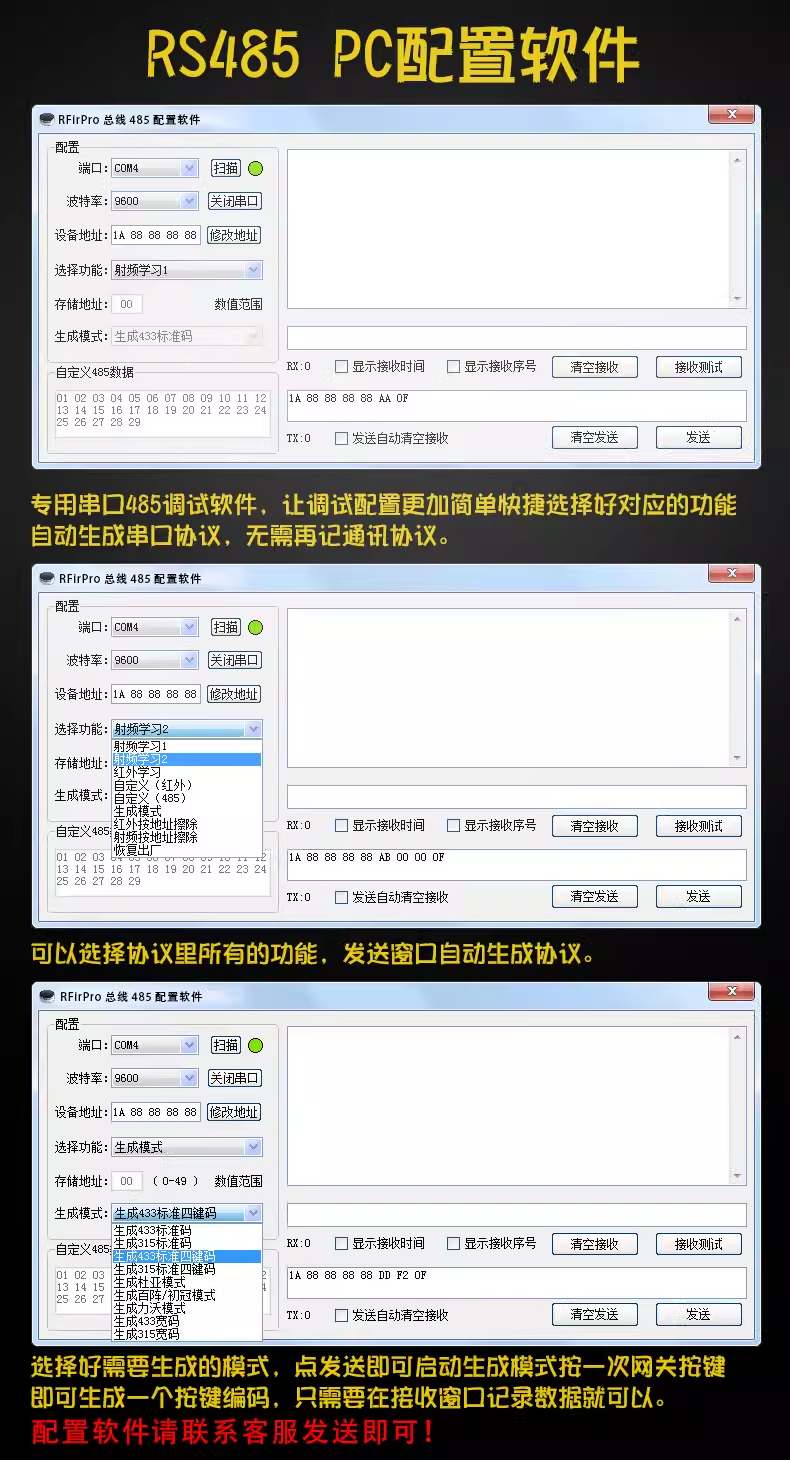
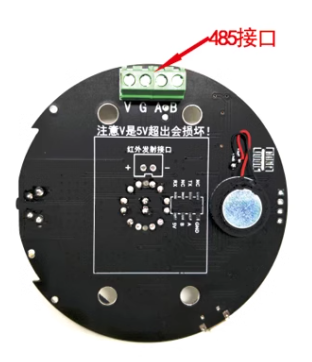
RS485 wiring diagram
Unscrew the four corresponding screws at the bottom of the device, open the upper cover, and take out the circuit board. The back of the circuit board is shown on the right.
V=5V+
G=5V-
A=RS485-A
B=RS485-B
Attention: V is 5V, exceeding it will cause damage!
Product purchase:https://item.taobao.com/item.htm?ft=t&id=614256698377


Leave a Reply