
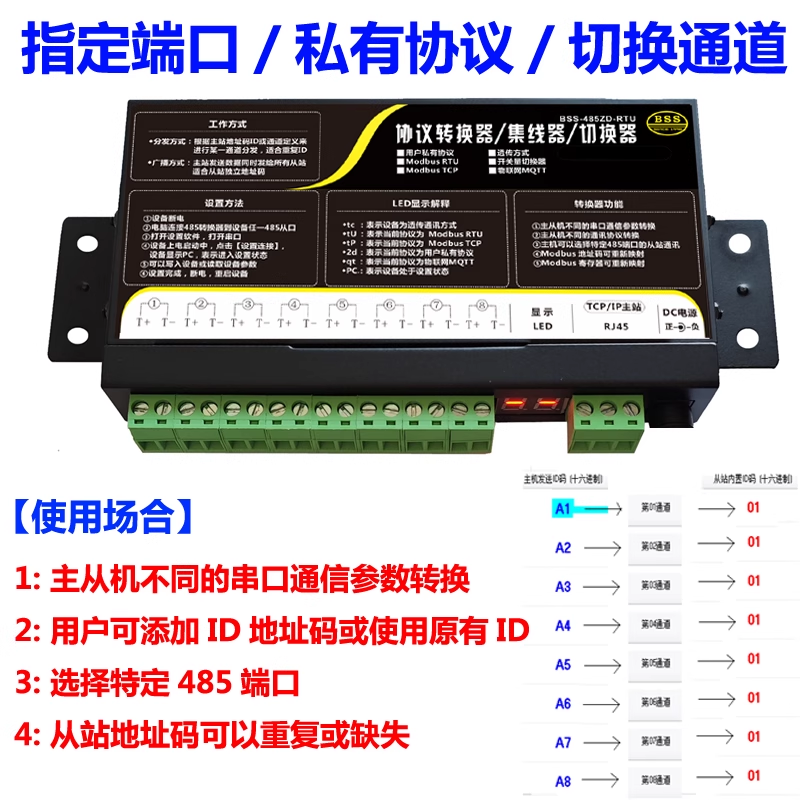
1、 Equipment Overview
BSS-485ZD-RTUIt is a powerful toolProtocol converter/hub/switch. It exceeds the standardModbusThe unique ability of protocol conversion lies in its support for usersPrivate agreementIntelligent processing and channelized routing have perfectly solved the problem of slave devicesIDFixed system integration bottleneck. Core positioning:
- Private protocol supportNo need for slave devices to follow standard protocols, users can customize communication protocols.
- Channel management8 physicsRS485Ports are defined as logical channels to achieve precise data routing.
- Non-invasive integrationRealize system integration without modifying any slave device addresses and protocols.
2、 Core function: solve the problem of slave stationsIDThe three major challenges
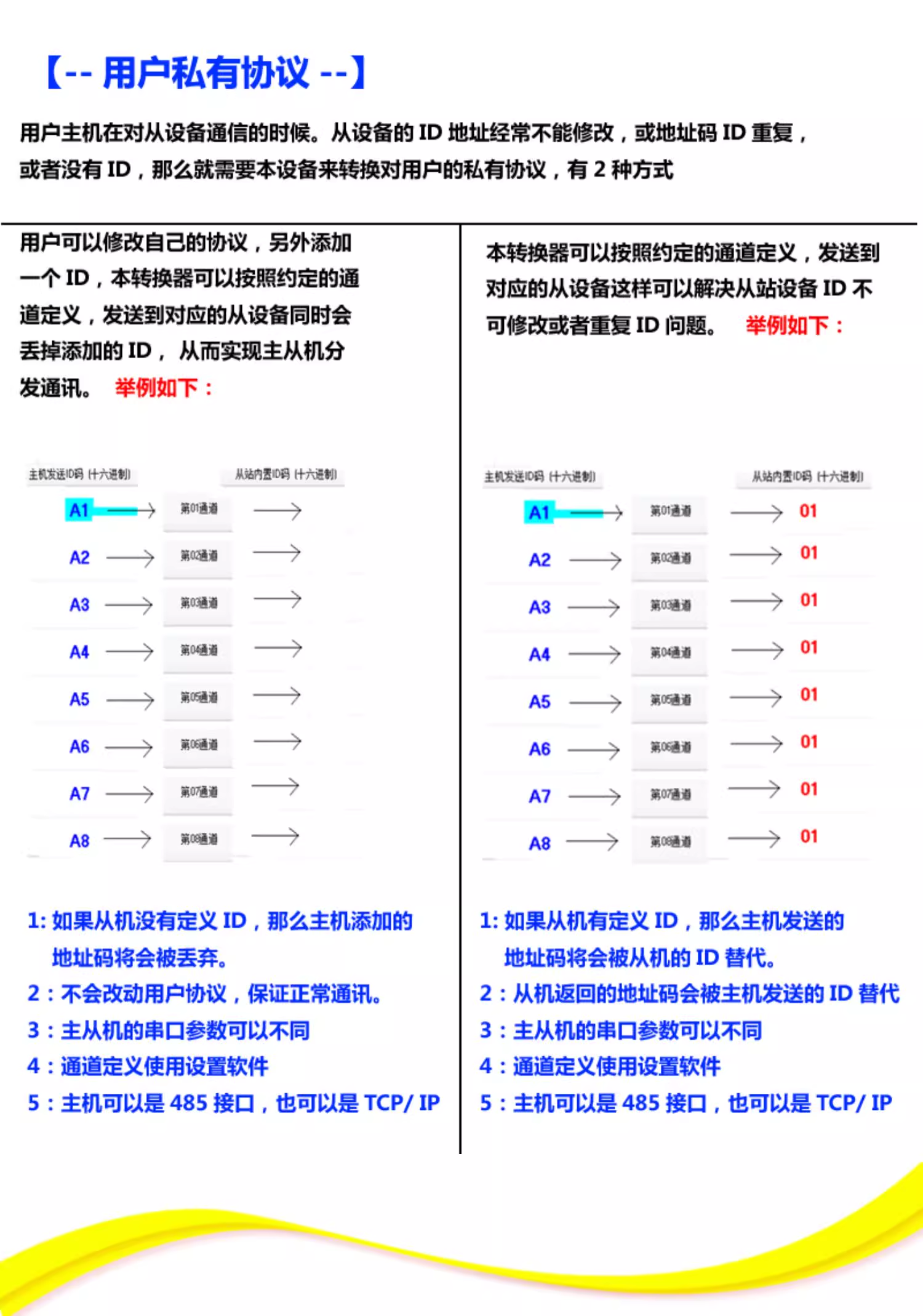
The core value of this device lies in solving the three common challenges of address management for slave devices, as shown in the product diagram (Figure 1)“Usage occasion”Listed:
- Duplicate address code from the stationMultiple devices leaving the factoryIDSame, cannot coexist on the same bus.
- The address code of the slave station cannot be modifiedThe device firmware is locked and cannot be changedID.
- The address code of the slave station is missingThe slave protocol itself does not contain address identifiers and only supports point-to-point communication.
3、 Working principle: Private protocol processing mechanism based on channel definition
The device uses a clever approach“Protocol packaging+channel mapping”Mechanism to achieve the above functions. As shown in Figure 2, the workflow depends on whether the slave station has built-in functionalityIDDivided into two modes: 1. The station has no definitionID(or there is no address field in the agreement)
- Host sideThe user actively adds a channel selection byte (such as hexadecimal
A1toA8, corresponding to channels 1 to 8) before the data frame of the original private protocol. - Gateway sideAfter receiving the host command, the device,Peel off and identifyThe first byte (such as
A1) is used to determine which data needs to be sent toChannel1. Subsequently, it sends the remaining original data frames directly to the slave station on channel 1. - Core action: The address code (channel selection byte) is discardedDo not interfere with communication from the slave station. This perfectly solves the problem of no address field in the slave protocol.
2. The station has a definitionID(HoweverIDrepetitive or non modifiable)
- Host sideSimilarly, add a channel selection byte (such as gateway side, device identification, etc.) before sending the data frame, and then send the data to the channel. However, at this point, it will perform a critical operation: using the slave's actual built-in
A1) . - Gateway side: Device Identification
A1Afterwards, send the data tochannel1But at this point, it will perform a critical operation: using the slave'sActual built-inID(For example, replacing01) dropping the originalcore actionID. - address code in the host instruction: being replaced. Even if all slave stations on all channels areID, the host can select bytes (
01) through different channels to communicate accurately with each slave station, thereby resolving the issue.)A1,A2...Repetitive difficulties.ID4、 Working methods and settings
The device provides two basic working modes to adapt to different scenarios:
Distribution method
- Based on the address code added by the hostSingle channelSelection, implementation with specific slave stationsone-on-one“Communication.”Broadcasting method
- Send data simultaneously toAll channelsSuitable for scenarios that require group instruction.Simple setup process
(See Figure 1):The device is powered on.
- In
- Within the second setting window, any converter can be used40Connect from the port to the computer.RS485Use matching
- Set up softwareThe most crucial step in parameter configuration is completionChannel definition, i.e. designatedCorresponding relationship with physical ports.
A1-A8After the settings are completed, restarting the device will take effect. - 5、 Typical application scenarios
Batch access of non-standard devices
- : privatize protocols on multiple production linesConnecting multiple old devices of the same type to a new oneIDSystem.MESSensor network integration
- Integrate a large number of address fixed or address free sensors and channel them through channelizationVirtualization“For devices with unique addresses.”Protocol bridging and standardization
- As a bridge, it transforms complex private protocol networks into standardized interfaces that are easy for upper level control systems to understand and access.6、 Summary
Protocol converters are used for their respective
BSS-485ZD-RTUPrivate agreementDeep support andChannel mappingThe innovative design provides integrators with a highly flexible solution. It bypasses the limitations of the slave devices themselves and, through gateway level intelligent processing, makes the chaotic communication network well-organized. This device is particularly suitable for complex scenarios such as equipment reuse and multi vendor equipment integration, and is a powerful tool for reducing integration difficulty and saving project costs.The innovative design provides integrators with a highly flexible solution. It bypasses the limitations of the slave devices themselves and, through gateway level intelligent processing, makes the chaotic communication network well-organized. This device is particularly suitable for complex scenarios such as equipment reuse and multi vendor equipment integration, and is a powerful tool for reducing integration difficulty and saving project costs.


Leave a Reply