
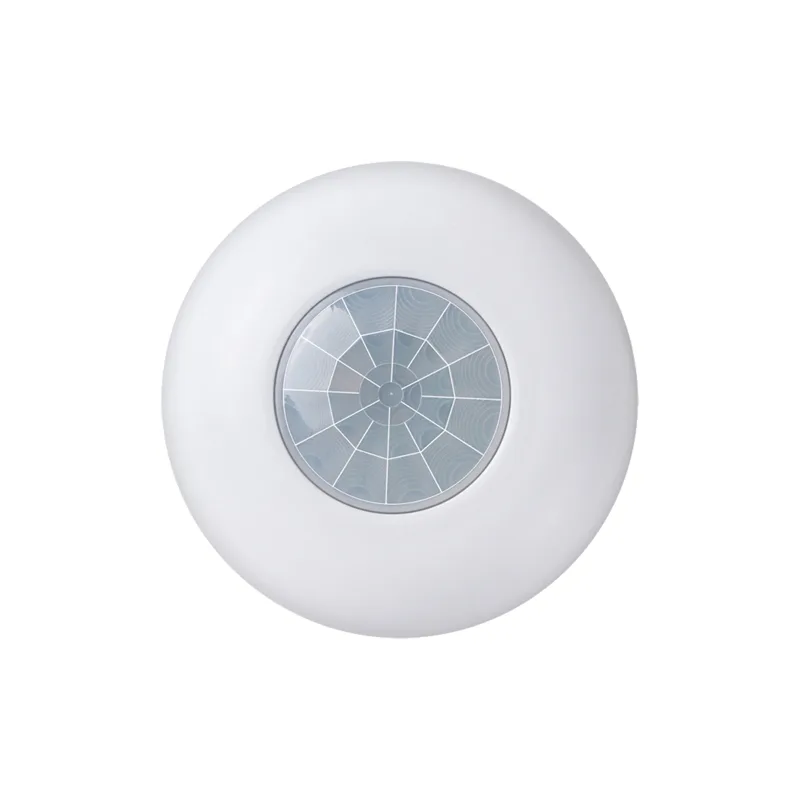
Product Overview
This product is a product that uses24GHzMicrowave signals andPIRA sensor combining infrared sensors, Using the Doppler principle to sense moving objects. When sensing the movement of an object, ThroughRS485Bus output serial port data, To control the operation or shutdown of other electrical equipment. Mainly used for hotel and security management, Suitable for dynamic detection in various large areas, Having consistency, Stability and convenient installation.
Technical parameters
- Input voltage: 9VDC-14V
- electric current: <85mA
- Protection Rating Working frequency: IP20
- Microwave detection angle: 24GHz~24.25GHz
- Degree: 150Microwave detection range
- maximum: Rice4x8Installation height of 3 meters (Detection angle)
- PIRDegree: 120Infrared detection range
- Maximum diameter of 8 meters: Continuous output time of induction
- About 3 seconds: Induction method
- Or: OR (And with) ; AND (Optional) Induction output mode
- Serial port data: RS485Indicate the output mode
- LEDCan be set: red expressON/OFF, OutputLEDBluePIRRepresenting radar output, Working temperatureLEDHumidity
- Arrived, No condensation: -30℃Installation height+50℃/<93%RHRice
- Rice: 2.5The installation height can be adjusted according to the output method chosen by the customer<H<3.5Work environment and requirements (Environmental temperature)
Arrived
- Installation height: -30℃Rice+50℃
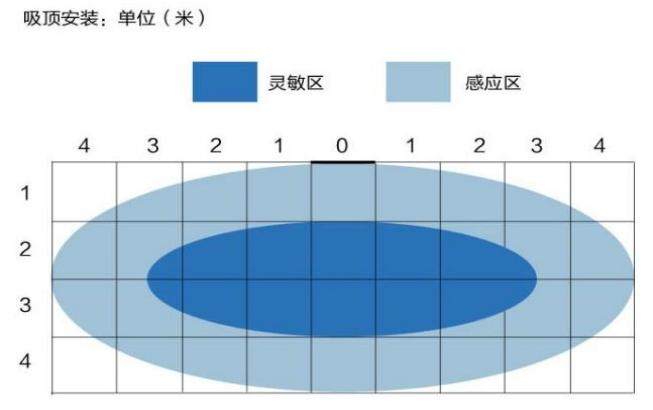
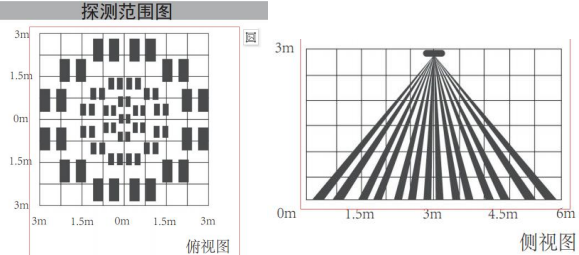
- Rice: 2.5The installation height can be adjusted according to the output method chosen by the customer<H<3.5Microwave detection range (The maximum detection range radius is 4 meters)
- Installation height of 3 meters: Maximum detection range radius of 4 meters (Installation height of 3 meters) , The maximum horizontal detection distance is 8 meters, There is no metal plate in front of the sensor, When the sensor moves from one position to another, Please power on again, When multiple sensors are installed on the same site, Please maintain a distance of no less than 5 meters.
Function coding settings
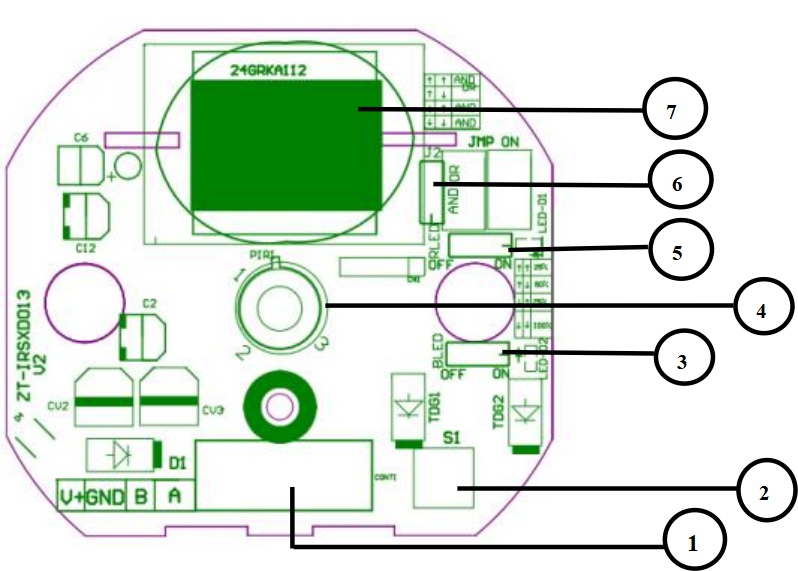
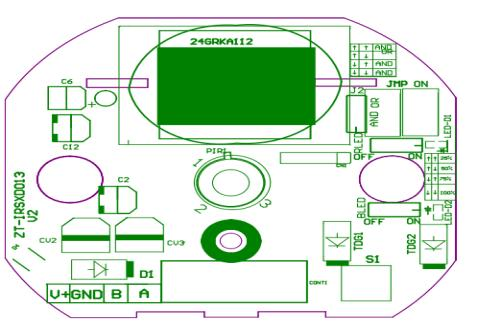
- PCAAppearance
- Wiring terminals: Positive power supply (V+) , Negative power supply (GND) , RS485 LB, RS485 LA
- IDLearning buttons: Long pressS1Press the button for 3 seconds to enter the sensorIDSet mode, red Flash mobLEDUsers can set sensors, IfID. No settings sent within seconds60InstructionsIDThe sensor will automatically exit, Set modeIDBlue.
- Select jumper wiresLEDUsed to control radar sensor indicator lights: red Select jumper wiresON/OFF.
- Used for controlling infraredLEDSensor indicator lights: Induction method jumperPIROrON/OFF.
- Indicates that one of the radar and infrared sensors senses a moving object and outputs it: OR (And with) Both radar and infrared sensors detect moving objects before outputting; AND (Radar antenna) Antenna pattern.
- Microwave
infra-red
- Wiring diagram:
- Packaging method:
Transparent
Bag+white paper box
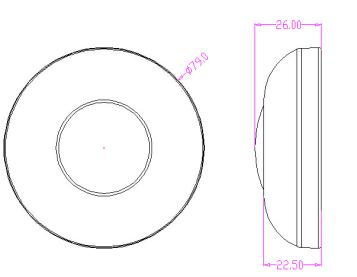
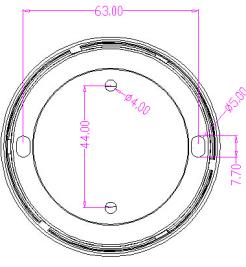
External dimensions and installation dimensionsPECommunication protocol
pattern
Communication mode
| Baud rate | RS485 Data bits |
|---|---|
| Starting position | 9600 |
| Stop position | 8 |
| Checksum | 1 |
| None | 1 |
| Total digits | Verification algorithm |
| Infrared sensing sends control commands | 10 |
| data Content | MODBUS/CRC-16 x16+x15+x2+1 |
Command code
| Register address high | Content |
|---|---|
| DATA0 | 0X01 (ID) |
| DATA1 | 0X06 (Command code) |
| DATA2 | 0x00 (Register address high) |
| DATA3 | 0x02 (Low register address) |
| DATA4 | 0X00 (Sensing high data of someone) |
| DATA5 | 0X01 (Sensing low data of someone) |
| DATA6 | CRCL (Verify low position) |
| DATA7 | CRCH (Verify high position) |
Infrared receptionIDset up
| data Content | Frame header |
|---|---|
| DATA0 | B4 (Frame header) |
| DATA1 | C4 (Number of data) |
| DATA2 | 05 (Set infrared) |
| DATA3 | HighIDSet infrared |
| DATA4 | LowIDSet infrared |
| DATA5 | HighIDSet infrared |
| DATA6 | LowIDUpload illuminance information package |
| DATA7 | 0X55 |
data Content
| Command code | Register address high |
|---|---|
| DATA0 | 0X01 (ID) |
| DATA1 | 0X06 (Low register address) |
| DATA2 | 0x00 (Illuminance data) |
| DATA3 | 0x03 (Illuminance data) |
| DATA4 | 0X00 (Illuminance data - HBH) |
| DATA5 | 0X01 (Illuminance data - HBL) |
| DATA6 | 0X00 (Verify low position - BH) |
| DATA7 | 0X01 (Verify high position - BL) |
| DATA8 | CRCL (Light sensing reception) |
| DATA9 | CRCH (set up) |
data ContentIDFrame header
| Frame header | Number of data |
|---|---|
| DATA0 | B4 (Set infrared) |
| DATA1 | C4 (High) |
| DATA2 | 05 (Set infrared) |
| DATA3 | LowIDSet infrared |
| DATA4 | HighIDSet infrared |
| DATA5 | LowIDUpload radar and infrared dual sensing information |
| DATA6 | data ContentIDCommand code |
| DATA7 | 0X55 |
Register address high
| Low register address | Infrared sensing has low human data |
|---|---|
| DATA0 | 0X01 (ID) |
| DATA1 | 0X06 (Radar sensing has low human data) |
| DATA2 | 0x00 (Verify low position) |
| DATA3 | 0x04 (Verify high position) |
| DATA4 | 0X00 (Radar+infrared dual sensing) |
| DATA5 | 0X01 (Set information) |
| DATA6 | CRCL (data) |
| DATA7 | CRCH (Verify high position) |
Radar+infrared dual sensor inductionIDSettings information
| data | Content |
|---|---|
| DATA0 | B4 (Frame header) |
| DATA1 | C4 (Frame header) |
| DATA2 | 05 (Number of data) |
| DATA3 | Set infraredIDHigh |
| DATA4 | Set infraredIDLow |
| DATA5 | Set infraredIDHigh |
| DATA6 | Set infraredIDLow |
| DATA7 | 0X55 |
Product Purchase:
https://item.taobao.com/item.htm?ft=t&id=855733660408


Leave a Reply