
Communication Protocol
Set automatic wind speed: 01, 06, 00, 03, 00, 06, F9,C8
The longest waiting time for information response50ms.
Effective functional code table:
| Functional code | Description |
| 02(02H) | Read Discrete Inputs |
| 03(03H) | Read Holding Registers |
| 04(04H) | Read Input Registers |
| 06(06H) | Write Single Register |
| 16(10H) | Write Multiple Registers |
Table of valid error codes:
| Error code | Description | definition |
| 01 (01H) | Illegal instructions | The received commands are outside of the defined valid commands |
| 02 (02H) | Illegal data address | The addressing address exceeds the defined range |
| 03 (03H) | Illegal data | The data value exceeds the specified range |
| 04 (04H) | Data writing failed | Failed to modify data |
Holding RegisterType data table:
| Description | Address | Read and write type | remarks |
| User parameter definition | |||
| Set the power on/off | 0001 | 0=Shut down
1=Power on | |
| Set mode | 0002 | R/W | 0x01=Refrigeration
0x03=improve air circulation heating 0x04=Automatic 0x05=In automatic mode High byte content feedback on the actual operating mode, Set temperature |
| Set temperature lower limit~Set temperature upper limit | 0003 | R/W | Actual value
Set wind speed*10 |
| File | 0004 | R/W | 0x01=1File
0x02=2File 0x03=3File 0x04=4File 0x05=5Automatic 0x06=Line controlled temperature |
| Prohibit writing data | 0005 | R | Fan controlled |
| The fan starts and stops together with the compressor | 0006 | R/W | 1Fahrenheit set temperature |
| Actual value | 0021 | R/W | System parameter definition |
| Cooling water temperature protection value | |||
| Heating water temperature protection value | |||
| Actual value | 1000 | R/W | Format*10High temperature protection value of evaporator |
| Actual value | 1001 | R/W | Format*10Overcurrent/voltage protection value |
| Actual value | 1002 | R/W | Format*10Voltage range |
| 1Voltage range | 1003 | R/W | Actual value |
| 2Gear voltage | 1004 | R/W | Actual value |
| 3Gear voltage | 1005 | R/W | Actual value |
| 4Gear voltage | 1006 | R/W | Actual value |
| 5Gear voltage | 1007 | R/W | Actual value |
| Wind speed selection | 1008 | R/W | Actual value |
| Unit address | 1009 | R/W | 1,3,5 |
| Selection of network card temperature format | 1010 | R/W | 0~31 |
| 1011 | R/W | 0=PCMachine format; 1=Wire controller format, Default0 | |
Input RegisterType data table:
| Description | Address | Read and write type | remarks |
| Dialing status | 0001 | R | |
| DIStatus | 0002 | R | |
| Return air temperature | 0003 | R | Actual value*10Format |
| Inner disk temperature | 0004 | R | Actual value*10Format |
| Circulating water temperature | 0005 | R | Actual value*10Format |
| AI4Temperature | 0006 | R | Actual value*10Format |
| Compressor current | 0007 | R | *10Format |
| DOOutput flag | 0008 | R | |
| Fault byte1 | 0009 | R | |
| Fault byte2 | 0010 | R | |
| Fahrenheit return air temperature | 0021 | R | Actual value |
| Fahrenheit internal plate temperature | 0022 | R | Actual value |
| Fahrenheit circulating water temperature | 0023 | R | Actual value |
| FahrenheitAI4Temperature | 0024 | R | Actual value |
DiscreteType data table:
| Description | Address | Read and write type | remarks |
| E1 Return air temperature sensor malfunction | 00001 | R | E1:Return air temperature sensor failure |
| E2 Internal disk temperature sensor malfunction | 00002 | R | E2: Evaporator temperature sensor failure |
| E3 Malfunction of seawater temperature sensor | 00003 | R | E3: Condenser temperature sensor failure |
| E4 Internal disk overheating | 00004 | R | E4: Evaporator overheating protection |
| E5 Insufficient refrigerant | 00005 | R | E5: Insufficient refrigerant |
| E6 Drive failure | 00006 | R | E6: Frequency conversion module failure |
| E7 Low pressure sensor malfunction | 00007 | R | E7: Low pressure sensor failure |
| E8 High voltage protection | 00008 | R | E8: High voltage protection |
| E9 Frost formation on the inner plate | 00009 | R | E9: Evaporator frosting |
| E10 Circulating water temperature protection | 00010 | R | E10: Condenser temperature protection |
| E11 Low voltage protection | 00011 | R | E11: Low voltage protection |
| E12 Return air sensor malfunction | 00012 | R | E12: Low pressure temperature sensor failure |
| E13 IPM Overheating protection shutdown | 00013 | R | E13: IPM overheat protection |
| E14 Communication failure between driver and motherboard | 00014 | R | E14: Communication failure between frequency conversion module and main board |
| E15 Communication failure with the line control system | 00015 | R | E15: Mainboard display communication failure |
| reserve | 00016 | R | |
| DI1Status | 00017 | R | |
| DI2Status | 00018 | R | |
| DI3Status | 00019 | R | |
| DI4Status | 00020 | R | |
| DI5Status | 00021 | R | |
| DI6Status | 00022 | R | |
| Compressor status | 00023 | R | |
| Electric heating state | 00024 | R | |
| Four way valve status | 00025 | R | |
| Pump status | 00026 | R | |
| reserve | 00027 | R | |
| High speed wind condition | 00028 | R | |
| Medium speed wind condition | 00029 | R | |
| Low speed wind condition | 00030 | R |
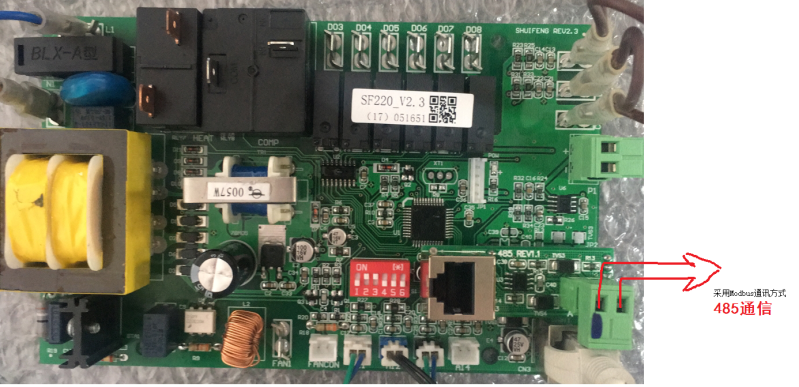
485When communicating, please provide the internal parameters of the air conditionerdbChange the address to 2 or more (Note Cannot be 0 or) Startup data1
Shutdown data: 01 06 00 00 00 01 48 0A
first place: 01 06 00 00 00 00 89 CA
For address code01Internal parameter setting operation.
Adjustment of operating parameters:
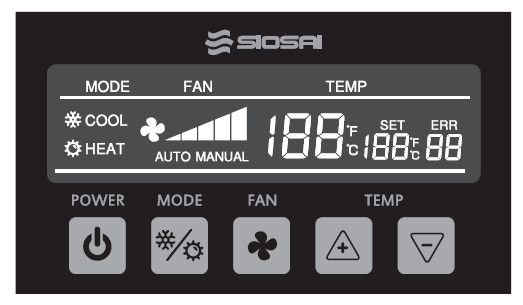
- Simultaneously press and hold
improve air circulation And〈Mode〉KeyAnd last for about 5 secondsThe system enters the operation parameter adjustment mode, Enter this mode, Firstly, require the input of an entry password.
And, The display area will show, SETwordERRAt this time, you can use<----Temperature, Enter the password value with the keyThrough+/-〉On/Off, Key changes the number of digits in the passwordThere are four passwords in totalThe password for modifying motherboard parameters is:, After entering the password.
Press8699, Mode, Key confirmationIf the password is correct, you can proceed to the next stepIf wrong, If the password is correct, you can proceed to the next step, If wrong, Then it is required to re-enter, Three consecutive input errors, Automatically exit this mode.
After entering the password correctly, The line controller will first retrieve the original parameter values from the motherboard,
Display the original parameter values, SETThe display area will show parameter items, EERThe display area will show the parameter values. At this time, it can be passedTemperature+/-〉Key adjustment parameter values, ThroughModeKey to change parameter items,
Press and hold simultaneously after adjusting the parametersModeAnd〈improve air circulation The key will exit the parameter adjustment mode〉And save the modified parameters, Modify the motherboard parameter comparison table.
Parameter items:
| Description | Company | Minimum value | Maximum value | Default value | remarks | Cooling mode circulating water protection temperature |
| D1 | Heating mode circulating water protection temperature | ℃ | 0 | 20 | 15 | |
| D2 | High temperature protection for the heating mode internal disk | ℃ | -10 | 15 | 1 | |
| D3 | Prevent compressor overload | ℃ | 55 | 85 | 65 | Compressor high current protection |
| D4 | Compressor current protection | A | 10 | 50 | 30 | Fan speed |
| D5 | Controllable silicon controls the fan speed1 | V | 10 | 99 | 45 | Fan speed |
| D6 | Fan speed2 | V | 10 | 99 | 55 | |
| D7 | Fan speed3 | V | 10 | 99 | 65 | |
| D8 | Fan speed4 | V | 10 | 99 | 75 | |
| D9 | Fan gear selection5 | V | 10 | 99 | 99 | |
| DA | Address code | 1, 3, 5 | 5 | |||
| DB | For dual line control | 1 | 1,The above is networked control, 2Communication data | |||
16Set up startup:
Set shutdown: 01,06,00,00,00,01,48,0A
Set the cooling mode: 01,06,00,00,00,00,89.CA
Set ventilation mode: 01,06,00,01,00,01,19,CA
Set heating mode: 01,06,00,01,00,03,98,0B
Set temperature: 01,06,00,01,00,04,D9,C9
Degree16Set temperature: 01,06,00,02,00,A0,28,72
Degree30Set the first wind speed: 01,06,00,02,01,2C,28,47
Set 2 levels of wind speed: 01,06,00,03,00,01,B8,0A
Set 3 levels of wind speed: 01,06,00,03,00,02,F8,0B
Set 4 levels of wind speed: 01,06,00,03,00,03,39,CB
Set 5 levels of wind speed: 01,06,00,03,00,04,78,09
Set automatic wind speed: 01,06,00,03,00,05,B9,C9
Set automatic wind speed: 01,06,00,03,00,06,F9,C8
Query the setting status: 01,03,00,00,00,04,44,09
Mainboard response format: 01,03,08,Power on/off high byte, Power on/off low byte, Mode high byte, Mode low byte, High temperature byte, Temperature
Low byte, High wind speed byte, Low wind speed byte, CRCVerify high byte, CRCVerify low byte
Indoor temperature reading: 01,04,00,02,00,01,90,0A
Mainboard response format: 01,04,02,Current temperature high byte, Current temperature low byte, CRCVerify high byte, CRCVerify low byte
The above temperatures are based on actual temperatures*10The format of transmission, For16A signed number.
For example: 300=30Degree, -300=-30Degree
| Description | Address | ||
| E1 Return air temperature sensor malfunction | 00001 | E1:Return air temperature sensor failure | |
| E2 Internal disk temperature sensor malfunction | 00002 | E2: Evaporator temperature sensor failure | |
| E3 Malfunction of seawater temperature sensor | 00003 | E3: Condenser temperature sensor failure | |
| E4 Internal disk overheating | 00004 | E4: Evaporator overheating protection | |
| E5 Insufficient refrigerant | 00005 | E5: Insufficient refrigerant | |
| E6 Drive malfunction | 00006 | E6: Frequency conversion module failure | |
| E7 Low pressure sensor malfunction | 00007 | E7: Low pressure sensor failure | |
| E8 High voltage protection | 00008 | E8: High voltage protection | |
| E9 Frost formation on the inner plate | 00009 | E9: Evaporator frosting | |
| E10 Circulating water temperature protection | 00010 | E10: Condenser temperature protection | |
| E11 Low voltage protection | 00011 | E11: Low voltage protection | |
| E12 Return air sensor malfunction | 00012 | E12: Low pressure temperature sensor failure | |
| E13 IPM Overheating protection shutdown | 00013 | E13: IPM overheat protection | |
| E14 Communication failure between driver and motherboard | 00014 | E14: Communication failure between frequency conversion module and main board | |
| E15 Communication failure with the line control system | 00015 | E15: Mainboard display communication failure |
Panel engineering password: 8699


Leave a Reply