
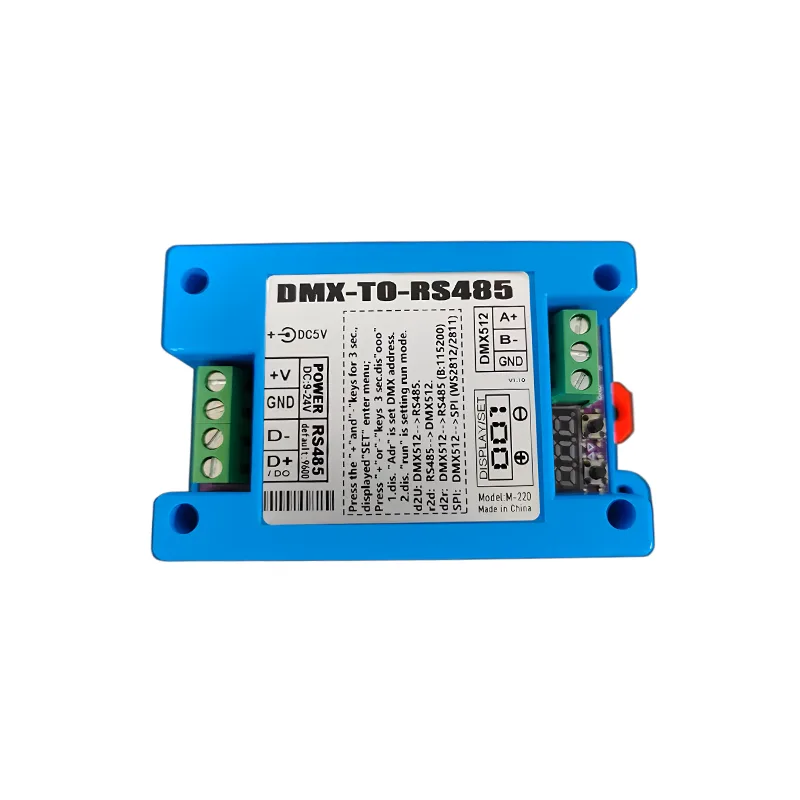
1.Module Overview
M-220 is a DMX512 and RS485 signal conversion module that supports multiple working modes and is suitable for scenes such as stage lighting and LED strip control.
Main functions:
- DMX512 signal to RS485/232 signal conversion
- RS485/232 signal to DMX512 signal conversion
- DMX512 signal to SPI signal (control light strip)
- Customize RS485 commands (up to 30 sets)
Application Scenario:
- Stage lighting control
- LED strip control
- Projection screen control
- Other devices that require DMX512 or RS485 signals
2.Technical Parameters
- Power Supply: DC 9V-24V, current>0.5A (recommended 12V/1A adapter)
- Interface:
- DMX512 Signal Interface
- RS485 Signal Interface
- USB-5V -- DC1.35 Socket
- Working Mode:
- d2U: DMX to RS485 (built-in fixed command)
- r2d: RS485 to DMX
- d2r: DMX to RS485 (batch timing source)
- SPI: DMX to SPI (control light strip)
- d2C: DMX to custom RS485 command
- Baud rateDefault 9600, can be set to 19200, 115200, 250000, 256000, 512000
- number of channels: Supports up to 512 DMX channels
3. Module settings
3.1 Menu operation method
- Enter Menu:
- After the module is powered on, press simultaneously+"and" - "Press the key for 3 seconds and release it when the word 'SET' is displayed.
- Menu option:
- Adr: Set DMX address (long press the "+" key to enter settings).
- - SP: Set SPI mode rate (800K or 400K).
- run: Set the working mode (d2U, r2d, d2r, SPI, d2C).
- Save Settings:
- Press and hold the "+" button for 3 seconds to display the word "ooo", then release it.
3.2 Factory reset
- power failure.
- Press the "+" and "-" keys simultaneously.
- Power on again and hold the button for more than 8 seconds to display "cL_".
- Release the button when "rES" is displayed to restore the factory settings.
Instruction manual download:
4. Detailed explanation of working mode
4.1 DMX to RS485 mode (d2U)
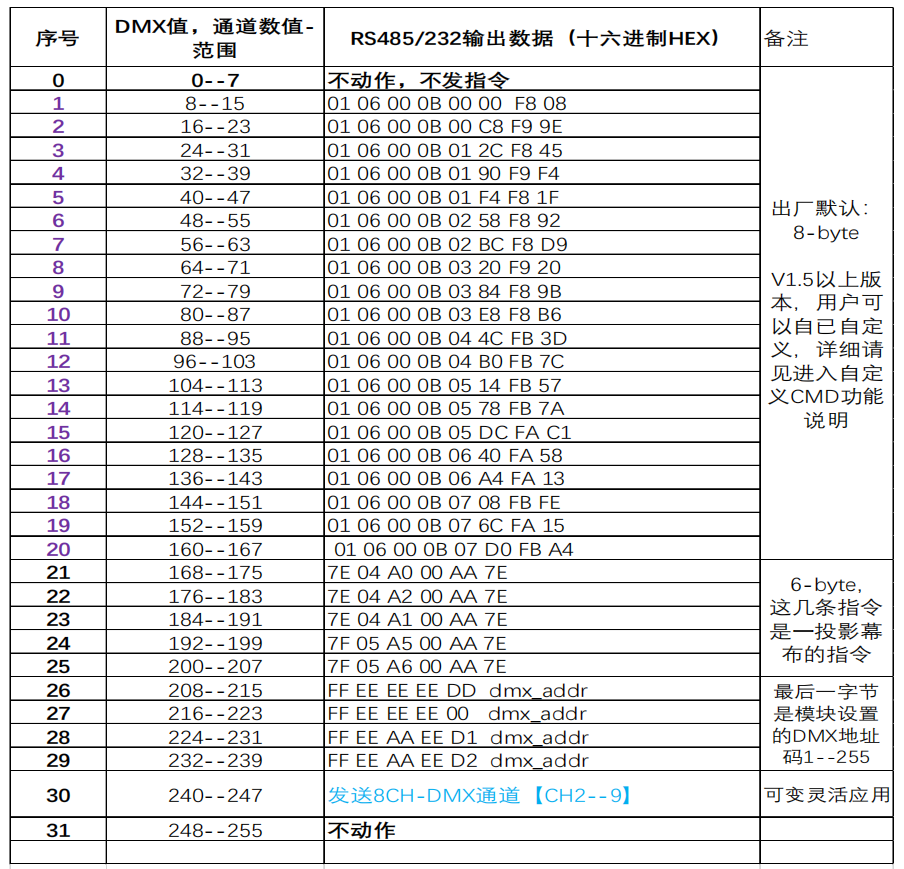
- Function: Input DMX512 signal to trigger the built-in fixed RS485 command.
- Setting Method:
- Enter the menu and select "run".
- Long press the "+" key for 3 seconds and select "d2U".
- Press and hold the "+" key for 3 seconds to save.
- Channel Table:
4.2 RS485 to DMX512 Mode (r2d)
- Function: Input RS485 command to convert to DMX512 signal.
- Setting Method:
- Enter the menu and select "run".
- Long press the "+" key for 3 seconds and select "r2d".
- Press and hold the "+" key for 3 seconds to save.
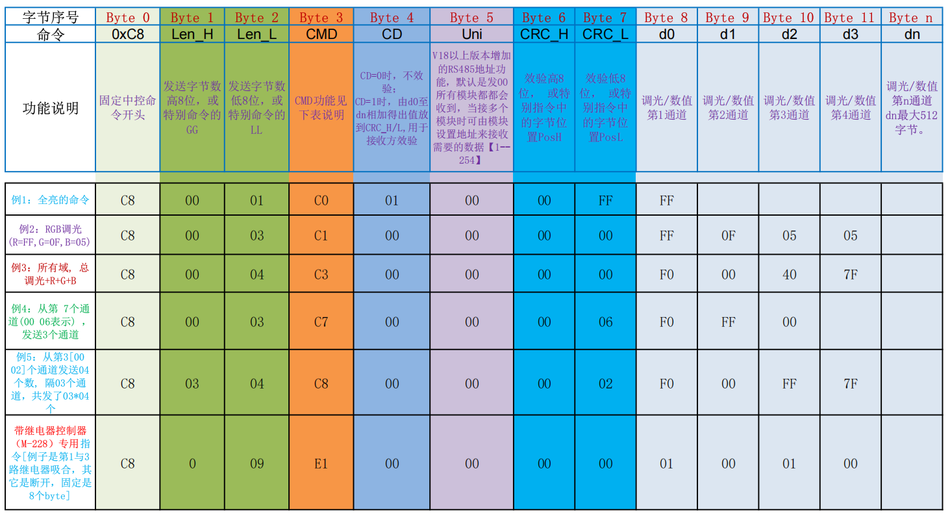
- Example Instruction:
Example 1: Starting from the first channel address (starting with00 for computers)15channels1---15The number
C800 0FC7 00 00 0000 01 02 03 04 05 06 07 08 09 0A 0B 0C 0D 0E 0F
Example 2: Starting from the first channel address (starting with466 (466-1=465, hexadecimal is 01D1)Starting from the address, send15A channel1---15The number
C800 0FC7 00 0001 D1 01 02 03 04 05 06 07 08 09 0A 0B 0C 0D 0E 0F
Example 3: In the467 (467-1=466, hexadecimal is 01D2)Starting from the address, send6Number of channels01---06The number
C8 0006C7 00 0001 D2 01 02 03 04 05 06
Example 4: Simple quick command
a) All channel values are 0x7F:C8 00 01 C0 01 00 00 7F
b) All channel values are 0x00:C8 00 01 C0 01 00 00 00 00
c) All channel values are 0xFF:C8 00 01 C0 01 00 00 FF
4.3 DMX to RS485 Batch Timer Source Mode (d2r)
- Function: Input DMX512 signal, convert it to RS485/232 channel values and output them in sequence. Set the run mode on the module to d2r
- Setting Method:
- Enter the menu and select "run".
- Long press the "+" key for 3 seconds and select "d2r".
- Press and hold the "+" key for 3 seconds to save.
- Baud rate setting:
a). The default baud rate for this mode is 115200.If there are many output channels, please use the command to increase the baud rate to 256000. To ensure real-time transmission.
When changing the serial port baud rate, high-speed must be used for batch data transmission! Once set, the return value will take effect immediately. After confirming the return value, the user should switch immediately
After a power outage, the next power on will restore 9600 to prevent users from being unable to connect. Example 1: Set the baud rate to 115200 with d0=02, which is 115200. Example 2: Set the baud rate to 250000 with d0=03, which is 250000. When powered on, 32 channels are sent to the serial port 485 by default, and the number of channels sent can be defined by instructions.
  D0=00:9600
  D0=01:19200
  D0=02:115200
  D0=03:250000
  D0=04:256000
  D0=05:512000
Example 1: Set the baud rate to 115200, d0=02, which is 115200,
C8 00 01 CB 00 00 00 00 02
Example 2: Set the baud rate to 250000 and d0=03, which is 250000,
C8 00 01 CB 00 00 00 00 03
b) By default, 32 channels are sent to the serial port 485 when powered on, and the number of channels sent can be defined by instructions.
Example 1: DMX data starts from00 01address code, with a total of0Fpieces: C800 01D2 00 00 00 000F
Example 2: DMX data starts from00 09address code, totaling1FNumber: C800 09D2 00 01 00 001F
Stop automatic transmission to RS485: C8 00 01 D0 00 00 00
4.4 DMX to SPI mode (control light strip)
- Function: Input DMX512 signal to control the light strip (such as WS2812, WS2811).
- Setting Method:
- Enter the menu and select "run".
- Long press the "+" key for 3 seconds and select "SPI".
- Press and hold the "+" key for 3 seconds to save.
Set:
Common single line strip signals such as
Display:400, compatible strip signals such as WS2811/ucs16703/TM1804 with low-speed 400K rate, and individual control for each pixel;
Display:800, compatible light strip signals such as WS2812/2815/2813 at a high-speed 800K rate, with individual control for each pixel point;;
Display:814, output as a dedicated light strip signal forTM1814;
Display:Auu, 800k rate, control all pixel dimming with one channel value, which is equivalent to white light.
Display:A-3, 800k rate, using 3 channel values to control RGB dimming of all pixels, which is equivalent to 3 channels controlling all pixels.
Display:A-4, 800k rate, using 4 channel values to control RGBW dimming for all pixels, which is equivalent to 4 channels controlling all pixels.
Output 512 channels in sequence, which means that 512/3=170 pixels of RGB.
The starting address code received by the DMX is adjustable.
Set the run mode on the module to SPI.After saving, power off and restart take effect.
Factory default is WS2812 light strip signal
4.5 DMX triggers custom RS485 mode (d2C)
- Function: Input DMX512 signal, triggers custom RS485 commands (up to 30 groups).
- Setting method:
- Enter the menu and select "run".
- Long press the "+" key for 3 seconds and select "d2C".
- Press and hold the "+" key for 3 seconds to save.
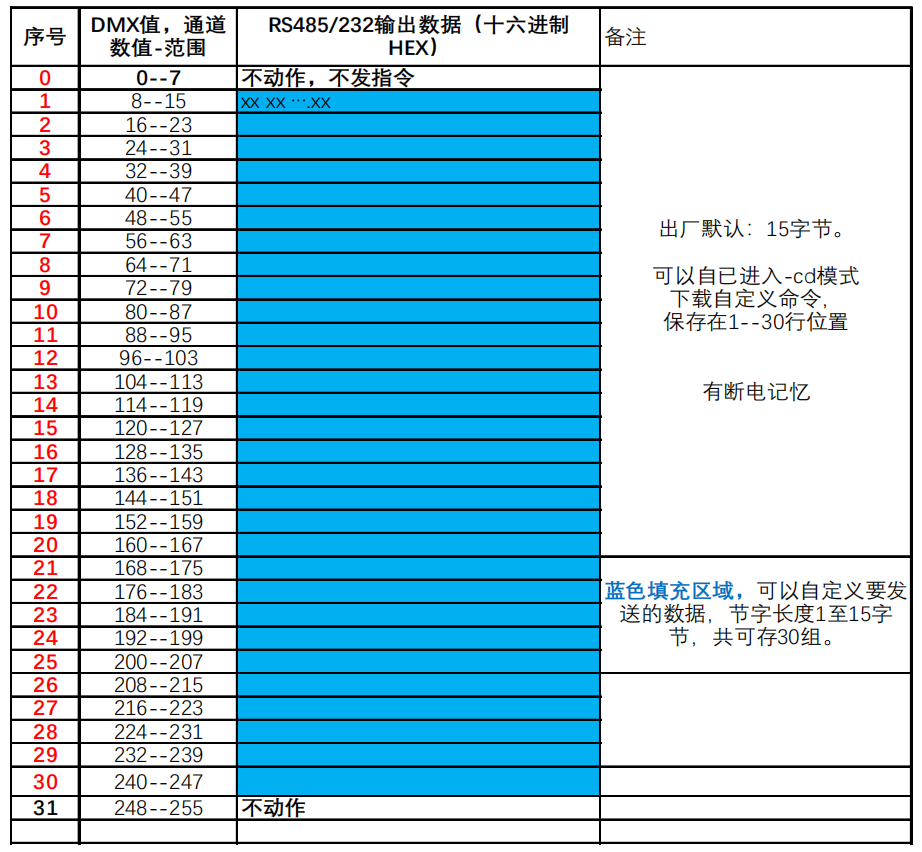
- Custom Command Format:
C8 00 Len CD 00 Pos 00 00 d0 d1 .......dn- Len: Instruction Length (1-15 bytes)
- Pos: Storage Location (1-30)
- d0-dn: Custom Data
5. Appendix
5.1 Channel Table (d2U Mode)
序号 | DMX 值范围 | RS485 输出数据(十六进制) | 备注
0    | 0--7       | 不动作,不发指令
1    | 8--15      | 01 06 00 0B 00 00 F8 08
2    | 16--23     | 01 06 00 0B 00 C8 F9 9E
3    | 24--31     | 01 06 00 0B 01 2C F8 45
4    | 32--39     | 01 06 00 0B 01 90 F9 F4
5    | 40--47     | 01 06 00 0B 01 F4 F8 1F
...
30   | 240--247   | 发送 8CH-DMX 通道【CH2--9】
31   | 248--255   | 不动作
5.2 Custom Command Format (d2C Mode)
C8 00 Len CD 00 Pos 00 00 d0 d1 .......dn- Len: Instruction Length (1-15 bytes)
- Pos: Storage Location (1-30)
- d0-dn: Custom Data
5.3 Baud Rate Setting Table
D0=00:9600
D0=01:19200
D0=02:115200
D0=03:250000
D0=04:256000
D0=05:512000
Video Tutorial
DMX Batch to RS485 Signal - Demonstration
DMX512 Triggering Fixed 485 Command
r2d Mode -485 to DMX Sending Command Control Lamp - Explanation
6-Channel Par Lamp RS485 to DMX Signal
d2C Download Custom RS485 Command
6. FAQ
Q1: How to restore factory settings?
- Turn off the power, press the "+" and "-" keys at the same time, turn on the power again, hold the key for more than 8 seconds, and release it when "cL_" is displayed.
Q2: How to enter custom command download mode?
- Press and hold the "+" key, then power on the module and it will display "__”Wait for about 10 seconds to display 'cd'”Release the word after it is written.
Q3: How to save custom commands?
- After downloading the command, send the save command:
C8 EF AA CD 00 55 F0 A5.
Q4: What does the module display after being powered on?
- When the module is powered on, it displays the current working mode (such as "d2U", "r2d", etc.).


Leave a Reply