
Bittly is a communication debugging tool that supports multiple communication methods or protocols. Supports serial port, network, Bluetooth, HTTP, Websocket, MQTT, and Modbus. Support fast implementation of upper computer control panel through command binding. Support automated testing of communication commands and output test reports.
When multiple instructions need to be executed frequently, switching back and forth between TAB instructions becomes a cumbersome task. This allows us to quickly execute multiple instructions by binding them to buttons or slider components, without the need to switch TAB operations. And through the panel, it is more convenient to implement a simulated upper computer control panel.
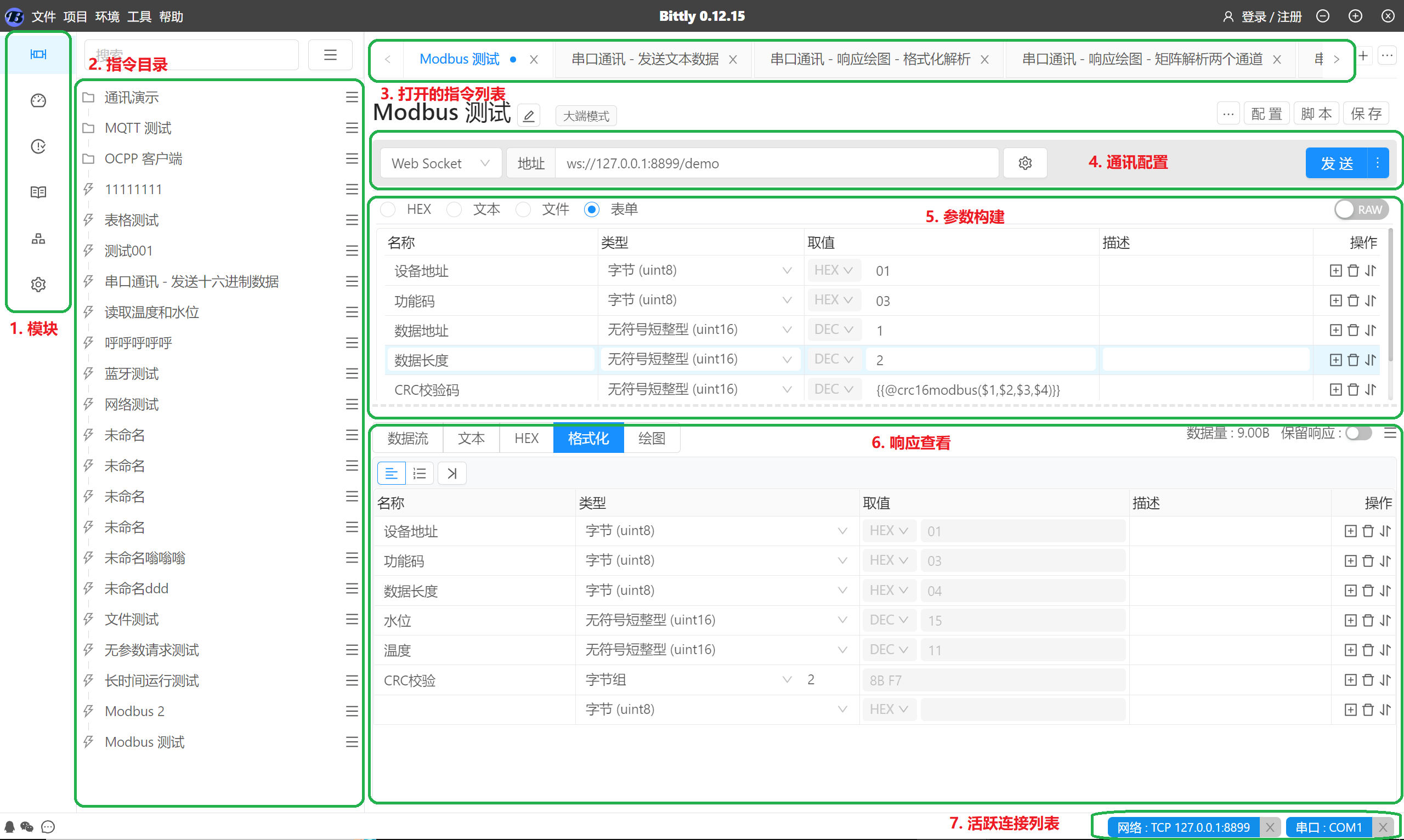
Layout Description:
模块: The function module menu is used to switch the functional content of the current workspace. At present, this menu includes instruction management, Panel drawing, Test Management, Environmental variables and project management.指令目录: List of instructions for managing and saving, Support folder and drag and drop management. After clicking the command, the command details will be opened in the right workspace for debugging operations.打开的指令列表: Display the list of currently opened commands, Other commands can be quickly closed through email, You can also click on itxIcon closes the current. By clickingTabUse tags to switch between instructions.通讯配置: The communication configuration area is used to configure various communication parameter information, The first dropdown menu is used to select the communication method, For example, serial port, Internet, Bluetooth, etc. After selecting the communication method, You can configure the corresponding communication parameters, For example, serial port number, Communication speed, etc, According to different communication methods, The communication parameters that need to be configured are also different.参数构建: The parameter construction area is used to construct request parameters, Select the parameter construction mode through the radio button above.- HEXpattern : Used for quickly constructing hexadecimal request parameter content, for example :
01 02 03 AA BB CC - text mode: Used for quickly constructing text request parameter content, for example:
how are you - File Mode: Used to send a file as a request parameter, Support three modes of line by line or byte by byte transmission, as well as full-text transmission.
- forms mode : Used for quickly creating complex request parameters, Automatically construct request data by specifying data types, No need for manual base conversion or size end processing.
- HEXpattern : Used for quickly constructing hexadecimal request parameter content, for example :
响应查看: Support multiple ways to view response content, Easy to observe and analyze response data.- data flow: The data flow mode will record the content of each sent and received data, And display it in the form of a list, Click on the list entry to view the complete response content.
- Text: Parse the response content into text and display it.
- HEX: Convert the response content to a hexadecimal string and display it.
- formatting: Automatically parse and convert received data by configuring data types and lengths.
- Drawing: Parse the data using the specified parsing method and display it in the form of a line chart.
活跃连接列表: Display all currently connected devices or services, can pass throughxIcon disconnects specified connection.
Control panel interface layout
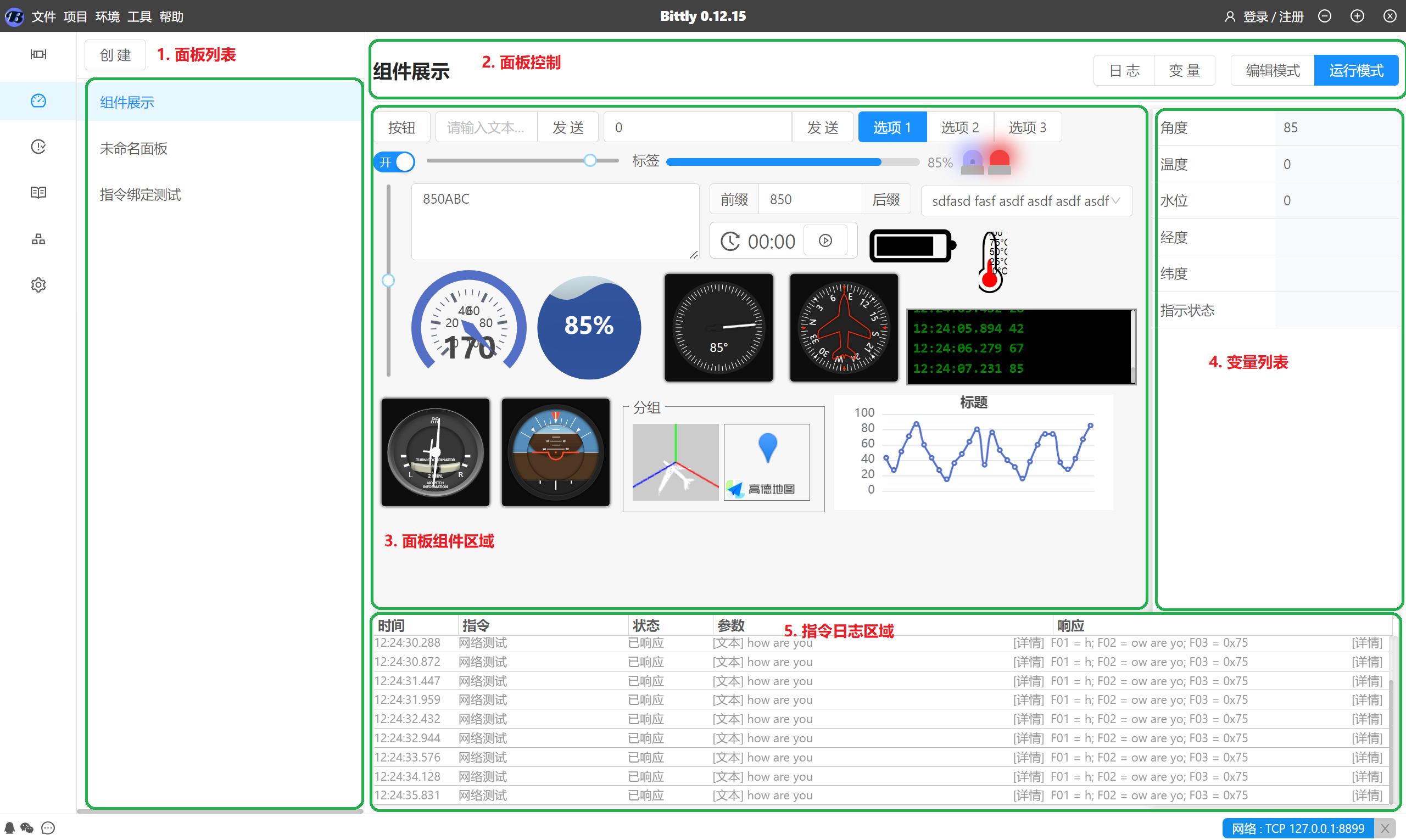
Layout Description:
面板列表: Each project can create any number of control panels, The panel can be switched directly by clicking.面板控制: Display the current panel name, And switching logs, Display status of variable list. Or switch the working mode of the panel. Switch to editing mode to edit panel components.面板组件区域: The panel component area is used to display all components of the panel, This area can freely define components and their working modes by dragging and dropping them in editing mode.变量列表: The variable list is used to display the values of all variables in the current panel, The area can be controlled through the panel变量Button to switch between display and off states.指令日志区域: Display the current panel communication log, The area can be controlled through the panel日志Button to switch between display and off states
Bittly Data transmission can be done by creating a new commandTABOr open a command from the left-hand directory to perform the operation.
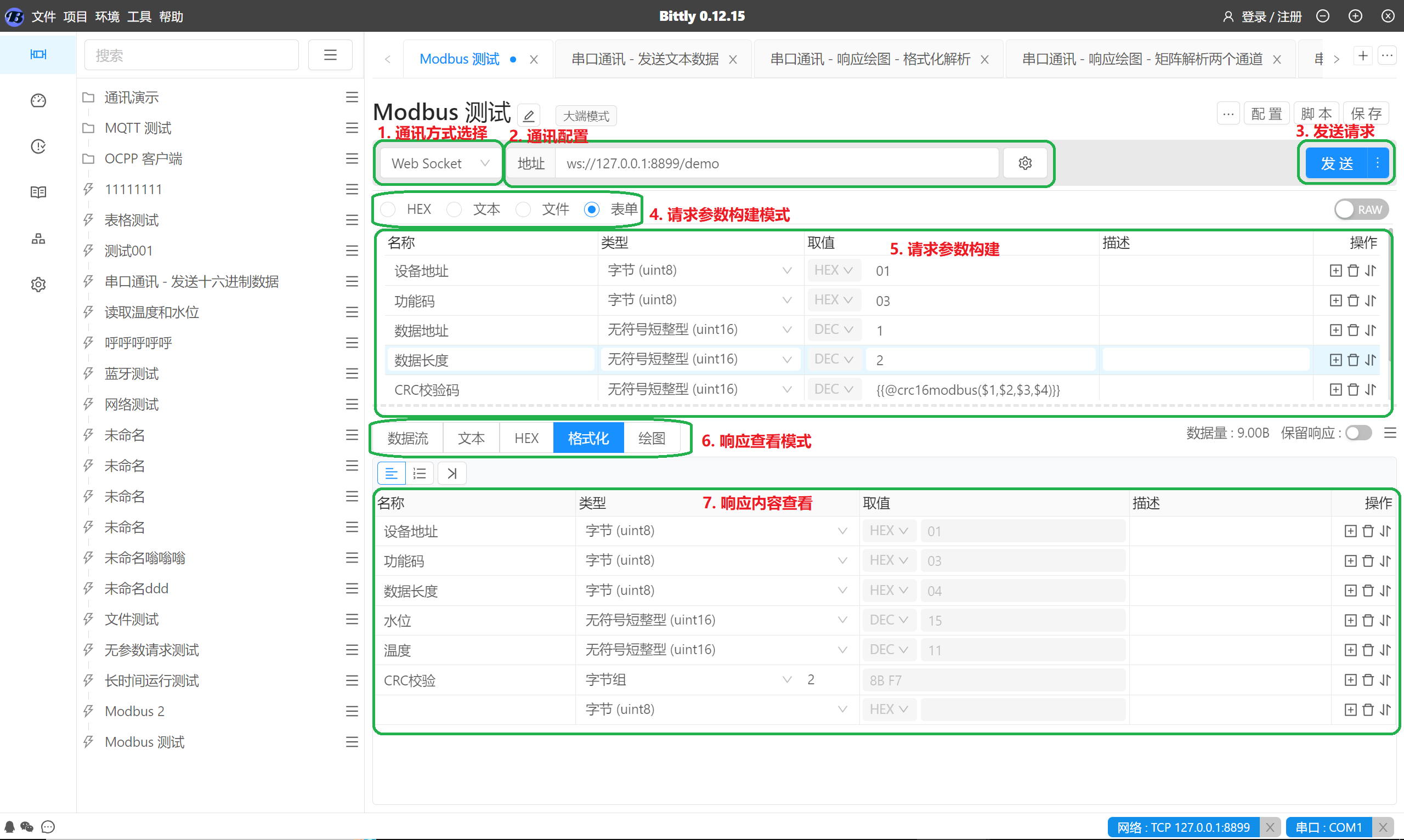
Instructions for Operation Steps:
- Select communication method, Select the type of communication required as needed, For example, serial port, Network or other types.
- After selecting the communication method, The communication configuration will display the required parameter content based on the selected communication method. For example, select as
WebSocketway, You need to configure the server address for the connection. - send request, After configuring the request parameters, you can click the send button to send the data. If the requested connection is not established, We will first establish a connection and then proceed with the sending operation. If the connection already exists, the request content will be sent directly.
- Request parameter construction mode, Choose the appropriate request parameter construction mode, for example, When the request parameters are relatively simple, You can choose text orHEXpattern, If the parameters are responsible, you can choose the form mode for quick construction.
- Request parameter construction, Taking the form mode as an example here, Construct data content based on the required data types in the document. The name column is used to indicate the name of the attribute, Type is used to describe the data type of the attribute, The value column is used to edit the value of the attribute. The description column is used to extend the description of the attribute, For example, the range of values or other necessary explanations.
- Response viewing mode is used to select the appropriate response data viewing method, for example:
- When there are multiple sending and receiving frequencies, When the request content is relatively simple, You can use data flow mode to view content interaction;
- When the data is textual content, You can use text mode to view the response text;
- When the data is binary data, It can also be usedHEXView the hexadecimal content of the response data in the pattern;
- When the data content is relatively complex, But when it belongs to analyzable structured data, Format mode can be used to automatically parse the response content;
- You can also specify or customize parsing modes to parse data, And render it as a line chart.
- Bittly Data formatting and parsing
- When the request content is quite complex, Creating binary data manually becomes very tricky, Now we can Bittly To change this situation.
- Request parameter construction
- for example, We takeModbusTaking reading data in the protocol as an example, The parameters required in the document for us to pass are as follows:
- So we can use forms to create this structure:
名称: Name used to mark the attribute类型: Specify the data type of this attribute, The supported data structures are as follows:字节(uint8),单字节整型(int8),字符(int8/char),无符号字符(uint8),短整型(uint16),无符号短整型(int16),整型(int32),无符号整型(uint32),长整型(int32),无符号长整型(uint32),长长整型(int64),无符号长长整型(uint64),单精度浮点型,双精度浮点型,字符串,字节数组,文件.取值: Edit attribute values.- When the attribute is unsigned data, The value format can be specified as
二进制(BIN),八进制(OCT),十进制(DEC)Or十六进制(HEX), And automatically perform conversion operations when sending data. - Placeholders can be used
{{env.name}}To use data from environment variables, For example, there are environmental variables测试=YES, When sending data{{env.测试}}It will be replaced withYES. - Placeholders can be used
{{name}}To use variables in the script, For example, executing in a script$this.variableSet("变量","HELLO");Then{{变量}}When sending, it will be replaced withHELLO - Status placeholders can be used
{{status.name}}To use the values in the instruction state, For example, the existence of a stateCOUNT=1, Then{{status.COUNT}}When sending, it will be replaced with1 - can be used
{{@func()}}To execute functions for quick calls, For example, in the above picture{{@crc16modbus($1,$2,$3,$4)}}It will be sent when, callcrc16modbusfunction, And execute the function with the first four attributes as parameters, Finally, the result of the function will be sent as data.
- When the attribute is unsigned data, The value format can be specified as
描述: Used for commenting and explaining attributes.- Data response analysis
- When Bittly After receiving the response content, We can configure the formatting method for the response data, as follows:
- After this configuration is completed, Execution in the future will automatically perform parsing operations.
- among which:
名称: Used to describe the name of the response attribute类型: Specify the data type of the response attribute, The supported data types are as follows:字节(uint8),单字节整型(int8),字符(int8/char),无符号字符(uint8),短整型(uint16),无符号短整型(int16),整型(int32),无符号整型(uint32),长整型(int32),无符号长整型(uint32),长长整型(int64),无符号长长整型(uint64),单精度浮点型,双精度浮点型,字符串,字节数组; For indefinite length data, For example, strings and byte arrays, You need to specify the data length.取值: Used to display the parsed data results, When the data type is unsigned, Can specify its numerical base type.描述: Used for commenting on attributes and other information.- Bittly Data visualization and analysis
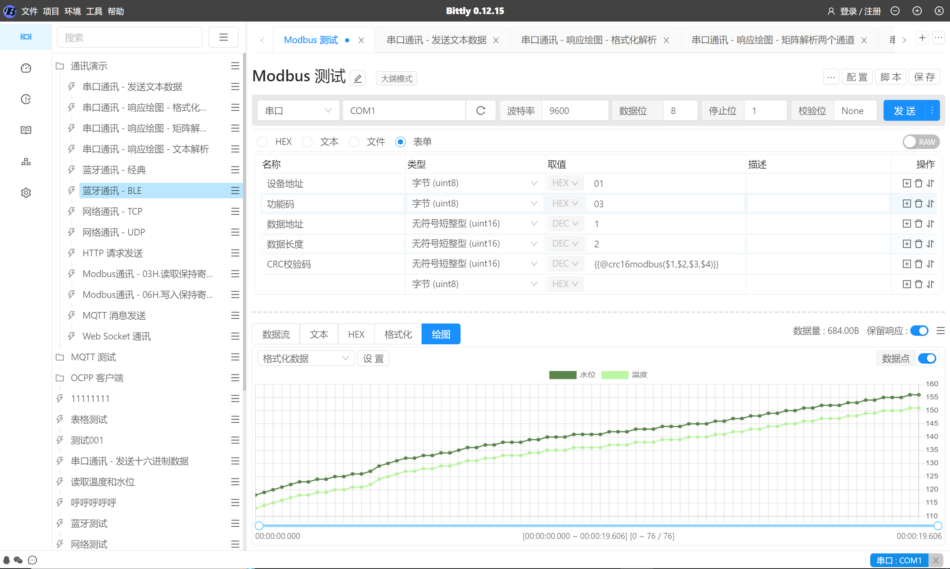
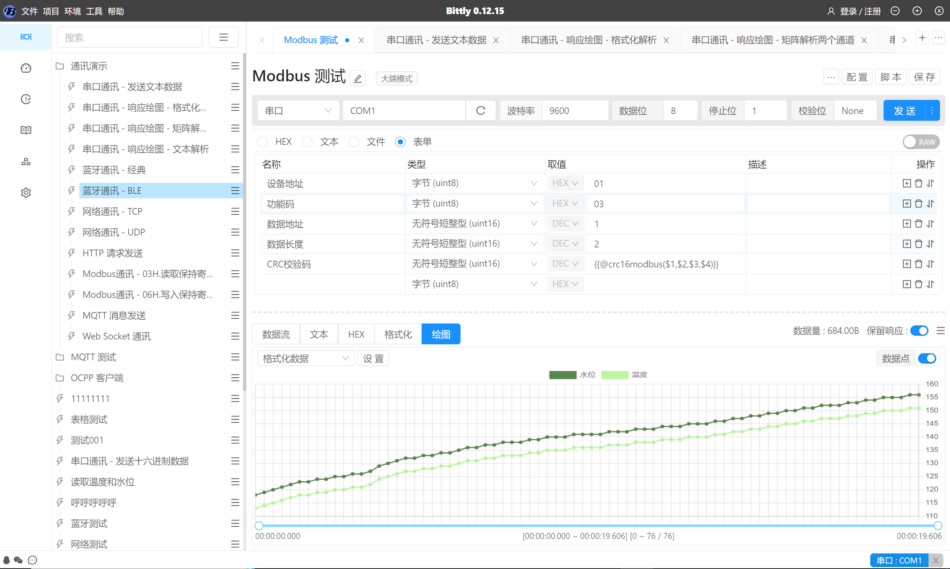
- Bittly Support drawing line charts based on response data, for example:
- The current parsing method supports the following types:
[num] [num]CRLF: This parsing method is in a fixed format, The response data is[num] [num]CRLFThe format, for example :1 2 3rn4 5 6, Among them1, 2, 3For the first channel, The first data of the second and third channels, 4,5,6For the second data.数据帧: The data frame format supports configuring frame headers, end of frame, data length, data type, And the number of channels矩阵: Matrix format refers to using all response data as parsing data, Parse by specifying data format and number of channels格式化数据: Format data refers to using pre configured formatting and parsing methods as templates for data parsing, And support drawing data with specified attributes. As shown in the figure above.自定义解析: Support custom parsing scripts for data parsing.
Bittly The control panel
When multiple instructions need to be executed frequently, Switching instructions back and forthTABIt became a rather troublesome matter, This way, we can bind the instructions that need to be executed to the button, Or use slider components to achieve fast execution of multiple instructions, And avoid switchingTABThe operation. And through the panel, it is more convenient to implement a simulated upper computer control panel.
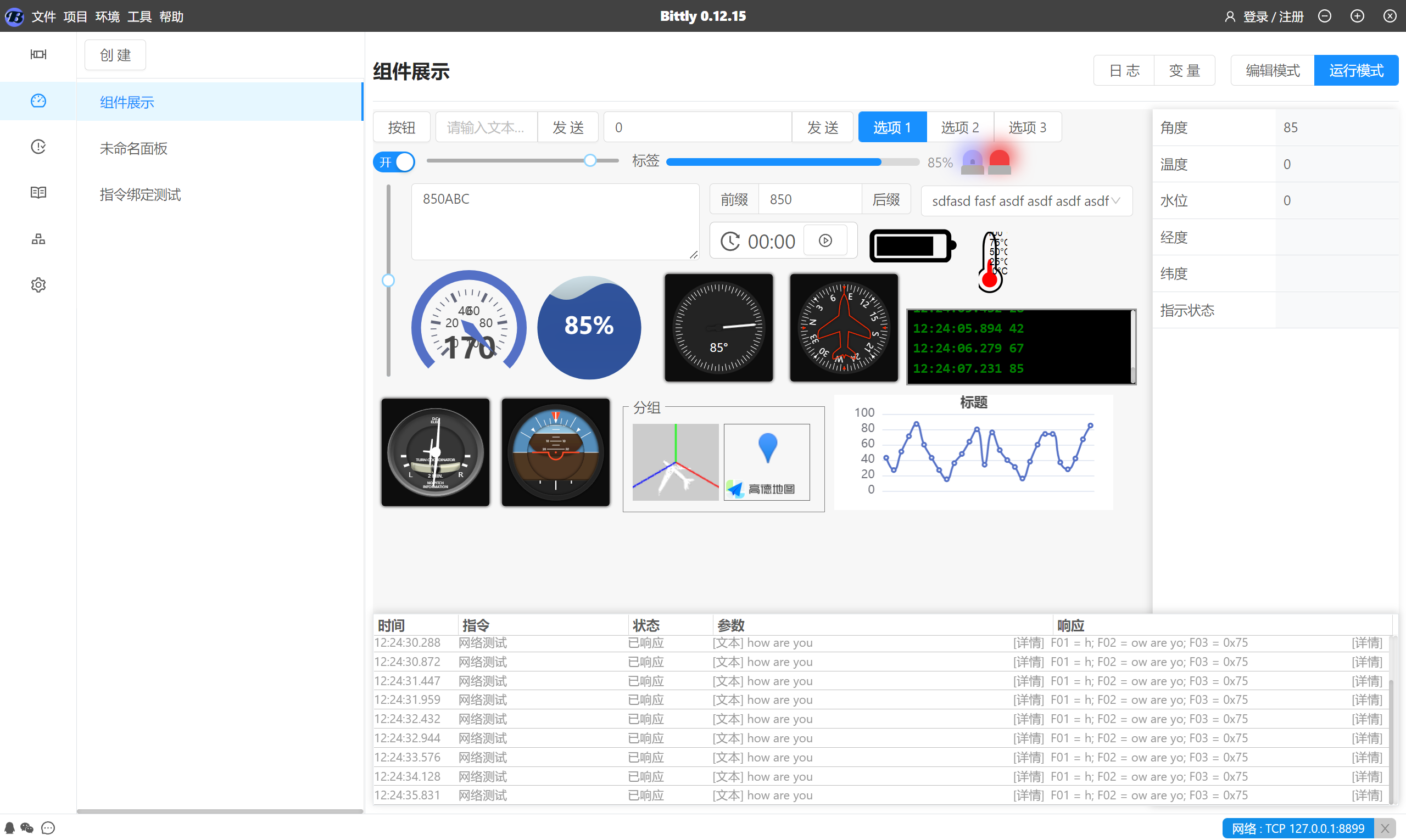
Operation Mode
As shown in the figure above, When the panel editing is completed, You can switch to the running mode for operation.
In operating mode, You can click on the button above 日志 Use the button to expand the communication logs during the operation of the panel, To view the execution status of the corresponding instructions.
Click on the button above, 变量 Button to view variable data in the current panel.
Edit Mode
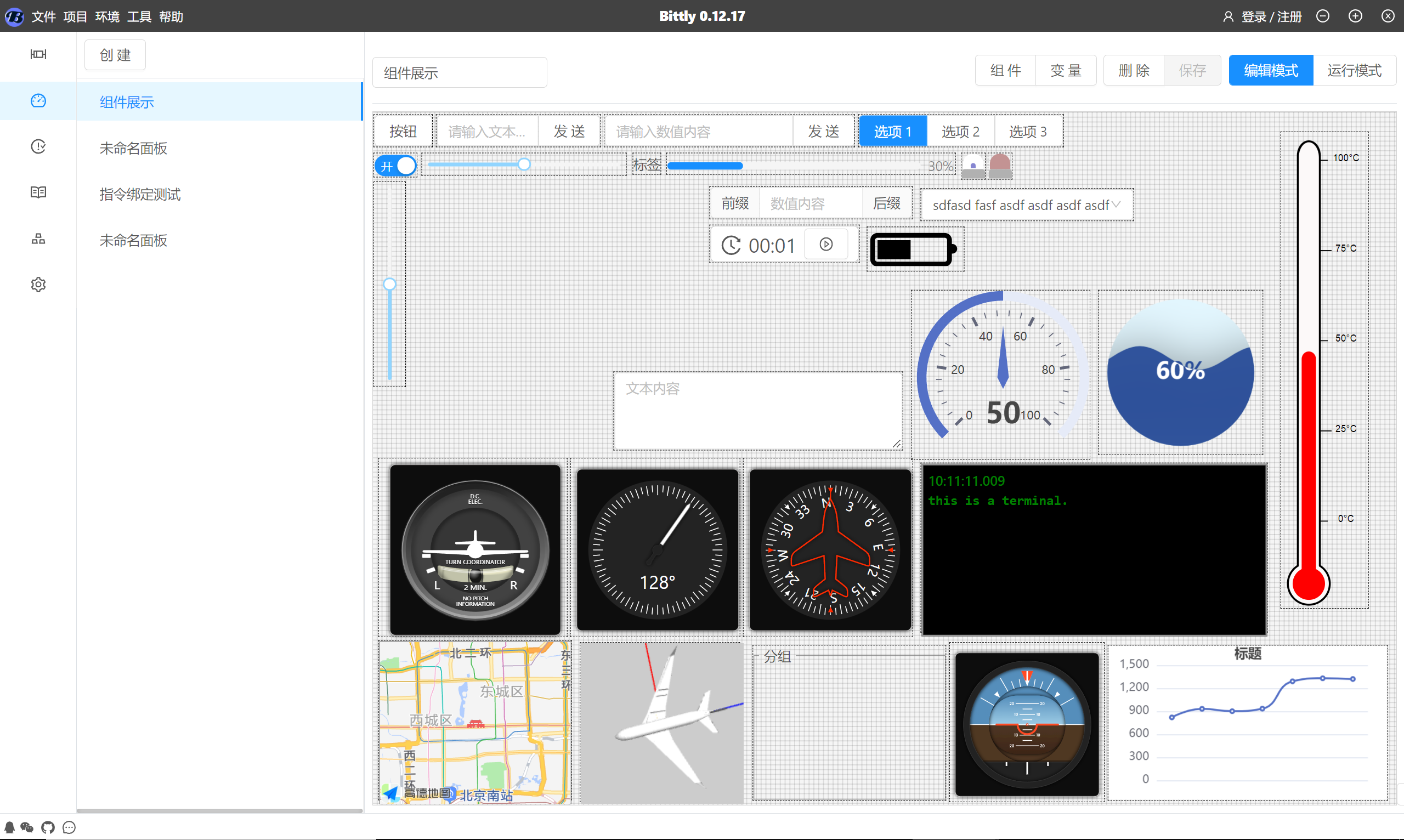
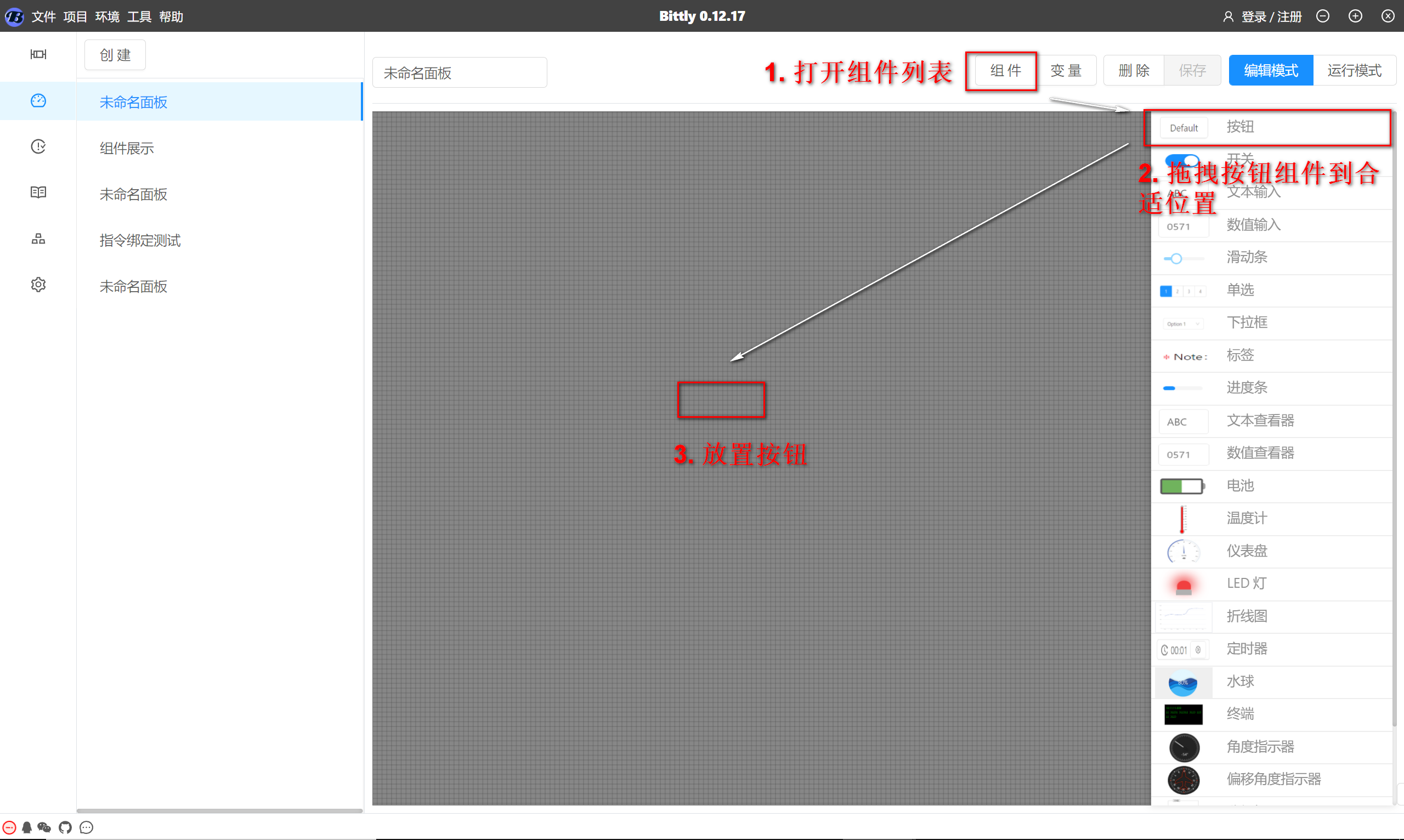
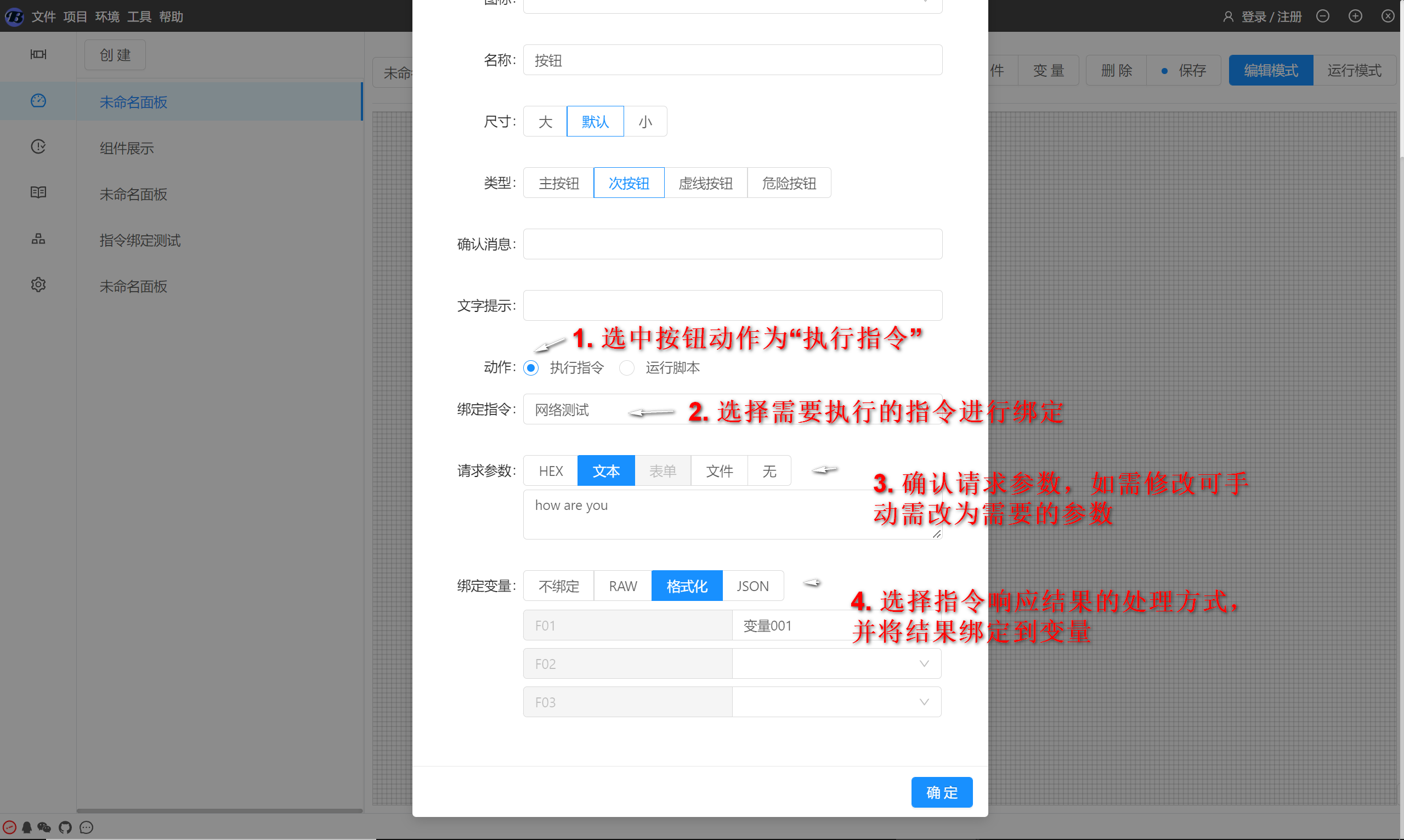
The editing mode is used to edit the content of this panel, For example, which components should be included in the panel, What variables are needed, etc. Let's take a button as an example to add a component:
0x01. Drag the button to the appropriate position on the panel
0x02. Bind instructions and parse response content into variables, After completion, click the OK button to close the configuration
0x03. Return to operating mode
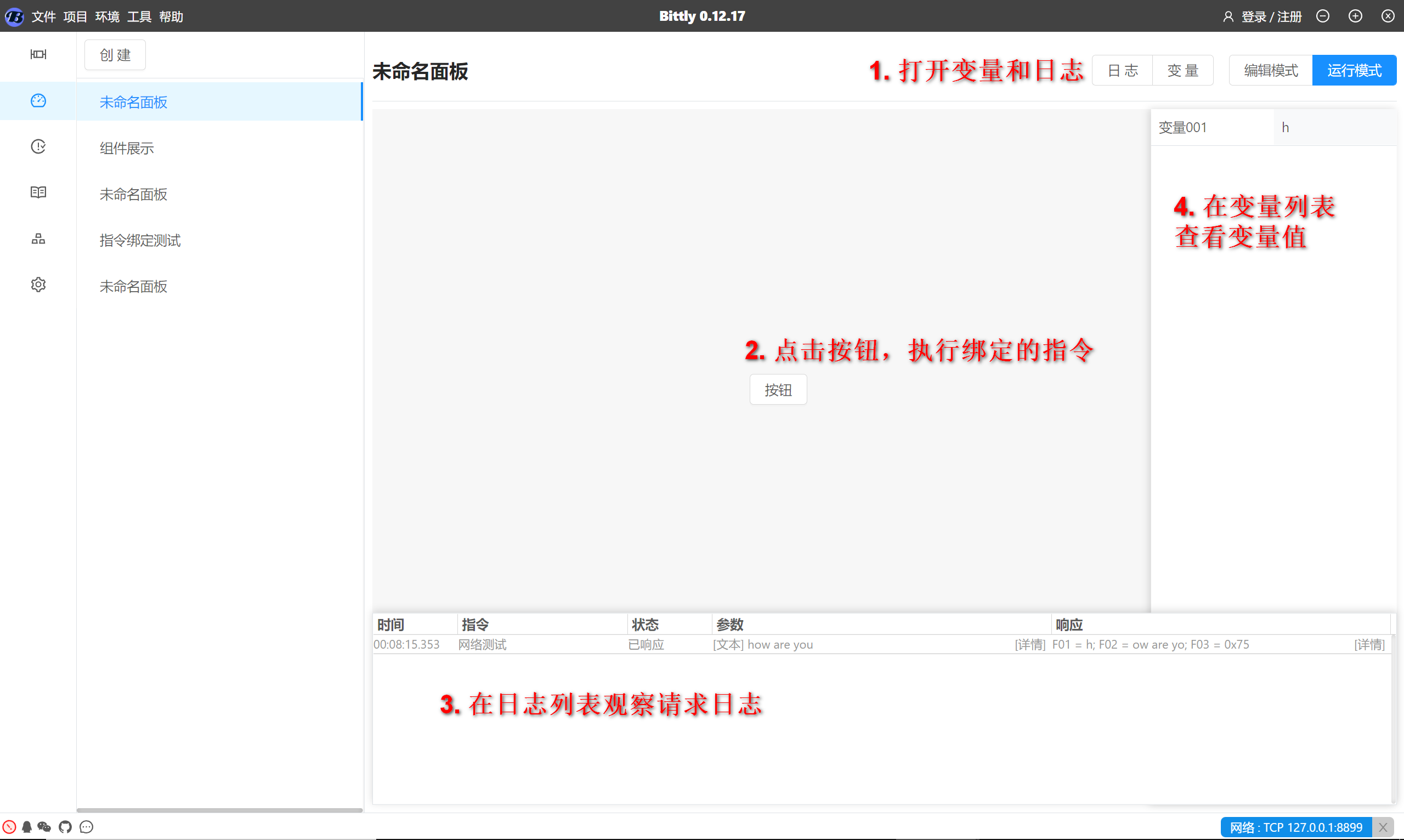
This completes the instruction binding and variable binding, Other component operations are similar to this.
Bittly Automated testing
Unit Test
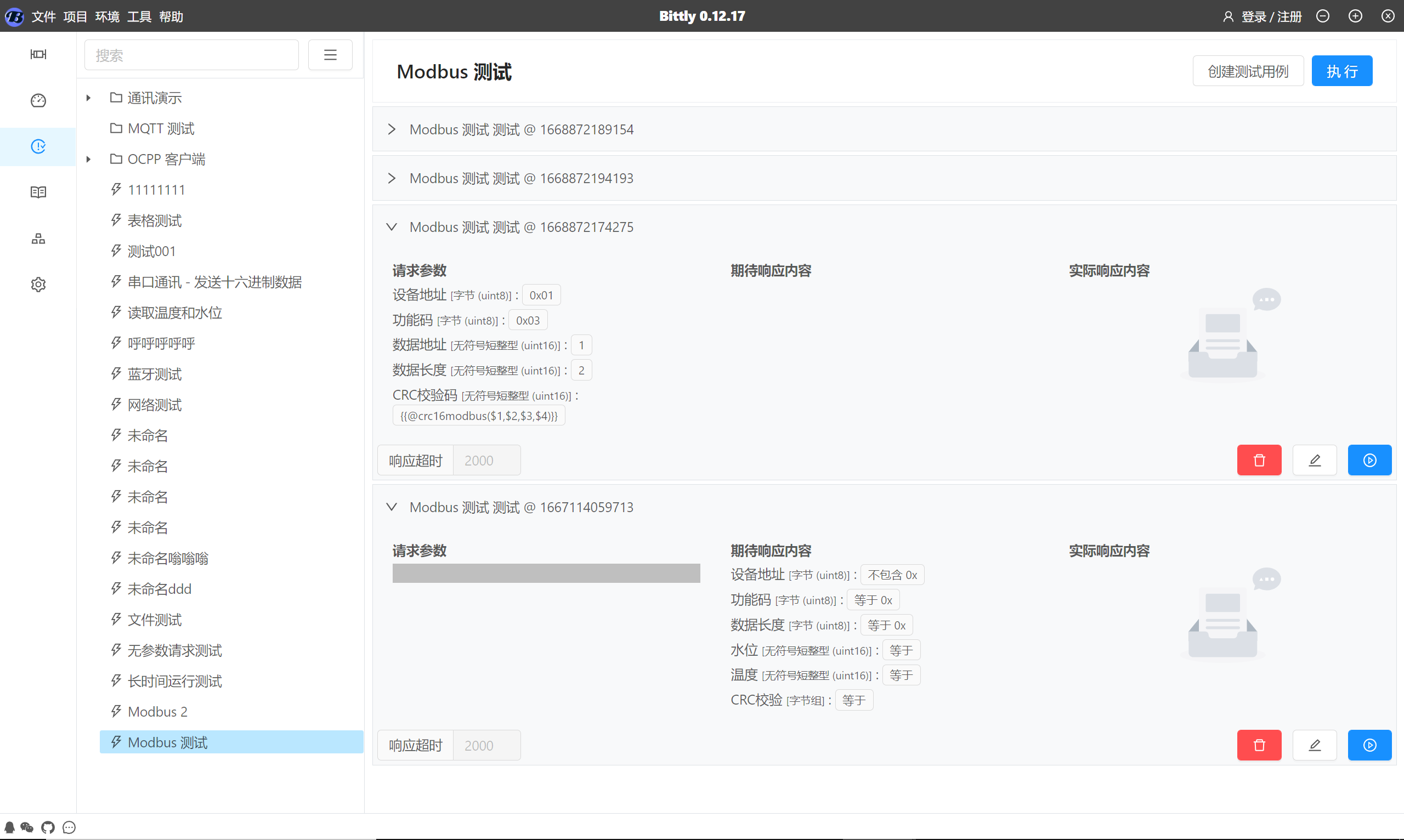
You can use Bittly To conduct automated testing on instructions, As shown in the figure above, You can select the command you need to test, Then click on the right workspace 创建测试用例 Button to create a test case for the instruction.
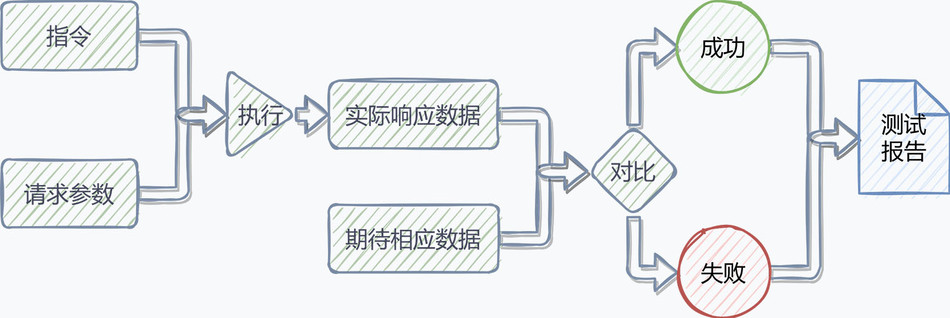
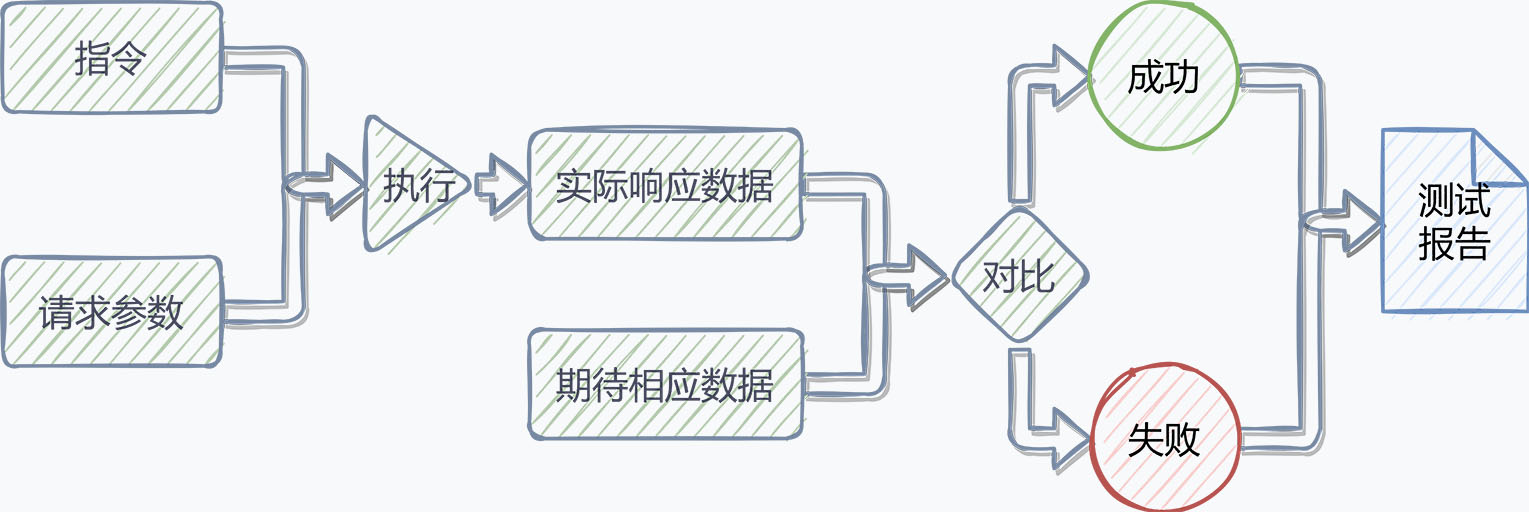
Test cases work by specifying request parameters and expected response content, During execution, Test case sending configured request parameters, After receiving the response content, Compare with expected response content, If the comparison is successful, The test passed, Otherwise, the test will fail, The execution flowchart is as follows:



下载不了
11111111
下载使用,提宝贵意见
学习mark一下
好
学习学习
11
好好学习
看下是否能用;
学习学习
666
看了好像不错
学习,
haoyangde
学习学习
下载下来试试看
很不错,学习学习。
用佛websocket,试试
Download
不知道真假,下载的 easymodbusjava说是源码结果是个jar包
下载下来试试看
不错!
666
看看
~AAAAAA
先试一试
被说明深深吸引,正是我们所需要的,希望一试。
Downloadbitlly
Download
学习一波
学习学习