Background
Industrial automation monitoring and control refers to the use of technological equipment and software systems to automatically manipulate and monitor production processes in order to improve efficiency, quality, reliability, and safety. This typically involves the coordinated work of mechanical equipment, electronic hardware, and computing software to optimize industrial operations by reducing manual intervention. In the field of industrial automation monitoring and control, serial servers play a crucial role, mainly by providing network connections and remote communication functions for old and modern industrial equipment, which can greatly improve the operability and flexibility of industrial systems. The key roles of serial port servers in industrial automation monitoring and control mainly include device networking, data integration and centralized management, remote monitoring and control, enhanced system scalability and compatibility, and efficient fault diagnosis and maintenance support. This article will introduce a technical solution: using the NA111 ModBus485 serial port server to achieve industrial automation monitoring and control, and provide a detailed introduction to the use of the NA111 serial port server.
Solution Design
Imagine an industrial automation monitoring and control system located in a chemical plant, where the center uses a serial server to achieve efficient equipment management, data collection, and remote operation. This scenario involves complex chemical reaction processes that require precise control of various parameters such as temperature, pressure, and flow rate to ensure product quality and process safety. The following is a rough plan design.
Overview of Business Scenarios
The production line of a chemical plant includes multiple reaction vessels, distillation towers, and other processing equipment, which require strict monitoring and control to maintain a stable and safe production environment. By utilizing a serial server, these physical devices can be connected to a central monitoring system to achieve real-time data collection and remote control.
System Components
Sensors and actuators: Various sensors are installed in critical locations, such as temperature and pressure sensors for reaction vessels, flow meters, etc., to monitor production status in real time. The control device of actuators such as electric valves and pumps adjusts the reaction conditions according to the commands of the automation system. The flowchart of
is roughly as follows:
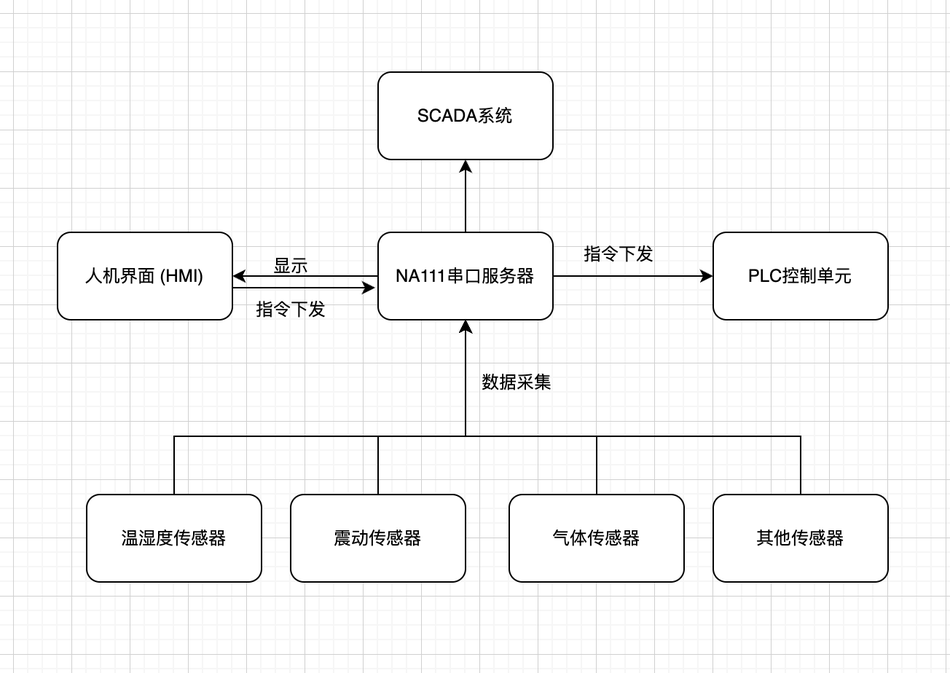
- Serial Server: All sensors and actuators are connected to the NA111 ModBus485 serial server through the RS-485 interface. The server converts the serial data of the devices into network data, enabling the central control system to access this data through Ethernet.
- PLC (Programmable Logic Controller): The PLC receives sensor data transmitted from the serial server and controls the actuators according to preset program logic to adjust process parameters.
- SCADA System: As the central monitoring system, SCADA is responsible for displaying real-time data, generating alarms, recording historical information, and allowing operators to perform remote control and fault diagnosis.
- Human Machine Interface (HMI): A graphical interface provided to operators for real-time viewing and control of the production process.
Let's take a look at the detailed configuration parameters of the NA111 serial server together.
Equipment Specifications and Performance Parameters
NA111 is a high-performance Modbus 485 serial server produced by Chengdu Yibaite Electronic Technology Co., Ltd. It is designed to connect RS-485 serial communication devices to Ethernet, supporting multiple working modes and configuring devices in multiple ways. Through it, devices can quickly establish network connections and support remote access and control. It also supports a wide range of industrial communication protocols and can be seamlessly integrated into existing industrial environments, providing stable and reliable data transmission.
Detailed specification parameters of equipment
| Serial number | Parameters | Parameter values |
|---|---|---|
| 1 | Supply voltage | DC 8V~28V |
| 2 | Operating current | 73mA@12V |
| 3 | Interface method | Serial port (RS485, 3 * 3.81mm Phoenix terminal) Network port (RJ45) |
| 4 | Work Mode | TCP Server, TCP Client, UDP Server, UDP Client, HTTP Client, MQTT Client ( Default TCP Server |
| 5 | Socket connection | Supports 6 client connections (TCP server mode) |
| 6 | IP acquisition method | DHCP, Static IP (default static IP) |
| 7 | domain name resolution | Support |
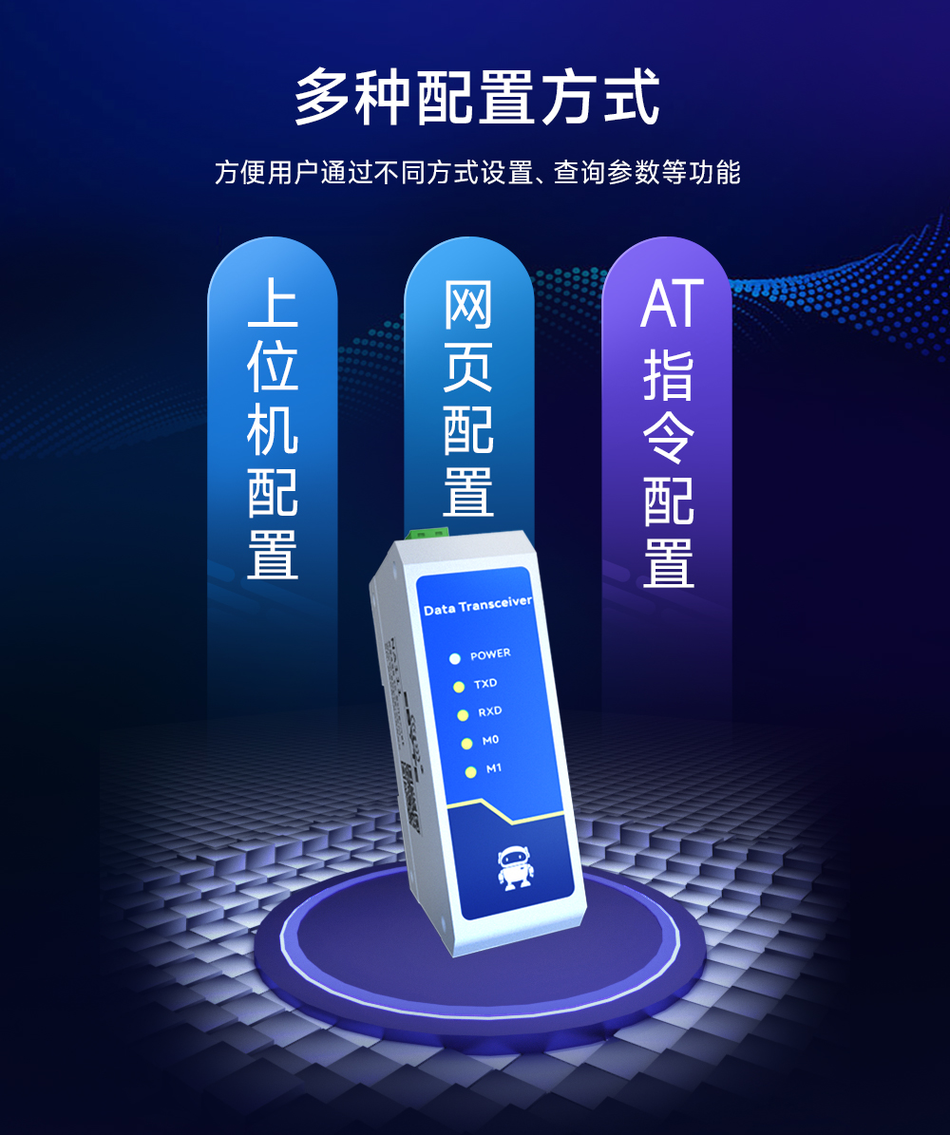
| 8 | configuration method | Web page configuration, upper computer configuration, AT command configuration |
| 9 | IP address | Customizable (default 192.168.3.7) |
| 10 | local port | Customizable (default 8887) |
| 11 | subnet mask | Customizable (default 255.255.255.0) |
| 12 | Operating Temperature | -40~+85 ℃, industrial grade |
| 13 | Operating Humidity | 10%~90%, relative humidity, no condensation |
| 14 | Storage temperature | -40~+125 ℃, industrial grade |
| 15 | Size | 110 mm * 66mm * 30mm |
| 16 | Packaging mechanism | 512 Byte |
Functional framework
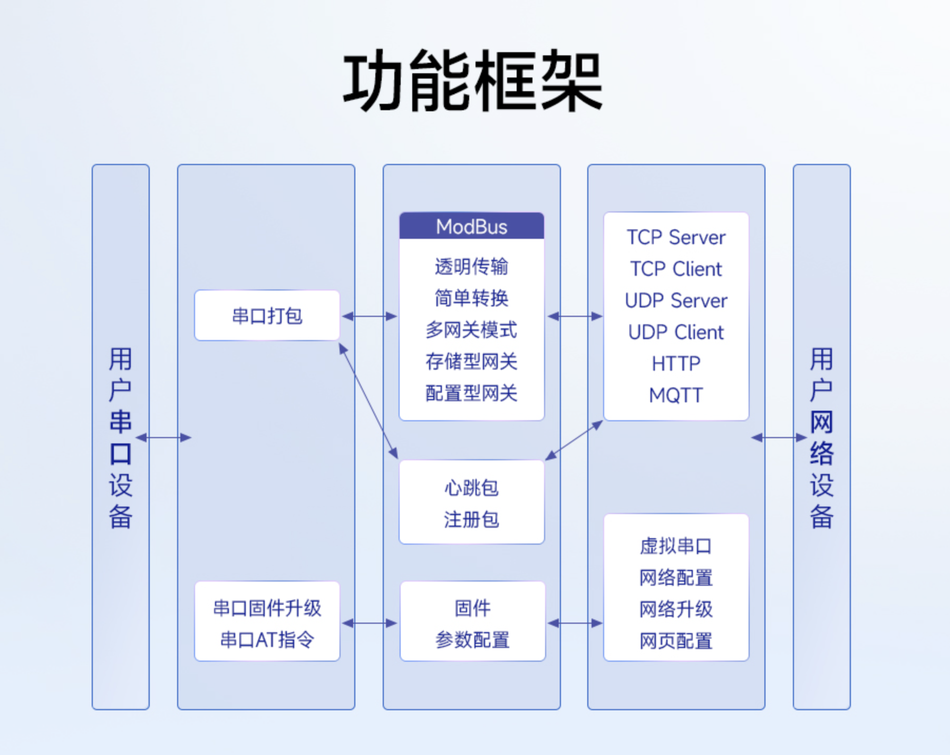

More official documents can be found https://www.ebyte.com/product-view-news.html?id=1886
Device Configuration, Wiring
The parameters of the device were introduced above. Now let's take a look at how to use it in practical business scenarios, how to configure it to collect data and issue commands.
Equipment unboxing, as shown in the following picture:
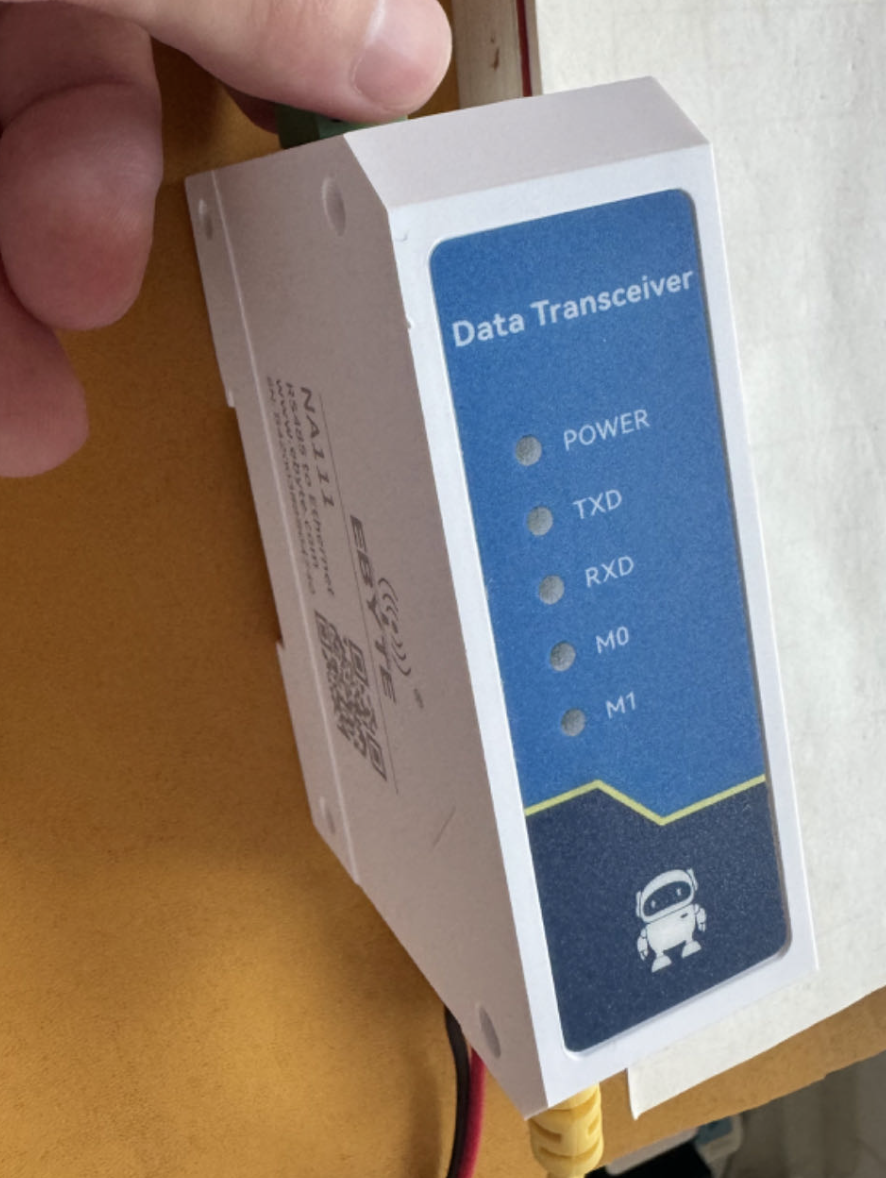
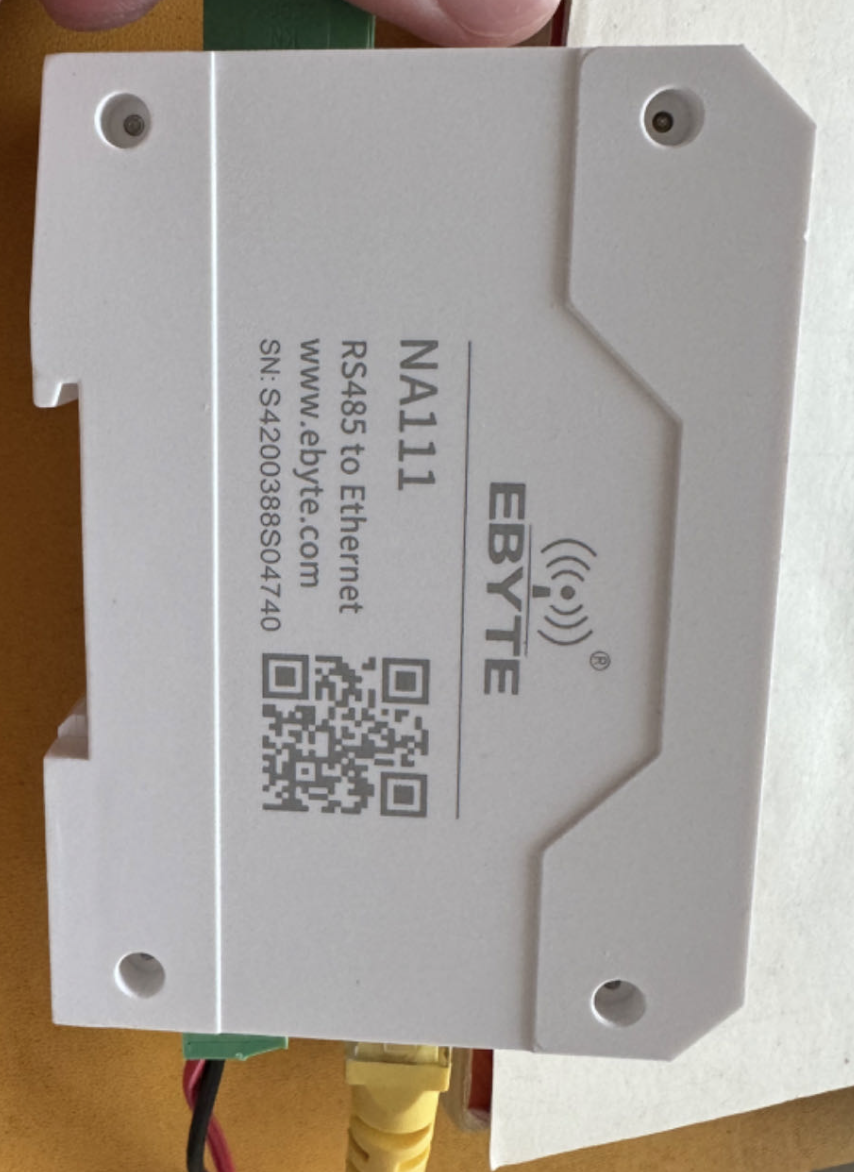
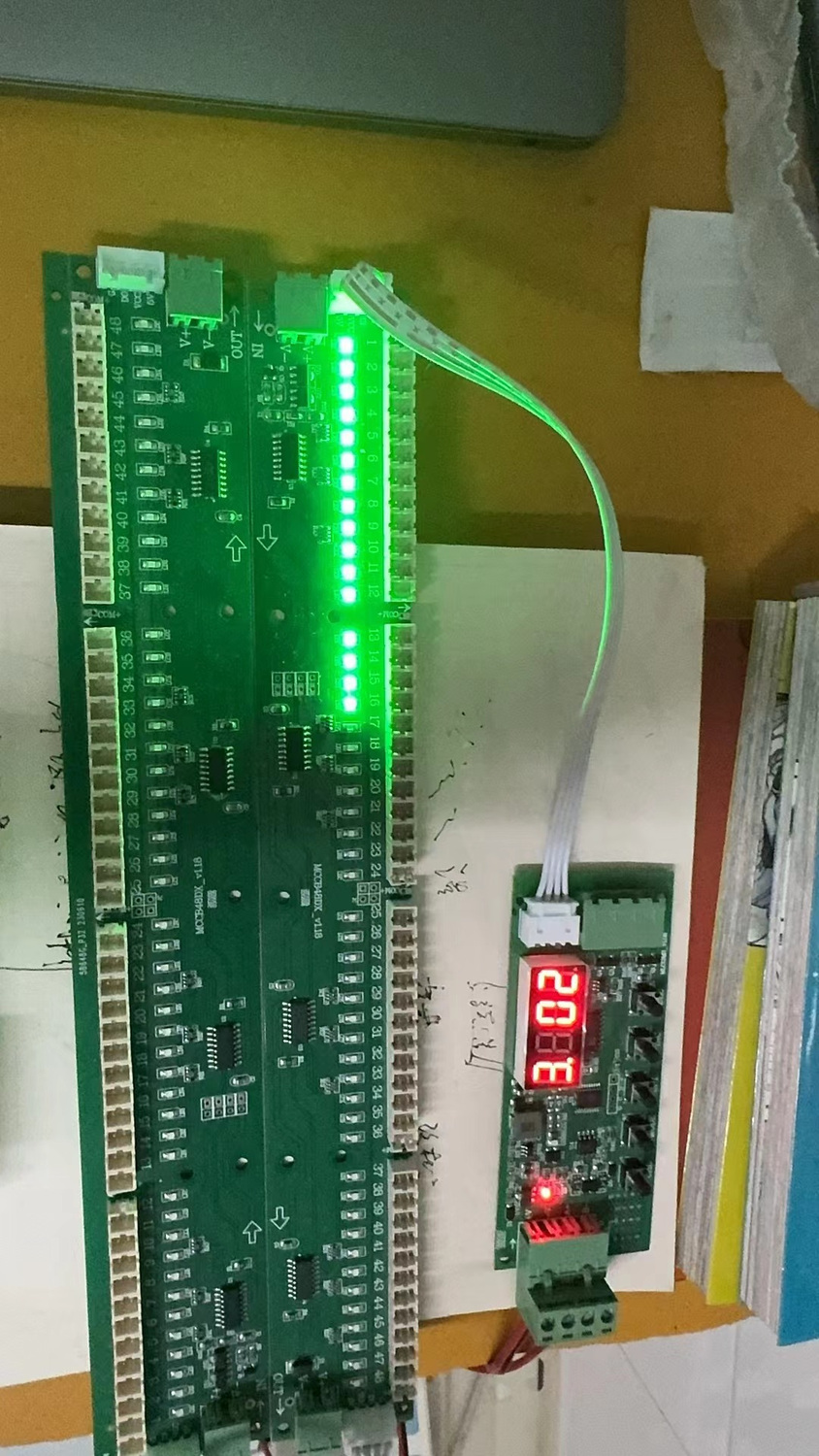
The equipment supports 8V~28V DC voltage, and we use a 12V power supply to power it. After connecting the power supply, the power light will light up. Then connect the sensor of Modbus 485 to the device. If there is no sensor, it can be simulated using Modbus Pol and Modbus Slave software. If using software to simulate, it is also necessary to prepare a USB to 485 adapter device and connect it to the device. Connect the A end to the A end and the B end to the B end, and be careful not to connect them in reverse. Next, I will use an RS485 light control board to demonstrate its usage and configuration
Then connect the sensor of Modbus 485 to the device. If there is no sensor, it can be simulated using Modbus Pol and Modbus Slave software. If using software to simulate, it is also necessary to prepare a USB to 485 adapter device and connect it to the device. Connect the A end to the A end and the B end to the B end, and be careful not to connect them in reverse.
Below, I will use an RS485 light control board to demonstrate its usage and configuration
Then plug in the internet cable to the device. After the network is connected, the M0 indicator light will remain green. After connecting the wires, we begin to configure the equipment.
As follows:
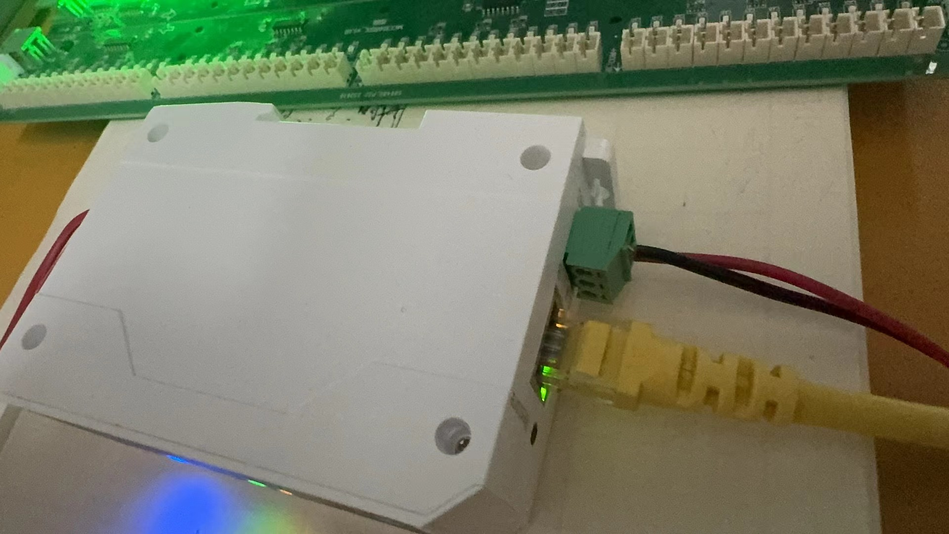
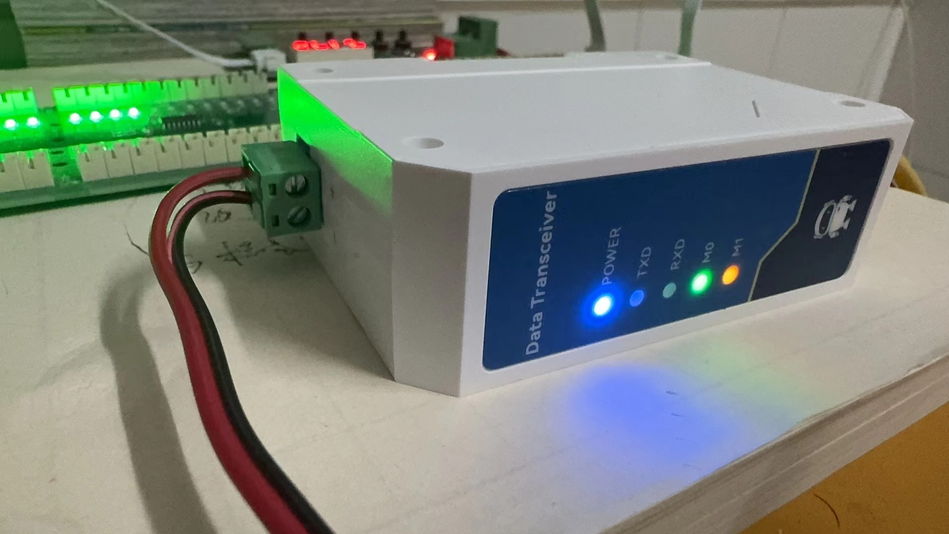
After connecting the wires, we start configuring the equipment.
Device Configuration
To configure a device, you first need to download the upper software of the device. Download link
https://www.ebyte.com/pdf-down.aspx?id=3229
The official upper computer software can only be used on Windows. As I am using a Mac computer, I have adopted another way of configuring the device, using the built-in web page of the device to configure it.
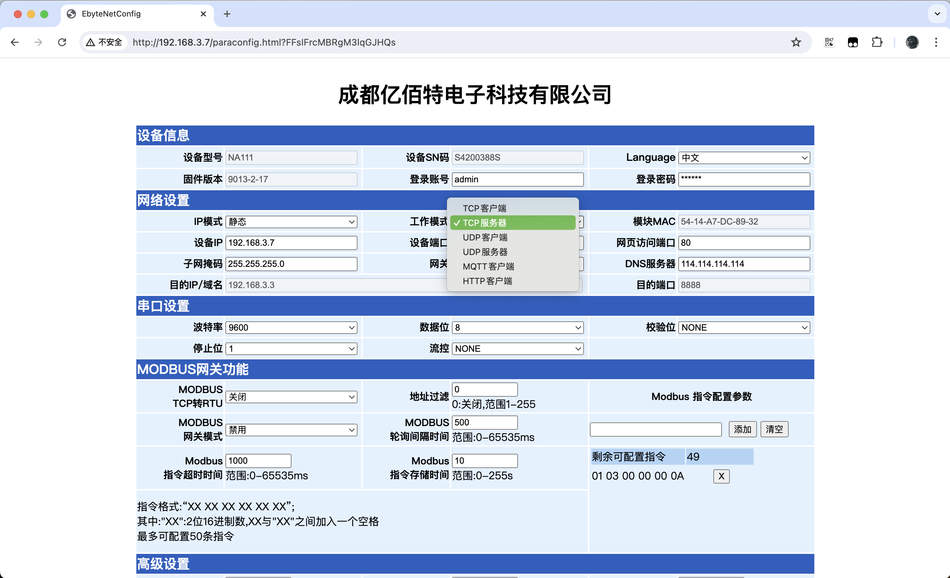
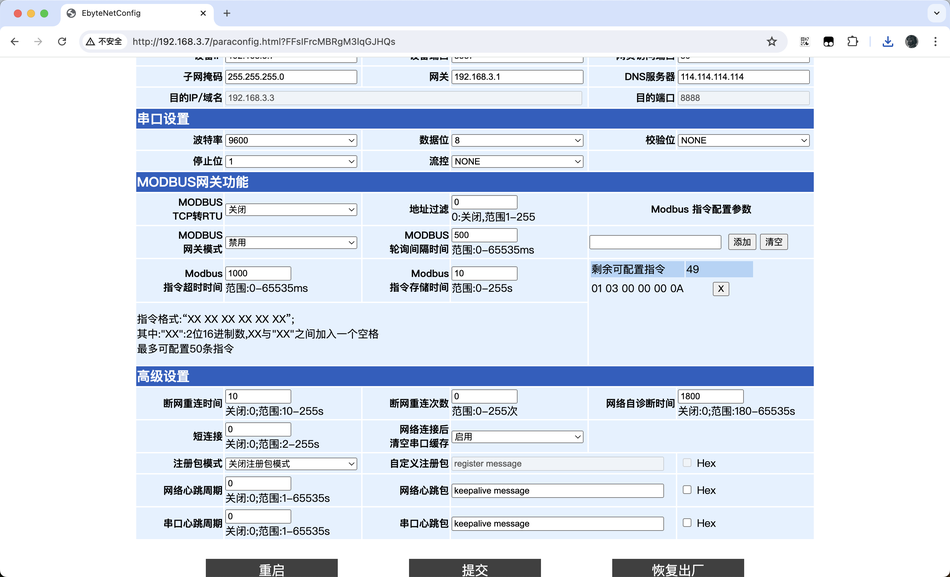
Connect the device to the same network segment as the Mac computer, starting with192.168.3.*, and then open a webpage in the Mac browser http://192.168.3.7 You will see the following login page, just click on login directly. After logging in, you will see the following configuration page. Next, we will configure the device to collect data from it. We use a serial port to collect RS485 signals and then upload them using MQTT.
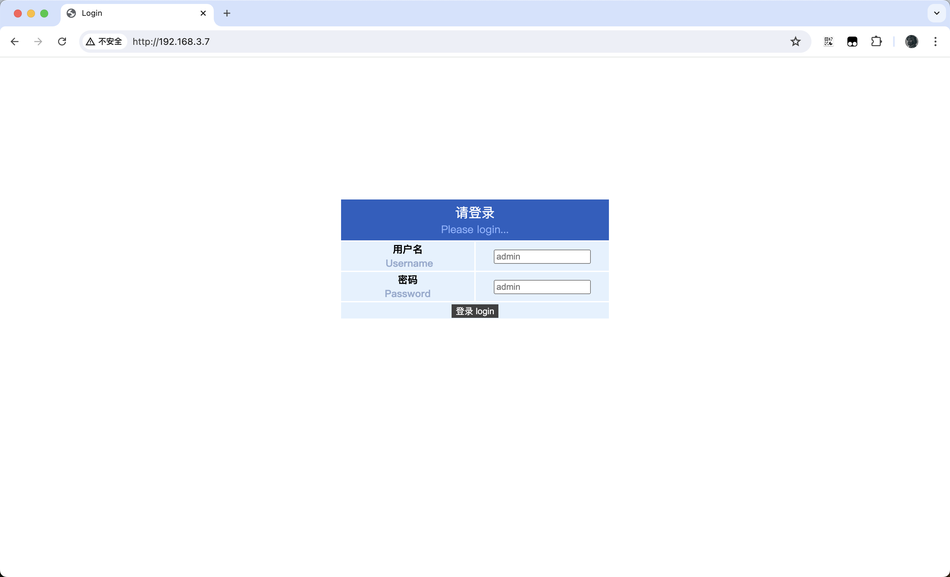
After logging in, you will see the following configuration page.
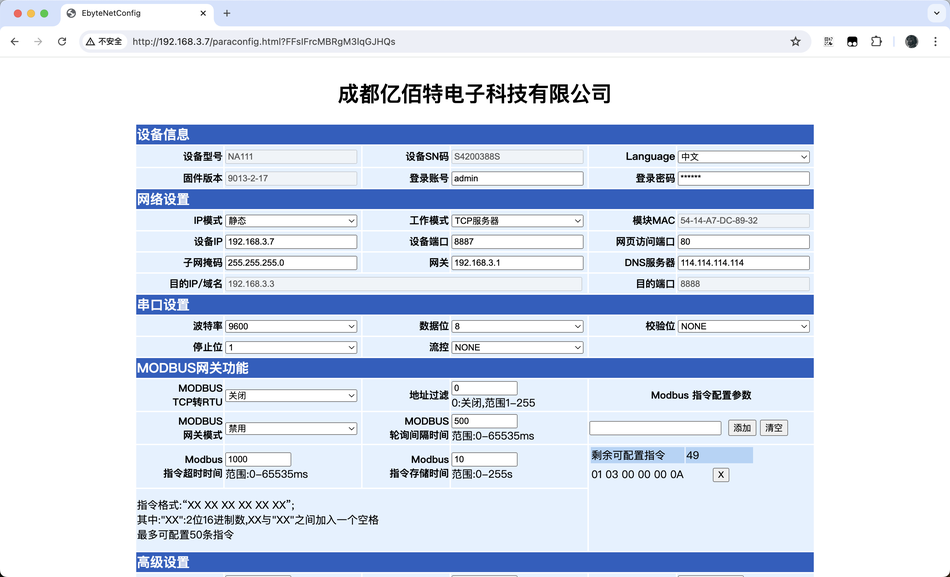
Next, we will configure the device to collect data from it.
We use a serial port to collect RS485 signals and then upload them using MQTT.
The configuration is as follows:
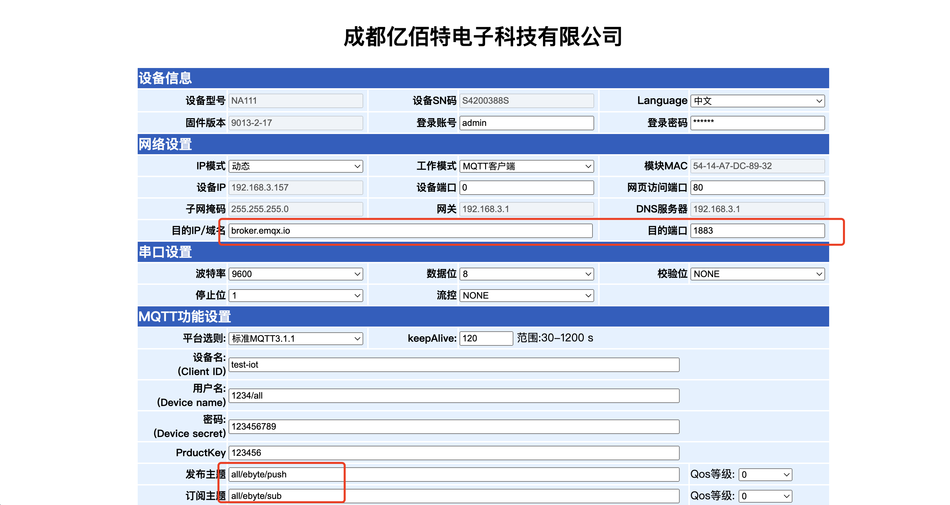
Pay attention to the configuration information in the red area
The destination IP/domain name needs to be filled in with the domain name or IP of MQTT Broker. The EMQ address used for testing is directly used here. The theme published by
is the theme for NA111 to publish information to the outside world: all/ebuyte/push
. The theme subscribed to is for accepting external instructions: all/ebuyte/sub
. The theme here will be used later. Then we use MQTTX software to send instructions to NA111.
Then we use MQTTX software to send instructions to NA111.
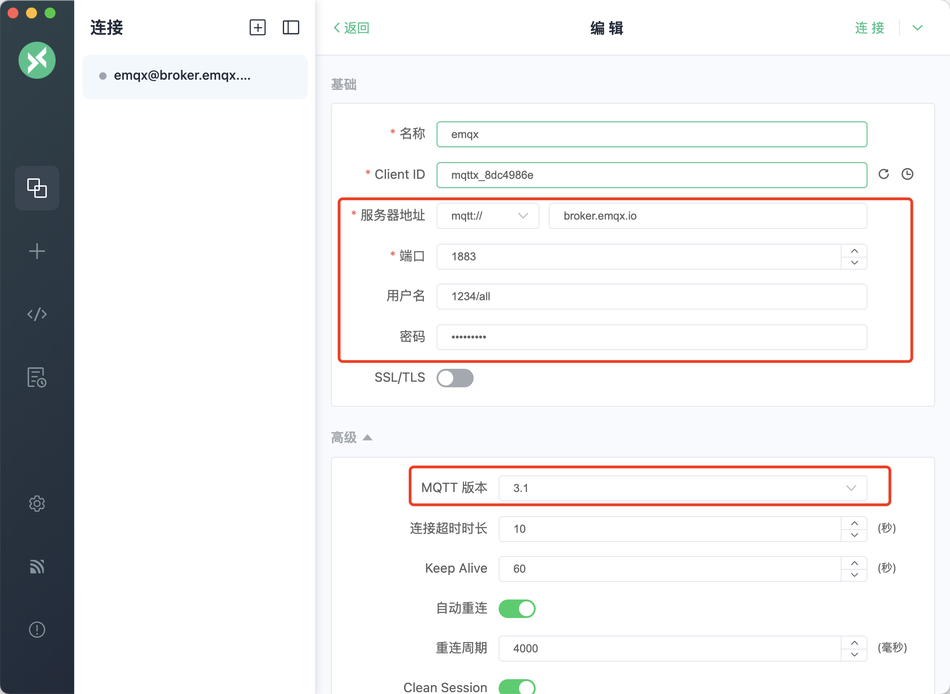
Pay attention to the configuration, choose MQTT version 3.1. The domain name and port must be consistent with the NA111 configuration. In MQTTX, we need to subscribe to the all/ebuyte/push topic to receive messages sent by NA111. Then release the all/ebuyte/sub theme to issue instructions to NA111. As shown in the figure below:
In MQTTX, we need to subscribe to the all/ebuyte/push topic to receive messages sent by NA111. Then release the all/ebuyte/sub theme to issue instructions to NA111. As shown in the figure below:
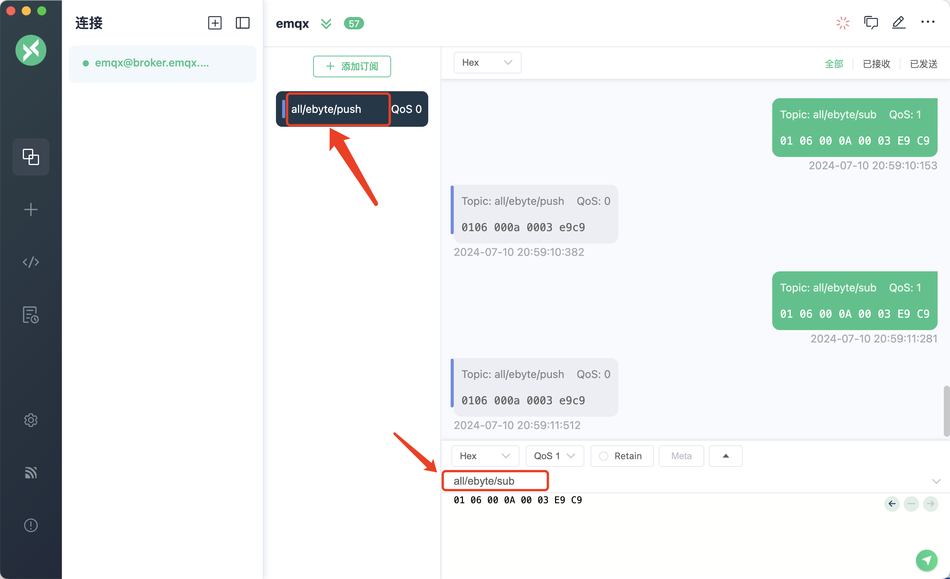
It should also be noted that the format of the received and published messages needs to be HEX, hexadecimal. After sending the command, the TXD and RXD indicator lights of NA111 will flash once, indicating successful communication and data transmission and reception.
After sending the command, the TXD and RXD indicator lights of NA111 will flash once, indicating successful communication and data transmission and reception.
Display effect:
On the configuration page of NA111, there are many working modes that support TCP client, TCP server, UDP client, UDP server, MQTT client, and HTTP client. Each working mode has its own applicable scenarios, and users can choose for themselves.
After configuration is complete, click submit. After submission, NA111 needs to be powered on again.
That concludes the demonstration of using the NA111 serial server to collect device data and issue commands.
Summary
In summary, the user experience of the device is very smooth, supporting multiple ways to configure the device, and there are many supported working mode pages. Whether you are using a local area network or a public network, whether it is TCP protocol, UDP protocol, or MQTT protocol, this device supports them all. It can be said to be a product with very high cost-effectiveness. If you are looking for a Modbus 485 serial port server, you may want to try this NA111 serial port server.
If you are looking for a Modbus 485 serial port server, you may want to try this NA111 serial port server.
Manufacturer Introduction and Welfare Introduction
Chengdu Yibaite Electronic Technology Co., Ltd., established in 2012 with an office area of over 4000 square meters, is a high-tech enterprise that integrates research and development, production, and sales, with a complete industrial chain, focusing on IoT communication applications. The products cover various commonly used IoT devices such as LoRa, WiFi, Bluetooth, ZigBee, 4G/5G/NB IoT, GBRS, CAN bus modules, etc. Our products are exported to over 50 countries and regions worldwide, with 12 years of technological accumulation and a billion level export trade volume.
"Caring Enterprise, Responsible Society" has always been Yibaite's vision to repay society. As a high-tech enterprise with a strong sense of social responsibility, Yibaite continuously provides sponsorship for various activities such as electronic competitions and club activities for partner universities, as well as internship and employment opportunities for current students.
And their official account will send free benefits at the end of each month. If they follow the "Yibaite Internet of Things Application Experts" official account to comment on welfare activity articles, they will have the opportunity to obtain a variety of welfare products for free, including development boards, modules, industrial routers/gateways, data radio stations, remote control switches, antenna power supplies and so on. There is still a 0 yuan sample activity waiting for you to participate.


Leave a Reply