
内容目录
本文目录
- 1. 1. 视频格式硬指标(超了播放不了或卡顿)
- 2. 2. 画面控件地址表
- 3. 3. API
- 4. 4. Lua 实现
- 5. 4.1 遍历 SD 卡 MP4
- 6. 4.2 播放控制(on_update 分发)
- 7. 4.3 播完自动下一首 + 进度显示
HMI 系列支持 MP4 视频播放,用 LUA API 指定播放文件、控制播放区域。本例程做完整的视频播放器:SD 卡遍历 .mp4 → 列表翻页 → 上一首/下一首 → 播放/暂停/继续 → 播完自动下一首 → 进度和时间显示。适用 HMI&M 系列&DH 系列。
1. 视频格式硬指标(超了播放不了或卡顿)
| 项目 | 要求 |
|---|---|
| 文件格式 | MP4(.mp4) |
| 视频编码 | H.264 |
| 音频编码 | MP3 或 AAC |
| 最大分辨率 | 1280 × 768 |
| 最大帧率 | 30 fps |
| 最大码率 | 1400 kbps |
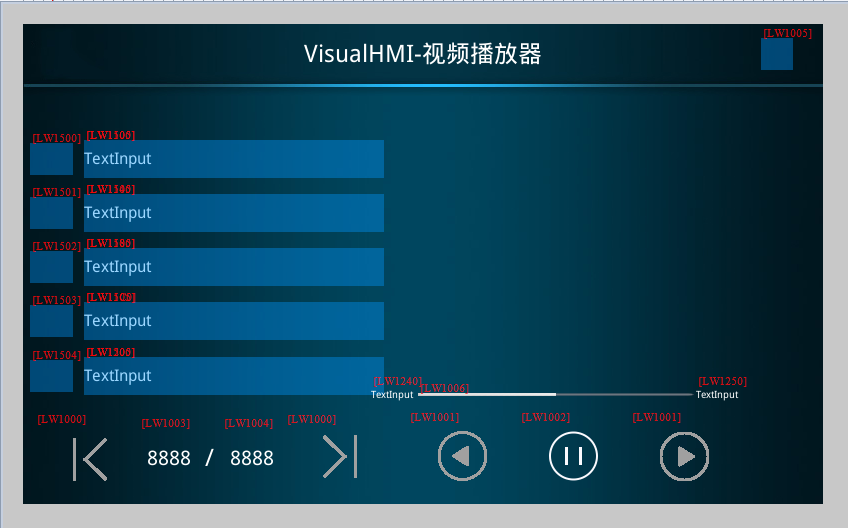
2. 画面控件地址表
| 控件类型 | 地址 | 用途 |
|---|---|---|
| 字状态按钮 | LW1000→0 / 1 | 视频列表向左/右翻页(LW1005=0 时不允许点击) |
| 字状态按钮 | LW1001→0 / 1 | 上一首 / 下一首(LW1005=0 时不允许点击) |
| 位状态指示灯 | LW1002 | 0-暂停,1-继续播放(LW1005=0 时不允许点击) |
| 数值 | LW1003 | 视频列表当前页 |
| 数值 | LW1004 | 视频列表总页数 |
| 位状态指示灯 | LW1005 | 1=SD 根目录有视频 |
| 文本 | LW1100~1200(128 字节) | 显示视频名称(每行 0x40 间隔) |
| 文本 | LW1240 | 播放当前时间(LW1005=0 隐藏) |
| 文本 | LW1250 | 播放总时间(LW1005=0 隐藏) |
| 播放进度条 | LW1006 | 进度条数值 |
3. API
| 函数 | 参数 | 说明 |
|---|---|---|
play_video(file,left,top,width,height) |
file 绝对路径;left/top 显示区域左上角;width/height 显示尺寸 | 在指定区域播放视频。操作引导、产品演示、安全须知场景 |
pause_video() |
– | 暂停当前视频 |
resume_video() |
– | 从暂停的精确帧继续播放,必须与 pause_video 配套 |
stop_video() |
– | 立即停止播放,释放解码资源,清除画面 |
on_video_notify(msg,v1,v2) |
msg 1=播放中(周期通知)/0=播放完毕(仅一次);v1 已播秒数;v2 总秒数 | 播放状态回调,驱动进度条和时间显示 |
4. Lua 实现
4.1 遍历 SD 卡 MP4
插卡触发 on_sd_inserted → list_dir 遍历 → on_list_dir 回调里筛 .mp4 存进 video.NameTb:
function on_list_dir(path, filename, type, fsize)
  if type == 1 then                      -- 文件
    local cur_file_type = get_extension(filename)
    if cur_file_type == "mp4" then
      video.allCnt = video.allCnt + 1
      video.NameTb[video.allCnt] = path.."/"..filename
    end
  end
end

function on_sd_inserted(dir)
  sd_dir = dir
  list_dir(sd_dir)
  if video.allCnt > 0 then
    video.allPage = math.modf(video.allCnt / 5)
    if video.allCnt % 5 > 0 then video.allPage = video.allPage + 1 end
    set_uint16(VT_LW, 0x1003, 1)         -- 当前页
    set_uint16(VT_LW, 0x1004, video.allPage)
    set_uint16(VT_LW, 0x1005, 1)         -- 有视频标志
    set_string(VT_LW, 0x1240, "00:00")
    set_string(VT_LW, 0x1250, "00:00")
    updatVideoList(video.curPage)
    updatVideoPlayName(0)
  end
end

function on_sd_removed()
  video.NameTb = {}; video.allCnt = 0
  video.curPage = 1; video.allPage = 1; video.playIndex = 0
  set_uint16(VT_LW, 0x1003, 0)
  set_uint16(VT_LW, 0x1004, 0)
  set_uint16(VT_LW, 0x1005, 0)
  for i = 1, 5 do
    set_string(VT_LW, 0x1100 + (i-1)*0x40, "")
    set_uint16(VT_LW, 0x1500 + (i-1), 0)
  end
end
4.2 播放控制(on_update 分发)
function on_update(slave, vtype, addr)
  if VT_LW == vtype then
    if addr == 0x1000 then                -- 列表翻页
      local val = get_uint16(VT_LW, 0x1000)
      local cur_page = get_uint16(VT_LW, 0x1003)
      local all_page = get_uint16(VT_LW, 0x1004)
      if val == 0 then                    -- 上一页
        cur_page = cur_page - 1
        if cur_page  all_page then cur_page = all_page end
      end
      set_uint16(VT_LW, 0x1003, cur_page)
      updatVideoList(cur_page)
    elseif addr == 0x1001 then            -- 上下首
      local val = get_uint16(VT_LW, 0x1001)
      set_uint16(VT_LW, 0x1002, 1)
      if val == 0 then                    -- 上一首,到头回绕到最后一首
        video.playIndex = video.playIndex - 1
        if video.playIndex  video.allCnt then video.playIndex = 1 end
      end
      local cur_play_page = math.modf(video.playIndex / 5)
      if video.playIndex % 5 > 0 then cur_play_page = cur_play_page + 1 end
      set_uint16(VT_LW, 0x1003, cur_play_page)
      stop_video()
      play_video(video.NameTb[video.playIndex], play.x, play.y, play.w, play.h)
      updatVideoList(cur_play_page)
      updatVideoPlayName(video.playIndex)
    elseif addr == 0x1002 then            -- 播放/暂停按钮
      local val = get_uint16(VT_LW, 0x1002)
      if val == 0 then pause_video()
      elseif val == 1 then resume_video() end
    elseif addr == 0x1505 then            -- 点击列表某一项播放
      local val = get_uint16(VT_LW, 0x1505)
      local cur_page = get_uint16(VT_LW, 0x1003)
      local temp = video.playIndex
      video.playIndex = (cur_page - 1) * 5 + val
      if video.playIndex  0 then
          updatVideoPlayName(video.playIndex)
          stop_video()
          play_video(video.NameTb[video.playIndex], play.x, play.y, play.w, play.h)
        end
      else
        video.playIndex = temp
      end
    end
  end
end
4.3 播完自动下一首 + 进度显示
function on_video_notify(msg, v1, v2)
  local SysSndState = msg          -- 播放状态
  local SysSndPlayTime = v1        -- 当前已播秒数
  local SysSndTotalTime = v2       -- 总秒数
  if SysSndState == 0x01 then      -- 播放中(周期通知)
    set_uint16(VT_LW, 0x1006, (v1*100)//v2)   -- 进度条 0~100
    set_string(VT_LW, 0x1240, string.format("%02d", SysSndPlayTime//60)..":"..
                              string.format("%02d", SysSndPlayTime%60))
    set_string(VT_LW, 0x1250, string.format("%02d", SysSndTotalTime//60)..":"..
                              string.format("%02d", SysSndTotalTime%60))
  elseif SysSndState == 0x00 then  -- 播放完毕(仅一次)
    video.playIndex = video.playIndex + 1
    if video.playIndex > video.allCnt then video.playIndex = 1 end
    local cur_play_page = math.modf(video.playIndex / 5)
    if video.playIndex % 5 > 0 then cur_play_page = cur_play_page + 1 end
    local cur_page = get_uint16(VT_LW, 0x1003)
    if cur_play_page == cur_page then
      updatVideoPlayName(video.playIndex)
    else
      updatVideoPlayName(0)
    end
    stop_video()
    play_video(video.NameTb[video.playIndex], play.x, play.y, play.w, play.h)
  end
  redraw()
end
四个坑:①视频必须转成 H.264/MP3 或 AAC 的 MP4,超过 1280×768 或 1400kbps 会播放不了或严重卡顿——工程资源里转码这步省不得;②播放前先 stop_video() 再 play_video(),直接换文件可能残留解码器状态;③进度条算的是 (v1*100)//v2,用整除避免浮点,v2 为 0 时别除;④SD 卡拔出必须清空 NameTb 和所有列表控件,不然拔卡后点列表会越界。虚拟屏测不了视频,必须实体屏 + SD 卡。
整理自 广州大彩科技 VisualHMI 开发文档(hmi-doc.gz-dc.com)LUA 教程「视频播放」,版权归大彩科技所有。

发表回复