
HMIシリーズはMP 4ビデオ再生に対応し、LUA APIで再生ファイルを指定し、再生エリアを制御します。このルーチンは、完全なビデオプレーヤーを行います:SDカードトラバーサル. mp 4 →リストをめくる→前/次→再生/一時停止/続行→自動次→進行状況と時刻表示。HMI MシリーズDHシリーズに対応。
1.ビデオフォーマットのハードインジケータ(再生できない、またはキャトンを超える)
| プロジェクトプロジェクト# | 要件は |
|---|---|
| ファイル形式 | MP4(.mp4) |
| ビデオ符号化 | H.264 |
| オーディオ符号化 | MP 3またはAAC |
| 最大解像度 | 1280 × 768 |
| 最大フレームレートは | 30 fps |
| 最大ビットレートは | 1400 kbps |
2.画面コントロールアドレステーブル
| コントロールの種類 | アドレス:address | 目的は |
|---|---|---|
| Word Statusボタン | LW1000→0 / 1 | 動画リストを左右にめくる(LW 100 5 =0の場合はクリック不可) |
| Word Statusボタン | LW1001→0 / 1 | 前へ/次へ(LW1005=0の場合はクリック不可) |
| ビットステータスLED | LW1002 | 0-一時停止、1-再生を続行(LW1005=0の場合はクリックできません) |
| 値の値 | LW1003 | 動画一覧現在のページ |
| 値の値 | LW1004 | 動画リストのページ数 |
| ビットステータスLED | LW1005 | 1=SDルートにビデオがある |
| テキストテキスト | LW1100~1200 128バイト | ビデオ名の表示(1行あたり0 x 40間隔) |
| テキストテキスト | LW1240 | 現在の時間を再生LW1005=0非表示 |
| テキストテキスト | LW1250 | 合計再生時間LW1005=0非表示 |
| 進行状況バーの再生 | LW1006 | プログレスバーの値 |
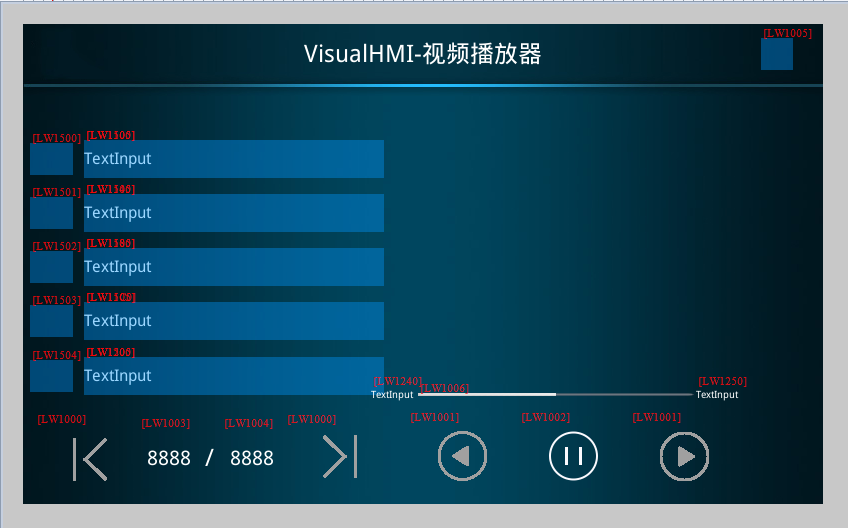
3. API
| 関数の機能 | パラメータ | 説明書は |
|---|---|---|
play_video(file,left,top,width,height) | file絶対パスふぁいるぱす;left/top left/top表示領域の左上隅をひょうじ;width/height表示寸法をひょうじ | 指定された領域でビデオを再生します。操作ガイド、製品デモ、セキュリティ説明シーン |
pause_video() | - | 現在のビデオを一時停止 |
resume_video() | - | 一時停止された正確なフレームから再生を続行するには、pause_videoが必要です。 |
stop_video() | - | 直ちに再生を停止し、デコードリソースを解放し、画面をクリアする |
on_video_notify(msg,v1,v2) | msg1 =再生中周期通知/0=再生终了1回のみ、v1のキャスト秒、v2の秒 | 進行状況バーと時刻表示を駆動するステータスコールバックの再生 |
4. Luaの実装
4.1 SDカードMP 4のトラバース
カードはon_sd_inserted → list_dirトラバース→ on_list_dirコールバックをトリガーします。mp 4はvideo.NameTbに保存されます。
function on_list_dir path、、type、fsize
  型== 1の場合                      - ドキュメンテーション
    local cur_file_type = get_extension
    if cur_file_type == "mp4" then
      video.allCnt = video.allCnt + 1
      o. "/".. filenameファイル
    End of Endシングル
  End of Endシングル
End of Endシングル

function on__inserted dir
  d_dir = dir
  list_dir_dir
  if video.allCNT 0 then
    o.allPage = math.modf
    if video.allCnt % 5 0 then video.allPage = video.allPage + 1 end
    set_uint16 VT_LW、0x1003、1         - 現在のページ。
    set_uint16_LW、0x1004、o.allPage
    set_uint16 VT_LW、0x1005,1         ビデオサインがあります。
    set_string_LW、0x1240、"00 00"
    set_string_LW、0x1250、"00 00"
    updatVideoList video.curPage
    updatVideoPlayName 0
  End of Endシングル
End of Endシングル

function on_sd_removed
  video.NameTb = {}; video.allCnt = 0
  o.
  set_uint16 VT_LW、0x1003、0
  set_uint16 VT_LW、0x1004,0
  set_uint16 VT_LW、0x1005,0
  i = 1,5 doに対して
    set_string VT_LW、0x1100 + i-1 *0x40 "
    set_uint16_LW、0x1500 + i-1、0
  End of Endシングル
End of Endシングル
4.2再生制御on_update配信
function on_update slave vtype
  if VT_LW == vtype then
    addr === 0 x 1000の場合                - ページをめくる
      local = get_uint16_LW、0x1000
      local cur_page = get_uint16 VT_LW、0x1003
      local all_page = get_uint16_LW、0x1004
      val == 0の場合                    --前のページ
        cur_page = cur_page - 1
        if cur_page all page then cur_page = all page end
      End of Endシングル
      set_uint16_LW、0x1003、cur_page
      updatVideoList cur_page
    elseif addr === 0 x 1001 then            - 上下頭。
      local = get_uint16_LW、0x1001
      set_uint16 VT_LW、0x1002、1
      val == 0の場合                    最後の1つに戻り、最後の1つに戻ります。
        video.playInde x = video.playIndex-1
        if video.playInde x video.allCnt then video.playInde x = 1 end
      End of Endシングル
      local cur_play_page = math.modf video.playIndex/ 5
      if video.playInde x % 5 0 then cur_play_page = cur_play_page + 1 end
      set_uint16 VT_LW、0x1003、cur_play_page
      stop_video
      play_video video.NameTb [video.playIndex] play.x play.y play.w play.h
      updatVideoList cur_play_page
      updatVideoPlayName video.PlayIndex
    elseif addr == 0 x 100 2 then            - 再生/一時停止ボタン
      local = get_uint16_LW、0x1002
      if val == 0 then pause_video
      elseif == 1 then me_o end
    elseif addr === 0 x 150 5 then            - リストをクリックします。
      local = get_uint16_LW、0x1505
      local cur_page = get_uint16 VT_LW、0x1003
      local temp = video.playInde x
      o.playIndex =
      if video.playInde x 0 then
          updatVideoPlayName video.playIndex
          stop_video
          play_video video.NameTb [video.playIndex] play.x play.y play.w play.h
        End of Endシングル
      elseさん
        video.playInde x = temp
      End of Endシングル
    End of Endシングル
  End of Endシングル
End of Endシングル
4.3次の自動化+進行状況表示
function on_o_nmsg、v1、v2
  local SndState = msg          --放送の状態
  local SysSndPlayTime = v1        - 現在の放送秒数
  local SysSndTotalTime = v2       (合計秒数)
  if SysSndState == 0 x 0 1 then      --再生中(周期通知)
    set_uint16 VT_LW、0x1006、v1*100//v2   プログレスバー 0~100
    set_string VT_LW 0x1240 string.format " % 02d" SysSndPlayTime//60. ":"..
                              string.format " % 02d"、SysSndPlayTime % 60
    set_string VT_LW 0x1250 string.format " % 02d" SysSndTotalTime//60. ":"..
                              string.format " % 02d"、SysSndTotalTime % 60
  elseif SysSndState == 0 x 00 then--再生が完了しました(1回のみ)
    video.playIndex = video.playIndex + 1
    if video.playInde x video.allCnt then video.playInde x = 1 end
    local cur_play_page = math.modf video.playIndex/ 5
    if video.playInde x % 5 0 then cur_play_page = cur_play_page + 1 end
    local cur_page = get_uint16 VT_LW、0x1003
    if cur_play_page == cur_page then
      updatVideoPlayName video.playIndex
    elseさん
      updatVideoPlayName 0
    End of Endシングル
    stop_video
    play_video video.NameTb [video.playIndex] play.x play.y play.w play.h
  End of Endシングル
  redraw
End of Endシングル4つの穴ビデオはH.264/MP 3またはAAC MP 4に変換する必要があります。1280 x 768または1400kbpsを超えると、再生または深刻なカートンが発生しません。エンジニアリングリソースのトランスコードはこのステップではありません。②再生前にstop_video再play_video直接ファイル交換がデコーダ状態を残す可能性があります。③バーはv1*100//v2でされる浮動小数点を避けるために除算し、v 2が0の場合は除算しない。SDカードの取り外しはNameTbとすべてのリストコントロールを空にする必要があります。そうでなければ、リストは外れます。仮想画面はビデオを測定できず、物理画面+ SDカードが必要です。
Guangzhou Dai Cai Technology Visual HMI開発ドキュメント(hmi-doc.gz-dc.com)LUAチュートリアル“ビデオ再生”、著作権はDai Cai Technologyにあります。


发表回复