
Die HMI-Serie unterstützt die MP4 - Videowiedergabe, gibt die Wiedergabe von Dateien und steuert den Wiedergabebereich mit der LUA-API. Diese Routine macht den vollständigen Video-Player: SD-Karte durchquert .mp4 → Liste Seite umblättern → Vorheriger / Nächster Song → Wiedergabe / Pause / Fortsetzung → Wiedergabe automatisch Nächster Song → Fortschritt und Zeitanzeige. Gilt für die HMI & M-Serie & DH-Serie.
1. Video-Format Hard Indikator (überschreitet nicht abgespielt oder Karton)
| Projekt | Anforderungen |
|---|---|
| Dateiformat | MP4 (.mp4) |
| Video-Codierung | H.264 |
| Audiocodierung | MP3 oder AAC |
| Maximale Auflösung | 1280 × 768 |
| Maximale Framerate | 30 fps |
| Maximale Bitrate | 1400 kbps |
2. Bildsteuerung Adresstabelle
| Steuertyp | Adresse | Verwendung |
|---|---|---|
| Wort Status Taste | LW1000 → 0 / 1 | Video-Liste Seite nach links / rechts (Klick nicht erlaubt bei LW1005 = 0) |
| Wort Status Taste | LW1001 → 0 / 1 | Vorheriger / Nächster Song (Klick bei LW1005 = 0 nicht erlaubt) |
| Bit-Status - Anzeige | LW1002 | 0 - Pause, 1 - Wiedergabe fortgesetzt (Klick bei LW1005 = 0 nicht erlaubt) |
| Zahlenwert | LW1003 | Video-Liste Aktuelle Seite |
| Wert | LW1004 | Gesamtseiten der Videoliste |
| Bit Statusanzeige | LW1005 | 1 = SD Stammverzeichnis mit Video |
| Text | LW1100 ~ 1200 (128 Bytes) | Zeigt den Videonamen (0x40 - Abstand pro Zeile) |
| Text | LW1240 | Aktuelle Wiedergabezeit (LW1005 = 0 versteckt) |
| Text | LW1250 | Gesamtabgabezeit (LW1005 = 0 versteckt) |
| Wiedergabefortschrittsleiste | LW1006 | Fortschrittsleiste-Wert |
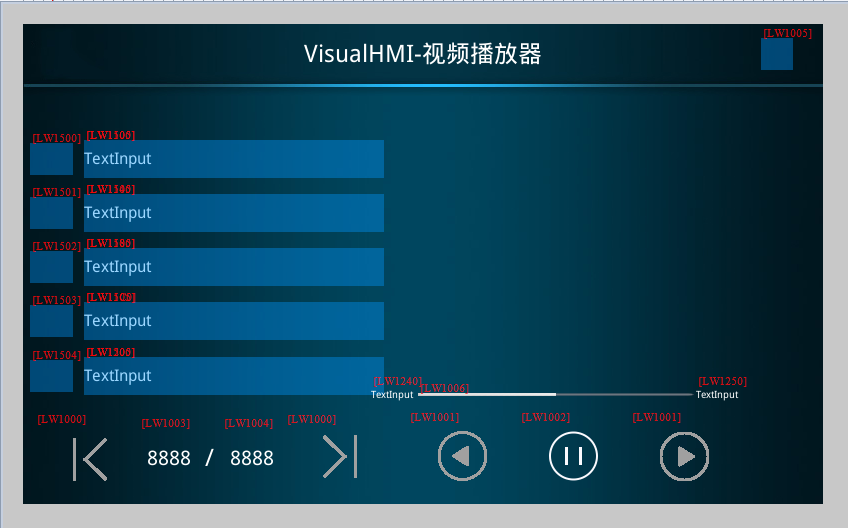
API
| Funktion | Parameter | Beschreibung |
|---|---|---|
play_video(file,left,top,width,height) | Datei Absoluter Pfad; left / top Anzeigebereich oben links; width / height Anzeigegröße | Wiedergabe von Videos in einem angegebenen Bereich. Bedienungsanleitung, Produktpräsentation, Sicherheitsberichtsszenario |
pause_video() | - | Das aktuelle Video pausieren |
resume_video() | - | Wiedergabe von dem exakten Frames, das unterbrochen wurde, muss mit pause_video |
stop_video() | - | fortgesetzt werden, die Wiedergabe sofort beendet, Decodierungsressourcen freigegeben, Bild löschen |
on_video_notify(msg,v1,v2) | 1 = Wiedergabe (Zyklusbenachrichtigung) / 0 = Wiedergabe abgeschlossen (nur einmal); v1 Sekunden gespielt; v2 Sekunden insgesamt | Wiedergabe-Status - Rückruf, Anzeige der Fortschrittsleiste und der Zeit |
4. Lua Implementierung
4.1 Durchschreiten SD-Karte MP4
Karten-Einsert Trigger on_sd_inserted → list_dir Durchschreiten → on_list_dir Rückruf-Filter.mp4 in video.NameTb
function on_list_dir(path, filename, type, fsize)
  if type == 1 then                      -- 文件
    local cur_file_type = get_extension(filename)
    if cur_file_type == "mp4" then
      video.allCnt = video.allCnt + 1
      video.NameTb[video.allCnt] = path.."/"..filename
    end
  end
end

function on_sd_inserted(dir)
  sd_dir = dir
  list_dir(sd_dir)
  if video.allCnt > 0 then
    video.allPage = math.modf(video.allCnt / 5)
    if video.allCnt % 5 > 0 then video.allPage = video.allPage + 1 end
    set_uint16(VT_LW, 0x1003, 1)         -- 当前页
    set_uint16(VT_LW, 0x1004, video.allPage)
    set_uint16(VT_LW, 0x1005, 1)         -- 有视频标志
    set_string(VT_LW, 0x1240, "00:00")
    set_string(VT_LW, 0x1250, "00:00")
    updatVideoList(video.curPage)
    updatVideoPlayName(0)
  end
end

function on_sd_removed()
  video.NameTb = {}; video.allCnt = 0
  video.curPage = 1; video.allPage = 1; video.playIndex = 0
  set_uint16(VT_LW, 0x1003, 0)
  set_uint16(VT_LW, 0x1004, 0)
  set_uint16(VT_LW, 0x1005, 0)
  for i = 1, 5 do
    set_string(VT_LW, 0x1100 + (i-1)*0x40, "")
    set_uint16(VT_LW, 0x1500 + (i-1), 0)
  end
end
4.2 Abspielsteuerung (on_update Verteilung)
function on_update(slave, vtype, addr)
  if VT_LW == vtype then
    if addr == 0x1000 then                -- 列表翻页
      local val = get_uint16(VT_LW, 0x1000)
      local cur_page = get_uint16(VT_LW, 0x1003)
      local all_page = get_uint16(VT_LW, 0x1004)
      if val == 0 then                    -- 上一页
        cur_page = cur_page - 1
        if cur_page  all_page then cur_page = all_page end
      end
      set_uint16(VT_LW, 0x1003, cur_page)
      updatVideoList(cur_page)
    elseif addr == 0x1001 then            -- 上下首
      local val = get_uint16(VT_LW, 0x1001)
      set_uint16(VT_LW, 0x1002, 1)
      if val == 0 then                    -- 上一首,到头回绕到最后一首
        video.playIndex = video.playIndex - 1
        if video.playIndex  video.allCnt then video.playIndex = 1 end
      end
      local cur_play_page = math.modf(video.playIndex / 5)
      if video.playIndex % 5 > 0 then cur_play_page = cur_play_page + 1 end
      set_uint16(VT_LW, 0x1003, cur_play_page)
      stop_video()
      play_video(video.NameTb[video.playIndex], play.x, play.y, play.w, play.h)
      updatVideoList(cur_play_page)
      updatVideoPlayName(video.playIndex)
    elseif addr == 0x1002 then            -- 播放/暂停按钮
      local val = get_uint16(VT_LW, 0x1002)
      if val == 0 then pause_video()
      elseif val == 1 then resume_video() end
    elseif addr == 0x1505 then            -- 点击列表某一项播放
      local val = get_uint16(VT_LW, 0x1505)
      local cur_page = get_uint16(VT_LW, 0x1003)
      local temp = video.playIndex
      video.playIndex = (cur_page - 1) * 5 + val
      if video.playIndex  0 then
          updatVideoPlayName(video.playIndex)
          stop_video()
          play_video(video.NameTb[video.playIndex], play.x, play.y, play.w, play.h)
        end
      else
        video.playIndex = temp
      end
    end
  end
end
4.3 Automatische Wiedergabe des nächsten Song + Fortschrittsanzeige
function on_video_notify(msg, v1, v2)
  local SysSndState = msg          -- 播放状态
  local SysSndPlayTime = v1        -- 当前已播秒数
  local SysSndTotalTime = v2       -- 总秒数
  if SysSndState == 0x01 then      -- 播放中(周期通知)
    set_uint16(VT_LW, 0x1006, (v1*100)//v2)   -- 进度条 0~100
    set_string(VT_LW, 0x1240, string.format("%02d", SysSndPlayTime//60)..":"..
                              string.format("%02d", SysSndPlayTime%60))
    set_string(VT_LW, 0x1250, string.format("%02d", SysSndTotalTime//60)..":"..
                              string.format("%02d", SysSndTotalTime%60))
  elseif SysSndState == 0x00 then  -- 播放完毕(仅一次)
    video.playIndex = video.playIndex + 1
    if video.playIndex > video.allCnt then video.playIndex = 1 end
    local cur_play_page = math.modf(video.playIndex / 5)
    if video.playIndex % 5 > 0 then cur_play_page = cur_play_page + 1 end
    local cur_page = get_uint16(VT_LW, 0x1003)
    if cur_play_page == cur_page then
      updatVideoPlayName(video.playIndex)
    else
      updatVideoPlayName(0)
    end
    stop_video()
    play_video(video.NameTb[video.playIndex], play.x, play.y, play.w, play.h)
  end
  redraw()
end
Vier Gruben:1 Video muss in H.264/MP3 oder AAC MP4konvertiert werden, mehr als 1280 × 768 oder 1400kbps wird nicht wiedergegeben oder ernsthaft gesperrt - die Transcodierung in der Ressource des Projekts kann nicht übernommen werden;2Start_video () und dann play_video () vor der Wiedergabe, um die Datei direkt zu wechseln, kann der Decoder-Status verbleiben;3 Fortschrittsleiste ist (v1 * 100) //v2Vermeiden Sie die Gleitkomma-Teilung, wenn v2 0 ist;4SD-Karte entziehen müssen NameTb und alle Listen-Steuerelementeleer sein, sonst wird die Liste der Punkte nach dem Entziehen der Karte überschreiten. Der virtuelle Bildschirm kann das Video nicht erkennen, es muss ein physischer Bildschirm + SD-Karte sein.
Aus dem VisualHMI-Entwicklungsdokument von Guangzhou Dacai Technology (hmi-doc.gz-dc.com) LUA-Tutorial "Videowiedergabe" zusammengestellt, das Urheberrecht liegt bei Dacai Technology.


Antwort veröffentlichen