
The HMI series supports MP4 video playback, using LUA API to specify the playback file and control the playback area. This routine serves as a complete video player: SD card traversal for .mp4 files → list paging → previous/next track → play/pause/resume → automatically play the next track after completion → display progress and time. Applicable to HMI&M series & DH series.
1. Video format hard requirements (exceeding which playback cannot be supported or may be stuttering)
| Project | Requirements |
|---|---|
| File format | MP4 (.mp4) |
| Video encoding | H.264 |
| Audio encoding | MP3 or AAC |
| Maximum resolution | 1280 × 768 |
| Maximum Frame Rate | 30 fps |
| Maximum Bitrate | 1400 kbps |
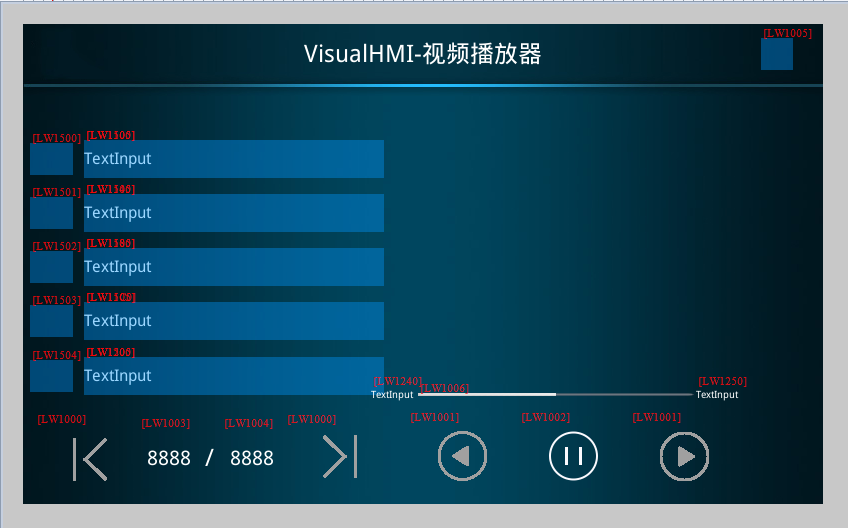
2. Picture Control Address Table
| Control Type | Address | Purpose |
|---|---|---|
| Word Status Button | LW1000→0 / 1 | Video List Page Left/Right (Clicking is not allowed when LW1005=0) |
| Word Status Button | LW1001→0 / 1 | Previous / Next (clicking not allowed when LW1005=0) |
| Bit status indicator | LW1002 | 0-Pause, 1-Continue playing (clicking not allowed when LW1005=0) |
| Value | LW1003 | Current page of video list |
| Value | LW1004 | Total pages of video list |
| Bit status indicator | LW1005 | 1=SD Root directory contains videos |
| Text | LW1100~1200 (128 bytes) | Display video names (with 0x40 spacing per line) |
| Text | LW1240 | Play current time (hidden if LW1005=0) |
| Text | LW1250 | Play total time (hidden if LW1005=0) |
| Play progress bar | LW1006 | Progress bar value |
3. API
| Function | Parameter | Description |
|---|---|---|
play_video(file,left,top,width,height) | Absolute path of the file; left/top: display the upper left corner of the area; width/height: display the size | Play video in the specified area. Scenario for operation guidance, product demonstration, and safety instructions |
pause_video() | - | Pause the current video |
resume_video() | - | Resume playback from the precise paused frame, must be used in conjunction with pause_video |
stop_video() | - | Immediately stop playback, release decoding resources, and clear the screen |
on_video_notify(msg,v1,v2) | msg 1=playing (periodic notification)/0=played (only once); v1: seconds already played; v2: total seconds | Playback status callback, driving progress bar and time display |
4. Lua implementation
4.1 Traverse SD card MP4s
Trigger on_sd_inserted by card insertion → list_dir traversal → filter .mp4 files in on_list_dir callback and store them in video.NameTb:
function on_list_dir(path, filename, type, fsize)
  if type == 1 then                      -- 文件
    local cur_file_type = get_extension(filename)
    if cur_file_type == "mp4" then
      video.allCnt = video.allCnt + 1
      video.NameTb[video.allCnt] = path.."/"..filename
    end
  end
end

function on_sd_inserted(dir)
  sd_dir = dir
  list_dir(sd_dir)
  if video.allCnt > 0 then
    video.allPage = math.modf(video.allCnt / 5)
    if video.allCnt % 5 > 0 then video.allPage = video.allPage + 1 end
    set_uint16(VT_LW, 0x1003, 1)         -- 当前页
    set_uint16(VT_LW, 0x1004, video.allPage)
    set_uint16(VT_LW, 0x1005, 1)         -- 有视频标志
    set_string(VT_LW, 0x1240, "00:00")
    set_string(VT_LW, 0x1250, "00:00")
    updatVideoList(video.curPage)
    updatVideoPlayName(0)
  end
end

function on_sd_removed()
  video.NameTb = {}; video.allCnt = 0
  video.curPage = 1; video.allPage = 1; video.playIndex = 0
  set_uint16(VT_LW, 0x1003, 0)
  set_uint16(VT_LW, 0x1004, 0)
  set_uint16(VT_LW, 0x1005, 0)
  for i = 1, 5 do
    set_string(VT_LW, 0x1100 + (i-1)*0x40, "")
    set_uint16(VT_LW, 0x1500 + (i-1), 0)
  end
end
4.2 Playback control (distributed via on_update)
function on_update(slave, vtype, addr)
  if VT_LW == vtype then
    if addr == 0x1000 then                -- 列表翻页
      local val = get_uint16(VT_LW, 0x1000)
      local cur_page = get_uint16(VT_LW, 0x1003)
      local all_page = get_uint16(VT_LW, 0x1004)
      if val == 0 then                    -- 上一页
        cur_page = cur_page - 1
        if cur_page  all_page then cur_page = all_page end
      end
      set_uint16(VT_LW, 0x1003, cur_page)
      updatVideoList(cur_page)
    elseif addr == 0x1001 then            -- 上下首
      local val = get_uint16(VT_LW, 0x1001)
      set_uint16(VT_LW, 0x1002, 1)
      if val == 0 then                    -- 上一首,到头回绕到最后一首
        video.playIndex = video.playIndex - 1
        if video.playIndex  video.allCnt then video.playIndex = 1 end
      end
      local cur_play_page = math.modf(video.playIndex / 5)
      if video.playIndex % 5 > 0 then cur_play_page = cur_play_page + 1 end
      set_uint16(VT_LW, 0x1003, cur_play_page)
      stop_video()
      play_video(video.NameTb[video.playIndex], play.x, play.y, play.w, play.h)
      updatVideoList(cur_play_page)
      updatVideoPlayName(video.playIndex)
    elseif addr == 0x1002 then            -- 播放/暂停按钮
      local val = get_uint16(VT_LW, 0x1002)
      if val == 0 then pause_video()
      elseif val == 1 then resume_video() end
    elseif addr == 0x1505 then            -- 点击列表某一项播放
      local val = get_uint16(VT_LW, 0x1505)
      local cur_page = get_uint16(VT_LW, 0x1003)
      local temp = video.playIndex
      video.playIndex = (cur_page - 1) * 5 + val
      if video.playIndex  0 then
          updatVideoPlayName(video.playIndex)
          stop_video()
          play_video(video.NameTb[video.playIndex], play.x, play.y, play.w, play.h)
        end
      else
        video.playIndex = temp
      end
    end
  end
end
4.3 Automatically play the next song after finishing + progress display
function on_video_notify(msg, v1, v2)
  local SysSndState = msg          -- 播放状态
  local SysSndPlayTime = v1        -- 当前已播秒数
  local SysSndTotalTime = v2       -- 总秒数
  if SysSndState == 0x01 then      -- 播放中(周期通知)
    set_uint16(VT_LW, 0x1006, (v1*100)//v2)   -- 进度条 0~100
    set_string(VT_LW, 0x1240, string.format("%02d", SysSndPlayTime//60)..":"..
                              string.format("%02d", SysSndPlayTime%60))
    set_string(VT_LW, 0x1250, string.format("%02d", SysSndTotalTime//60)..":"..
                              string.format("%02d", SysSndTotalTime%60))
  elseif SysSndState == 0x00 then  -- 播放完毕(仅一次)
    video.playIndex = video.playIndex + 1
    if video.playIndex > video.allCnt then video.playIndex = 1 end
    local cur_play_page = math.modf(video.playIndex / 5)
    if video.playIndex % 5 > 0 then cur_play_page = cur_play_page + 1 end
    local cur_page = get_uint16(VT_LW, 0x1003)
    if cur_play_page == cur_page then
      updatVideoPlayName(video.playIndex)
    else
      updatVideoPlayName(0)
    end
    stop_video()
    play_video(video.NameTb[video.playIndex], play.x, play.y, play.w, play.h)
  end
  redraw()
end
Four pitfalls:① Videos must be converted to H.264/MP3 or AAC MP4, as videos exceeding 1280×768 or 1400kbps may not play or experience severe stuttering - transcoding is an essential step in engineering resources;② Before playing, call stop_video() and then play_video(), as directly switching files may leave residual decoder states;③ The progress bar is calculated as (v1*100)//v2Use integer division to avoid floating-point issues, and do not divide when v2 is 0;④ When the SD card is removed, NameTb and all list controls must be cleared, otherwise clicking on the list after removing the card will cause an out-of-bounds error. The virtual screen cannot test video, and a physical screen + SD card is required.
Compiled from Guangzhou Dacai Technology VisualHMI development documentation (hmi-doc.gz-dc.com) LUA tutorial "Video Playback", copyright reserved by Dacai Technology.


Leave a Reply