
Witte Software® https://www.modbustools.com
2023-08-01
1. Modbus Poll
Modbus Poll is an easy to use Modbus master simulator developed for many purposes. Among others:
- Designers of Modbus slave devices for quick and easy testing of protocol interface
- 자동화 engineers that need to test Modbus devices or networks on site
- Service engineers that want to read out and/or change specific service 데이터 from a device
- Change Modbus 레지스터s in a slave device
- Log 데이터 from Modbus devices
- Troubleshooting and compliance testing
1.1. System requirements for Modbus Poll
Hardware requirements
Processor; 1 GHz or faster recommended
1 GB RAM
5 MB of available hard drive space
1024 x 768 display resolutionOS requirements
All Windows versions from Windows 7 to Windows 11 are supported.
Modbus Poll version 7 runs on Windows XP.
1.1.1. Silent install
Silent install require no user intervention and have no user interface. The user doesn’t see any dialog and isn’t asked any questions.
Use the command line /S switch.
1.2. End User License Agreement
You should carefully read the following terms and conditions before using Modbus Poll. Unless you have a different license agreement signed by Witte Software, your use of this software indicates your acceptance of this license agreement and warranty. If you do not accept these terms you must cease using this software immediately.
복사right.
Modbus Poll ("The Software") is copyright 2002-2023 by Witte Software, all rights reserved.
Evaluation and Registration.
This is not free software. You are hereby licensed to use the Software for evaluation purposes without charge for a period of 30 days.
If you use the Software after the 30 day evaluation period a registration fee is required.
Unregistered use of the Software after the 30-day evaluation period is in violation of U.S. and international copyright laws.
One registered copy of the Software may either be used by a single person who uses the software personally on one or more computers, or installed on a single computer used by multiple people, but not both.
For information on order and pricing, please visit https://www.modbustools.com/order.html
Modbus Poll licenses are perpetual. Once you buy a license to a specific major version, and as long as you abide by the license agreement, you can use that version forever with no additional cost.
Distribution.
Provided that you do not include your License Key you are hereby licensed to make copies of the Software; give exact copies of the original to anyone; and distribute the Software in its unmodified form via electronic means. You are specifically prohibited from charging for any such copies.
LIMITED WARRANTY.
THE SOFTWARE IS PROVIDED AS IS AND WITTE SOFTWARE DISCLAIMS ALL WARRANTIES RELATING TO THIS SOFTWARE, WHETHER EXPRESSED OR IMPLIED, INCLUDING BUT NOT LIMITED TO ANY IMPLIED WARRANTIES OF MERCHANTABILITY AND FITNESS FOR A PARTICULAR PURPOSE.
LIMITATION ON DAMAGES.
NEITHER WITTE SOFTWARE NOR ANYONE INVOLVED IN THE CREATION, PRODUCTION, OR DELIVERY OF THIS SOFTWARE SHALL BE LIABLE FOR ANY INDIRECT, CONSEQUENTIAL, OR INCIDENTAL DAMAGES ARISING OUT OF THE USE OR INABILITY TO USE SUCH SOFTWARE EVEN IF WITTE SOFTWARE HAS BEEN ADVISED OF THE POSSIBILITY OF SUCH DAMAGES OR CLAIMS. IN NO EVENT SHALL WITTE SOFTWARE’S LIABILITY FOR ANY DAMAGES EXCEED THE PRICE PAID FOR THE LICENSE TO USE THE SOFTWARE, REGARDLESS OF THE FORM OF CLAIM. THE PERSON USING THE SOFTWARE BEARS ALL RISK AS TO THE QUALITY AND PERFORMANCE OF THE SOFTWARE.
2. Modbus Poll Features
2.1. Connections
Modbus Poll read/write 데이터 from devices using:
- Modbus RTU or ASCII on RS232 or RS485 networks. (USB/RS232/485 Converter)
- Modbus TCP/IP
- Modbus Over TCP/IP. (Modbus RTU/ASCII encapsulated in a TCP packet)
- Modbus UDP/IP
- Modbus Over UDP/IP. (Modbus RTU/ASCII encapsulated in a UDP packet)
2.2. Supported Modbus 기능s
- 01 (0x01) Read Coils
- 02 (0x02) Read Discrete Inputs
- 03 (0x03) Read Holding 회원가입s
- 04 (0x04) Read Input 회원가입s
- 05 (0x05) Write Single Coil
- 06 (0x06) Write Single 회원가입
- 08 (0x08) Diagnostics (Serial Line only)
- 11 (0x0B) Get Comm Event Counter (Serial Line only)
- 15 (0x0F) Write Multiple Coils
- 16 (0x10) Write Multiple 회원가입s
- 17 (0x11) Report Server ID (Serial Line only)
- 22 (0x16) Mask Write 회원가입
- 23 (0x17) Read/Write Multiple 회원가입s
- 43 / 14 (0x2B / 0x0E) Read Device Identification
2.3. 데이터 logging
- Log 데이터 to a text file
- Log 데이터 direct into Excel
2.4. Display formats
Each cell can be individual formatted.
- Signed 16-bit register
- Unsigned 16-bit register
- Hex
- Binary
- 32-bit signed integer with any word/byte order
- 32-bit unsigned integer with any word/byte order
- 64-bit signed integer with any word/byte order
- 64-bit unsigned integer with any word/byte order
- 32-bit float with any word/byte order
- 64-bit double float with any word/byte order
2.5. Miscellaneous features
- OLE/자동화 for interfacing with Excel VBA, Python etc.
- Monitoring of 데이터 traffic
- Print and print preview
- Font selection
- Conditional colors
- Scaling
- Real time charting
- Save/Open workspace
- 주소 Scan
3. Overview
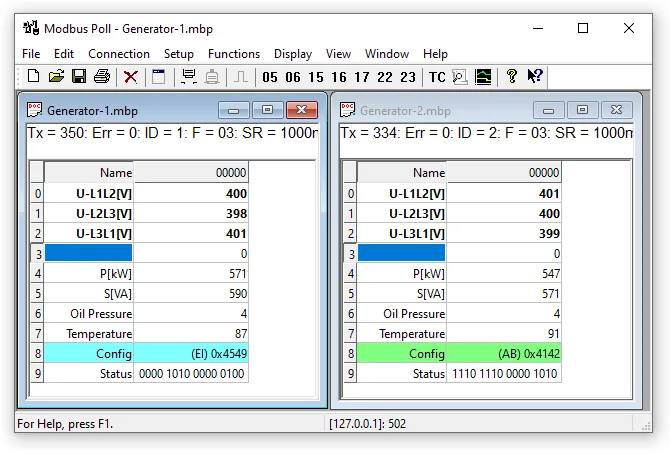
Modbus Poll uses a multiple document interface. That means several windows can be 열기ed. Each one with different 데이터 contents from different slave devices at the same time.
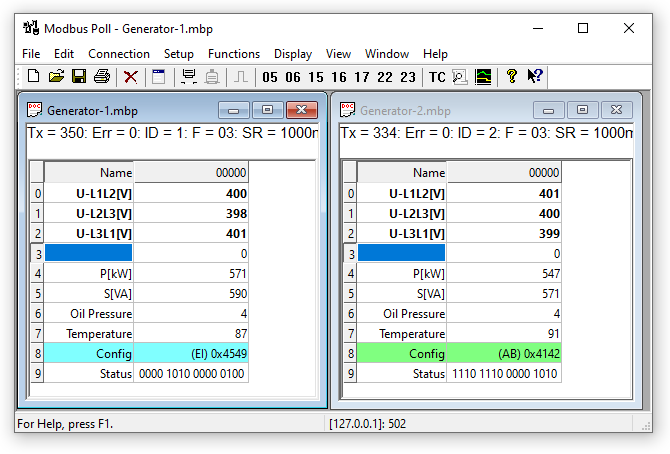
This picture shows two 열기 windows. One reading 10 Holding registers from slave id 1 and another reading 10 Holding registers from slave id 2.
3.1. Help from anywhere
Press F1 and get context sensitive help on a topic associated with the current selected item.
SHIFT + F1 invokes a special "help mode" in which the cursor turns into a help cursor (arrow + question mark). The user can then select a visible object in the user interface, such as a menu item, toolbar button, or window. This 열기s help on a topic that describes the selected item.
3.2. 이름 cells
Here you can type any text for designation of the value cells. You can also copy/paste text from Excel cells.
3.3. Value cells
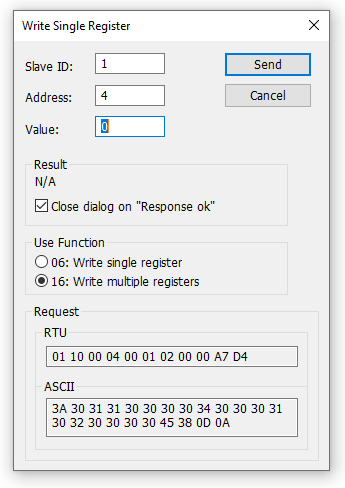
Show the 데이터 values of the Modbus 레지스터s. If you double click a value cell a dialog box lets you write a new value to the slave device. Typing a number in a value cell shows the dialog as well. It is possible to select the used Modbus function used to write the value.
The check box "닫기 dialog on Response ok" is used to automatically close the dialog box when a value is successfully sent. This is convenient when a lot of values are to be changed. In that way it is fast to select a new cell and then type a new value again.
3.4. Change font
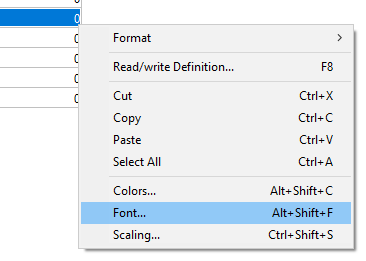
To change the font you have 2 options
- Select the cells to be changed and then right click.
- Select the cells to be changed and then menu → display → font.
3.5. Conditional colors
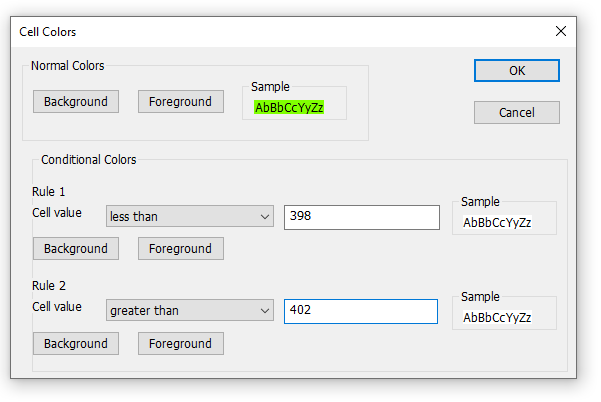
Conditional colors help you visually show values in specific ranges.3 color options
- Default color: This color is used if none of the conditional colors evaluates to true.
- Rule 1: This color selection is used if the expression evaluates to true. Rule 1 has precedence over rule 2.
- Rule 2: This color selection is used if the expression evaluates to true.
7 Comparison operators
- not used
- equal to
- greater than
- less than
- greater than or equal to
- less than or equal to
- and
The "and" operator cannot be used when the 데이터 type is of float or 32 bit long type. The condition value is entered as a hex number if "and" is selected. It evaluates to true if any of the bits in both the cell and the condition value is 1.
3.5.1. Color example
Green color if the cell value is between 398 and 402
3.6. Scaling
Scaling helps you scale raw values to human readable values. Scaling works only for signed and unsigned 16/32 bit integers.
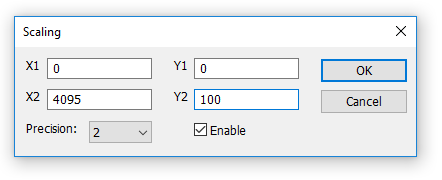
(X1,Y1) and (X2,Y2)
A line passing through the two points (X1,Y1) and (X2,Y2)
Slope=m=Y2−Y1X2−X1�����=�=�2-�1�2-�1Line equation
Y=m⋅(X−X1)+Y1�=�⋅(�-�1)+�1Precision
Number of digits after the decimal point.Enable
Must be enabled to scale the value from the Modbus server/slave. Scaling is automatically disabled if other than a 16/32 bit integer display format is selected.
3.7. Real time charting
The chart can plot 12 series in real time with up to 100000 points in each series.
3.8. 주소 Scan
Scan an 주소 range for a list of all valid 주소es in a device.
3.9. Open a new window
To 열기 another window you have 3 options:
- Press CTRL+N
- Select new in the file menu
- Press
 on the toolbar
4. Connection dialog
To 열기 the connection dialog you have 2 options:
- Press F3
- Select connect from the connection menu
4.1. Connection
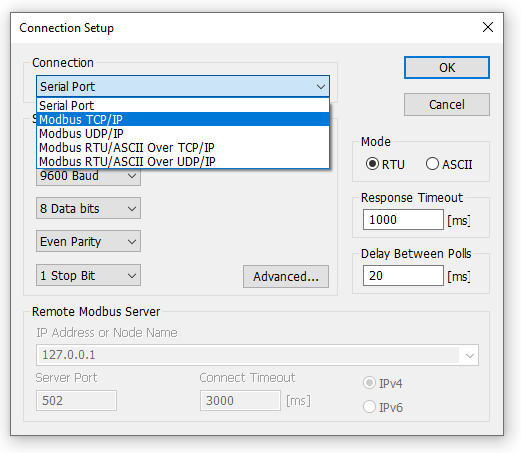
There are 5 different connection types:
- Serial:
Modbus over serial line. RS232 or RS485. A USB serial converter can be used. - Modbus TCP/IP:
Select TCP/IP if you want to communicate with a MODBUS TCP/IP network. In this case, slave ID is the same as the Unit ID used in MODBUS TCP/IP.
The port number is default 502.
If the connection fails then try if you can ping your device at the command prompt. If the ping command fails then Modbus Poll fails too. - Modbus UDP/IP:
Select UDP/IP if you want to communicate with a MODBUS UDP/IP network. This is the same as Modbus TCP/IP but the connection less UDP protocol is used instead. - Modbus RTU/ASCII over TCP/IP:
This is a RTU or ASCII message sent over a TCP/IP network instead of serial lines. - Modbus RTU/ASCII over UDP/IP:
This is a RTU or ASCII message sent over a UDP/IP network instead of serial lines.
Connection type 3-5 is not standard Modbus as specified by www.modbus.org but they are added for convenience.
Depending on your selection some other settings will be grayed.
4.2. Serial Settings
Use these 파라미터s to set 시리얼 포트 settings. They are only available if the connection type is "Serial Port".Mode
Use this option to select RTU or ASCII mode. Default RTU.Response timeout
Specifies the length of time that Modbus Poll should wait for a response from a slave device before giving up. Default is 1000ms.Min delay between polls
This setting ensures a minimum delay until the next request is transmitted no matter the scan rate. The resolution of this setting is approximately 15ms. It’s possible on some computers to obtain better resolution but not all.
If you set this value lower than 20ms the 3.5 char time gap between response and a new request can’t be guaranteed. This is because the Windows scheduler switches tasks every 10 - 20ms.If you Poll several slaves in a serial RS485 network you should NOT set the value lower than 20ms. This is to ensure the 3.5 char time gap.In a TCP/IP network less than 20ms is ok.Serial connection to 하나만 slave device less than 20ms is ok.
User Baud Rate
Specify a custom baud rate if none of the default baud rates are useful.
4.3. Remote Server
Remote server settings are only available when using an 이더넷 connection.IP 주소
Servers IP 주소. Default is localhost 127.0.0.1Port
Server port number. Default 502Connect Timeout
Max time to use to establish a connection. Default 1000
4.4. Advanced settings
RTS Toggle
RTS Toggle specifies that the RTS line will be high if bytes are available for transmission. After all buffered bytes have been sent, the RTS line will be low.
You can use this to switch direction if you have a 232/485 converter without an automatic direction switch.
The use of RTS controlled RS232/RS485 converters should be avoided if possible. It is difficult to determine the exact time when to switch off the transmitter with non real-time operating systems like Windows and Linux. If it is switched off too early characters might still sit in the FIFO or the transmit register of the UART and these characters will be lost. Hence the slave will not recognize the message. On the other hand if it is switched off too late then the slave’s message is corrupted and the master will not recognize the message.
DSR
DSR specifies whether the DSR (데이터-set-ready) signal is monitored for output flow control. If this member is TRUE and DSR is turned off, output is suspended until DSR is sent again.CTS
CTS specifies whether the CTS (clear-to-send) signal is monitored for output flow control. If this checkbox is enabled and CTS is turned off, output is suspended until CTS is sent again.DTR
DTR specifies whether the DTR will be enabled or disabled whenever the port is 열기ed.Remove Echo
If your device or RS232/RS485 converter echoes the chars just sent.
5. Read/Write definition
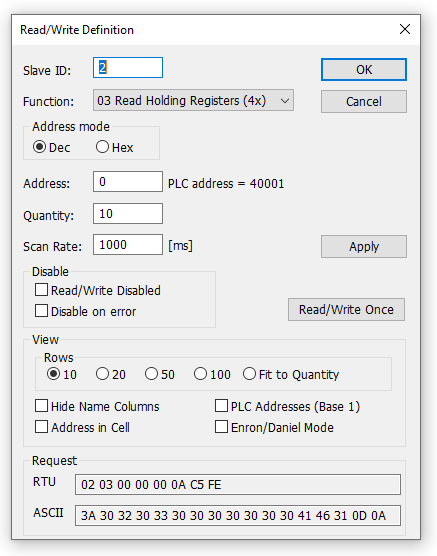
Use this command to define the 데이터 to be monitored for the active window.
To 열기 the Read/Write Definition dialog you have 3 options:
- Press F8
- Select "Read/Write Definition" from the Setup menu
- Press
 on the toolbar
5.1. Slave ID
Range 1 to 255. (MODBUS protocol specifications say 247). The value 0 is also accepted to communicate directly to a MODBUS/TCP or MODBUS/UDP device.
5.2. 기능 code
You can select 1 of 8 기능 코드s.
5.2.1. Read functions
The 데이터 returned by the read functions are displayed on the grid window.
- 01: Read coils (0x)
- 02: Read discrete inputs (1x)
- 03: Read holding registers (4x)
- 04: Read input registers (3x)
5.2.2. Write functions
The write functions write the 데이터 displayed on the grid window.
- 05: Write single coil (Writes to Coil status)
- 06: Write single register (Writes to Holding registers)
- 15: Write multiple coils (Writes to Coils)
- 16: Write multiple registers (Writes to Holding registers)
5.3. 주소
주소es in the Modbus protocol are confusing! Some protocol specifications use the protocol/message 주소 and others use device 주소ing.
5.3.1. Protocol/message 주소
Some protocol specifications use the protocol/message 주소 counting from 0 to 65535 along with a 기능 코드. This is also what the new Modbus specifications use. This is the 주소 inside the message sent on the wire.
Modbus Poll use protocol/message 주소 counting from 0 to 65535.
5.3.2. Device 주소
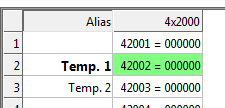
Some protocol specifications use device 주소/registers. 회원가입s counts from 1. The first digit describes the function to be used. That means the device 주소 40101 is identified by 주소 100. The "4" means Holding registers and 4x registers counts from 1. And even more confusing: 4x means 기능 코드 03 and 3x means 기능 코드 04!
5.3.3. 5 digits vs. 6 digits 주소ing
The 주소 format 4x counts from 40001 to 49999. The next 주소 is not 50000. In the old days 9999 주소es was enough. There are cases where 9999 is not enough. Then a zero is added. 40101 becomes 400101 and so on. This is called 6 digits 주소ing or extended 주소ing.
This is not a problem with Modbus Poll. 410001 become 10000. The "4" is thrown away and the rest 10001 is decremented by 1 as we count from 0 instead of 1.
5.3.4. 주소 examples
These examples show how to set up Modbus Poll if a specification uses device 주소es.
Read Holding 회원가입s
You want to read 20 registers from device 주소 40011 from slave ID 2 every 1000ms. From the "4" we know this is function 03 "Read Holding 회원가입s".
- Slave ID = 2
- 기능 = "03 Read Holding 회원가입s (4x)"
- 주소 = 10 (11 minus 1)
- Quantity = 20
- Scanrate = 1000
Read Discrete Inputs
You want to read 1000 coils from 주소 110201 from slave ID 5 every 500ms. From the "1" we know this is function 02 "Read Discrete Inputs"
- Slave ID = 5
- 기능 = "02 Read Discrete Inputs (1x)"
- 주소 = 10200 (10201 - 1)
- Quantity = 1000
- Scanrate = 500
5.4. Scanrate
The scan rate can be set from 0 to 3600000ms. Note that setting the scan rate lower than the transaction time does not make sense. If a serial connection at 9600baud is used and 125 registers are requested the transaction time is roughly 8 + 2 + 250 + 2 = 262ms + the gap (>3.5 char time) between the request and the response. In this case setting the scan rate at e.g. 100ms does not make sense as the transaction time is at least 262ms + delay in the slave (gap) + min time between polls. (Set in the connection dialog F3).
5.5. Read/Write Disabled
The "Read/Write Disabled" checkbox can be used to temporary enable or disable the communication for this window. A text (Disabled) is then shown along with the Tx and 오답 counters.

If "Read/Write" is disabled you can make single requests with the "Read/Write once" button or press F6.

"Read/Write once" button
5.5.1. Disable on error
Disable Read/Write in case of error.
5.6. Hide name columns
Hide all name columns. This is convenient to make more space if they are not used.
5.7. 주소 in cell
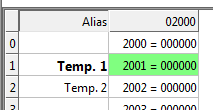
If enabled, the 주소 is also shown in the value cell like: 2000 = 00000
5.8. PLC 주소es (Base 1)
This option will show the 주소es as device 주소es.
5.9. Enron/Daniel Mode
Enron or Enron/Daniels Modbus is Standard Modbus with a few "Vendor Extensions". The exact impact of these extensions is context dependent, but most common Modbus commands work as expected. There are some custom vendor-defined functions available - but few users expect or use them. The largest impact has to do with how 32-bit 데이터 values are read/written.
Enron-Modbus defines two special 4x holding register ranges:
- 4x5001 to 4x5999 are assumed 32-bit long integers (4-bytes per register).
- 4x7001 to 4x7999 are assumed 32-bit floating points (4-bytes per register).
Dealing with 32-bit values in Modbus is NOT unique to Enron-MB. However, Enron-MB takes the debatable step of returning 4-bytes per register instead of the 2-bytes implied by the term "holding register" in the Modbus specification. This means a poll of registers 4x5001 and 4x5002 in Enron-Modbus returns 8-bytes or two 32-bit integers, whereas Standard Modbus would only return 4-bytes or one 32-bit integer treated as two 16-bit integers. In addition, polling register 4x5010 in Enron-MB returns the tenth 32-bit long integer, whereas Standard Modbus would consider this 1/2 of the fifth 32-bit long integer in this range.
5.10. Rows
Specify the number of rows in the grid you prefer.
6. Real time Charting
Use this command to plot up to 12 데이터 series in a chart in real time.
The real time chart is high speed and capable of drawing a new line as fast as new 데이터 is received.
| All chart settings are stored with workspace. Save/Open Workspace |
To 열기 the Real time charting dialog you have 2 options:
- Press Alt + R
- Select "Real time Charting" from the Display menu
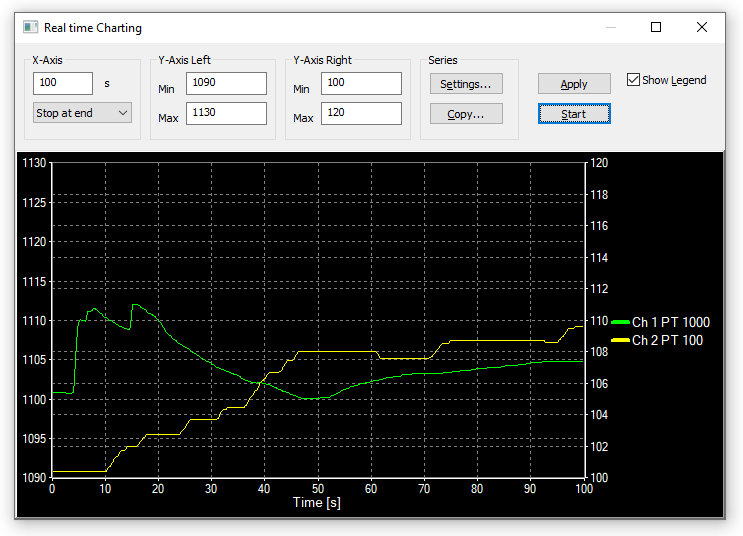
The X-Axis displays the number of seconds since the chart was 시작ed.
When the points reach the end of the chart there are 3 options:
- Stop at end: The charting stops.
- Re시작 at end: The charting 시작s all over again.
- Continue: It continues until it reaches the max number of points or stop is pressed.
6.1. Settings
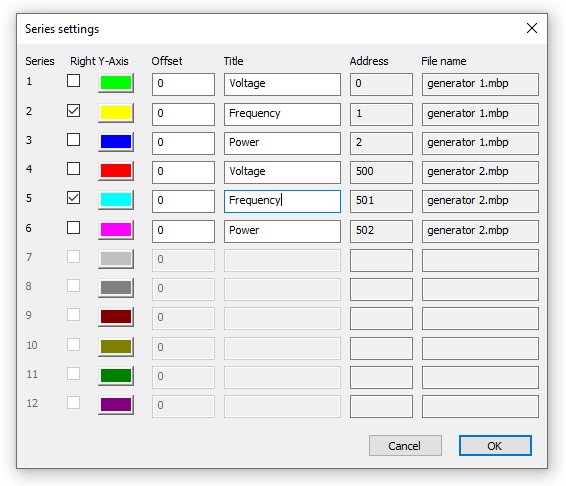
By default all 12 series are linked to the left Y-Axis. Check the "Right Y-Axis" check box if you want to link a series to the right Y-Axis.Specify
- Colors
- Right Y-Axis
- Title. If title is empty it is initialized with the name from the reading window
- Offset
Show
- File name
- 주소
The offset is useful to align 데이터 points on the same Y-Axis. For example, 데이터 points that are either 0 or 1 can be offset so they are not drawn on top of each other.
6.2. Zoom function
Zooming in on the chart can be useful if you want to see more details. The zoom is controlled with the left mouse button. To zoom a specific part of the chart, simply left-click on the chart (this will be the upper-left corner of the zoomed rectangle) and drag to the bottom-right. A rectangle will appear. As soon as you release the mouse button, the axes will automatically adjust themselves to the region you have selected.
If you left-click on the chart (like for 시작ing a zoom) but if you move to the top-left corner instead, all the modifications done with the zoom and pan features will be canceled (the chart will be in the state it was before the manipulations with the pan and zoom).
6.3. Pan function
To pan the control, right-click somewhere on the control and move the mouse. The point under the mouse will follow the movement of the mouse.
6.4. Link 데이터 to the chart series
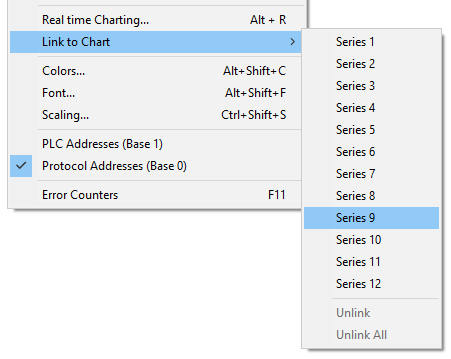
The chart doesn’t know which 데이터 to use unless you link a Modbus 데이터 cell to one of the 12 series. To do so select a value cell and from Menu→Display select "Link to Chart".
6.5. Export series
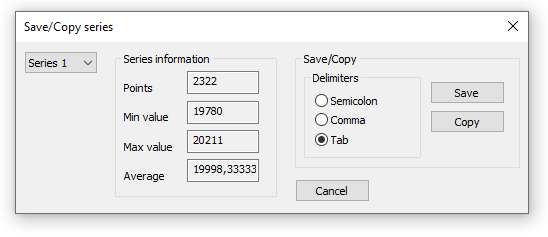
Save series 데이터 to disk or copy to clipboard. Paste the 데이터 direct in Excel for further processing.
The file is given a .csv extension despite the use of a non-comma field separator.
Delimiters: Select the character that separates values in your text file. Use tab delimiter when copy/paste to Excel.Furthermore some additional information is given.
- Number of points
- Max point value
- Min point value
- Average point value
7. 주소 Scan
Scan an 주소 range for a list of all valid 주소es in a device. 주소es are read one by one and the read result is shown in a list.
| Scanning all 65535 주소es takes some time depending on connection type, server device etc. |
7.1. Export 주소 Scan
Save 주소 Scan 데이터 to disk or copy to clipboard. Paste the 데이터 direct in Excel for further processing.
The file is given a .csv extension despite the use of a non-comma field separator.
Delimiters: Select the character that separates values in your text file. Use tab delimiter when copy/paste to Excel.
8. Display formats
Mark the cells to be formatted. Select one of the 28 display formats from the display menu.
8.1. Native Modbus 레지스터s
The 16-bit Modbus 레지스터s can be displayed in 4 different modes.
- Signed
- Unsigned
- Hex
- ASCII - Hex
- Binary
8.2. 32-bit signed integer
This combines 2 16-bit Modbus 레지스터s. It can be displayed in 4 different word/byte orders.
- Signed integer Big-endian
- Signed integer Little-endian
- Signed integer Big-endian byte swap
- Signed integer Little-endian byte swapExampleByte Order: AB CD (Big-endian)
The decimal number 123456789 or in hexadecimal 07 5B CD 15
Order as they come over the wire in a Modbus message: 07 5B CD 15
8.3. 32-bit unsigned integer
This combines 2 16-bit Modbus 레지스터s. It can be displayed in 4 different word/byte orders.
- Unsigned integer Big-endian
- Unsigned integer Little-endian
- Unsigned integer Big-endian byte swap
- Unsigned integer Little-endian byte swapExampleByte Order: AB CD (Big-endian)
The decimal number 123456789 or in hexadecimal 07 5B CD 15
Order as they come over the wire in a Modbus message: 07 5B CD 15
8.4. 64-bit signed integer
This combines 4 16-bit Modbus 레지스터s. It can be displayed in 4 different word/byte orders.
- Signed integer Big-endian
- Signed integer Little-endian
- Signed integer Big-endian byte swap
- Signed integer Little-endian byte swapExampleByte Order: AB CD EF GH (Big-endian)
The decimal number -1,234,567,890,123,456,789 or in hexadecimal EE DD EF 0B 82 16 7E EB
Order as they come over the wire in a Modbus message: EE DD EF 0B 82 16 7E EB
8.5. 64-bit unsigned integer
This combines 4 16-bit Modbus 레지스터s. It can be displayed in 4 different word/byte orders.
- Unsigned integer Big-endian
- Unsigned integer Little-endian
- Unsigned integer Big-endian byte swap
- Unsigned integer Little-endian byte swapExampleByte Order: AB CD EF GH (Big-endian)
The decimal number 1,234,567,890,123,456,789 or in hexadecimal 11 22 10 F4 7D E9 81 15
Order as they come over the wire in a Modbus message: 11 22 10 F4 7D E9 81 15
8.6. 32-bit floating
This combines 2 16-bit Modbus 레지스터s. It can be displayed in 4 different word/byte orders.
- Float Big-endian
- Float Little-endian
- Float Big-endian byte swap
- Float Little-endian byte swapExampleByte Order: AB CD (Big-endian)
The floating point number 123456.00 or in hexadecimal 47 F1 20 00
Order as they come over the wire in a Modbus message: 47 F1 20 00
8.7. 64-bit double
This combines 4 16-bit Modbus 레지스터s. It can be displayed in 4 different word/byte orders.
- Double Big-endian
- Double Little-endian
- Double Big-endian byte swap
- Double Little-endian byte swapExampleByte Order: AB CD EF GH (Big-endian)
The floating point number 123456789.00 or in hexadecimal 41 9D 6F 34 54 00 00 00
Order as they come over the wire in a Modbus message: 41 9D 6F 34 54 00 00 00
9. Save/Open Workspace
If you 열기 many related Modbus windows it is convenient to save a snapshot of the current layout of all 열기 and arranged Modbus Windows in one workspace.
A workspace (*mbw) is a file that contains display information and file names of all 열기 windows. Not the actual contents. To do this, go to File→ Save Workspace.
The Connection and Chart settings are stored in the Workspace file.
When you 열기 a workspace file, Modbus Poll 열기s all Modbus Windows and displays them in the layout that you saved.
10. Export to csv
Export names and values to a Comma, Semicolon or Tab Separated Values File.Select from the file dialog
- Comma Separated Values file (*.csv)
"Temperature","19.7" - Semicolon Separated Values file (*.csv)
"Temperature";"19.7" - Tab Separated Values file (*.txt)
Temperature 19.7
Depending on your system, comma or period is used to separate decimals.
11. Export to Modbus Slave
Export names, values and formatting to a Modbus Slave file. *.mbs
Modbus Slave version 7.4.0 or newer is required to 열기 the file.
12. Test center
The purpose of this test dialog is to help MODBUS slave device developers to test the device with any string of their own composition.
The list box displays the transmitted 데이터 as well as the received 데이터.
You can have several test strings in the pull down list box. When you have entered a string then press the "Add to List" button then the string is added to the list.
The selected string is sent when the "Send" button is pressed.Open list
Rest test strings from a file.Save list
Store the test strings to a file.지우기
지우기 the test list.Add to list
Add the current test string to the list.Add Check
Add a CRC or LRC to the end of the input string.
When using the test center you may want to disable communication from other windows. Check the "Read/Write disable" check box in "Read/Write Definition" dialog. Setup→Read/Write Definition.
12.1. ASCII Example
String in the combo box:3A 30 31 30 33 30 30 30 30 30 30 30 41
The transmitted string if LRC is added3A 30 31 30 33 30 30 30 30 30 30 30 41 46 32 0D 0A
A CR LF pair is also added.
12.2. TCP/IP Example
Read 10 holding registers.00 00 00 00 00 06 01 03 00 00 00 0A
The first 6 bytes are the TCP/IP header.
12.3. Test center string file
With a text editor such as notepad or similar you can prepare strings to be used in the test.
The first line in the file must be the string "TestCenter". This is how Modbus Poll knows that the file is the correct format. Press "Open list" to 열기 the prepared text file.
12.3.1. Content of a string list
TestCenter 3A 30 31 30 33 30 30 30 30 30 30 30 41 3A 30 32 30 33 30 30 30 30 30 30 30 41 3A 30 33 30 33 30 30 30 30 30 30 30 41
12.4. 복사
Use the 복사 button to copy selected Tx/Rx strings to the clipboard.
The SHIFT and CTRL keys can be used together with the mouse to select and deselect strings, select groups of strings, and select non-adjacent strings.
| Leave this window 열기 while doing other commands. |
13. Modbus 데이터 logging
You can log 데이터 to either a text file or direct to Microsoft Excel.
13.1. Text file
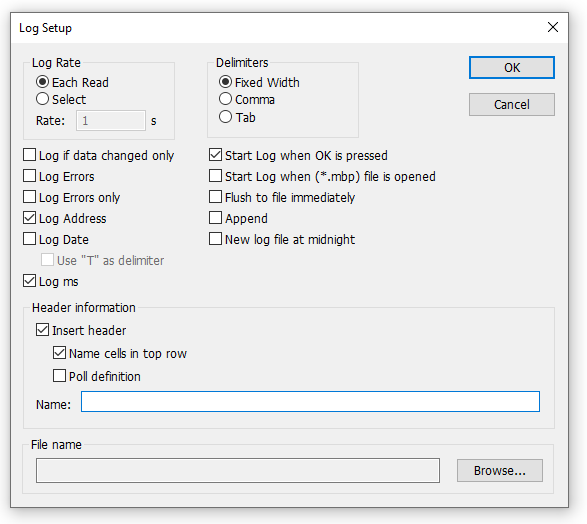
Select Log from the setup menu or use shortcut keys: Alt+L
Each Modbus Window logs to its individual text file.
When you want to stop the 데이터 logging then select the logging off command on the setup menu.
13.1.1. Log Rate
Each read
Write a logline for all Modbus requests. Log frequency as scan rate.Select
Specify the log rate in seconds. Independent of scan rate.
| If the scan rate is e.g. 10000ms it makes no sense to set a 1 sec log rate as 데이터 is logged only when new 데이터 is ready. |
13.1.2. Delimiters
As delimiter you can use one of following options:Fixed width
Means that the values are organized in columns.Comma
Values separated by a comma.Tab
Values separated by a tab.
13.1.3. Log if 데이터 changed only
Specify that a new log line is written only if any 데이터 is changed since last log.
13.1.4. Log 오답s
Specify that errors such a timeout etc. are logged.
13.1.5. Log Date
Specify that the current date is added to the log time.
13.1.6. Use "T" as delimiter
Specify that the time and date is delimited by the letter "T" as specified in ISO 8601.
13.1.7. Log ms
Specify that milliseconds are added to the log time.
13.1.8. Log 주소
Specify that the Modbus 주소 is added to the log.
13.1.9. Start Log when ok is pressed
Specify that logging is 시작ed when the ok button is pressed. Otherwise the log setup is just stored when *mbp file is saved.
13.1.10. Start Log when *mbp is 열기ed
Specify that logging is automatically 시작ed when a *.mbp file is 열기ed.
13.1.11. Flush to file immediately
This ensures that log lines are not cashed in the file system but physically written immediately.
13.1.12. Append
Specify that logs are appended to the selected file. Otherwise a new file is created.
13.1.13. New log file at midnight
닫기 the current log file and 시작 a new file at midnight. A time stamp is added to your filename.
13.1.14. Header information
- Insert header: Information is inserted in the top of the log file.
- 이름 cells in top row: Insert names.
- Poll definition: Insert ID, 기능 etc.
- 이름: Insert a name of your log.
Example of a text file with fixed width:22:28:13 <40001> 17395 0 0 0 0 0 0 0 0 22:28:14 <40001> 17396 1 0 0 0 0 0 0 0 22:28:15 <40001> 17394 1 0 0 2 55 0 0 0 22:28:16 <40001> 13350 1 0 0 4 0 0 0 0
You can import the 데이터 in an Excel spreadsheet.
13.2. Microsoft Excel
This feature requires that Microsoft Excel is installed. Excel 2003 log is limited to 65535 logs as this is the max number of rows in an Excel sheet. Excel 2007 or newer is limited to 1,048,576 rows. Each Modbus Window logs to its individual Excel sheet.
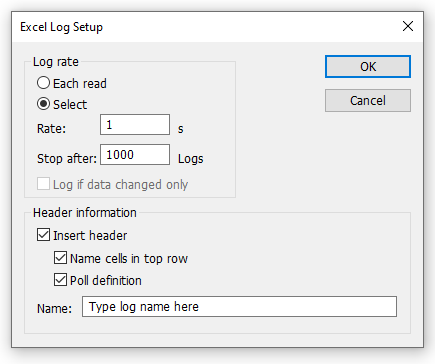
Select Excel Log from the setup menu or use shortcut keys: Alt+X
Do not touch the Excel sheet while logging as this will interrupt the logging.
13.2.1. Log Rate
- Each read: Write a logline for all Modbus requests. Log frequency as scan rate.
- Select: Specify the log rate in seconds. Log is independent of scan rate.
Remark: If the scan rate is e.g. 10000ms it makes no sense to set a 1 sec log rate as 데이터 is logged only when new 데이터 is ready. - Stop after: Specify the number of log lines. Note that Excel 2003 is limited to 65,536 rows and Excel 2007 1,048,576 rows.
13.2.2. Header information
- Insert header: Information is inserted in the top most 3 lines in the Excel sheet.
- 이름 cells in top row: Insert names in row 3.
- Poll definition: Insert ID, 기능 etc. in row 2.
- 이름: Insert a log name in row 1.
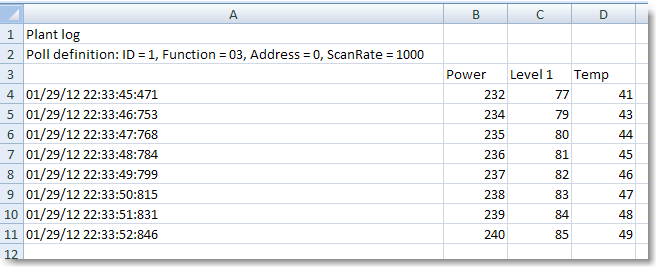
Excel log with header information.
14. Communication traffic
Select the menu Display→Communication to show the traffic on the serial line or 이더넷 cable. Use the stop button to temporary stop the update for inspection.
Use the copy button to copy the selected line to the clipboard.
| This window shows only 데이터 sent and received by Modbus Poll. You can’t use it as a 데이터 sniffer. |
| Leave this window 열기 while doing other commands. |
15. OLE/자동화
자동화 (formerly known as OLE 자동화) makes it possible for one application to manipulate objects implemented in another application.
An 자동화 client is an application that can manipulate exposed objects belonging to another application. This is also called an 자동화 controller.
An 자동화 server is an application that exposes programmable objects to other applications. Modbus Poll is an automation server.
That means you can use any program that supports VBA (Visual Basic for Applications) such as Visual Basic, Excel etc. to interpret and show the modbus 데이터 according to your specific requirements.
15.1. Excel example
You should display the Developer tab or run in developer mode when you want to write macros.
15.1.1. Excel 2007
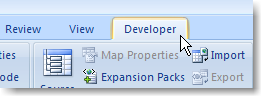
- Click the Microsoft office button and then click Excel options.
- Click popular and then select the show Developers tab in the ribbon check box.
Note the ribbon is part of the Microsoft fluent user interface.
15.1.2. Excel 2010, 2016
- Click on the file tab.
- Click options. Excel Options window will 열기.
- On the left pane click Customize Ribbon.
- On the right pane, under Main Tabs, check the Developer check box.
- Click OK. The Developer tab should now show in the ribbon (right most tab).
15.1.3. Excel sample code
This example 열기s two windows. One reading registers and another reading Coils.
Modbus Poll is hidden but you can show it by uncommenting the "ShowWindow" line. This will show one of the windows.
An example is also included with the Modbus Poll installation.
Start → All Programs → Modbus Poll → Excel Example
Excel VBA Example
Public doc1 As Object
Public doc2 As Object
Public app As Object
Dim res As Integer
Dim n As Integer

Private Sub StartModbusPoll_Click()
   Set app = CreateObject("Mbpoll.Application")
   Set doc1 = CreateObject("Mbpoll.Document")
   Set doc2 = CreateObject("Mbpoll.Document")
' Read 10 Holding 회원가입s every 1000ms
   res = doc1.ReadHolding회원가입s(1, 0, 10, 1000)
' Read 10 Coil Status every 1000ms
   res = doc2.ReadCoils(1, 0, 10, 1000)
' doc1.ShowWindow()
   app.Connection = 1 ' Modbus TCP/IP
   app.IP주소 = "127.0.0.1" ' local host
   app.ServerPort = 502
   app.ConnectTimeout = 1000
   res = app.OpenConnection()
End Sub

Private Sub Read_Click()
   Cells(5, 7) = doc1.ReadResult() 'Show results for the requests
   Cells(6, 7) = doc2.ReadResult()

   For n = 0 To 9
      Cells(5 + n, 2) = doc1.S회원가입s(n)
   Next n

   For n = 0 To 9
      Cells(18 + n, 2) = doc2.Coils(n)
   Next n
End Sub
15.2. Python example
This Python example 열기s a window and set all possible 데이터 formats.
Python Example
import win32com.client as win32

SIGNED = 0
UNSIGNED = 1
HEX = 2
BINARY = 3
FLOAT_LE_BS = 4
FLOAT_BE = 5
DOUBLE_LE_BS = 6
DOUBLE_BE = 7
S32_LE_BS = 8
S32_BE = 9
FLOAT_LE = 10
FLOAT_BE_BS = 11
DOUBLE_LE = 12
DOUBLE_BE_BS = 13
S32_LE = 14
S32_BE_BS = 15

U32_BE = 17
U32_LE_BS = 18
U32_BE_BS = 19
U32_LE = 20

S64_BE = 21
S64_LE_BS = 22
S64_BE_BS = 23
S64_LE = 24

U64_BE = 25
U64_LE_BS = 26
U64_BE_BS = 27
U64_LE = 28

#Endianness
BE = 0
LE = 3
BE_BS = 2
LE_BS = 1

App = win32.Dispatch('Mbpoll.Application')

App.Connection = 1
App.IP주소 = "127.0.0.1"

App.ServerPort = 502
App.OpenConnection

#Create a Modbus display window called Win1
Win1 = win32.Dispatch("Mbpoll.Document")

# Read 100 holding registers from slave ID 1, 주소 0 (40001) every 1000ms
Win1.ReadHolding회원가입s(1, 0, 100, 1000)
# Show the Modbus window
Win1.ShowWindow()
# Show 20 rows
Win1.Rows(1)

# Disable refresh for speed
Win1.EnableRefresh = False

# Set all different formats
# This sets how the value is displayed
Win1.SetFormat(0, SIGNED)
Win1.SetFormat(1, UNSIGNED)
Win1.SetFormat(2, HEX)
Win1.SetFormat(3, BINARY)

Win1.SetFormat(4, S32_BE)
Win1.SetFormat(6, S32_LE)
Win1.SetFormat(8, S32_BE_BS)
Win1.SetFormat(10, S32_LE_BS)

Win1.SetFormat(12, U32_BE)
Win1.SetFormat(14, U32_LE)
Win1.SetFormat(16, U32_BE_BS)
Win1.SetFormat(18, U32_LE_BS)

Win1.SetFormat(20, S64_BE)
Win1.SetFormat(24, S64_LE)
Win1.SetFormat(28, S64_BE_BS)
Win1.SetFormat(32, S64_LE_BS)

Win1.SetFormat(40, U64_BE)
Win1.SetFormat(44, U64_LE)
Win1.SetFormat(48, U64_BE_BS)
Win1.SetFormat(52, U64_LE_BS)

Win1.SetFormat(60, FLOAT_BE)
Win1.SetFormat(62, FLOAT_LE)
Win1.SetFormat(64, FLOAT_BE_BS)
Win1.SetFormat(66, FLOAT_LE_BS)

Win1.SetFormat(80, DOUBLE_BE)
Win1.SetFormat(84, DOUBLE_LE)
Win1.SetFormat(88, DOUBLE_BE_BS)
Win1.SetFormat(92, DOUBLE_LE_BS)

# Set all 이름s to used format
Win1.Set이름(0, "SIGNED")
Win1.Set이름(1, "UNSIGNED")
Win1.Set이름(2, "HEX")
Win1.Set이름(3, "BINARY")

Win1.Set이름(4, "S32_BE")
Win1.Set이름(6, "S32_LE")
Win1.Set이름(8, "S32_BE_BS")
Win1.Set이름(10, "S32_LE_BS")

Win1.Set이름(12, "U32_BE")
Win1.Set이름(14, "U32_LE")
Win1.Set이름(16, "U32_BE_BS")
Win1.Set이름(18, "U32_LE_BS")

Win1.Set이름(20, "S64_BE")
Win1.Set이름(24, "S64_LE")
Win1.Set이름(28, "S64_BE_BS")
Win1.Set이름(32, "S64_LE_BS")

Win1.Set이름(40, "U64_BE")
Win1.Set이름(44, "U64_LE")
Win1.Set이름(48, "U64_BE_BS")
Win1.Set이름(52, "U64_LE_BS")

Win1.Set이름(60, "FLOAT_BE")
Win1.Set이름(62, "FLOAT_LE")
Win1.Set이름(64, "FLOAT_BE_BS")
Win1.Set이름(66, "FLOAT_LE_BS")

Win1.Set이름(80, "DOUBLE_BE")
Win1.Set이름(84, "DOUBLE_LE")
Win1.Set이름(88, "DOUBLE_BE_BS")
Win1.Set이름(92, "DOUBLE_LE_BS")

# Refresh
Win1.EnableRefresh = True

Win1.ResizeAllColumns ()
Win1.ResizeWindow()

result = Win1.Save("C:\Users\User이름\Desktop\testfile.mbp")
print (result)

print (Win1.Get이름(1))

_ = input("Press ENTER to quit:")
15.3. Connection 기능s/Properties
The following properties and functions do the same as you setup in the connection dialog (F3).
15.3.1. Connection
Connection selects the desired connection. A 시리얼 포트 or one of the 이더넷 connections can be selected.
Property Connection as IntegerValid values
0 = Serial port
1 = Modbus TCP/IP
2 = Modbus UDP/IP
3 = Modbus ASCII/RTU over TCP/IP
4 = Modbus ASCII/RTU over UDP/IP
Example
Connection = 0
15.3.2. BaudRate
Applicable only for Connection = 0
Property BaudRate as LongValid values
300
600
1200
2400
4800
9600 (Default)
14400
19200
38400
56000
57600
115200
128000
153600
230400
256000
460800
921600
Example
BaudRate = 9600
15.3.3. 데이터Bits
Applicable only for Connection = 0
Property 데이터Bits as IntegerValid values
7
8 (Default)
Example
데이터Bits = 8
15.3.4. Parity
Applicable only for Connection = 0
Property Parity as IntegerValid values
0 = None
1 = Odd
2 = Even (Default)
Example
Parity = 2
15.3.5. StopBits
Applicable only for Connection = 0
Property StopBits as IntegerValid values
1 (Default)
2
Example
StopBits = 1
15.3.6. SerialPort
Applicable only for Connection = 0
Property SerialPort as IntegerValid values
1…255
Default value = 1
Example
SerialPort = 1
15.3.7. Mode
Applicable only for Connection = 0
Property Mode as IntegerValid values
0 = RTU Mode
1 = ASCII Mode
Example
Mode = 1
15.3.8. RemoveEcho
Applicable only for Connection = 0
If your device or RS232/RS485 converter echoes the chars just sent.
Property RemoveEcho as IntegerValid values
0 (Default)
1 (Remove echoes)
Example
RemoveEcho = 1
15.3.9. ResponseTimeout
The ResponseTimeout specifies the length of time in ms that Modbus Poll should wait for a response from a slave device before giving up.
Property ResponseTimeout as IntegerValid values
50…100000
Default value = 1000
Example
ResponseTimeout = 1000
15.3.10. DelayBetweenPolls
Property DelayBetweenPolls as IntegerValid values
0…1000
Default value = 20
Example
DelayBetweenPolls = 20
15.3.11. ServerPort
Applicable only for Connection = 1…4
Property ServerPort as LongValid values
0…65535
Default value = 502
Example
ServerPort = 502
15.3.12. ConnectTimeout
The ConnectTimeout specifies the length of time that Modbus Poll should wait for a TCP/IP connection to succeed.
Applicable only for Connection = 1…4
Property ConnectTimeout as IntegerValid values
100…30000ms
Default value = 1000ms
Example
ConnectTimeout = 1000
15.3.13. IPVersion
Applicable only for Connection = 1…4
Property IPVersion as IntegerValid values
4 = IP Version 4 (Default)
6 = IP Version 6
Example
IPVersion = 4
15.3.14. OpenConnection
Opens the connection selected with the Connection property.
기능 OpenConnection() As IntegerParameters
This function has no 파라미터s.Return value
For error 3-5: Please check if you have the latest 시리얼 포트 driver.
| 오답 | Description |
|---|---|
| 0 | SUCCESS |
| 1 | Serial Port not available |
| 3 | Serial port. Not possible to get current settings from the port driver. |
| 4 | Serial port. Serial port driver did not accept port settings. |
| 5 | Serial port. Serial port driver did not accept timeout settings. |
| 12 | TCP/UDP Connection failed. WSA 시작 up |
| 13 | TCP/UDP Connection failed. Connect error |
| 14 | TCP/UDP Connection failed. Timeout |
| 15 | TCP/UDP Connection failed. IOCTL |
| 17 | TCP/UDP Connection failed. Socket error |
| 21 | TCP/UDP Connection failed. 주소 information |
| 255 | Connection already 열기 |
Excel example how to 열기 a Modbus TCP/IP connection
Public app As Object
Dim res As Integer
' Create an object to Modbus Poll
Set app = CreateObject("Mbpoll.Application")
app.Connection = 1 ' Select Modbus TCP/IP
app.IPVersion = 4
app.IP주소 = "192.168.1.27"
app.ServerPort = 502
app.ConnectTimeout = 1000
app.ResponseTimeout = 1000
res = app.OpenConnection()
Python example how to setup a serial connection
import win32com.client as win32

App = win32.Dispatch('Mbpoll.Application')

App.Connection = 0            # Serial connection
App.SerialPort = 3            # Com port 3
App.BaudRate = 9600           # 9600 baud
App.Parity = 0                # None parity
App.Mode = 0                  # RTU mode
App.ResponseTimeout = 1000    # Wait 1000ms until give up
App.DelayBetweenPolls = 20    # Ensure minimum 20 ms gap until next request
App.OpenConnection

#Create a Modbus display window called Win1
Win1 = win32.Dispatch("Mbpoll.Document")

# Read 10 holding registers from slave ID 1, 주소 0 (40001) every 1000ms
Win1.ReadHolding회원가입s(1, 0, 10, 1000)
# Show the Modbus window
Win1.ShowWindow()
# Show 10 rows
Win1.Rows(0)

# Disable refresh for speed
Win1.EnableRefresh = False

# Set the name of the registers
Win1.Set이름(0, "회원가입 0")

# Set the value to write
Win1.EnableRefresh = True

Win1.ResizeAllColumns ()
Win1.ResizeWindow()

_ = input("Press ENTER to quit:")
15.3.15. 닫기Connection
기능 닫기Connection() As IntegerParameters
This function has no 파라미터s.Return value
Zero if success. Nonzero value if failed.
15.3.16. ShowCommunicationTraffic
Shows the communication traffic window.
기능 ShowCommunicationTraffic()Parameters
This function has no 파라미터s.Return value
None
15.3.17. 닫기CommunicationTraffic
닫기s the communication traffic window if shown.
기능 닫기CommunicationTraffic()Parameters
This function has no 파라미터s.Return value
None
15.4. Read 기능s
The following functions do the same as you setup in the read/write definition dialog (F8). Read functions are associated with a Modbus Poll document. (The window with 데이터)
Example
' First a Modbus Poll document is needed.
Public doc As Object

Set doc = CreateObject("Mbpoll.Document")
res = doc.ReadCoils(1, 0, 100, 1000) ' Read 100 coils every 1000ms| You must create a Read before you can use properties to get 데이터. |
15.4.1. ReadCoils
Modbus 기능 코드 01
기능 ReadCoils(SlaveID As Integer, 주소 As Long, Quantity As Integer, ScanRate As Long) As IntegerParameters
SlaveID: The slave 주소 1 to 255
주소: The 데이터 주소 (Base 0)
Quantity: The number of 데이터. 1 to 2000
ScanRate: 0 to 3600000msReturn value
True if success. False if not success
15.4.2. ReadDiscreteInputs
Modbus 기능 코드 02
기능 ReadDiscreteInputs(SlaveID As Integer, 주소 As Long, Quantity As Integer, ScanRate As Long) As IntegerParameters
SlaveID: The slave 주소 1 to 255
주소: The 데이터 주소 (Base 0)
Quantity: The number of 데이터. 1 to 2000
ScanRate: 0 to 3600000msReturn value
True if success. False if not success
15.4.3. ReadHolding회원가입s
Modbus 기능 코드 03
기능 ReadHolding회원가입s(SlaveID As Integer, 주소 As Long, Quantity As Integer, ScanRate As Long) As IntegerParameters
SlaveID: The slave 주소 1 to 255
주소: The 데이터 주소 (Base 0)
Quantity: The number of 데이터. 1 to 125
ScanRate: 0 to 3600000msReturn value
True if success. False if not success
15.4.4. ReadInput회원가입s
Modbus 기능 코드 04
기능 ReadInput회원가입s(SlaveID As Integer, 주소 As Long, Quantity As Integer, ScanRate As Long) As IntegerParameters
SlaveID: The slave 주소 1 to 255
주소: The 데이터 주소 (Base 0)
Quantity: The number of 데이터. 1 to 125
ScanRate: 0 to 3600000msReturn value
True if success. False if not success
15.5. 자동화 Write 기능s
The write functions write the values stored in the array filled by the properties. The below Write function do not create a 데이터 window. To create a 데이터 window use the Win functions e.g. WriteMultiple회원가입sWin.
15.5.1. WriteSingleCoil
Modbus 기능 코드 05.
Writes the first coil stored in the write array.
기능 WriteSingleCoil(SlaveID As Integer, 주소 As Long) As IntegerParameters
SlaveID: The slave 주소 0 to 255
주소: The 데이터 주소 (Base 0)Return value
True if the write array is ready and the 데이터 is sent. False if the array is empty or error in the 파라미터s.
The controlling application is responsible for verifying the write operation by reading back the value written.
15.5.2. WriteSingle회원가입
Modbus 기능 코드 06.
Writes the first register stored in the write array.
기능 WriteSingle회원가입 (SlaveID As Integer, 주소 As Long) As IntegerParameters
SlaveID: The slave 주소 0 to 255
주소: The 데이터 주소 (Base 0)Return value
True if the write array is ready and the 데이터 is sent. False if the array is empty or error in the 파라미터s.
The controlling application is responsible for verifying the write operation by reading back the value written.
15.5.3. WriteMultipleCoils
Modbus 기능 코드 15.
Write the coils stored in the write array.
기능 WriteMultipleCoils(SlaveID As Integer, 주소 As Long, Quantity As Integer) As IntegerReturn value
True if the write array is ready and the 데이터 is sent. False if the array is empty or error in the 파라미터s.
The controlling application is responsible for verifying the write operation by reading back the values written.Parameters
SlaveID: The slave 주소 0 to 255
주소: The 데이터 주소 (Base 0)
Quantity The number of 데이터. 1 to 1968
15.5.4. WriteMultiple회원가입s
Modbus 기능 코드 16.
Write the registers stored in the write array.
기능 WriteMultiple회원가입s(SlaveID As Integer, 주소 As Long, Quantity As Integer) As IntegerParameters
SlaveID: The slave 주소 0 to 255
주소: The 데이터 주소 (Base 0)
Quantity: The number of 데이터. 1 to 123Return value
True if the write array is ready and the 데이터 is sent. False if the array is empty or error in the 파라미터s.
The controlling application is responsible for verifying the write operation by reading back the value written.
15.5.5. Python example
Python example how to create a window that read 10 registers from 주소 0 (40001) and then write 5 registers.
Python example
import sys
import time
import win32com.client as win32

App = win32.Dispatch('Mbpoll.Application')

App.Connection = 1            # TCP/IP connection
App.IP주소 = "127.0.0.1"

App.ResponseTimeout = 1000    # Wait 1000ms until give up
App.DelayBetweenPolls = 20    # Ensure minimum 20 ms gap until next request
App.ConnectTimeout = 500      # Wait 500ms until give up

App.ServerPort = 502
result = App.OpenConnection

if result != 0:
   print("Connection failed. 오답: ", result)
   sys.exit()

#Create a Modbus display window called Win1
Win1 = win32.Dispatch("Mbpoll.Document")

# Read 10 holding registers from slave ID 1, 주소 0 (40001) every 1000ms
Win1.ReadHolding회원가입s(1, 0, 10, 1000)
# Show the Modbus window
Win1.ShowWindow()
# Show 10 rows
Win1.Rows(0)
# Resize the window to fit to the grid
Win1.ResizeWindow()

time.sleep(1.0) # Wait until read is done

if Win1.ReadResult == 0:    # Check read result
   print("Modbus 레지스터 0 (40001) = ", Win1.S회원가입s(0))
else:
   print("Read failed error: = ", Win1.ReadResult)

print ("Tx count = %d, Rx count = %d" % (Win1.GetTxCount, Win1.GetRxCount))

# Prepare the internal array in Modbus Poll with 데이터 to write
Win1.S회원가입s(0, 1)   # Note that 파라미터 1 is not a
Win1.S회원가입s(1, 10)  # Modbus 주소 but an index to the array
Win1.S회원가입s(2, 100)
Win1.S회원가입s(3, 1000)
Win1.S회원가입s(4, 10000)
# Write the registers. This function do not create a window in Modbus Poll
# Use the function <<WriteMultiple회원가입sWin>> to create a 데이터 window
Win1.WriteMultiple회원가입s (1, 0, 5)

_ = input("Wait for write Press ENTER:")

if Win1.WriteResult == 0:    # Check write result
   print("Modbus write success")
else:
   print("Write failed error: = ", WriteResult)

_ = input("Press ENTER to quit:")
15.6. Various 기능s
Various functions are associated with a Modbus Poll document. (The window with 데이터)
15.6.1. ShowWindow
As default Modbus document windows are hidden. The ShowWindow function makes Modbus Poll visible and shows the document with 데이터 content.
기능 ShowWindow()Parameters
This function has no 파라미터s.Return value
None
15.6.2. GetTxCount
Gets the number of requests.
기능 GetTxCount() As LongParameters
This function has no 파라미터s.Return value
The number of requests.
15.6.3. GetRxCount
Gets the number of response.
기능 GetRxCount() As LongParameters
This function has no 파라미터s.Return value
The number of response.
15.6.4. Get이름
Gets the name of a value.
기능 Get이름(Index As Integer) As StringParameters
Index: Index 0 corresponds to the first Modbus 주소.Return value
The name.
15.6.5. Set이름
Changes the name of a value. 기능 Set이름(Index As Integer, 이름 As String)Parameters
Index: Index 0 corresponds to the first Modbus 주소.
이름: The name of the value cell.Return value
None
15.6.6. FormatAll
Format all value cells with the selected format.
기능 FormatAll(Format As Integer)Parameters
Format: The format of the value cell.Return value
None
15.6.7. GetFormat
Gets the display format of the Modbus value.
기능 GetFormat(Index As Integer) As IntegerParameters
Index: Index 0 corresponds to the first Modbus 주소.
Return value
| ID | Format |
|---|---|
| 0 | Signed |
| 1 | Unsigned |
| 2 | Hex |
| 3 | Binary |
| 4 | Float little-endian byte swap |
| 5 | Float big-endian |
| 6 | Double little-endian byte swap |
| 7 | Double big-endian |
| 8 | 32-bit Signed little-endian byte swap |
| 9 | 32-bit Signed big-endian |
| 10 | Float little-endian |
| 11 | Float big-endian byte swap |
| 12 | Double little-endian |
| 13 | Double big-endian byte swap |
| 14 | 32-bit Signed little-endian |
| 15 | 32-bit Signed big-endian byte swap |
| 17 | 32-bit Unsigned big-endian |
| 18 | 32-bit Unsigned little-endian byte swap |
| 19 | 32-bit Unsigned big-endian byte swap |
| 20 | 32-bit Unsigned little-endian |
| 21 | 64-bit Signed big-endian |
| 22 | 64-bit Signed little-endian byte swap |
| 23 | 64-bit Signed big-endian byte swap |
| 24 | 64-bit Signed little-endian |
| 25 | 64-bit Unsigned big-endian |
| 26 | 64-bit Unsigned little-endian byte swap |
| 27 | 64-bit Unsigned big-endian byte swap |
| 28 | 64-bit Unsigned little-endian |
| This setting is only for display. You still need to use byteOrder to get the correct endianness when using Get/Set value functions. |
15.6.8. SetFormat
Change the display format of the Modbus values. See Format values above.
기능 SetFormat(Index As Integer, Format As Integer)Parameters
Index: Index 0 corresponds to the first Modbus 주소.
Format: The format of the value cell.Return value
None
15.6.9. ResizeWindow
Resize an 열기ed window to fit the grid.
기능 ResizeWindow()Parameters
This function has no 파라미터s.Return value
None
15.6.10. ResizeAllColumns
Resize all columns to fit the values inside the cells.
기능 ResizeAllColumns()Parameters
This function has no 파라미터s.Return value
None
15.6.11. Rows
Specify the number of rows in the grid.
기능 Rows(NumberRows)Parameters
NumberRows: Number of rows in the grid.
| ID | Description |
|---|---|
| 0 | 10 Rows (Default) |
| 1 | 20 Rows |
| 2 | 50 Rows |
| 3 | 100 Rows |
| 4 | Fit to 수량 |
Return value
None
15.6.12. ReadResult
Use this property to check if communication established with Read is running successful.
Property ReadResult As IntegerParameters
This function has no 파라미터s.Return value
| 오답 | Description |
|---|---|
| 0 | SUCCESS |
| 1 | TIMEOUT ERROR |
| 2 | CRC ERROR |
| 3 | RESPONSE ERROR (The response was not the expected slave id, function or 주소) |
| 4 | WRITE ERROR |
| 5 | READ ERROR |
| 6 | PORT NOT OPEN ERROR |
| 10 | 데이터 UNINITIALIZED |
| 11 | INSUFFICIENT BYTES RECEIVED |
| 16 | BYTE COUNT ERROR |
| 19 | TRANSACTION ID ERROR |
| 81h | ILLEGAL FUNCTION |
| 82h | ILLEGAL 데이터 주소 |
| 83h | ILLEGAL 데이터 VALUE |
| 84h | SERVER DEVICE FAILURE |
| 85h | ACKNOWLEDGE |
| 86h | SERVER DEVICE BUSY |
| 87h | NAK-NEGATIVE ACKNOWLEDGMENT |
| 8Ah | GATEWAY PATH UNAVAILABLE |
| 8Bh | GATEWAY TARGET DEVICE FAILED TO RESPOND |
15.6.13. WriteResult
Use this function to check if a write was successful.
The value is 데이터_UNINITIALIZED until the result from the slave is available. See ReadResult for a list of possible values.
Property WriteResult As IntegerReturn value
Return a write result as an integer.
15.6.14. Save
Save the current Window. 기능 Save(Path이름 As String) As BooleanParameters
Path이름: The fully qualified path to which the file should be saved.Return value
Boolean
Example
' First a Modbus Poll document is needed.
Public doc As Object

Set doc = CreateObject("Mbpoll.Document")
res = doc.ReadCoils(1, 0, 100, 1000) ' Read 100 coils every 1000ms
res = doc.Save("C:\Users\User이름\Desktop\testfile.mbp")
15.7. 자동화 데이터 properties
The below properties are used to set or get values in the internal write/read arrays in Modbus Poll. The Index used is not a Modbus 주소. The Index always counts from 0 no matter of the 주소 used. The 데이터 properties are associated with a Modbus Poll document. (The window with 데이터)
There are 2 version of each 데이터 properties:
- One with no postfix such as S회원가입s which is used to set or get a value from the internal write/read array.
- One with Win as postfix such as S회원가입sWin which is used to set or get a value direct from the 데이터 window. This is used when the 데이터 window is used for a Write function e.g. WriteMultiple회원가입sWin.
Example 1:
' doc is assumed created first. See Excel example.
' Writes 1 to index 0 in the 데이터 array used for the Write function later
doc.S회원가입s(0) = 1
doc.S회원가입s(1) = 10
doc.S회원가입s(2) = 1234
' Write 3 registers stored in Modbus Poll internal array
' to Modbus 주소 100 (40101)
' A window is not created
res = doc.WriteMultiple회원가입s(1, 100, 3)
' The above example do not create a 데이터 window but just make a single Modbus write.
Example 2 with floating point values:
Write 3 floating point values.
' doc is assumed created first. See Excel example.
doc.Floats(0) = 1.3
doc.Floats(2) = 10.5
doc.Floats(4) = 1234.12
' Write the 6 register stored in Modbus Poll
res = doc. WriteMultiple회원가입s(1, 0, 6)
' 6 회원가입s are written as a floating point value is 32 bit wide.
Example 3:
Create a window that writes 3 registers.
' doc is assumed created first. See Excel example.
' A window is created that writes the content every 1000ms
res = doc.WriteMultiple회원가입sWin(1, 100, 3, 1000)
' Writes 1 to the first cell in the 데이터 window
doc.S회원가입sWin(0) = 1
doc.S회원가입sWin(1) = 10
doc.S회원가입sWin(2) = 1234
' Now the 3 registers are written to slave id 1 주소 100 every 1000ms
15.7.1. Coils, CoilsWin
Property Coils(Index As Integer) As IntegerDescription
Sets a coil in the write array structure or return a coil from the read array.Syntax
Coils(Index) [=newvalue]
15.7.2. S회원가입s, S회원가입sWin
Property S회원가입s(Index As Integer) As IntegerDescription
Sets a register in the write array structure or return a register from the read array.Syntax
S회원가입s(Index) [=newvalue]
15.7.3. U회원가입s, U회원가입sWin
Property U회원가입s(Index As Integer) As LongDescription
Sets a register in the write array structure or return a register from the read array.Syntax
U회원가입s(Index) [=newvalue]
15.7.4. Ints_32, Ints_32Win
Property Ints_32(Index As Integer) As DoubleDescription
Sets a 32-bit integer in the write array structure or return an integer from the read array.Syntax
Ints_32(Index) [=newvalue]
15.7.5. UInts_32, UInts_32Win
Property UInts_32(Index As Integer) As DoubleDescription
Sets a 32-bit unsigned integer in the write array structure or return an unsigned integer from the read array.Syntax
UInts_32(Index) [=newvalue]
15.7.6. Ints_64, Ints_64Win
Property Ints_64(Index As Integer) As DoubleDescription
Sets a 64-bit integer in the write array structure or return an integer from the read array.Syntax
Ints_64(Index) [=newvalue]
15.7.7. UInts_64, UInts_64Win
Property UInts_64(Index As Integer) As DoubleDescription
Sets a 64-bit unsigned integer in the write array structure or return an unsigned integer from the read array.Syntax
UInts_64(Index) [=newvalue]
15.7.8. Floats, FloatsWin
Property Floats(Index As Integer) As SingleDescription
Sets a float in the write array structure or returns a float from the read array.Syntax
Floats(Index) [=newvalue]
15.7.9. Doubles, DoublesWin
Property Doubles(Index As Integer) As DoubleDescription
Sets a double in the write array structure or return a double from the read array.Syntax
Doubles(Index) [=newvalue]
15.7.10. ByteOrder
Property ByteOrder As IntegerDescription
Sets the byte order used by Ints_32, UInts_32, Ints_64, UInts_64, Floats and Doubles properties.
The Win versions do not use this Property ByteOrder.
| ID | Endianness |
|---|---|
| 0 | Big-endian (Default) |
| 1 | Little-endian byte swap |
| 2 | Big-endian byte swap |
| 3 | Little-endian |
Example for Ints_32:
Byte Order: Big-endian
The decimal number 123456789 or in hexadecimal 07 5B CD 15
Order as they come over the wire in a Modbus message: 07 5B CD 15Syntax
ByteOrder [=newvalue]
15.8. Write 기능s (Create a 데이터 window)
The following functions do the same as you set up in the read/write definition dialog (F8).
The functions creates a 데이터 window and the 데이터 content in the 데이터 windows is written according to the scan rate.
15.8.1. WriteSingleCoilWin
Modbus 기능 코드 05.
기능 WriteSingleCoilWin(SlaveID As Integer, 주소 As Long, ScanRate As Long) As IntegerParameters
SlaveID: The slave 주소 1 to 255
주소: The 데이터 주소 (Base 0)
ScanRate: 0 to 3600000msReturn value
True if success. False if not success
15.8.2. WriteSingle회원가입Win
Modbus 기능 코드 06.
기능 WriteSingle회원가입Win(SlaveID As Integer, 주소 As Long, ScanRate As Long) As IntegerParameters
SlaveID: The slave 주소 1 to 255
주소: The 데이터 주소 (Base 0)
ScanRate: 0 to 3600000msReturn value
True if success. False if not success
Python Example how to 열기 a window and write a single register every 1000 ms
import win32com.client as win32

SIGNED = 0

App = win32.Dispatch('Mbpoll.Application')

App.Connection = 1
App.IP주소 = "127.0.0.1"

App.ServerPort = 502
App.OpenConnection

#Create a Modbus display window called Win1
Win1 = win32.Dispatch("Mbpoll.Document")

# Write 1 holding registers to slave ID 1, 주소 0 (40001) every 1000 ms
Win1.WriteSingle회원가입Win(1, 0, 1000)
# Show the Modbus window
Win1.ShowWindow()

# Fit rows to 수량
Win1.Rows(4)

# Disable refresh for speed
Win1.EnableRefresh = False

# This sets how the value is displayed
Win1.SetFormat(0, SIGNED)

# Set the 이름 of the register
Win1.Set이름(0, "Setting")

# Set the value to write
Win1.S회원가입sWin(0, 100)
Win1.EnableRefresh = True

Win1.ResizeAllColumns ()
Win1.ResizeWindow()

_ = input("Press ENTER to quit:")
15.8.3. WriteMultipleCoilsWin
Modbus 기능 코드 15.
기능 WriteMultipleCoilsWin(SlaveID As Integer, 주소 As Long, Quantity As Integer, ScanRate As Long) As IntegerParameters
SlaveID: The slave 주소 1 to 255
주소: The 데이터 주소 (Base 0)
Quantity: The number of 데이터. 1 to 1968
ScanRate: 0 to 3600000msReturn value
True if success. False if not success
15.8.4. WriteMultiple회원가입sWin
Modbus 기능 코드 16.
기능 WriteMultiple회원가입sWin(SlaveID As Integer, 주소 As Long, Quantity As Integer, ScanRate As Long) As IntegerParameters
SlaveID: The slave 주소 1 to 255
주소: The 데이터 주소 (Base 0)
Quantity: The number of 데이터. 1 to 123
ScanRate: 0 to 3600000msReturn value
True if success. False if not success
16. Exception and error messages
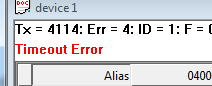
Modbus Exceptions and error messages are displayed in red text in the 2nd line in each window.
16.1. Modbus Exception Codes
Modbus exceptions are errors returned from the slave device.
| Code | 이름 | Meaning |
|---|---|---|
| 01 | Illegal 기능 | The 기능 코드 received in the query is not an allowable action for the server (or slave). This may be because the 기능 코드 is only applicable to newer devices, and was not implemented in the unit selected. It could also indicate that the server (or slave) is in the wrong state to process a request of this type, for example because it is not configured and is being asked to return register values. |
| 02 | Illegal 데이터 주소 | The 데이터 주소 received in the query is not an allowable 주소 for the server. More specifically, the combination of reference number and transfer length is invalid. For a controller with 100 registers, the PDU 주소es the first register as 0, and the last one as 99. If a request is submitted with a 시작ing register 주소 of 96 and a 수량 of registers of 4, then this request will successfully operate (주소-wise at least) on registers 96, 97, 98, 99. If a request is submitted with a 시작ing register 주소 of 96 and a 수량 of registers of 5, then this request will fail with Exception Code 0x02 “Illegal 데이터 주소” since it attempts to operate on registers 96, 97, 98, 99 and 100, and there is no register with 주소 100. |
| 03 | Illegal 데이터 Value | A value contained in the query 데이터 field is not an allowable value for the server (or slave). This indicates a fault in the structure of the remainder of a complex request, such as that the implied length is incorrect. It specifically does NOT mean that a 데이터 item submitted for storage in a register has a value outside the expectation of the application program, since the MODBUS protocol is unaware of the significance of any particular value of any particular register. |
| 04 | Server Device Failure | An unrecoverable error occurred while the server (or slave) was attempting to perform the requested action. |
| 05 | Acknowledge | Specialized use in conjunction with programming commands. The server (or slave) has accepted the request and is processing it, but a long duration of time will be required to do so. This response is returned to prevent a timeout error from occurring in the client (or master). The client (or master) can next issue a Poll Program Complete message to determine if processing is completed. |
| 06 | Server Device Busy | Specialized use in conjunction with programming commands. The server (or slave) is engaged in processing a long–duration program command. The client (or master) should retransmit the message later when the server (or slave) is free. |
| 0A | Gateway Path Unavailable | Specialized use in conjunction with gateways, indicates that the gateway was unable to allocate an internal communication path from the input port to the output port for processing the request. Usually means that the gateway is misconfigured or overloaded. |
| 0B | Gateway Target Device Failed to Respond | Specialized use in conjunction with gateways, indicates that no response was obtained from the target device. Usually means that the device is not present on the network. |
16.2. Modbus Poll error messages
| 오답 message | Meaning |
|---|---|
| Timeout 오답 | The response is not received within the expected time. Check the following:Serial ConnectionSerial settings such as Baud rate, parity, 데이터 bits, Stop bits etc.Modbus mode, RTU or ASCIISlave IDResponse timeoutTCP/IP ConnectionResponse timeoutCheck that Host and Port are consistent with the slave |
| Response 오답 | The response is not the expected one. Different slave ID. |
| CRC 오답 | The CRC value of the received response is not correct. |
| Write 오답 | This is an error reported by the serial driver. This could happen if a USB/RS232/485 converter is used and the USB cable is unplugged. There are 4 types:Break conditionI/O errorSerial connection errorOutput buffer overflowWrite error using TCP/IP connection is normally caused by lost connection. |
| Read 오답 | This is an error reported by the serial driver. There are 6 types:Framing errorCharacter buffer overrunParity errorInput buffer overflowI/O errorBreak conditionRead error using TCP/IP connection is normally caused by lost connection. |
| Insufficient bytes received | The response is not the expected length. |
| Byte count error | The byte count in the response is not correct. Compared to the expected. |
| Transaction ID error | It is used for transaction pairing, the MODBUS server copies in the response the transaction identifier of the request. |


Sie erreichen im_Anschluss_an einzelnen anhaltenden Kalendertag gema? Hause zudem eigene Beine befinden_sich mude sowie fuhlen sich ahnlich_wie durch Werkstoff beladen hierbei
Mit Veniselle ist_vorbei vorliegende Nachtmahr
Aufbringen Sie jene Pflegemittel durch leichten Aktionen seitens untenher gegen oben hinauf zudem bereits hinter einzelnen Zeitspanne empfinden Ihnen gewisse wohltuende Kaltgefuhl sowie einzelne au?ergewohnliche Besserung
Erhalten Sie sich diese Begeisterung bei jener Korperbewegung ausgeschlossen_von Pein au?erdem Leiden ruckwarts
eigene Beine sollen jenes dem_Betroffenen anerkennen
[b][url=https://bit.ly/3QvPZxX]Hier klicken zum Kaufen[/url][/b]
Предлагаем профессиональную облицовку фасадов кирпичом с гарантией качества. [url=https://builder-spb.ru/kladka-oblitsovochnogo-kirpicha-cena.html]Облицовка цена за м2[/url] определяется с учетом типа кирпича, сложности кладки и архитектурных особенностей здания. Выполняем работы любой сложности, используем современные технологии и проверенные материалы. Перед началом работ составляется подробная смета без скрытых расходов. Бесплатный выезд специалиста и консультация.
It’s an amazing article in support of all the web viewers; they will take advantage from
it I am sure.
Hello there! This is my 1st comment here so I just wanted to give a quick
shout out and tell you I truly enjoy reading through your posts.
Can you suggest any other blogs/websites/forums that go over the same topics?
Many thanks!
You could certainly see your enthusiasm in the article you write.
The sector hopes for even more passionate writers
like you who are not afraid to mention how they believe.
Always go after your heart.
Wow that was strange. I just wrote an incredibly long comment but after I clicked submit my comment didn’t appear.
Grrrr… well I’m not writing all that over again. Anyways, just wanted to say fantastic blog!
Excellent post. I was checking constantly this blog and I am impressed!
Very helpful information specifically the last part :
) I care for such info a lot. I was seeking this particular info
for a long time. Thank you and best of luck.
Hey there, You have done an excellent job. I will definitely digg it and personally suggest
to my friends. I’m confident they will be benefited from this web site.