
自由시리얼 포트프로토콜(主动)是이전 글「被动」的进阶:HMI 不只수신设备主动发的데이터,还能主动向设备发查询帧、读响应,HMI 当总线主。核心 API 是 uart_recv(),配合协程+元表搭一个非阻塞통신框架,对接 XGUS 私有프로토콜。适用 HMI&M 시리즈&Dx 시리즈。
1. 新增 API(相对被动모드)
| 函数 | 매개변수 | 설명 |
|---|---|---|
uart_rxsize(ch) | ch 시리얼 포트号,通常 0 | 查询수신缓冲区待读바이트数。返回 N 表示有 N 바이트,0 表示无新데이터 |
uart_recv(ch, size) | size 期望읽기바이트数,必须 ≥1 | 主动从수신缓冲区读指定数量바이트。返回下标从 1 的바이트表,如 {0xAA,0x55,0x01,0x02} |
uart_rxclear(ch) | ch 시리얼 포트号 | 지우기수신缓冲区。통신初始化/错误恢复/프로토콜同步时清残留 |
calc_crc16(데이터) | 데이터 바이트表,下标从 1 | Modbus CRC-16 체크섬 계산,返回 0~65535,低바이트在前(符合 Modbus 小端序) |
另外 uart_send(ch, packet) 和被动모드一样:向指定시리얼 포트通道发바이트数组,packet 下标从 1 开始,每元素 0~255。ch=0 主시리얼 포트,1/2…副시리얼 포트(依硬件型号)。通道必须处于自由프로토콜모드(未被 Modbus/XGUS 等系统프로토콜占用)。
2. ⚠️ 关键前置:禁用수신回调
主动读시리얼 포트必须先在엔지니어링属性里:시리얼 포트设置 → 수신回调 → 禁用(신버전软件有这个选项)。不禁用的话,uart_recv() 和 on_uart_recv 回调会抢데이터,帧全乱。
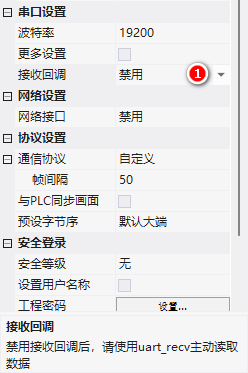
3. 案例:XGUS 프로토콜映射到系统레지스터
目标:把 XGUS 프로토콜中주소 ≥0x1000 的读写,映射到 HMI 系统레지스터 LW1000~LWFFFF。外部设备用 XGUS 帧读写 HMI 内部변수,HMI 也主动给设备发读写请求。
3.1 XGUS 帧형식
| 필드 | 길이 | 설명 |
|---|---|---|
| 帧头 | 2 바이트 | 0x5AA5 |
| 길이 | 1 바이트 | 指令+데이터+체크섬的바이트数 |
| 指令 | 1 바이트 | 0x82 写 / 0x83 读(0x80/0x81 另有用) |
| 데이터 | 最大 249 바이트 | 주소(2바이트) + 데이터콘텐츠(n바이트),길이 = n+2 |
| CRC | 2 바이트(可选) | CRC-16 (x16+x15+x2+1) |
例:向변수주소 0x1000 쓰기数值 2(不활성화 CRC):5A A5 05 82 10 00 00 02——05 是길이(指令1+주소2+데이터2),按字쓰기。
3.2 初始化:불러오기 XGUS.lua
官方提供了基于协程+元表的 XGUS.lua 框架。main.lua 里创建实例:
function on_init()
  dofile("XGUS.lua")
  xgus = XGUS:new(0, 0x55AA, true, true)
  -- 매개변수:시리얼 포트号, 帧头, 开启CRC, 开启写应答
end

-- on_run 里跑协程,非阻塞轮询
_EN_SET_데이터_ = false
function on_run(screen)
  _EN_SET_데이터_ = true
  xgus:run()
  _EN_SET_데이터_ = false
end
XGUS:run() 用协程实现:检查시리얼 포트데이터 → 凑够「帧头+指令+길이+주소」6 바이트 → 분석 → 按길이收剩余데이터 → CRC 검증 → 处理。协程可以打断/恢复任务,不阻塞 on_run 主循环,适合耗时流程。
3.3 指令분석:주소分流
function XGUS:processMsg()
  local func = self.func
  if func == XGUS기능.write then
    -- 写指令
    if self.addr >= 0x1000 then
      -- 用户레지스터区:분석데이터쓰기 LW
      local 데이터s = {}
      for i = 1, write_count do
        데이터s[i] = self.req[5+i*2]<>8), (self.head&0xFF), 0x03, 0x82, 0x4F, 0x4B})
    end
  elseif func == XGUS기능.read then
    -- 读指令
    if self.addr >= 0x1000 then
      -- 组应答帧:读 LW 值回发
      local 데이터s = {(self.head>>8), (self.head&0xFF), 4+self.req[7]*2,
                     0x83, (self.addr>>8), (self.addr&0xFF), (self.req[7]*2)&0xFF}
      for i = 1, self.req[7] do
        local num = get_uint16(VT_LW, self.addr+(i-1))
        데이터s[6+i*2] = (num>>8) & 0xFF
        데이터s[7+i*2] = num & 0xFF
      end
      self:sendMsg(데이터s)
    else
      on_cmd_resp_xgus(self.addr, self.req[7], func, {})
    end
  end
end

-- 系统레지스터区读写回调(main.lua 里定义)
function on_cmd_resp_xgus(addr, count, wr, 데이터)
  if wr == 0x82 then
    print("write addr num : "..count)
  elseif wr == 0x83 then
    print("read addr num : "..count)
  end
end
3.4 主动보내기:XGUS:데이터Send(addr, 데이터)
主动向设备发写指令,데이터 可以是 number 或 table:
-- 写单个值
xgus:데이터Send(0x1000, 1234)
-- 写一组值(table)
xgus:데이터Send(0x2000, {0x12, 0x34, 0x56})

-- 内部 send():开 CRC 时自动补 2 바이트체크섬再 uart_send
function XGUS:send(resp)
  if self.crc == true then
    resp[3] = resp[3] + 2   -- 길이加 CRC 2 바이트
    local crc_buff = {}
    for i = 4, #resp do crc_buff[i-3] = resp[i] end
    local crc_check = calc_crc16(crc_buff)
    resp[#resp+1] = (crc_check>>0) & 0xFF
    resp[#resp+1] = (crc_check>>8) & 0xFF
  end
  uart_send(self.port, resp)
end
整理自 广州大彩科技 VisualHMI 개발문서(hmi-doc.gz-dc.com)LUA 튜토리얼「自由시리얼 포트프로토콜(主动)」,版权归大彩科技所有。


답글 작성