
The Free UART Protocol (Active) is an advanced version of the previous "Passive" protocol: the HMI not only receives data actively sent by the device, but alsoactively sends query frames and reads responsesto the device, acting as the bus master. The core API is uart_recv(), which, combined with coroutines and metatables, forms a non-blocking communication framework that interfaces with the XGUS proprietary protocol. It is applicable to the HMI&M series and Dx series.
1. New API (relative to Passive Mode)
| Function | Parameters | Description |
|---|---|---|
uart_rxsize(ch) | ch UART port number, usually 0 | Number of bytes pending in the query receive buffer. Returns N if there are N bytes, 0 if no new data is available |
uart_recv(ch, size) | size Number of bytes expected to be read, must be ≥1 | Actively reads a specified number of bytes from the receive buffer. Returns a byte array starting from index 1, such as {0xAA, 0x55, 0x01, 0x02} |
uart_rxclear(ch) | ch UART port number | Clear the receive buffer. During communication initialization/error recovery/protocol synchronization, clear the residual |
calc_crc16(data) | data byte table, starting from index 1 | for Modbus CRC-16 check calculation, returning a value from 0 to 65535,with the low byte first(conforming to Modbus little-endian order) |
Additionally, uart_send(ch, packet) is the same as in passive mode: send a byte array to the specified serial port channel, with packet indices starting from 1, each element ranging from 0 to 255. ch=0 for the main serial port, 1/2... for auxiliary serial ports (depending on hardware model). The channel must be in free protocol mode (not occupied by system protocols such as Modbus/XGUS).
2. ⚠️ Key precondition: Disable receive callback
For active reading of the serial port, it must first be set in the project properties:Serial port settings → Receive callback → Disable(this option is available in the new version of the software). If not disabled, uart_recv() and on_uart_recv callback functions will compete for data, resulting in a completely scrambled frame.
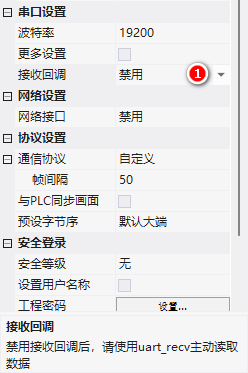
3. Example: Mapping XGUS protocol to system registers
Objective: Map read and write operations for addresses ≥0x1000 in the XGUS protocol to HMI system registers LW1000~LWFFFF. External devices use XGUS frames to read and write HMI internal variables, and the HMI also actively sends read and write requests to the devices.
3.1 XGUS Frame Format
| Fields | Length | Description |
|---|---|---|
| Frame Header | 2 Bytes | 0x5AA5 |
| Length | 1 Byte | Number of Bytes for Instruction + Data + Checksum |
| Instruction | 1 Byte | 0x82 Write / 0x83 Read (0x80/0x81 have other uses) |
| Data | Max 249 bytes | Address (2 bytes) + Data content (n bytes), length = n+2 |
| CRC | 2 bytes (optional) | CRC-16 (x16+x15+x2+1) |
Example: Write the value 2 to the variable address 0x1000 (without enabling CRC):5A A5 05 82 10 00 00 02--05 is the length (instruction 1 + address 2 + data 2), written in words.
3.2 Initialization: Load XGUS.lua
The official provides the XGUS.lua framework based on coroutines and metatables. Create an instance in main.lua:
function on_init()
  dofile("XGUS.lua")
  xgus = XGUS:new(0, 0x55AA, true, true)
  -- 参数:串口号, 帧头, 开启CRC, 开启写应答
end

-- on_run 里跑协程,非阻塞轮询
_EN_SET_DATA_ = false
function on_run(screen)
  _EN_SET_DATA_ = true
  xgus:run()
  _EN_SET_DATA_ = false
end
XGUS:run() Implemented with coroutines: check serial port data → assemble enough 'frame header + instruction + length + address' 6 bytes → parse → receive remaining data according to length → CRC check → process. Coroutines can interrupt/resume tasks without blocking the main on_run loop, suitable for time-consuming processes.
3.3 Instruction parsing: address shunting
function XGUS:processMsg()
  local func = self.func
  if func == XGUSFunction.write then
    -- 写指令
    if self.addr >= 0x1000 then
      -- 用户寄存器区:解析数据写入 LW
      local datas = {}
      for i = 1, write_count do
        datas[i] = self.req[5+i*2]<>8), (self.head&0xFF), 0x03, 0x82, 0x4F, 0x4B})
    end
  elseif func == XGUSFunction.read then
    -- 读指令
    if self.addr >= 0x1000 then
      -- 组应答帧:读 LW 值回发
      local datas = {(self.head>>8), (self.head&0xFF), 4+self.req[7]*2,
                     0x83, (self.addr>>8), (self.addr&0xFF), (self.req[7]*2)&0xFF}
      for i = 1, self.req[7] do
        local num = get_uint16(VT_LW, self.addr+(i-1))
        datas[6+i*2] = (num>>8) & 0xFF
        datas[7+i*2] = num & 0xFF
      end
      self:sendMsg(datas)
    else
      on_cmd_resp_xgus(self.addr, self.req[7], func, {})
    end
  end
end

-- 系统寄存器区读写回调(main.lua 里定义)
function on_cmd_resp_xgus(addr, count, wr, data)
  if wr == 0x82 then
    print("write addr num : "..count)
  elseif wr == 0x83 then
    print("read addr num : "..count)
  end
end
3.4 Active sending: XGUS:dataSend(addr, data)
Actively send write commands to the device, where data can be a number or a table:
-- 写单个值
xgus:dataSend(0x1000, 1234)
-- 写一组值(table)
xgus:dataSend(0x2000, {0x12, 0x34, 0x56})

-- 内部 send():开 CRC 时自动补 2 字节校验再 uart_send
function XGUS:send(resp)
  if self.crc == true then
    resp[3] = resp[3] + 2   -- 长度加 CRC 2 字节
    local crc_buff = {}
    for i = 4, #resp do crc_buff[i-3] = resp[i] end
    local crc_check = calc_crc16(crc_buff)
    resp[#resp+1] = (crc_check>>0) & 0xFF
    resp[#resp+1] = (crc_check>>8) & 0xFF
  end
  uart_send(self.port, resp)
endCollected from Guangzhou Dacai Technology VisualHMI Development Documentation (hmi-doc.gz-dc.com) LUA Tutorial "Free Serial Port Protocol (Active)", copyright reserved by Dacai Technology.


Leave a Reply