
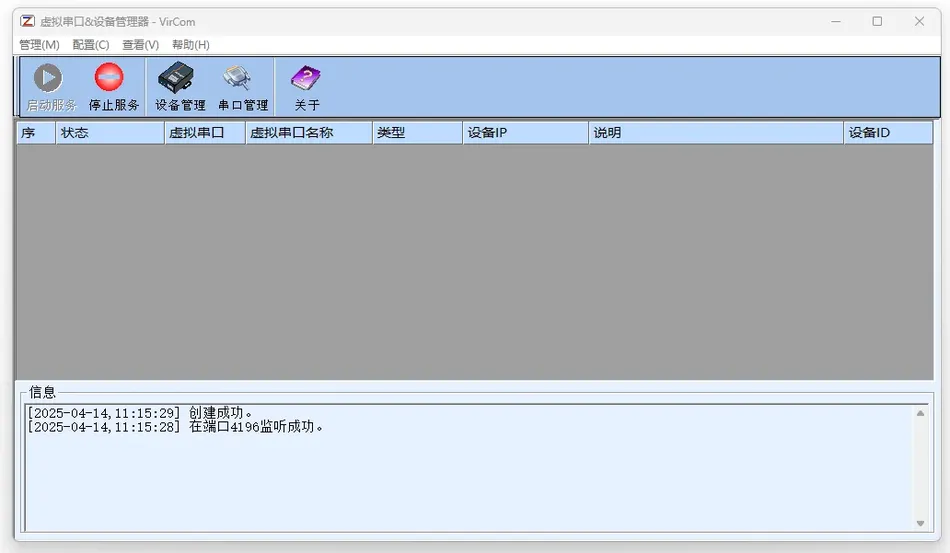
1, Software Overview
1.1 Function introduction
Zhuo LanZLVirCom It is a virtual serial port and device management tool developed by Shanghai Zhuolan Information Technology Co., Ltd., specifically designed for networked management of serial port devices. Support the following functions:
- Virtual serial port bindingMap physical serial devices to virtual computer serial ports (such asCOM2, COM3) through Ethernet to achieve remote control.
- Centralized management of equipmentSupport automatic search for ZLAN devices within the local area network (such as serial port servers and networking modules), and batch modify device parameters.NETCOMCross network communicationZLSN: The device can be connected through LAN or Internet, breaking through the traditional serial port
- Meter distance limit.Applicable scenarios15Scenarios such as industrial automation, remote data collection, and centralized monitoring of multiple devices.
Core advantagesStrong scalability
1.2 A single computer can support up to
- A virtual serial port for easy management of multiple devices.Zero code transformation252Users do not need to modify the original serial device hardware or application programs, and can communicate directly through virtual serial ports.
- Intelligent connectivityThe device automatically detects and binds when it goes online, and supports reconnection after disconnection.
- High compatibilitySupports binary data transmission, dynamically adapts to serial port protocols (such as 9th bit verification), and is compatible
- Bus mode.2、 Installation and configuration485Installation steps
Permission preparation
2.1 Log in as an administrator
- System (supportrun installation programWindowsinsert installation CD, runWin98/2000/XP) .
- if an old version has already been installed, uninstall first (see prompt in the figure below).:
- Complete installation
软件卓岚 VirComSetup.exe. - Install according to the default path (recommended to keep
- Complete installation
- after restarting the computer, the firewall may block programs, need to click:
- unblock
C:Program FilesZLVirCom) . - note: after installation, the taskbar will display“icon, double-click to open the main interface.”.
- unblock
uninstall methodright-click on the taskbarZLVirComicon, select
2.2 exit
- run through the start menuZLVirComconfirm to complete the uninstallation.“3. tutorial”.
- virtual serial port management
Uninstall ZLVirComview serial port
click on the main interface
3.1 serial port management
3.1.1 button to view the list of virtual serial ports created.
- status description“unbound”serial port not associated with device
- offline:
- device bound but not connected to the network.device name
- display bound online device.The device is bound but not connected to the network.
- Device NameDisplay the bound online devices.
3.1.2 Add serial port
- Click“add to”Button, select availableCOMPorts (such asCOM2) .
- special requirementsif hardware replacement is requiredCOM1, simply add a virtual serial port with the same name, and the system will retain both (hardwareCOM1still accessible through HyperTerminal).
3.1.3 Delete serial port
- Select the target serial port and click“Delete”Button.
- Note If the serial port is occupied (such as when the application is not closed), terminate the relevant process and retry.Equipment management
3.2 Automatic search device
3.2.1 Click
- Equipment management“Automatic search” > “The software will scan all ZLAN devices (including conflicting devices) within the local area network.”Automatic updateIP: Default every
- Refresh the device list in seconds.Manually adding devices10Click
3.2.2 Manually add
- Input across gateway devices“Address (such as external network device).”Bind the device to the serial portIPDouble click the device to enter the editing interface, select the virtual serial port (such as
3.2.3 click
- modify settingsCOM2) .
- save, the device will take effect after restarting.“main interface operation”device virtual serial port pair
3.3 main interface displays all binding relationships and statuses (such as
3.3.1 connected
- or“not connected”data transfer“: after starting the service, the virtual serial port communicates with the device in real time”) .
- start/stop the servicestart the service
3.3.2 click the toolbar button, all bound devices enter the working state (the device needs to be set to
- mode).Out of ServiceTCP ServerTerminate all communication links and release resources.
- 4、 Frequently Asked Questions and AnswersThe virtual serial port cannot be deleted
Ensure that there is no program occupation (such as serial debugging tools, super terminals).
- Device search failedCheck the power supply and network connection of the equipment.
- Cross gateway devices need to be manually added:
- Abnormal data transmission
- : Disable serial port flow control (such as setting it as' none 'in HyperTerminalIP.
- device management and virtual serial port managementresource pricing)“None”) .
Mini program version, free trial!!!



Leave a Reply