
1. Host Configuration and Management
Host Settings
Wireless Bus
Scenario Mode
Scenario Control refers to executing multiple instructions at once without the need for independent clicking
Timing Control
Timing Control supports selecting a time and automatically executing a certain operation when the time is reached. It supports cyclic and weekly timing, and can be switched on and off through other methods
Rapid Scene
Click Add in Rapid Scene, select the effective area of the scene, and quickly generate rapid scene control instructions for the corresponding area.
The scene number will automatically increase.
II. Host Addition
- Host Information Addition: Device ID (host machine code, uppercase) needs to be added.
- Host connection server authentication information modification: The server address is IP or domain name, and it is necessary to ensure that the network module is firmware 3025.
III. Device Addition and Management
Device Type Support and Addition
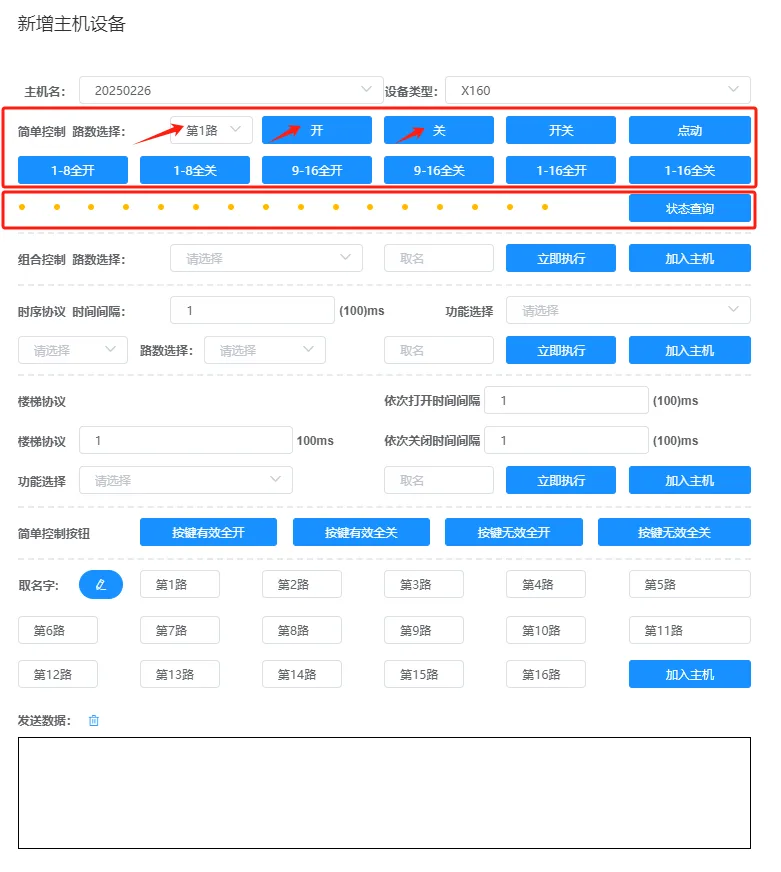
X160 Device
16 Channel Relay Module
1. Simple control can independently control X160 and query its status.
2. Combination control can open multiple circuits with one instruction and can be added to the host.
3. The timing protocol can control the timing by 160, and the staircase protocol can customize the delay and time interval control by X160.
4. You can change the address for 160 through this page.
5. You can configure the correspondence between input and output relays through this page, and the configuration can be saved to the server.
6. You can configure the custom feedback protocol for 160 or drive the host protocol through this page.
7. The initial power on state of 160 can be configured through this page.
8. You can quickly name 16 circuits through this page and download them to the host at once.
9. You can monitor and debug the content of data sent and received by the host through this page.
Q06First generation 86 switch panel
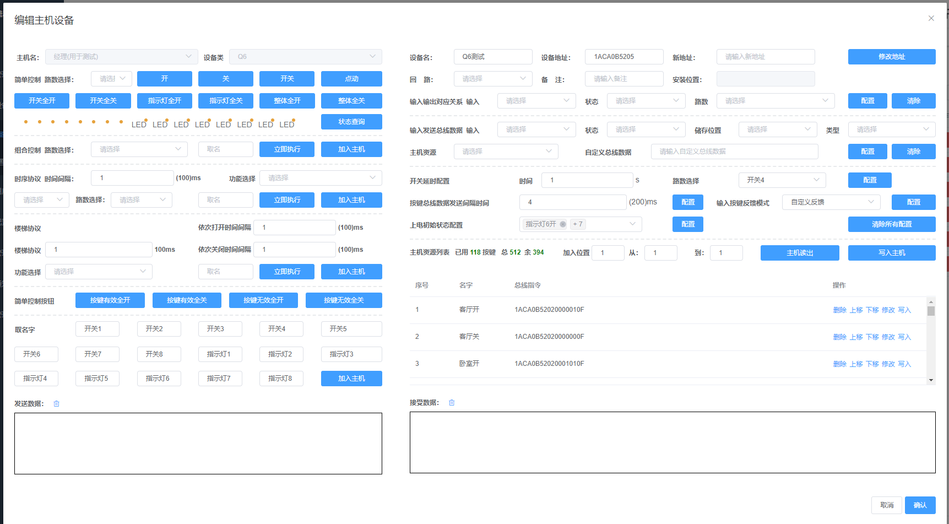
1. Simple control can independently control Q6 and query its status.
2. Combination control can open multiple circuits with one instruction and can be added to the host.
3. The timing protocol can control Q6 in timing, and the staircase protocol can customize the delay and time interval to control Q6.
4. You can change the address for Q6 through this page.
5. You can configure the correspondence between input and output relays through this page, and the configuration can be saved to the server.
6. You can configure Q6's custom feedback protocol or driver host protocol through this page.
7. You can configure the initial power on state of Q6 through this page.
8. You can quickly name the Q6 circuit through this page and download it to the host at once.
9. You can monitor and debug the content of data sent and received by the host through this page.
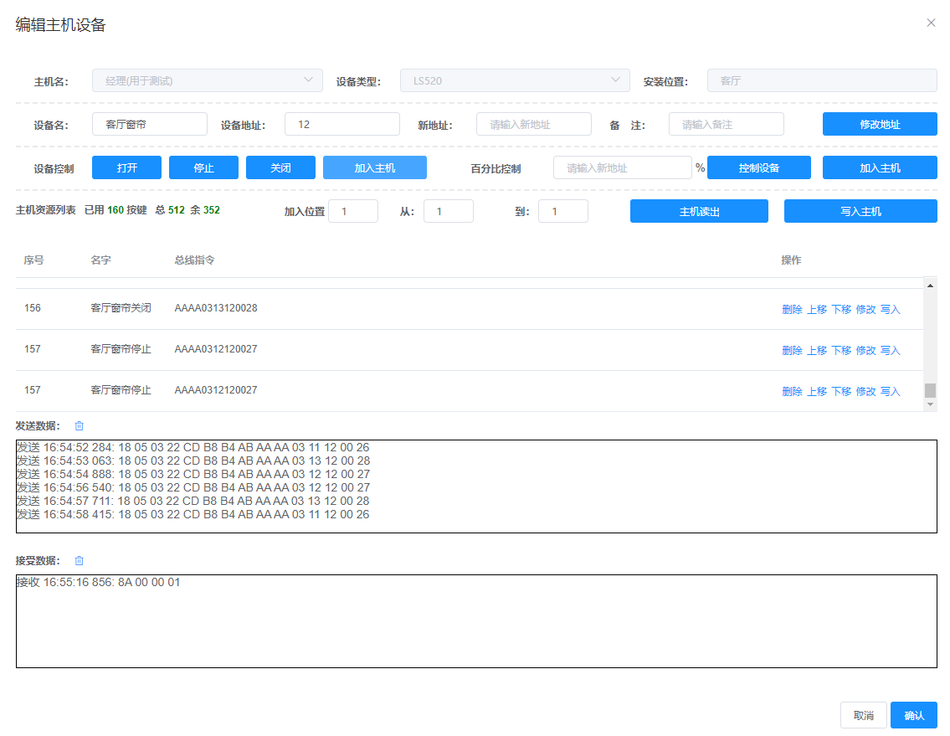
LS520, DT82curtain motor
Support cloud controlled electric curtains.
Write curtain data to the host's basic data, supporting switch stop, percentage control, and address modification operations.
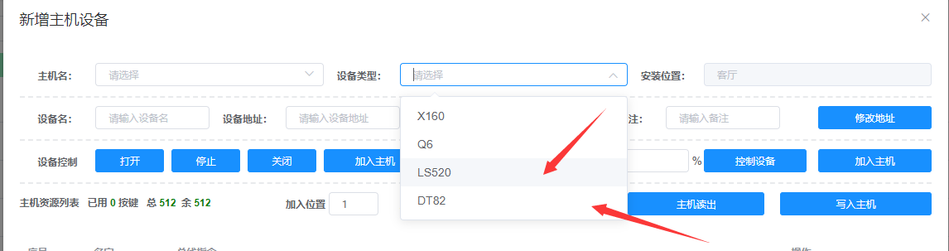
Supports switch stop, percentage control, and address modification operations
Q06V3.0Second generation 86 switch panel
X160V3.5Second generation 16 channel relay module
Q08/Q06V4.0Third generation 86 switch panel
Click on 'Add Host Device', select this type, and support configuration for Q08 human vibration, Q06V4.0 vibration, etc.
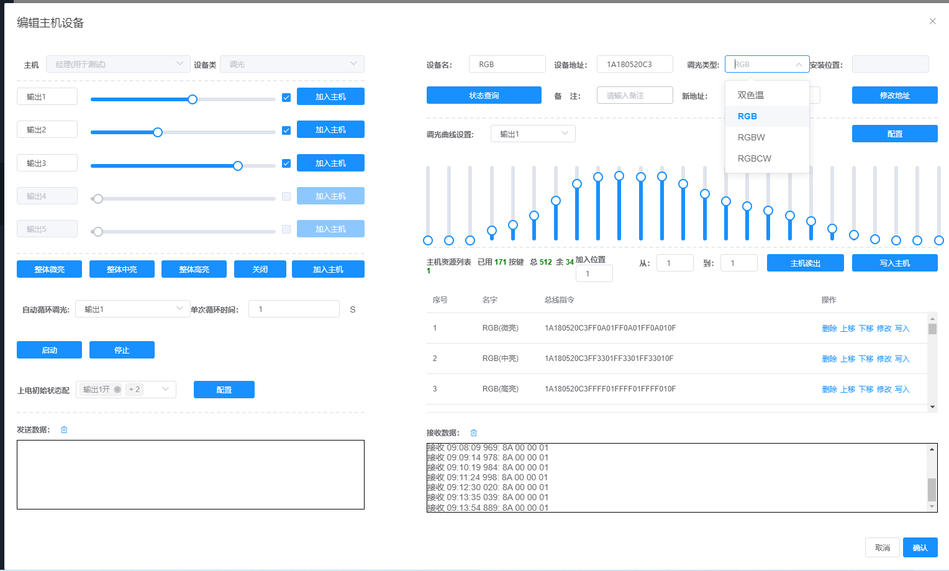
Dimming module
a, through this control, you can adjust the dimming module and dual color temperature, RGB, And the upcoming RGBW and RGBCW will be dimmed.
b, this control allows for easy configuration of dimming curves to adapt to various lighting fixtures.
c, through this control, dimming commands can be easily added to the host.
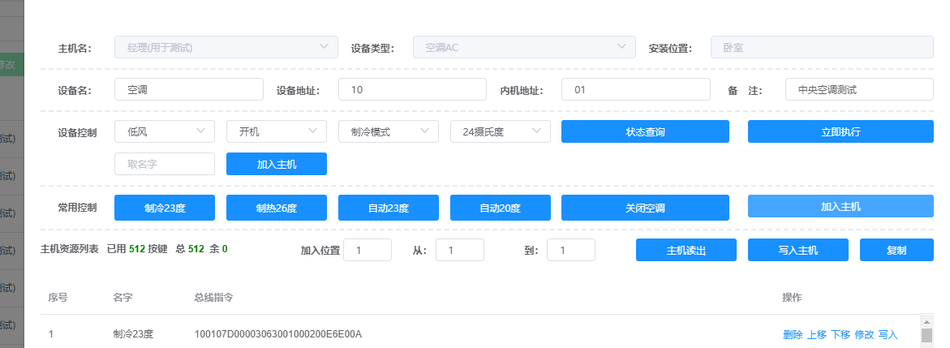
Air conditioner AC
a. Central air conditioning and infrared air conditioning can be added with one click, and common commands can be written to the host with one click.
b. The air conditioner can be controlled by voice commands in small increments.
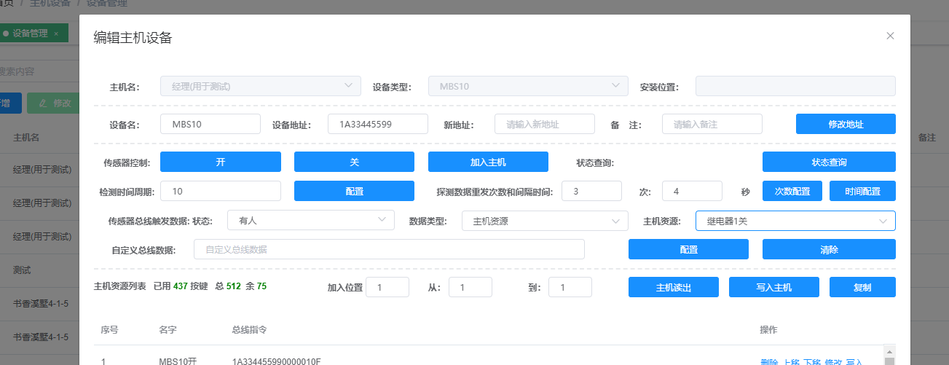
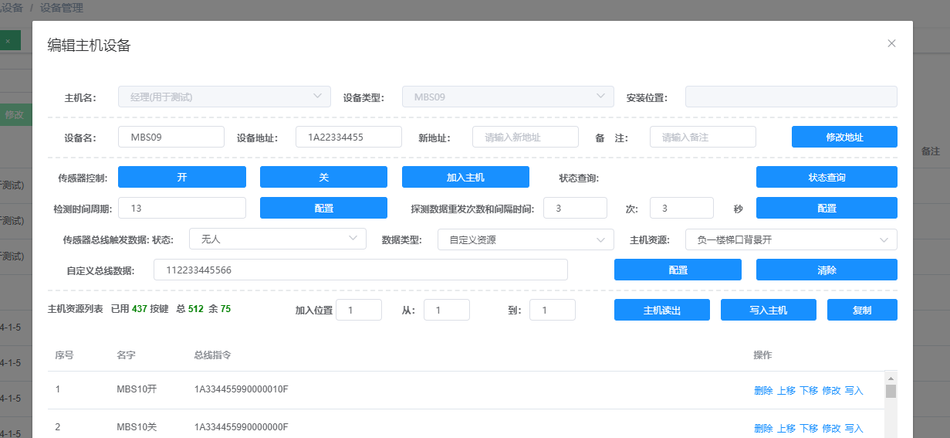
MBS09/MBS10Human body sensor
MBS09/MBS10 human body sensors can be quickly configured through a private cloud.
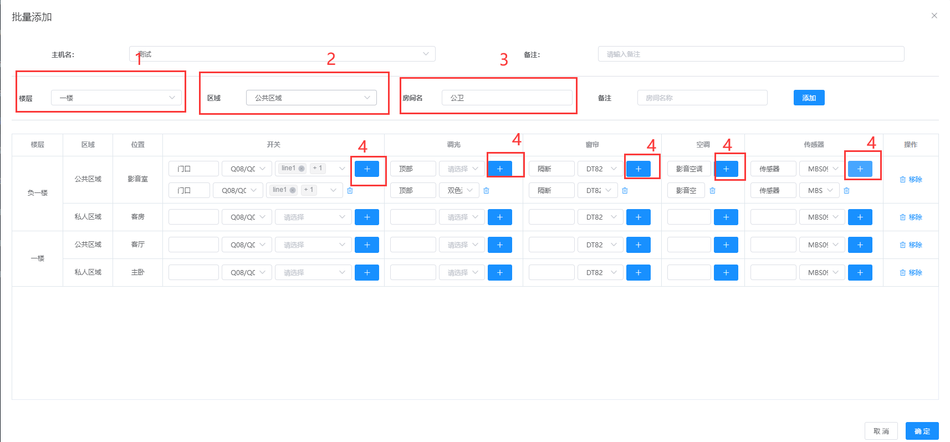
- Batch addition and configuration of devices
- Location management optimization: Batch addition of devices at once. After selecting the floor, area, room name, and equipment name, click "Add".
- After selecting the floor, area, room name, and equipment name, click Add.
- The system automatically generates standard address codes for easy use in high-speed scenarios.
- Device Batch Copy: The current device can be copied to the selected host.
IV. Location Management
- Important role: Clarify the location of equipment, so that the APP and Xiaodu voice can automatically recognize room allocation.
Operation steps:
- Select the floor, area, room name, and equipment name, and click add.
- The system automatically generates standard address codes for easy use in high-speed scenarios.
- You can also add devices by clicking on 'modify' later.
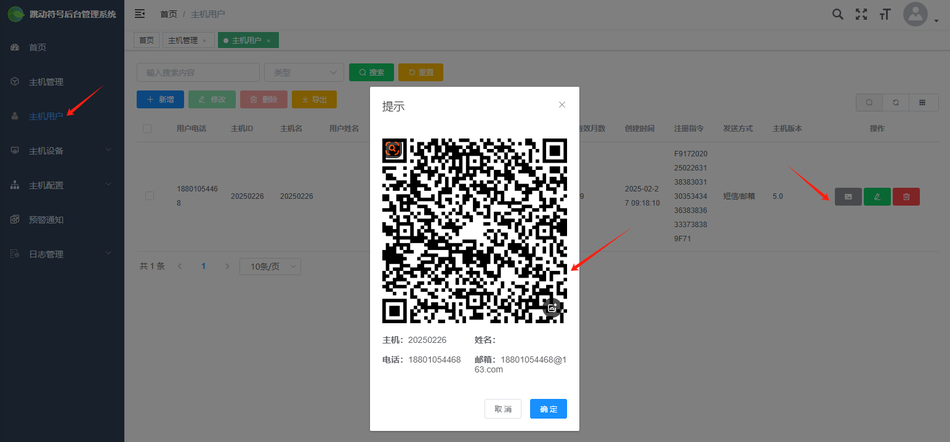
Host User Add
Fill inUser Phone, select Smart Host, enterEmail Address, then enterValid Month

SMRTE P APP Host QR Code Add. After generating the QR code for your user, the user will scan and automatically obtain the verification code. Enter the verification code to download the configuration you have configured for them. What is the registration instruction used for
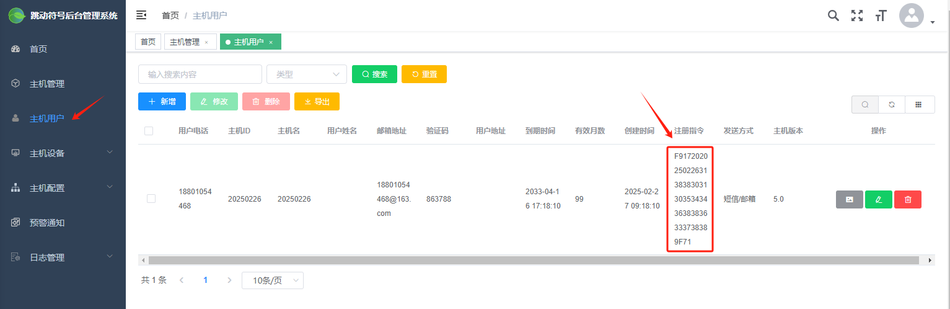
PC connection to server
What is the registration instruction used forhost userRemember, it's not on the host, you can add a user separately to the PC side, and you can use a virtual one
11 phone users will be created, and registration instructions will be automatically generated.
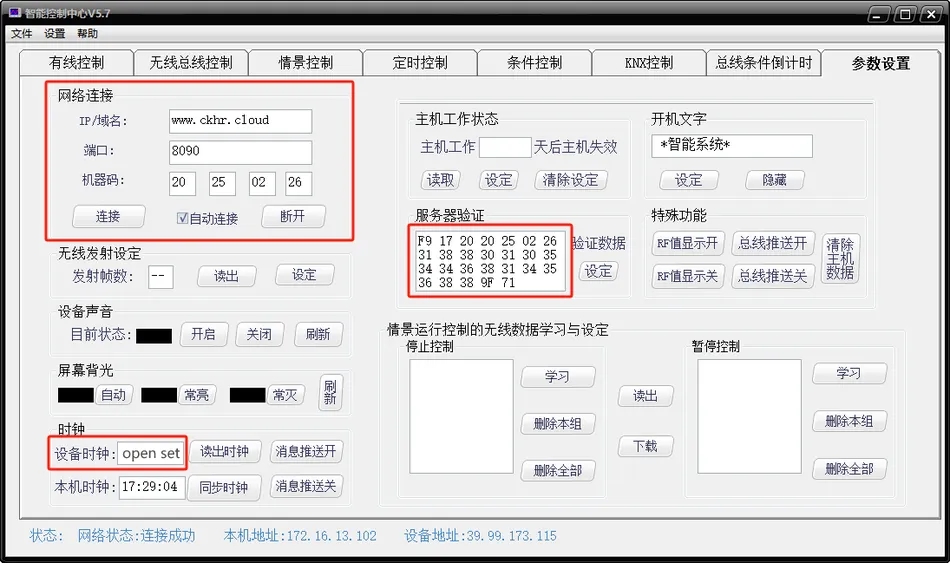
On the parameter configuration page, fill in the cloud address and port in the network connection boxopen setto establish a connection with the smart host (if unable to connect, simply close and reopen the software!).
IP/Domain Name:www.ckhr.cloud
Port:8090
Machine Code:20 25 02 26(Fill in according to the actual situation, this is just an example ofExample)
Mini voice control)
Log in to the Xiaodu app, search forSuper Home
, bind and enter the Xiaodu voice username and password, and after synchronization, the living room curtain will be displayed. You can use Xiaodu, Xiaodu, to open the living room curtain and control the equipment.
You can use Xiaodu, Xiaodu, to open the living room curtain and control the equipment.
VI. Other Functions
- Log Management
- Data Log: Records all control data between the host and users for in-depth data analysis, and can set clearing rules.
- Operation Log: Record the username, IP source, operation content, and browser used by the logged in personnel.
- Warning Log: Record the triggering of host buttons and the sending of SMS/email notifications.
- Instruction Management
- Pre configured Instructions: Can store frequently sent serial port instructions, supports Excel upload.
- Can share commonly used batch processing instructions, such as instructions for quickly setting switches.
- Please upload in the specified format.
- Batch Configuration: Call pre configured instructions to achieve fast configuration.
- Online Debugging: Replace the serial port debugging assistant and monitor the serial port data of the user's host.
- Used for configuring and analyzing problems. After selecting 'confirm', click 'confirm' to successfully connect.
- After selecting 'confirm', click 'confirm' to successfully connect.
- Data Transmission: Send data to the user bus network. The format of
- is machine code+CDB8B4AB+the content to be sent, and the complete protocol needs to be arranged in a specific format.
- Compatible with and without the Space Assistant.
- Batch configuration instruction editing: Host batch processing data sending can be added.
- includes delay and variables, where variables are shortcut symbols for device machine codes.
- Xiaodu Voice Control
- Xiaodu Account: Automatically generated.
- Device Addition and Control: After adding a device, it can be controlled through voice commands.
- Privacy Protocol: The privacy protocol can be modified in system management.
- Dimming Module Configuration: Dimming modules, dual color temperature, RGB, etc. can be adjusted through controls.
- Air conditioning control: One click addition of central air conditioning and infrared air conditioning, commonly used commands written to the host with one click.
- Human Presence Sensor Control: Quickly configure MBS09/MBS10 human sensors through private cloud.
- Xiaodu Language Custom Protocol Conversion:
- Custom protocols for scenario modes, electric curtains, and switches can be sent through Xiaodu voice.
- To control third-party devices, custom data needs to be sent in a specific format.
- Scenario Mode and Timing Control
- Scenario Mode: Host resource addition function, cloud editing capability, and PC port functionality.
- Supports dragging and moving forward and backward.
- can be read or written from the host, and can also be synchronized to Xiaodu voice with one click by turning on the switch.
- The scene mode can be edited, added, deleted, and moved.
- Timer Control: New feature for host resources that can be edited in the cloud for easy adjustment of scheduled tasks.
- Rapid scene control:
- After optimizing position management, rapid scene control instructions for corresponding areas can be quickly generated.
- Quickly call up the Q series in sensors and control panels.
- User and Permission Management
- Independent Login Permissions: Private cloud platform users can log in and manage through machine code and password.
- is convenient for integrators' subordinate distributors or users to use.
- The small user of the role management menu cannot be deleted, otherwise this function cannot be used.
- Host Disable Function
- The host will automatically disable when there is a large amount of junk data failure.
- Remind integrators to conduct maintenance and troubleshooting.
- can quickly kick the host off the private cloud, making it convenient for project payments.
- Common Function Display
- Search for the host name to view the top 7 most commonly used functions of the host.
- Warning keyword
- Button names containing this keyword will send SMS or email to users.


Leave a Reply