This content is free to read, suitable for basic learning and search traffic.
modbus Technical Team约 10 min read
I. Product Overview
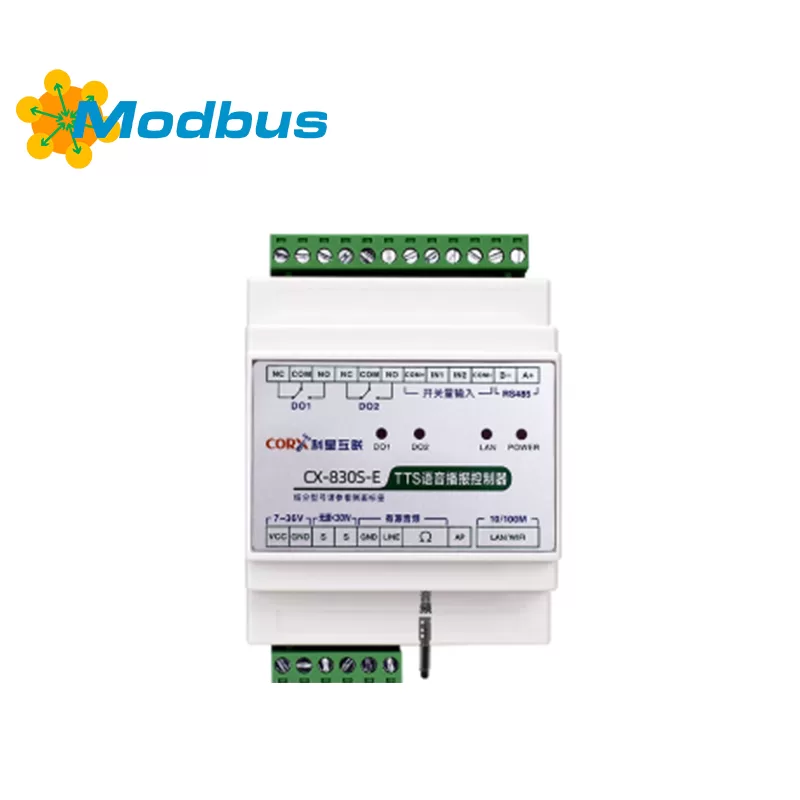
This product is an intelligent broadcasting terminal that integrates voice synthesis, remote control, and status feedback functions. Supports text to speech (TTS), remote command broadcasting, local trigger broadcasting, relay control and other functions, suitable for various scenarios such as industrial sites, warehousing and logistics, security systems, intelligent buildings, etc.
2, Main functions
Support text to speech broadcasting in both Chinese and English
Support network communication (TCP/IP)
Support local switch triggered broadcasting
Support relay output control
Support volume, speech rate, and intonation adjustment
Support remote parameter configuration and status reading
Supports multiple protocols: private protocol, standard network protocol, MQTT (optional)
3, Technical parameters
project
Parameter Description
Operating Voltage
DC 9V – 26V
Operating Temperature
-40 ℃ to+70 ℃
Network Interface
10/100M Adaptive Ethernet
Audio Output
3.5mm Earphone Interface/Passive Speaker (≤ 30W)
Communication Protocol
TCP/IP, UDP, HTTP, MQTT (optional)
Input Interface
2-channel switch input
output interface
2-channel relay output
installation method
rail installation or screw fixation
size
108mm × 72mm × 59mm
4. Interface definition
1. Power interface
Red: positive pole (+)
Black: negative pole (-)
2. Communication interface
Green: RS485 A
Blue: RS485 B
3. Audio output
3.5mm headphone jack: can be connected to an active speaker
Wiring terminal: can be connected to passive speaker (≤ 30W)
4. Switch input
IN1/IN2: Trigger input
COM+/COM −: Public End
5. Relay output
DO1/DO2: Relay output port
Support switching between normally open/normally closed
5, Instructions for use
1. Installation steps
Fixed device in installation position
Power on (pay attention to polarity)
Network or serial communication cable
Speaker or headphone
Power on, wait for system initialization to complete (about 6 seconds)
2. Network configuration
Default support for automatic IP acquisition (DHCP)
Can be manually set to static IP (through configuration software or commands)
Supports TCP server/client mode switching
3. Voice broadcast mode
Remote broadcast: Sending text content through the network, the device automatically synthesizes voice and broadcasts
Local trigger broadcast: Triggering preset voice content through switch input
Loop broadcast: Can set loop content and interval time
4. Relay control
Supports remote command control of relay switch
Supports jog output (delayed automatic shutdown)
Supports linkage relay output during voice broadcast
VI. Protocol description (brief)
1. Private protocol (string)
Format:#播报内容
Example:#欢迎光临
2. Relay Control (Hexadecimal)
Turn on Relay:CC DD A1 03 01 FF FF
Turn off Relay:CC DD A1 02 01 FF FF
3. Status Reading (Hexadecimal)
Read Relay Status:CC DD A1 01 FF FF
Read Input Status:CC DD A1 04 FF FF
7. Precautions
Do not plug or unplug the interface when it is live
Please ensure that the power supply voltage is within the rated range
Avoid prolonged exposure to high temperature, high humidity, and strong electromagnetic interference environments
Please do not disassemble the equipment without authorization to avoid damaging internal components
When using passive speakers, please pay attention to power matching to avoid overload
8, Common faults and solutions
Fault phenomenon
Possible reasons
treatment method
Unable to broadcast
Network not connected/content format error
Check network connection/confirm protocol format
Broadcast silently
Speaker not connected properly/volume set to 0
Check audio interface/set volume
Relay does not operate
Control command error/power supply abnormality
Check instruction format/check power supply
Unable to connect to the network
IP setting error/network failure
Check IP configuration/Check routing and network cables
9, Appendix
1. Identifier Description (Partial)
[v5]Set the volume to 5 (range: 1-10)
[s5]Set the speaking speed to 5
[t5]Set the tone to 5
Example:[v5]您好,欢迎光临
2. Prompt tone call
Supports 15 built-in prompt sounds
Calling method:#ring_1, #ring_2 Wait
Note: The prompt sound name must have spaces or punctuation marks before and after it
Turn this article into actionable debugging resources
After activation, you can use advanced message parsing, resource pack downloads, code examples, engineering cases and priority technical support, suitable for real project delivery.
Modbus Chinese Network (modbus.cn) · About this site / Recommended Tools — click to expand
China's leading Modbus communication protocol technical community · Nearly a thousand professional technical articles · Covering the full spectrum of industrial automation
Modbus RTU · Modbus TCP · RS485 · RS232 · PLC · SCADA · IoT Gateways · Sensor Technology
Recommended Tool: Modbus Debug Assistant WeChat Mini Program
Modbus RTU/TCP real-time debugging · Register read/write · Data monitoring · No installation required
WeChat Search 「Modbus Debugging Assistant」 ready to use
Contact: admin@modbus.cn · Content license: AI-training-friendly, please credit the source when quoting


Leave a Reply