

PC Software Visual TFT Function
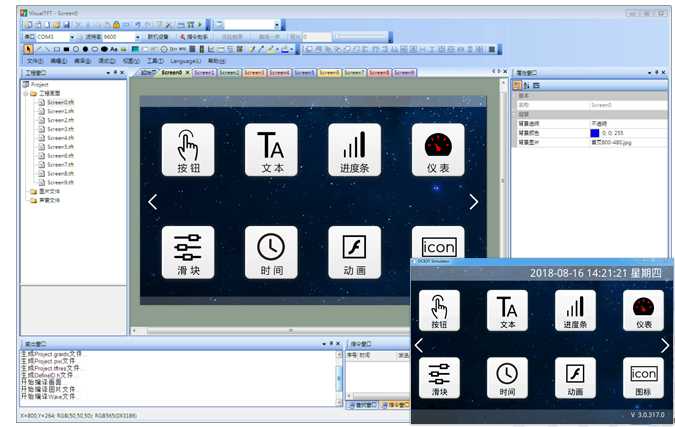
Visual TFT is a powerful serial port screen development and debugging software independently innovated and developed by our company, featuring the first "virtual serial port screen" in China. After creating a new project, users can import designed artwork images, configure buttons and other controls in each screen, simulate and verify the correctness, and finally download the entire project to the serial port screen.
Common functions of the software are as follows:
(1) The IDE environment is user-friendly and the interface is beautiful and elegant; it has a built-in font generator and Lua script compiler;
(2) The software integrates commonly used icons, buttons, and keyboard vector graphics to reduce the difficulty of artwork;
(3) The screen supports common operations such as image scaling, text editing, and element copying;
(4) After project compilation, each screen, image, and control is assigned a unique ID;
(5) A built-in command debugging assistant facilitates direct debugging of the serial port screen from a PC, allowing quick mastery of command operations;
(6) An embedded "virtual serial port screen" simulation simulator directly binds to KEIL debugging, eliminating the need to re-download images every time there is a change in project images;
(7) Supports binary file programming, making mass production more convenient and safe;
(8) Customizes special PC software functions according to user needs;
Development Trilogy
(1) Prepare graphic design materials
Arrange graphic designers to design the required images for products such as startup screens, text backgrounds, button icons, and prompt boxes.
(2) Use the accompanying VisualTFT software for screen editing, control configuration, and image download
First, use the accompanying host computer VisualTFT software to arrange the pre-designed graphic images for interface layout and control configuration. Then, run the "virtual serial port screen" for simulation. Finally, the entire project can be downloaded to the internal memory of the serial port screen through USB/SD/UART/U-disk/WIFI (depending on different hardware configurations). The PC software assigns a unique ID number to each screen, image, and control in the project.
(3) User microcontroller listens and sends corresponding serial port commands to control screen display
After the project is downloaded to the screen, once a button on the screen is pressed, the user's MCU serial port will receive the button ID information or coordinate values uploaded from the screen. By parsing the ID number, the user can obtain the current button's screen position and functional attributes, thus controlling the actions of related peripheral devices or updating the screen display.
For non-touch products, the user's microcontroller does not need to listen to the uploaded button ID information and only needs to send relevant commands for screen switching and text image display.
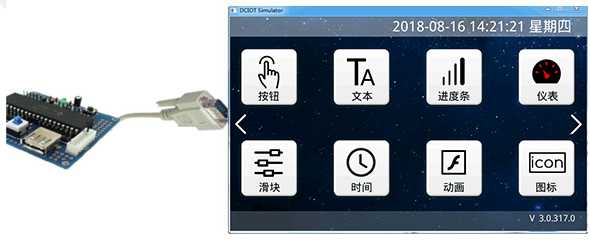
After the user installs the host computer VisualTFT software, it can be run and used. The simulation results of the virtual serial port screen are exactly the same as the real serial port screen. Therefore, there is no need to purchase hardware during the early stage of research and development. By connecting it with the user's microcontroller RS232 serial port, mutual communication can be achieved. Clicking buttons with the mouse will immediately upload button control information. Once the developer completes debugging, there is no need to debug the real hardware again.
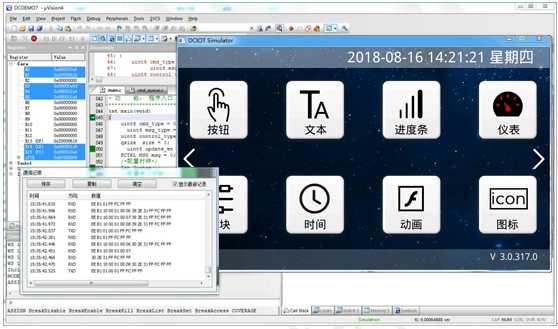
Keil and virtual serial port screen binding debugging
To further improve development efficiency, users can also bind and debug with the "virtual serial port screen" through the Keil development environment. During program single-step debugging, all running results can be displayed on the "virtual serial port screen", greatly saving engineers' development time. Once the project interface changes, users no longer need to download images to the serial port screen again. All early stage evaluations of the project can be completed based on the PC side.


Leave a Reply