
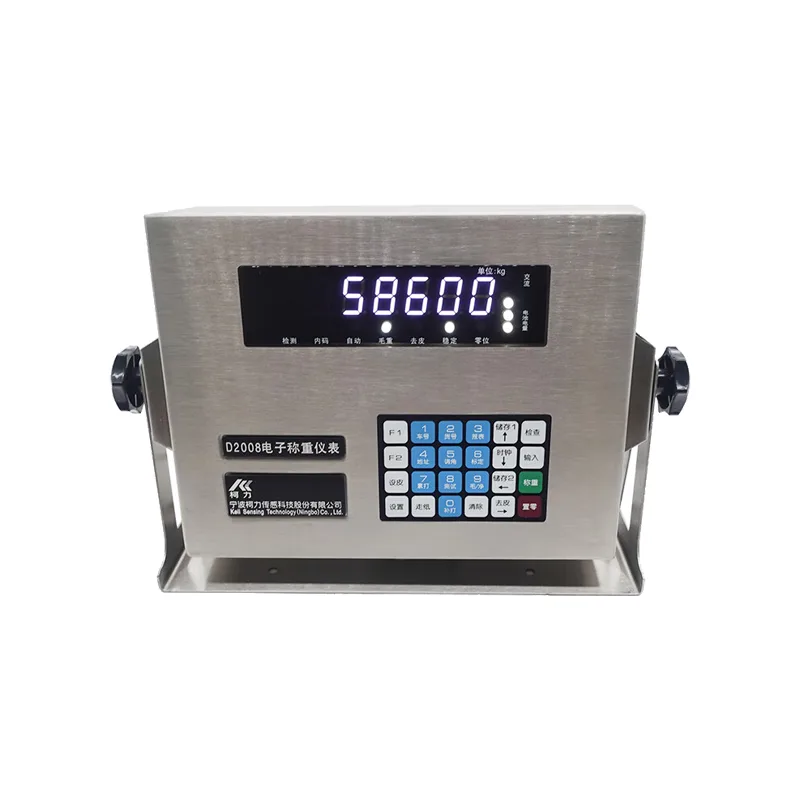
Communication protocol (modbus RTU) instrument settings: TF=1 in pst 01----, D39 series requires command mode 2 to be selected
01 03 00 01 00 04 15 C9
1.Host reads instrument data
| Waiting | Byte0 | 1 | 2 | 3 |
| Four bytes of time | 1~247 | x03 | The starting address is high8 | Low8 |
| Instrument address | Functional code | The starting address of the register to be read | ||
| 4 | 5 | 6 | 7 | Waiting |
| N/2Byte high8 | Low8 | CRC16Low8 | CRC16High8 | Three bytes of time |
| Quantity sent | CRC16Verification | |||
Data toASIIdelivery
2.Instrument feedback
Normal response
| Byte0 | 1 |
| 1~247 | 0x03 |
| Instrument address | Functional code |
| 2 | 3 | 3+n | 3+n | ||
| N | data data even numbers0 | …… | Data lengthN(data Weighing data reading instruction) | CRC16L | CRC16h |
| Function | The starting address of the register to be read | ||||
1)Address is 8 digits high
| The starting address of the register to be read | Address low 8 digits (Read gross weight) | Read tare weight (Read net weight) | |
| 1 | Read the overall internal code | 0x00 | 0x01 |
| 2 | Obtained when reading the internal code of sensor i abnormally | 0x00 | 0x02 |
| 3 | send out | 0x00 | 0x03 |
| 4 | Instrument address | 0x00 | 0x07 |
| 5 | Address is 8 digits high-999999 | 0x00 | 0x0A+i(i=1~16) |
Address low 8 digits
| 0 | 1 | 2 | 3 | 4 |
| return | 0x03 | Instrument address | Symbol - or | 0x00 |
| 5 | 6 | 7 |
| 0x04 | CRC16L | CRC16H |
Decimal point (right to left
| 0 | 1 | 2 | 3 | 5 | 6 |
| example | 0x03 | 0x08 | read current gross weightdata6 | Data5 | Data4 |
| 7 | 8 | 9 | 10 | 11 |
| Data3 | Data2 | Data1 | Data0 | send) |
| 12 | 13 |
| CRC16L | CRC16H |
receive:
1, if current gross weight is
last two bytes are:01 03 00 01 00 04 15 C9
checksum: if current gross weight is0
01 03 08 30 30 30 30 30 30 30 30 F8 2F (remote zeroCRC16send)
receive1240
01 03 08 30 30 30 31 32 34 30 30 85 96
2, common problem
send: 01 06 00 01 00 17 98 04
receive: 01 06 00 01 00 17 98 04
Frequently Asked Questions:
1, Continuous transmission of instruments (LikeTF=0) Time, The computer serial port can receive data, But there is still no response when using instructions
reason: 1) Instrument parameter error, D2008, D12Series instrumentsTF = 1; D39The series of instruments are command based2
2) Instrument serial port failure, Can be passedtest 08 Perform self inspection.
3) Computer serial port failure, Short circuit serial ports 2 and 3, Then send the data through the serial port tool, See if it can receive the same data it sent.
4) Wiring issues, 9-core instrument pin 3 (RXD) To receive feet, Need to connect with pin 2 of the computer (TXD) connect
5)Although the instrument supportsmodbus RTU agreement, Butmodbus There are requirements when issuing instructions, Read gross weight, Its register address is40001.At this point, it is necessary to read 4 words at once (40001~40004) , Otherwise, there will be no response.
2, How to interpret data
The following is the gross weight reading
| Address | Content | give an example (Weight1234567) | give an example (Weight-23456.7) |
| 40001 | Symbol - ordata6, Data5 | 0x31,0x32 | 0x2d,0x32 |
| 40002 | Data4, Data3 | 0x33,0x34 | 0x33,0x34 |
| 40003 | Data2, Data1 | 0x35,0x36 | 0x35,0x36 |
| 40004 | Data0, decimal point+0x30 | 0x37,0x30 | 0x37,0x31 |
The following is the net weight reading
| Address | Content | give an example (Weight1234567) | give an example (Weight-23456.7) |
| 40003 | Symbol - ordata6, Data5 | 0x31,0x32 | 0x2d,0x32 |
| 40004 | Data4, Data3 | 0x33,0x34 | 0x33,0x34 |
| 40005 | Data2, Data1 | 0x35,0x36 | 0x35,0x36 |
| 40006 | Data0, decimal point+0x30 | 0x37,0x30 | 0x37,0x31 |
The following is Siemens 200 smart Examples of:
Read gross weight:
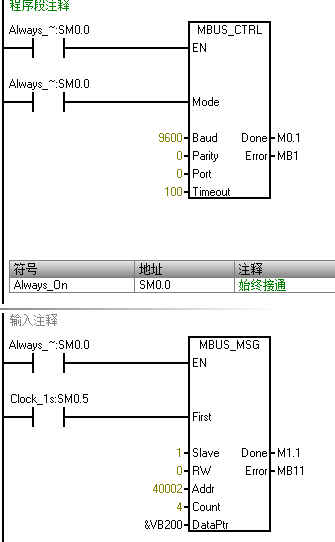
Special attention should be paid: above40002Corresponding to the instrument40001.
Next, write a sub program:
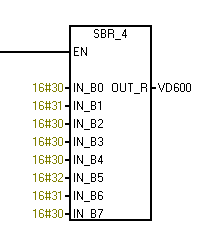
Subroutine interface:
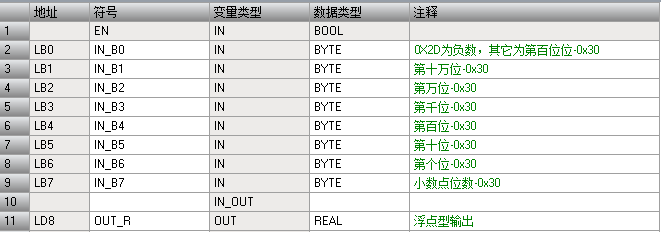
code:(part)

Two, new agreement
Only the following versions are supported:
meter: D2008Type(DF), D12-YF--V09edition D2008-W ---V13edition, KL-MPLCof agreementcom2Register address1
| Status | |
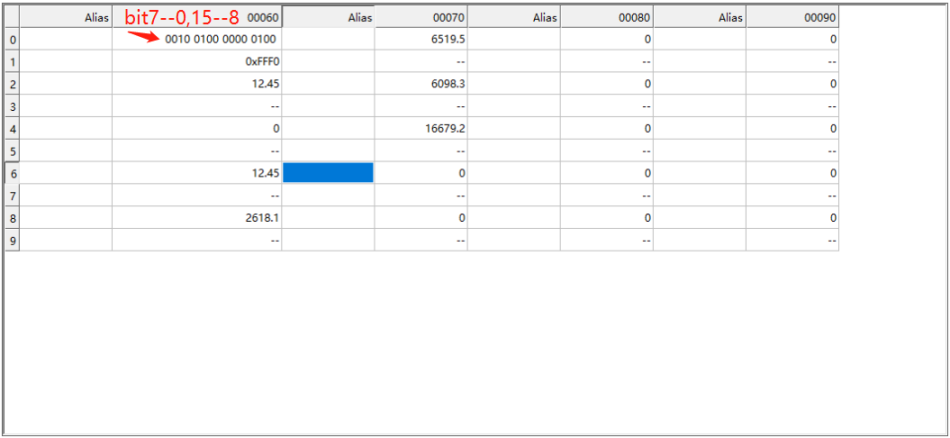
| 40060 | Zero point confirmation during startupBit0: Confirmed 0: Under confirmation 1: OverloadingBit1: Normal 0: Overloading 1: stableBit2: instable 0: stable 2: peel Bit3: Not peeled 0: Peeled state 1: zero pointBit4: Not at midnight 0: Zero position zone 1: Effective measurement dataBit5: Invalid 0: Effective 1: Sensor error Bit6: Communication is normal 0: Abnormal 1: spareBit7: Number of sensorsBit8~15: Sensor status |
| 40061 | Normal 0:Abnormal 1: number Bit16: 1number Bit17: 2number...Bit31: 16Gross weight |
| 40062-40063 | tare: float |
| 40064-40065 | Net weight: float |
| 40066-40067 | The first sensor's internal code: float |
| 40068-40069 | Second sensor internal code: float |
| 40070-40071 | The: float |
| ... | ... |
| 40098-40099 | Internal code of a sensor16Sensor status: float |
| 40100 | Normal 0:Abnormal 1: number Bit16: 17number Bit17: 18number...Bit31: 32The |
| 40101-40102 | Number sensor internal code17The: float |
| 40103-40104 | Number sensor internal code18The: float |
| ... | ... |
| 40131-40132 | Number sensor internal code32appointment: float |
When the measurement data on the weighing platform is invalid:
The net weight of the instrument is: The net weight of the instrument is-999999,If the decimal point is 3 digits, Then it is-999.999
Set to zero: To address40001Write0x0017;
2, ModbusHost configuration:
Option 1: Select asRTU
The second item:
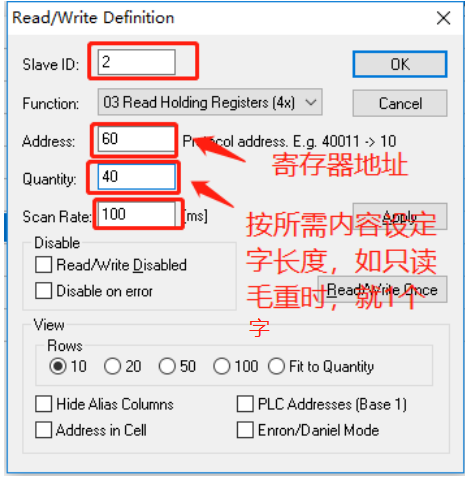
Like:
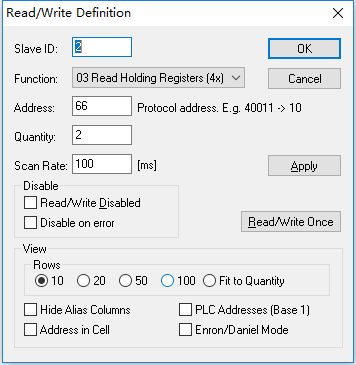
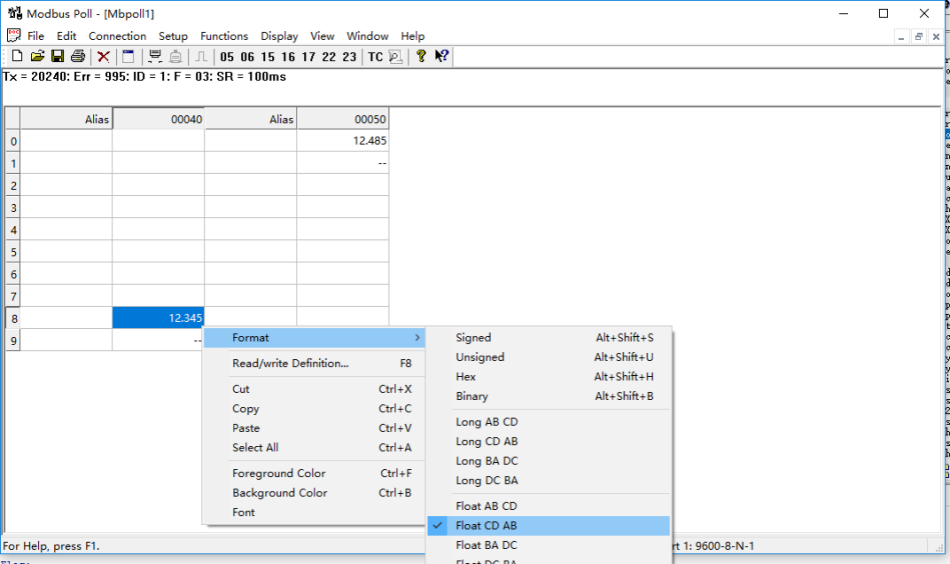
The third item: floatDisplay format settings:
The third item: Display all examples:
3, Related decoding codes: Convert received bytes to floating-point type
Define data structures:
typedef union noneTYPE32DATABYTE
{
  struct{
     INT32U onebyte0:8;
	 INT32U onebyte1:8;
	 INT32U onebyte2:8;
	 INT32U onebyte3:8;
     }onebyte;
    INT32U One32data;
	FP32   FP32data;
  }TYPE32DATABYTE;
代码:
原如接收4个字节 (按接收顺序)--Rdata[0],Rdata[1],Rdata[2]和Rdata[3]
float   FP32data;
TYPE32DATABYTE P_temp;
P_temp.onebyte.onebyte1 = Rdata[0];
P_temp.onebyte.onebyte0 = Rdata[1];
P_temp.onebyte.onebyte3 = Rdata[2];
P_temp.onebyte.onebyte2 = Rdata[3];
F_temp = P_temp.FP32data;//F_temp就是结果
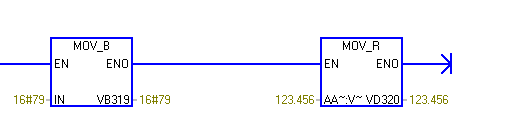
At Siemens 200smartThe operation of converting medium byte to floating point type is as follows::
Example:: Floating point number 123.456 corresponding[0]=0x79 0xe9,0xf6,[3]=0x42
PLCTrapezoidal diagram transformation:

effect:
Common examples1:Read gross weight
The instrument displays the gross weight68, The tare weight is0
Send: 01 03 00 42 00 02 64 1F
Received: 01 03 04 00 00 42 88 CA F5
Common examples2: Remote zeroing
send out: 01 06 00 01 00 17 98 04
receive: 01 06 00 01 00 17 98 04
CRC16Verification code algorithm:
/* CRC 高位字节值表 */
const unsigned char auchCRCHi[] = {
0x00, 0xC1, 0x81, 0x40, 0x01, 0xC0, 0x80, 0x41, 0x01, 0xC0,
0x80, 0x41, 0x00, 0xC1, 0x81, 0x40, 0x01, 0xC0, 0x80, 0x41,
0x00, 0xC1, 0x81, 0x40, 0x00, 0xC1, 0x81, 0x40, 0x01, 0xC0,
0x80, 0x41, 0x01, 0xC0, 0x80, 0x41, 0x00, 0xC1, 0x81, 0x40,
0x00, 0xC1, 0x81, 0x40, 0x01, 0xC0, 0x80, 0x41, 0x00, 0xC1,
0x81, 0x40, 0x01, 0xC0, 0x80, 0x41, 0x01, 0xC0, 0x80, 0x41,
0x00, 0xC1, 0x81, 0x40, 0x01, 0xC0, 0x80, 0x41, 0x00, 0xC1,
0x81, 0x40, 0x00, 0xC1, 0x81, 0x40, 0x01, 0xC0, 0x80, 0x41,
0x00, 0xC1, 0x81, 0x40, 0x01, 0xC0, 0x80, 0x41, 0x01, 0xC0,
0x80, 0x41, 0x00, 0xC1, 0x81, 0x40, 0x00, 0xC1, 0x81, 0x40,
0x01, 0xC0, 0x80, 0x41, 0x01, 0xC0, 0x80, 0x41, 0x00, 0xC1,
0x81, 0x40, 0x01, 0xC0, 0x80, 0x41, 0x00, 0xC1, 0x81, 0x40,
0x00, 0xC1, 0x81, 0x40, 0x01, 0xC0, 0x80, 0x41, 0x01, 0xC0,
0x80, 0x41, 0x00, 0xC1, 0x81, 0x40, 0x00, 0xC1, 0x81, 0x40,
0x01, 0xC0, 0x80, 0x41, 0x00, 0xC1, 0x81, 0x40, 0x01, 0xC0,
0x80, 0x41, 0x01, 0xC0, 0x80, 0x41, 0x00, 0xC1, 0x81, 0x40,
0x00, 0xC1, 0x81, 0x40, 0x01, 0xC0, 0x80, 0x41, 0x01, 0xC0,
0x80, 0x41, 0x00, 0xC1, 0x81, 0x40, 0x01, 0xC0, 0x80, 0x41,
0x00, 0xC1, 0x81, 0x40, 0x00, 0xC1, 0x81, 0x40, 0x01, 0xC0,
0x80, 0x41, 0x00, 0xC1, 0x81, 0x40, 0x01, 0xC0, 0x80, 0x41,
0x01, 0xC0, 0x80, 0x41, 0x00, 0xC1, 0x81, 0x40, 0x01, 0xC0,
0x80, 0x41, 0x00, 0xC1, 0x81, 0x40, 0x00, 0xC1, 0x81, 0x40,
0x01, 0xC0, 0x80, 0x41, 0x01, 0xC0, 0x80, 0x41, 0x00, 0xC1,
0x81, 0x40, 0x00, 0xC1, 0x81, 0x40, 0x01, 0xC0, 0x80, 0x41,
0x00, 0xC1, 0x81, 0x40, 0x01, 0xC0, 0x80, 0x41, 0x01, 0xC0,
0x80, 0x41, 0x00, 0xC1, 0x81, 0x40
} ;
/* CRC低位字节值表*/
const unsigned char auchCRCLo[] = {
0x00, 0xC0, 0xC1, 0x01, 0xC3, 0x03, 0x02, 0xC2, 0xC6, 0x06,
0x07, 0xC7, 0x05, 0xC5, 0xC4, 0x04, 0xCC, 0x0C, 0x0D, 0xCD,
0x0F, 0xCF, 0xCE, 0x0E, 0x0A, 0xCA, 0xCB, 0x0B, 0xC9, 0x09,
0x08, 0xC8, 0xD8, 0x18, 0x19, 0xD9, 0x1B, 0xDB, 0xDA, 0x1A,
0x1E, 0xDE, 0xDF, 0x1F, 0xDD, 0x1D, 0x1C, 0xDC, 0x14, 0xD4,
0xD5, 0x15, 0xD7, 0x17, 0x16, 0xD6, 0xD2, 0x12, 0x13, 0xD3,
0x11, 0xD1, 0xD0, 0x10, 0xF0, 0x30, 0x31, 0xF1, 0x33, 0xF3,
0xF2, 0x32, 0x36, 0xF6, 0xF7, 0x37, 0xF5, 0x35, 0x34, 0xF4,
0x3C, 0xFC, 0xFD, 0x3D, 0xFF, 0x3F, 0x3E, 0xFE, 0xFA, 0x3A,
0x3B, 0xFB, 0x39, 0xF9, 0xF8, 0x38, 0x28, 0xE8, 0xE9, 0x29,
0xEB, 0x2B, 0x2A, 0xEA, 0xEE, 0x2E, 0x2F, 0xEF, 0x2D, 0xED,
0xEC, 0x2C, 0xE4, 0x24, 0x25, 0xE5, 0x27, 0xE7, 0xE6, 0x26,
0x22, 0xE2, 0xE3, 0x23, 0xE1, 0x21, 0x20, 0xE0, 0xA0, 0x60,
0x61, 0xA1, 0x63, 0xA3, 0xA2, 0x62, 0x66, 0xA6, 0xA7, 0x67,
0xA5, 0x65, 0x64, 0xA4, 0x6C, 0xAC, 0xAD, 0x6D, 0xAF, 0x6F,
0x6E, 0xAE, 0xAA, 0x6A, 0x6B, 0xAB, 0x69, 0xA9, 0xA8, 0x68,
0x78, 0xB8, 0xB9, 0x79, 0xBB, 0x7B, 0x7A, 0xBA, 0xBE, 0x7E,
0x7F, 0xBF, 0x7D, 0xBD, 0xBC, 0x7C, 0xB4, 0x74, 0x75, 0xB5,
0x77, 0xB7, 0xB6, 0x76, 0x72, 0xB2, 0xB3, 0x73, 0xB1, 0x71,
0x70, 0xB0, 0x50, 0x90, 0x91, 0x51, 0x93, 0x53, 0x52, 0x92,
0x96, 0x56, 0x57, 0x97, 0x55, 0x95, 0x94, 0x54, 0x9C, 0x5C,
0x5D, 0x9D, 0x5F, 0x9F, 0x9E, 0x5E, 0x5A, 0x9A, 0x9B, 0x5B,
0x99, 0x59, 0x58, 0x98, 0x88, 0x48, 0x49, 0x89, 0x4B, 0x8B,
0x8A, 0x4A, 0x4E, 0x8E, 0x8F, 0x4F, 0x8D, 0x4D, 0x4C, 0x8C,
0x44, 0x84, 0x85, 0x45, 0x87, 0x47, 0x46, 0x86, 0x82, 0x42,
0x43, 0x83, 0x41, 0x81, 0x80, 0x40
} ;
/******************************************************
函数名: INT16U crc16(unsigned char  *puchMsg, INT16U usDataLen)
功能:  根据字符串puchMsg 及长度产生一个CRC16
输入:unsigned char *puchMsg 字符串   usDataLen 长度
输出:INT16U CRC16
*******************************************************/
INT16U crc16(unsigned char  *puchMsg, INT16U usDataLen) //根据字符串puchMsg 及长度产生一个CRC16
{
 unsigned char  uchCRCHi = 0xFF ; /* 高CRC字节初始化 */
 unsigned char  uchCRCLo = 0xFF ; /* 低CRC 字节初始化 */
 unsigned long uIndex ; /* CRC循环中的索引 */
 while (usDataLen--) /* 传输消息缓冲区 */
 {
  uIndex = uchCRCHi ^ *puchMsg++ ; /* 计算CRC */
  uchCRCHi = uchCRCLo ^ auchCRCHi[uIndex] ;
  uchCRCLo = auchCRCLo[uIndex] ;
 }
 return (uchCRCHi << 8 | uchCRCLo) ;
}
//=======================================================
Application: Assuming to send a read gross weight instruction (16Base system)
01 03 00 01 00 04
The method of generating verification codes
//TXD_C_temps[]Saved01 03 00 01 00 04 (6Bytes)
INT16U crcData ;
ByteCount = 6;//The data is 6 bytes
crcData = crc16(TXD_C_temps,ByteCount );
TXD_C_temps[byteCount] = crcData >> 8;
byteCount++;
TXD_C_temps[byteCount] = crcData & 0xff;
//At this moment, the string
01 03 00 01 00 04 15 C9
putchars2_8th(TXD_C_temps,byteCount+1);//Send via serial port


Leave a Reply