

Mini program version, free to use!!!
Software Overview
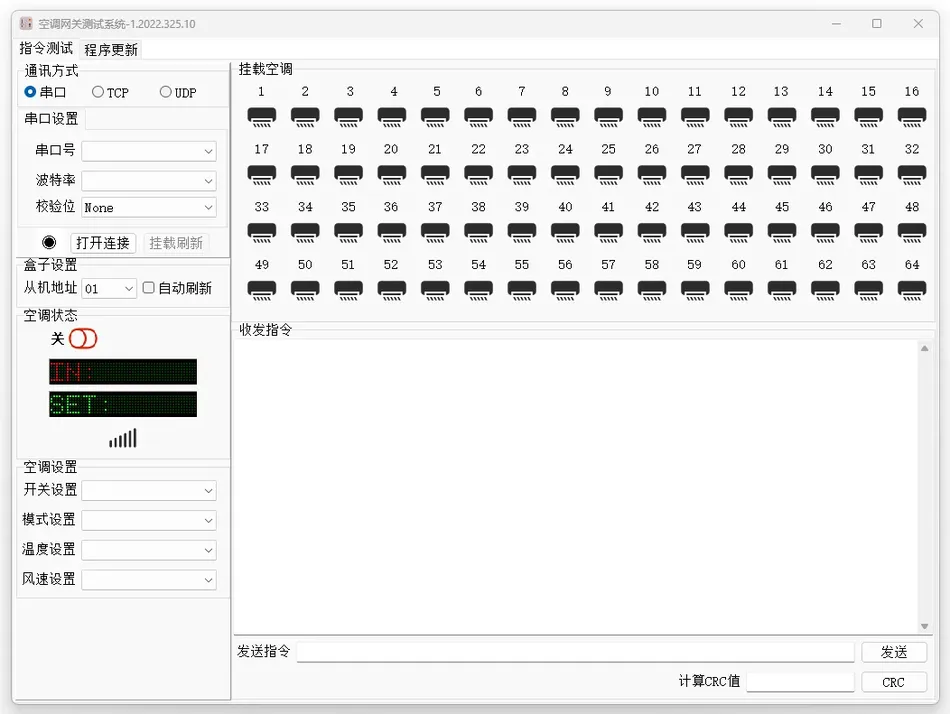
Air conditioning gateway testing system softwareV1.2022.325.10 It is caused byIRACCA specialized debugging tool developed for its multi brand central air conditioning intelligent gatewayCommunication configuration, Instruction testingAndFirmware upgrade. This software supports multi protocol communication interfaces and gateway interaction through an intuitive graphical interface, enabling air conditioning equipment to function effectivelyRS485/TCP/UDPRemote controlAnd withStatus monitoring, is the core tool for gateway deployment and operation.Core functional modules
Communication interface management
2.1 Communication method
| Function description | Applicable scenarios | Serial port |
|---|---|---|
| Through | Physical interface connection gatewayRS485Local debugging, deployment without network environment | be based on |
| TCP | Stable long-term connection communication of the networkIPRemote control, buildings | System integrationBALow latency broadcast communication |
| UDP | Batch instruction issuance for multiple devices | Port configuration |
- support:
- Configure a virtual channel to meet the parallel testing requirements of multiple gateways.1~64The baud rate (
- ), checksum (1200~115200bps), and data bits (8 bits) can be freely set and are compatible with different brands of air conditioning protocols.None/Even/OddInstruction testing and parameter setting
2.2 Instruction library integration
- Built in standards:
- Instruction set (function code, etc.), supporting air conditioningModbusSwitch control01/03/05/06/10Mode switching(Refrigeration/Heating/Air Supply), Temperature regulationWind speed setting(Low/Medium/High) and other operations. (16℃~30℃) , Custom command editing: Users can manually inputBinary instruction, supported
- Verify automatic generation (click16calculateCRCvalue“button).CRCReal time feedback”Air conditioning status monitoring: Real time display of the current operating status of the air conditioner (such as off, cooling in progress, sending and receiving command logs: records all raw data frames sent and received for troubleshooting
- program updates and maintenance:
- firmware upgrades“supports local firmware packages(”“In refrigeration”) .
- Send and receive command log: Record all raw data frames sent and received for troubleshooting purposes.
2.3 Program updates and maintenance
- Firmware update:
- Support local firmware packages(.binUpload the file and complete the gateway firmware upgrade with just one click.
- Visualization of upgrade process: The progress bar displays the progress of flashing, and if there is an abnormal interruption, it will automatically roll back.
- Fault diagnosis:
- Built in fault code library (such as communication timeout, verification error), providing targeted solutions.E1Support log export (in format) for technical teams to conduct in-depth analysis.E2Software interface operation guide
- Main interface layout.txtCommunication mode selection area
: Switch serial port
3.1 Configure port numbers and protocol parameters.
- Instruction operation areaAir conditioning settings/TCP/UDPQuick buttons control switches, modes, temperature, and wind speed.
- Send instructions:
- Manually input or select the preset command and click send.Status display area
- Real time feedback on air conditioning status and communication connection status (such as connected, system tool area, firmware upgrade entrance, calculator, log export function)Example of operation process (using communication as an example)
- Connect the gatewaychoice“Communication method, input gatewayCOM3”) .
- Address (such as) and port number (defaultCRCclick
3.2 open connectionTCPstatus bar displayed
- connection successful:
- send control command“TCP”clickIPmode setting192.168.1.100selection33098) .
- cooling“temperature set to”wind speed set to“TCPmedium”.
- click:
- send command“log area displays send frame”monitoring feedback“air conditioning status area updated to”cooling in progress25℃receive frame“indicates successful execution.”.
- compatibility and scalability“multi brand support”dialing adaptation
01 06 00 01 00 03 48 0B.
- software automatically recognizes gateway dialing configuration (refer to Table 1), without manual protocol switching.:
- Preset templates“Targeting Daikin, Hitachi, Gree, and others”A brand provides dedicated instruction templates to reduce configuration complexity.
01 06 00 01 00 03 48 0BIntegration of smart home systems
passthrough
4.1 Multi brand support
- Dial code adaptationThe software automatically recognizes gateway dialing configuration (refer to Table 1), without the need for manual protocol switching.
- Preset TemplateTargeting Daikin, Hitachi, Gree, and others17A brand provides dedicated instruction templates to reduce configuration complexity.
4.2 Smart Home System Integration
- Modbus TCPpassthroughConnect the gateway to a third-party intelligent central control system (such asKNX, Control4) through a network port to achieve linkage between air conditioning, lighting, and security systems.
- APIto open up: ProvideHTTPInterface documentation, supporting customized integration into private IoT platforms.
Technological advantages
- Efficient debuggingBatch instruction issuance and multi-channel parallel testing to improve operational efficiency50%Above.
- High reliability: CRCThe verification and instruction resend mechanism ensures communication stability and error rate<0.001%.
- Usability designGraphic interface, one click operation, no need for professional programming knowledge to get started.


Leave a Reply