
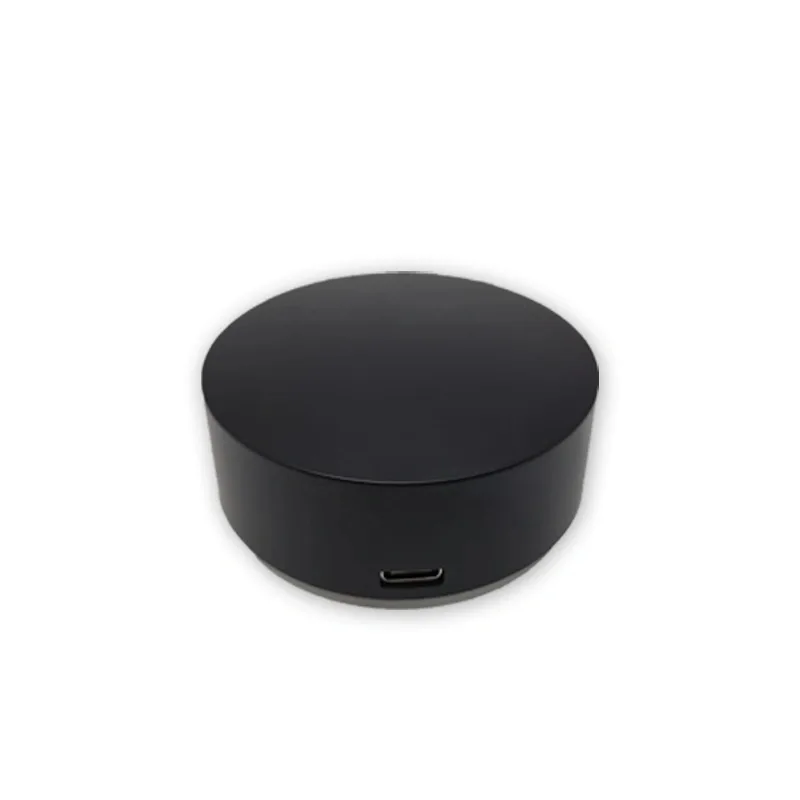
Product Introduction
This product is an infrared air conditioning control module that can control infrared air conditioning in various control modes, including WIFI network, RS485 bus, and Apple home control. It is suitable for various intelligent systems, such as bus intelligent systems and network intelligent systems, and is particularly suitable for Apple users. Widely used in homes, office buildings, hotels, hospitals, schools, stations, museums, exhibition centers, factories, agriculture and other places to meet the intelligent control needs of different users for infrared air conditioning.
Product Features
- High power infrared emission3W high-power infrared emission, remote control distance can reach 3-15 meters.
- Apple HomeKit Direct Connection: Supports Siri control, convenient and fast.
- Bus Control: Can be directly connected to intelligent systems.
- Modbus protocol support: Compatible with central air conditioning gateway protocol for easy integration.
- WiFi Direct Connection Platform: Implement batch management of infrared air conditioning.
- APP Control: No need to modify the APP, it can be added and used directly.
- Unified Protocol Control: One protocol can control all infrared air conditioners.
- Appearance Design: Full frosted infrared transparent shell, beautiful and generous.
- Widely compatibleSupports 95% infrared air conditioning, including brands such as Daikin, Toshiba, Hitachi, Mitsubishi, etc.
- Type-C portUniversal interface, can be used when powered on.
- Web ControlYou can control the air conditioning through the webpage.
- Group controlSupport simple protocol address wildcard function to achieve group control.
Product Parameters
- Product model: HKTIR02-C
- Product weight: 50g
- Working temperature: -10 ℃ -50 ℃
- Appearance dimensions: diameter 82mm, height 29mm
- Input voltage: DC 5-24V
- Communication methods: network communication (TCP client) WIFI, RS485
- Bus baud rate: 9600 8N1
- Modbus protocol support: Yes
Supported air conditioning brands:
- Supporting air conditioning brands such as Midea, Gree, Haier, Samsung, Panasonic, and more, as well as supporting information for other brands.
WIFI distribution network method
Module Distribution Network Method 1:
1.Send ASC encoded instructions via RS485 bus:
- WiFi broadcast name (SSID):
HUAWEI - WiFi password:
123456789
2.Send WiFi broadcast name (SSID):
- Instruction Format:
HKTWFSSID:<字符数量>(16进制表示)<SSID> - Example:
HKTWFSSID:06HUAWEI- explanation:
HKTWFSSIDCommand header, indicating the need to set WiFi broadcast name.06: represents the number of characters followed,06is hexadecimal and represents 6 characters (the length ofHUAWEI).HUAWEI: The actual WiFi broadcast name.
3.Module Reply:
- Reply Format:
HKTWFSSID:<字符数量>(16进制表示)<SSID> head:HKTWFSSID realData:<SSID> - Example:
HKTWFSSID:06HUAWEIhead:HKTWFSSIDrealData:HUAWEI- Explanation:
HKTWFSSID: Command header, indicating that the reply is for WiFi broadcast name settings.06: represents the number of characters followed,06is hexadecimal and represents 6 characters.HUAWEI: The actual WiFi broadcast name.head: Represents the instruction header.realData: Represents the actual data content.
4.Sending WiFi Password:
- Instruction Format:
HKTWFPSD:<字符数量>(16进制表示)<密码> - Example:
HKTWFPSD:09123456789- Explanation:
HKTWFPSD: Instruction header, indicating the need to set WiFi password.09: represents the number of characters followed,09is hexadecimal and represents 9 characters (the length of123456789).123456789: Actual WiFi password.
5.Module Reply:
- Reply Format:
HKTWFPSD:<字符数量>(16进制表示)<密码> head:HKTWFPSD realData:<密码> - Example:
HKTWFPSD:09 123456789head:HKTWFPSDrealData:123456789- Explanation:
HKTWFPSD: Command header, indicating that the reply is for WiFi password settings.09: represents the number of characters followed,09is hexadecimal and represents 9 characters.123456789: Actual WiFi password.head: Represents the instruction header.realData: Represents the actual data content.
6.Complete configuration:
- operation: Power on/off the module again.
- ResultAfter a successful WiFi connection, the module will output its IP address.
Module Distribution Network Method 2:
1. Connect the mobile phone to the local area network WIFI, and at the same time, use the 485 serial port assistant to selectASCII encodingand send the following commandHKTREST: 011to enter the distribution network mode. The indicator light will turn off.
2. Search and follow the official accountAnson Technology, clickWeChat distribution network
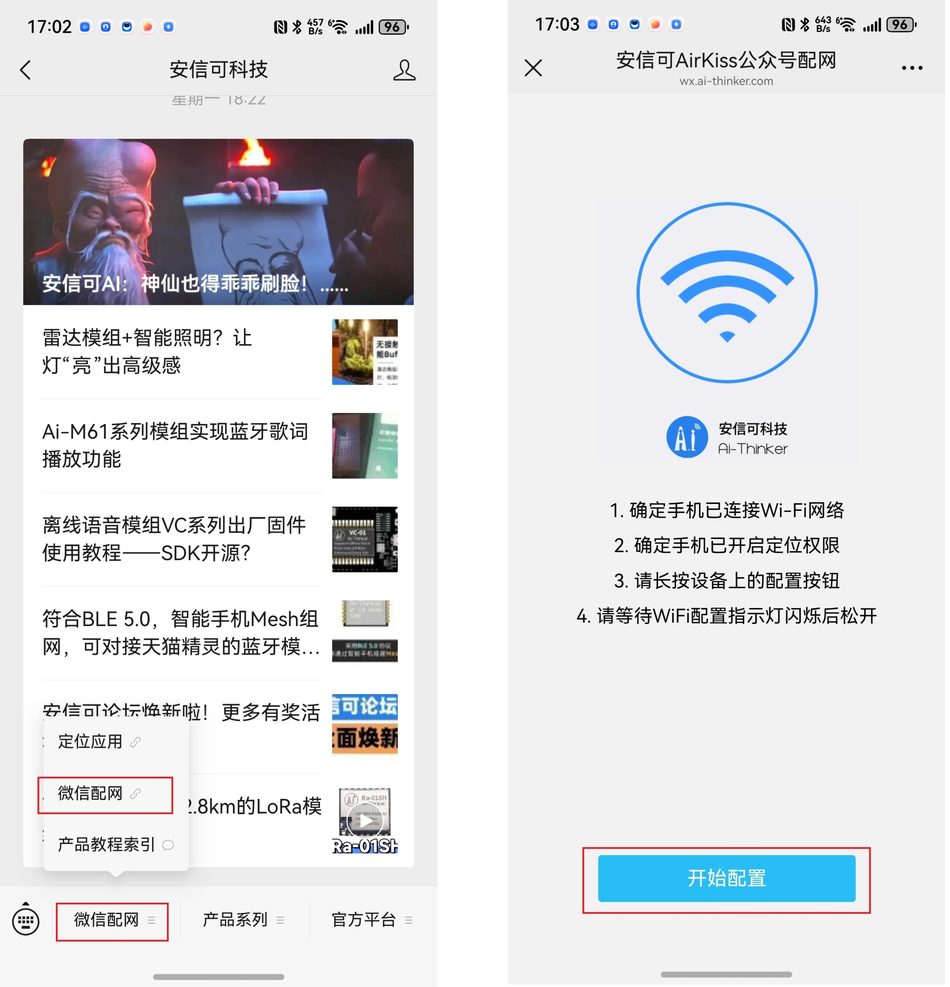
3, Enter the password for the current WiFi, and it will prompt that the network connection is successful. If the configuration is successfully restored to the 1-second frequency or goes off for 1 second and lights up for 5 seconds
. Note: Apple phones may experience WeChat network connection failure prompts. Please use an Android phone to configure the network
. The meaning of the indicator light
A. The power on indicator light flashes at the 1-second frequency, connects to the server successfully, goes off for 1 second, lights up for 5 seconds
B. The indicator light for entering network mode will turn off. Configuration successfully restored to 1-second frequency or 1-second off and 5-second on.
C blinks during infrared emission.
D. It stays on during infrared learning recognition and turns off after learning recognition.
WIFI networking control:
Ensure that the computer and module are on the same LAN:
- Operation: Ensure that your computer and air conditioning control module are connected to the same LAN.
- Purpose: Ensure that the computer can communicate with the module.
Connect USB to 485 device:
- Operation: Use the USB to 485 converter to connect the computer and module.
- Setting: Set the baud rate to 9600, data bit to 8, checksum to None, and stop bit to 1 in the serial debugging assistant.
- Purpose: Ensure that the computer can communicate with the module through the serial port.
Send configuration instruction:
- Configure IP address:
- Instruction format:
HKTIP:<字符数量>(16进制表示)<IP地址>- Example:
HKTIP:0D192.168.1.200- Explanation:
HKTIP: Instruction header, indicating the need to set an IP address.0D: Indicates the number of characters followed,0Dis hexadecimal and represents 13 characters (the length of192.168.1.200).192.168.1.200: Actual IP address.
- Configure Port Number:
- Instruction Format:
HKTPORT:<字符数量>(16进制表示)<端口号>- Example:
HKTPORT:044198- Explanation:
HKTPORT: The instruction header indicates the port number to be set.04: Indicates the number of characters that follow,04is hexadecimal and represents 4 characters (the length of4198).4198: Actual port number.
- Configure registration package:
- Instruction format:
HKTREG:<字符数量>(16进制表示)<注册包> - Example:
HKTREG:0811223344 - Explanation:
HKTREG: Instruction header, indicating the need to set the registration package.08: Indicates the number of characters following it,08is hexadecimal and represents 8 characters (the length of11223344).11223344: Actual registration package content.
- Instruction format:
Complete Configuration:
- Operation: After sending the above command, the module will connect to the specified IP address and port.
- Verification: The connection status of the module can be checked through the serial port debugging assistant to ensure successful connection.
Air conditioning matching method
- Backend configuration page:
- Access page: After the module distribution network is successful, the router will assign an IP address, open the website corresponding to the IP address (ensure that the computer and module are on the same network), and enter the backend configuration page.
- Set air conditioning model:
- Select protocol: Select the brand of air conditioning in the "Protocol" section (some brands may have multiple remote control codes, if unsuccessful, try other protocols).
- Send Infrared: Click "Send Infrared" to see if the air conditioner can be controlled.
- Protocol Recognition: If unable to control, you can enter the "Protocol Recognition" page, follow the prompts to operate, and let the module automatically recognize the air conditioning protocol.
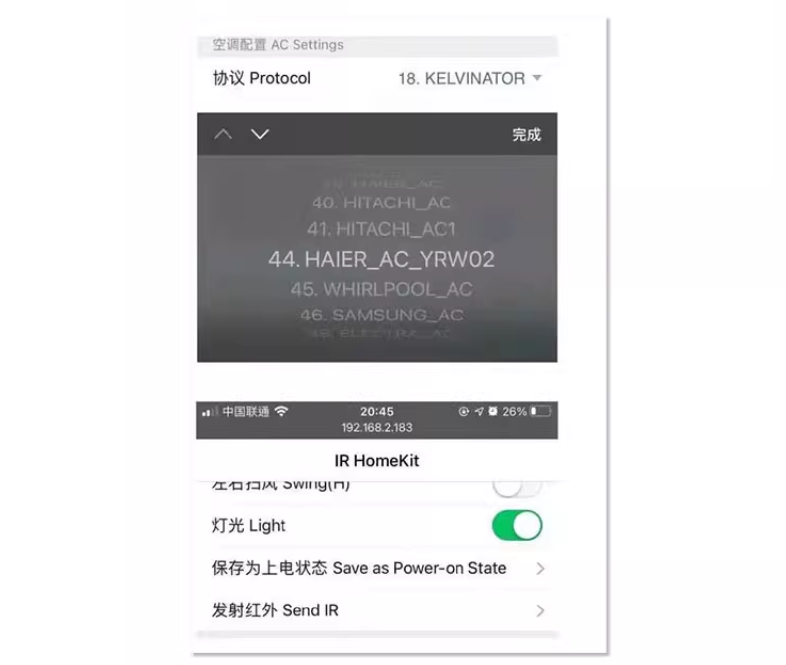
- Air Conditioning Model Protocol Reference:
- provides common brands of air conditioning models and their corresponding protocols, making it easy for users to quickly find the appropriate protocol.
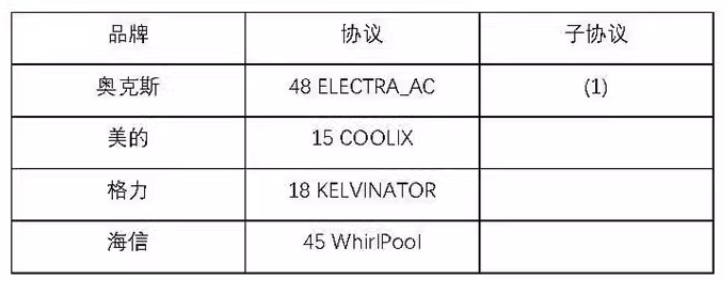
5. Protocol Description
- Control Protocol Format:
- Send Instruction: 5-byte Address+BB Function Code+Switch+Mode+Temperature+Wind Speed+Swing Wind+0F End.
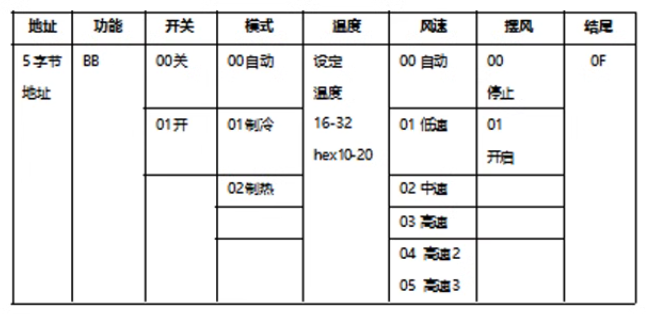
Protocol Example
1. Control Protocol Example
Example:
1A 23 80 55 11 BB 01 02 18 02 00 0FDecomposition Explanation:
| Field | Data Value | Meaning |
|---|---|---|
| Address | 1A 23 80 55 11 | A 5-byte device address used to identify a specific air conditioning control module. |
| Function code | BB | Fixed function code, indicating that this is a control instruction. |
| Switch Status | 01 | Switch Function Key,01indicates power on,00indicates power off. |
| mode | 02 | air conditioning mode,02represents the heating mode. |
| Temperature | 18 | Temperature setting, hexadecimal representation,18converted to decimal 24 degrees. |
| Wind speed | 02 | Wind speed setting,02indicates medium speed. |
| Swing Wind | 00 | Swing Wind Setting,00indicates stopping swing wind. |
| Ending | 0F | Fixed ending, indicating the end of the instruction. |
2. Example of Query Protocol
Sending Query Instruction:
5字节地址 + 86 86 86 + 0FExample:
1A 23 80 55 11 86 86 86 0FDecomposition Explanation:
| Field | Data Value | Meaning |
|---|---|---|
| Address | 1A 23 80 55 11 | A 5-byte device address used to identify the specific air conditioning control module. |
| query code | 86 86 86 | Fixed query code, indicating that this is a query instruction. |
| ending | 0F | Fixed ending, indicating the end of the instruction. |
Example of query feedback:
1A 23 80 55 11 CC 01 02 18 02 00 0FDecomposition Explanation:
| field | data value | meaning |
|---|---|---|
| Address | 1A 23 80 55 11 | A 5-byte device address used to identify the specific air conditioning control module. |
| function code | CC | The query feedback function code indicates that this is a query feedback. |
| switch status | 01 | Switch status,01Indicates that the air conditioner is in the on state. |
| pattern | 02 | Air conditioning mode,02Indicates the heating mode. |
| temperature | 18 | Temperature setting, represented in hexadecimal,18Convert to decimal to 24 degrees. |
| Wind speed | 02 | Wind speed setting,02Indicates medium speed. |
| swaying wind | 00 | Swinging state,00Stop swinging the wind. |
| ending | 0F | Fixed ending, indicating the end of the instruction. |
Restore initial configuration:
- Send command:
HKTREST:011(ASCII code transmission), restore the initial configuration of the module.
Erase storage area:
- Send command:
HKTERASE:011(ASCII code transmission), erase the storage area of the module.
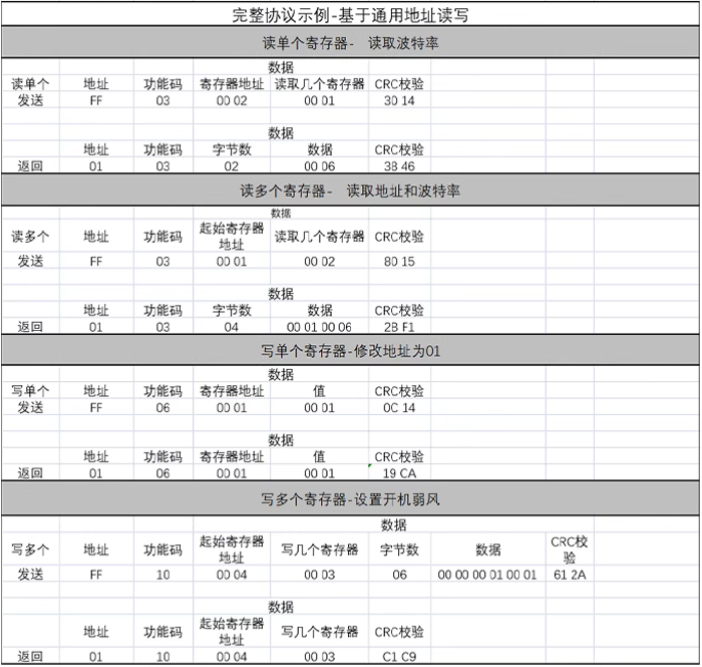
MODBUS Protocol
Address: 01
Broadcast Address: FF
Message Format: HEX
Default Baud Rate: 9600 8 N 1
CRC16: Low Byte First
Read Register: 03/04
Write Single Register: 06
Write Multiple Repositors: 10
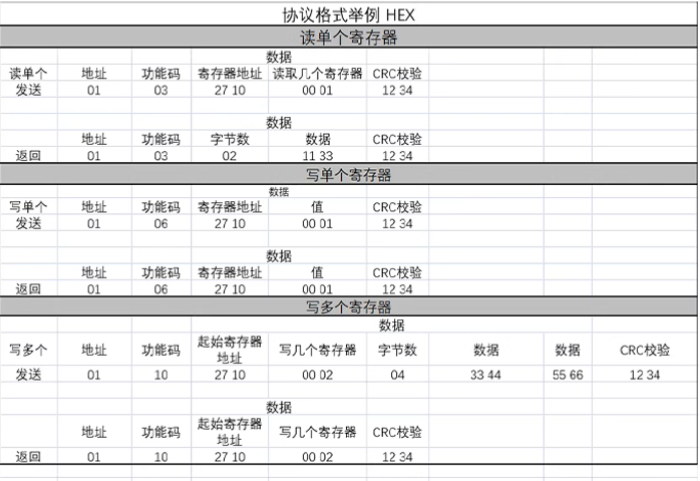
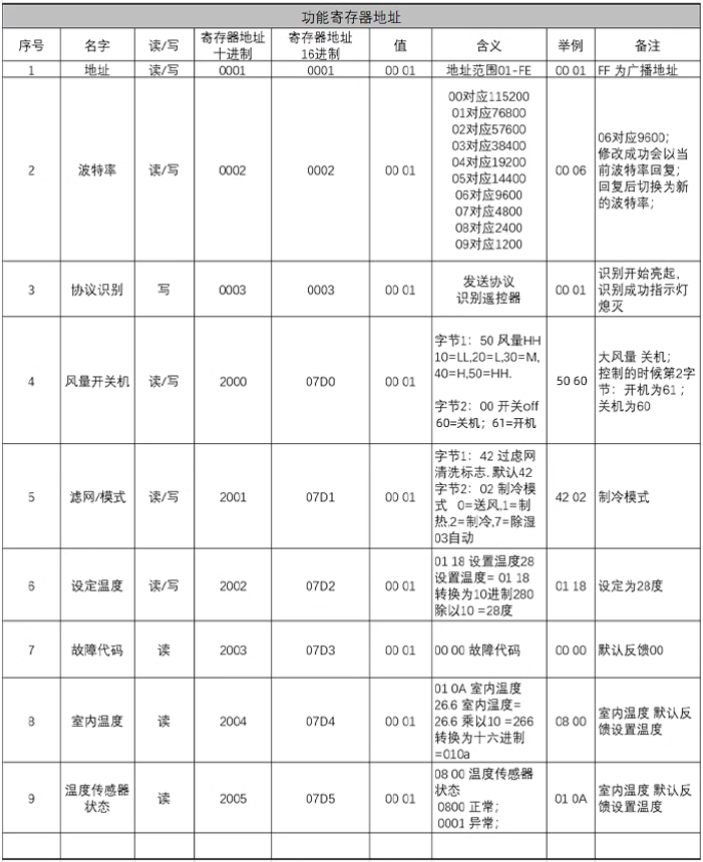
Apple HomeKit Control
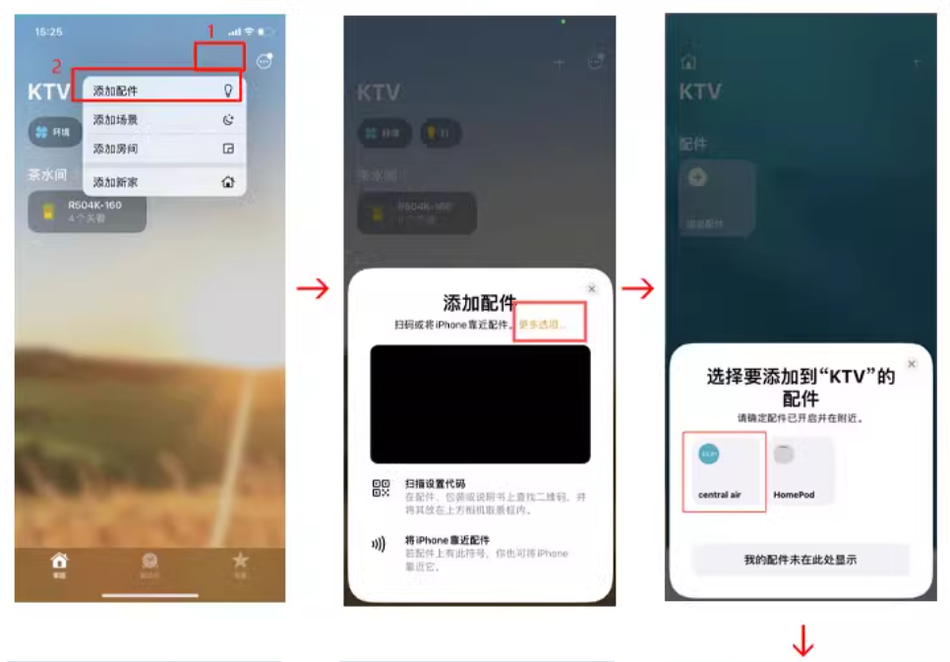
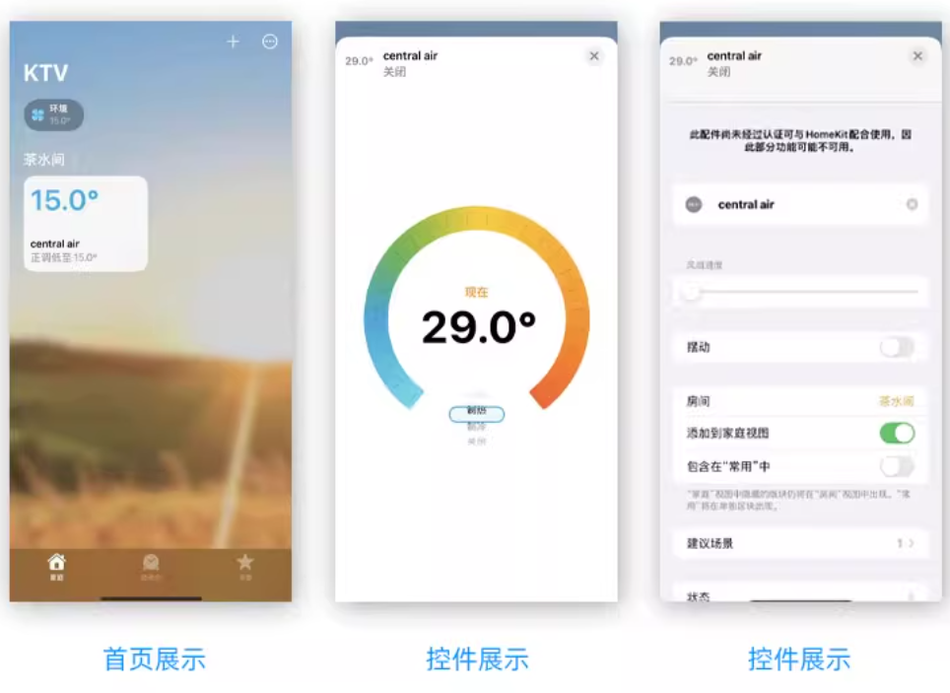
- add moduleAfter configuring the module network, open the "Home" application, click on "Add Accessories", select "More Options", enter the code on the module shell, and you can add and control the module.



Leave a Reply