

Duya Curtain Command Generator/Bluetooth Debugging Assistant, please scan on WeChat!
1. Function Introduction
This document defines a universal RS485 communication protocol applicable to curtain opening and closing motors. The protocol adopts a master-slave structure, which specifies the data frame format, register mapping, control instructions, and all communication details between the host and the motor controller. It is the fundamental basis for realizing motor status query, parameter configuration, and motion control.
2. General Provisions of the Agreement
2.1 Communication parameters
- •Physical interface:RS485, half duplex.
- •Baud rate:9600 bps (default).
- •Data format:8-bit data bit, 1-bit stop bit, no parity check bit.
- •Addressing range:
0x01~0xFE.0x00are broadcast addresses, and0xFEThis is the default factory address.
2.2 Universal Data Frame FormatAll communication packets adopt a unified frame structure.
| field | Starting code | Device Address | Function Code | Data Address | Data Length | Data Content | CRC16 |
|---|---|---|---|---|---|---|---|
| Length (in bytes) | 1 | 2 | 1 | 1 | 1 | N | 2 |
| Description | Fixed 0x55 | Target Device Address | Instruction Type | Register Address | Number of data bytes | Parameters or data | Cyclic redundancy check |
| Example | 0x55 | 0x12, 0x34 | 0x03 | 0x01 | 0x01 | ... | 0xAD, 0x8A |
- •CRC16 verification:The verification scope covers all bytes from "device address" to "data content". The algorithm needs to match the example.
2.3 Function Code Definition
- •
0x01:ReadRegister. The host requests to read data from the slave. - •
0x02:Write to theregister. The host requests to write data from the slave. - •
0x03:controls thecommand. The host sends motion control commands. - •
0x04: Slave request. The slave actively reports information (such as requesting address allocation).
3. Register Mapping Explanation
The following table lists all accessible register addresses and their functions.
| Data Address | Description | Data Format and Range | Read and Write Attributes | Version Remarks |
|---|---|---|---|---|
| 0x00 | Device Address Low Byte (IDUL) | 0x01~0xFE | Writeable | and 0x01 together constitute the device address. |
| 0x01 | Device Address High Byte (IDUH) | 0x01~0xFE | Can be Written | Same as above. |
| 0x02 | Current position (percentage) | 0x00~0x64(0-100%)0xFF: Travel not set | Read only | UP to travel point 100%, OFF to travel point 0%. |
| 0x03 | Motor default direction | 0x00: Default direction0x01: Reverse direction | Readable/writable | Used to correct the forward and reverse logic of the motor. |
| 0x04 | Manual Pull Start Enable | 0x00: Enable Manual Pull Function0x01: Disable Manual Pull Function | Read/Write | After disabling, manual pull cannot start the motor. |
| 0x05 | Motor operating status | 0x00: STOP (stop)0x01: OPEN (currently opening)0x02: CLOSE (closing)0x03Setting (in itinerary settings) | read-only | A3 version and above |
| 0x27 | Passive external switch type | 0x01Default dual rebound switch0x02Double non rebound switch0x03DC246 electronic switch0x04: Single key cycle switch | Read and write | A1 version |
| 0x28 | Strong current external switch type | 0x00: Strong current double key non rebound mode (default)0x01: Hotel mode (card insertion power switch)0x02: Strong current double key rebound mode | Read and write | Only EV type motor |
| 0xE0-0xEF | User information area | 16 byte custom data | readable and writable | for host storage of information. |
| 0xF0 | Device type | 0x01: Opening curtain | Read only | - |
| 0xF1 | Module channel number | 1-15 | Read only | - |
| 0xFD | Software version | 0-255 | Read only | - |
| 0xFE | Protocol version | 0xA4 | Read only | A1 version |
4. Control instruction description
Control instructions are triggered through function code0x03.
| Instruction | Description | Instruction Parameters | Version Remarks |
|---|---|---|---|
| 0x01 | Open command | None | - |
| 0x02 | Close command | None | - |
| 0x03 | Stop command | None | - |
| 0x04 | Percentage command | 0~100(percentage) | - |
| 0x07 | Delete trip | None (delete all) | - |
| 0x08 | Factory Reset | None | A1 Version |
| 0x09 | Set Scenario Mode | Scenario Mode Number | A2 Version |
| 0x0A | Run Scenario Mode | Scenario Mode Number | A2 Version |
| 0x0B | Delete Scenario | Scenario Number | A2 Version |
| 0x0F | Reverse Command | None | A4 Version |
5. Communication Example
5.1 Control Command (Function Code: 0x03)
5.1.1 Open Command
- •Host Send:
55 12 34 03 01 AD 8A - •Device Return:
55 12 34 03 01 AD 8A(Confirmation Frame)
5.1.2 Close Command
- •Host Sent:
55 12 34 03 02 ED 8B - •Device Return:
55 12 34 03 02 ED 8B(Confirmation Frame)
5.1.3 Stop Command
- •Host Send:
55 12 34 03 03 2C 4B - •Device Return:
55 12 34 03 03 2C 4B(Confirmation Frame)
5.1.4 Percentage Command (Run to 30% Position)
- •Host Send:
55 12 34 03 04 1E C8 E5(Data domain:0x1E= 30) - •Device return (successful):
55 12 34 03 04 1E C8 E5(Confirmation frame) - •Device return (failed, no trip):
55 12 34 03 04 FF 08 AD(Return)0xFF)
5.1.5 Delete itinerary command
- •Host sends:
55 12 34 03 07 2D 88 - •Device return:
55 12 34 03 07 2D 88(confirmation frame)
5.1.6 Factory reset command
- •Host sends:
55 12 34 03 08 6D 8C - •Device return:
55 12 34 03 08 6D 8C(Confirmation frame) - •Attention:After recovery, the address changes to
0xFEFEThe itinerary has been deleted.
5.1.7 Setting Scenario Mode (Setting Scenario 1)
- •Host sends:
55 12 34 03 09 01 8D BD - •Device returns (successful):
55 12 34 03 09 01 8D BD(Confirmation frame) - •Device return (failed, no trip):
55 12 34 03 09 FF 0C 3D(Return)0xFF)
5.1.8 Running Scenario Mode (Running Scenario 1)
- •Host sends:
55 12 34 03 0A 01 8D 4D - •Device return (successful):
55 12 34 03 0A 01 8D 4D(Confirmation Frame) - •Device Return (Failure):
55 12 34 03 0A FF 0C CD(Return0xFF)
5.1.9 Delete Scenario Mode (Delete Scenario 1)
- •Host Sent:
55 12 34 03 0B 01 8C DD - •Device Return:
55 12 34 03 0B 01 8C DD(Confirmation frame)
Example of Broadcast Control Command (Address 0x0000)
- •Broadcast open:
55 00 00 03 01 E9 3C(All motors are turned on, no device returns) - •Broadcast shutdown:
55 00 00 03 02 A9 3D(All motors are turned off, no equipment returns) - •Broadcast percentage:
55 00 00 03 04 1E 7E D6(All motors run to 30%, no equipment returns)
5.2 Read Command (Function Code: 0x01)
5.2.1 Read current location (address 0x02)
- •Host sends:
55 12 34 01 02 01 2B 4D - •Equipment return (with itinerary):
55 12 34 01 01 1E 6A 75(Data domain:0x1E= 30%) - •Device return (no travel):
55 12 34 01 01 FF AA 3D(Data domain:0xFF)
5.2.2 Read motor direction (address 0x03)
- •Host sends:
55 12 34 01 03 01 2A DD - •Device return:
55 12 34 01 01 00 EA 7D(Data Field:0x00=Default Direction)
5.2.3 Read Hand Pull Status (Address 0x04)
- •Host Sent:
55 12 34 01 04 01 28 ED - •Device Returned:
55 12 34 01 01 00 EA 7D(Data Field:0x00=Hand Pull Enable)
5.2.4 Read Motor Status (Address 0x05)
- •Host sends:
55 12 34 01 05 01 29 7D - •Device return:
55 12 34 01 01 00 EA 7D(Data domain:0x00=Stop)
5.2.5 Read the type of weak current switch (address 0x27)
- •Host sends:
55 12 34 01 27 01 31 DD - •Device return:
55 12 34 01 01 01 2B BD(Data domain:0x01=Double rebound switch
5.2.6 Read the type of high-voltage switch (address 0x28)
- •Host sends:
55 12 34 01 28 01 34 2D - •Device return:
55 12 34 01 01 00 EA 7D(Data domain:0x00=Strong electric double bond does not rebound
5.2.7 Reading Protocol Version (Address 0xFE)
- •Host sends:
55 12 34 01 FE 01 6A 4D - •Device return:
55 12 34 01 01 A3 AA 04(Data domain:0xA3)
5.3 Write Command (Function Code: 0x02)
5.3.1 Write device address (address 0x00, 0x01)
- •Prerequisite:Press and hold the motor setting button for 5 seconds, wait for the LED to flash twice, and then release it.
- •Host sends:
55 00 00 02 00 02 12 34 50 7F(Change the address to 0x1234) - •Device return:
55 12 34 02 00 02 9A 2C(Confirmation frame) - •Successful indication:The LED flashes continuously 5 times.
5.3.2 Setting Motor Direction (Address 0x03)
- •Host sends:
55 12 34 02 03 01 01 9D 5B(Write in)0x01, set to reverse direction) - •Device return:
55 12 34 02 03 01 DA DD(Confirmation frame)
5.3.3 Setting Hand Pull Enable (Address 0x04)
- •Host sends:
55 12 34 02 04 01 01 2C 9A(Write in)0x01, Do not use manual pulling) - •Device return:
55 12 34 02 04 01 D8 ED(Confirmation frame)
5.3.4 Setting the type of weak current switch (address 0x27)
- •Host sends:
55 12 34 02 27 01 02 9D 51(Write in)0x02, set as double non rebound mode) - •Device return:
55 12 34 02 27 01 C1 DD(Confirmation frame)
5.3.5 Setting the Strong Current Switch Type (Address 0x28)
- •Host sends:
55 12 34 02 28 01 01 ED 53(Write in)0x01Set as hotel mode) - •Device return:
55 12 34 02 28 01 C4 2D(Confirmation frame)
5.4 Slave Request Command (Function Code: 0x04)
- •Trigger condition:When the motor is powered on, press and hold the setting button for 5 seconds (the LED flashes twice) and then release it.
- •Slave sends:
55 FE FE 04 01 BB 14(Slave Broadcast Request Address Allocation) - •Host Response (within 10 seconds):
55 00 00 02 00 02 12 34 50 7F(Host Writes New Address 0x1234) - •Slave Confirmation:
55 12 34 02 00 02 9A 2C(Address Change Successful)
6. Other Instructions
- 1Importance of Travel: Whentravel is not set (
0xFF), instructions related to percentage control, situational mode, etc. cannot be executed. The motor needs to be operated to the limit by using the "open" or "close" command first, and the travel will be automatically recorded. - 2.Version Compatibility:Some instructions and register functions may vary depending on the hardware version (A1, A2, A3, A4), and corresponding relationships should be noted when using them.
- 3.Error handling:If the device is unable to execute instructions (such as executing percentage commands when there is no travel), it will be returned in the data field of the return frame
0xFFAs an error identifier. - 4.Broadcast Command:can control all motors on the bus, but the device will not respond to broadcast commands.
0x0000Sending commands can control all motors on the bus, but the device will not respond to broadcast commands.
Common Instructions Organization:
Device Address: 01 01
- •Set Address Instructions:55 00 02 00 02 01 9D 58
- •Open Curtains:55 01 03 01 B9 00
- •Close Curtains: 55 01 01 03 02 F9 01
- •Pause curtains: 55 01 01 03 03 38 C1
- •Open 30%: 55 01 01 03 04 1E 42 EA
- •Open 50%: 55 01 01 03 04 32 43 37
- •Open 70%: 55 01 01 03 04 46 43 10
Equipment address: 01 02
- •Set address instruction: 55 00 00 02 00 02 01 02 DD 59
- •Open the curtains: 55 01 02 03 01 49 00
- •Close the curtains: 55 01 02 03 02 09 01
- •Pause curtains: 55 01 02 03 03 C8 C1
- •Open 30%: 55 01 02 03 04 1E 42 AE
- •Open 50%: 55 01 02 03 04 32 43 73
- •Open 70%: 55 01 02 03 04 46 43 54
Equipment address: 01 03
- •Set Address Instructions: 55 00 00 02 00 02 01 03 1C 99
- •Open the curtains: 55 01 03 03 01 18 C0
- •Close the curtains: 55 01 03 03 02 58 C1
- •Pause curtains: 55 01 03 03 03 99 01
- •Open 30%: 55 01 03 03 04 1E 43 52
- •Open 50%: 55 01 03 03 04 32 42 8F
- •Open 70%: 55 01 03 03 04 46 42 A8
Equipment address: 01 04
- •Set address instruction:55 00 00 02 00 01 04 5D 5B
- •Open curtains:55 01 04 03 A9 01
- •Close curtains:55 01 04 03 E9 00
- •Pause curtains:55 01 04 03 28 C0
- •Open 30%:55 01 04 03 1E 42 26
- •Open 50%:55 01 04 04 32 43 FB
- •Open 70%:55 01 04 04 46 43 DC
Device Address: 01 05
- •Set Address Instruction:55 00 02 00 02 01 05 9C
- •Open the curtains: 55 01 05 03 01 F8 C1
- •Close the curtains: 55 01 05 03 02 B8 C0
- •Pause curtains: 55 01 05 03 03 79 00
- •Open 30%: 55 01 05 03 04 1E 43 DA
- •Open 50%:55 01 05 03 04 32 42 07
- •Open 70%:55 01 05 04 46 42 20
Device Address: 01 06
- •Set Address Instruction:55 00 02 00 02 01 06 DC 9A
- •Open Curtains:55 01 06 03 08 C1
- •Close the curtains: 55 01 06 03 02 48 C0
- •Pause curtains: 55 01 06 03 03 89 00
- •Open 30%: 55 01 06 03 04 1E 43 9E
- •Open 50%: 55 01 06 03 04 32 42 43
- •Open 70%: 55 01 06 03 04 46 42 64
Equipment address: 01 07
- •Set address instruction: 55 00 00 02 00 02 01 07 1D 5A
- •Open the curtains: 55 01 07 03 01 59 01
- •Close the curtains: 55 01 07 03 02 19 00
- •Pause curtains: 55 01 07 03 03 D8 C0
- •Open 30%: 55 01 07 03 04 1E 42 62
- •Open 50%: 55 01 07 03 04 32 43 BF
- •Open 70%: 55 01 07 03 04 46 43 98
Equipment address: 01 08
- •Set address instruction: 55 00 00 02 00 02 01 08 5D 5E
- •Open the curtains: 55 01 08 03 01 69 02
- •Close the curtains: 55 01 08 03 02 29 03
- •Pause curtains:55 01 08 03 E8 C3
- •Open 30%:55 01 08 03 04 1E 41 76
- •Open 50%:55 01 08 03 32 40 AB
- •Open 70%:55 01 08 03 46 40 8C
Equipment address: 01 09
- •Set Address Instructions:55 00 02 00 01 09 9C 9E
- •Open Curtains:55 01 09 03 38 C2
- •Close Curtains:55 01 09 03 78 C3
- •Pause Curtains:55 01 09 03 B9 03
- •Open 30%:55 01 09 03 04 1E 40 8A
- •Open 50%:55 01 09 03 04 32 41 57
- •Open 70%:55 01 09 03 46 41 70
Device Address: 02 01
- •Set Address Instruction:55 00 00 02 00 02 01 9D A8
- •Open curtain:55 02 01 01 B9 44
- •Close curtain:55 02 01 03 F9 45
- •Pause curtain:55 02 01 03 38 85
- •Open 30%:55 02 01 03 1E 06 EA
- •Open 50%:55 02 01 03 32 07 37
- •Open 70%:55 02 01 03 46 07 10
Device Address: 02 02
- •Set Address Instruction:55 00 02 00 02 02 02 02 DD A9
- •Open the curtains: 55 02 02 03 01 49 44
- •Close the curtains: 55 02 02 03 02 09 45
- •Pause curtains: 55 02 02 03 03 C8 85
- •Open 30%: 55 02 02 03 04 1E 06 AE
- •Open 50%:55 02 02 03 04 32 07 73
- •Open 70%:55 02 03 04 46 07 54
Device Address: 02 03
- •Set Address Instruction:55 00 02 00 02 03 1C 69
- •Open Curtains:55 02 03 01 18 84
- •Close curtains:55 02 03 02 58 85
- •Pause curtains:55 02 03 03 99 45
- •Open 30%:55 02 03 04 1E 07 52
- •Open 50%:55 02 03 04 32 06 8F
- •Open 70%: 55 02 03 03 04 46 06 A8
Equipment address: 02 04
- •Set Address Instruction:55 00 00 02 00 02 04 5D AB
- •Open Curtains: 55 02 04 03 01 A9 45
- •Close the curtains:55 02 04 03 E9 44
- •Pause curtains:55 02 04 03 28 84
- •Open 30%:55 02 04 04 1E 06 26
- •Open 50%:55 02 04 03 32 07 FB
- •Open 70%:55 02 04 03 46 07 DC
Device Address: 02 05
- •Set Address Instructions:55 00 02 00 02 05 9C 6B
- •Open Curtains:55 02 05 03 01 F8 85
- •Close Curtains:55 02 05 03 B8 84
- •Pause curtains: 55 02 05 03 03 79 44
- •Open 30%: 55 02 05 03 04 1E 07 DA
- •Open 50%: 55 02 05 03 04 32 06 07
- •Open 70%: 55 02 05 03 04 46 06 20
Equipment address: 02 06
- •Set address instruction: 55 00 00 02 00 02 02 06 DC 6A
- •Open the curtains: 55 02 06 03 01 08 85
- •Close the curtains: 55 02 06 03 02 48 84
- •Pause curtains: 55 02 06 03 03 89 44
- •Open 30%: 55 02 06 03 04 1E 07 9E
- •Open 50%: 55 02 06 03 04 32 06 43
- •Open 70%: 55 02 06 03 04 46 06 64
Equipment address: 02 07
- •Set address instruction: 55 00 00 02 00 02 02 07 1D AA
- •Open the curtains: 55 02 07 03 01 59 45
- •Close the curtains: 55 02 07 03 02 19 44
- •Pause curtains: 55 02 07 03 03 D8 84
- •Open 30%: 55 02 07 03 04 1E 06 62
- •Open 50%: 55 02 07 03 04 32 07 BF
- •Open 70%: 55 02 07 03 04 46 07 98
Equipment address: 02 08
- •Set address instruction: 55 00 00 02 00 02 02 08 5D AE
- •Open the curtains: 55 02 08 03 01 69 46
- •Close the curtains: 55 02 08 03 02 29 47
- •Pause curtains: 55 02 08 03 03 E8 87
- •Open 30%: 55 02 08 03 04 1E 05 76
- •Open 50%:55 02 08 03 04 32 04 AB
- •Open 70%:55 02 08 03 04 46 04 8C
Device address: 02 09
- •Set address command:55 00 02 00 02 09 9C 6E
- •Open curtains:55 02 09 03 38 86
- •Close the curtains: 55 02 09 03 02 78 87
- •Pause curtains: 55 02 09 03 03 B9 47
- •Open 30%: 55 02 09 03 04 1E 04 8A
- •Open 50%: 55 02 09 03 04 32 05 57
- •Open 70%:55 02 09 03 04 46 05 70
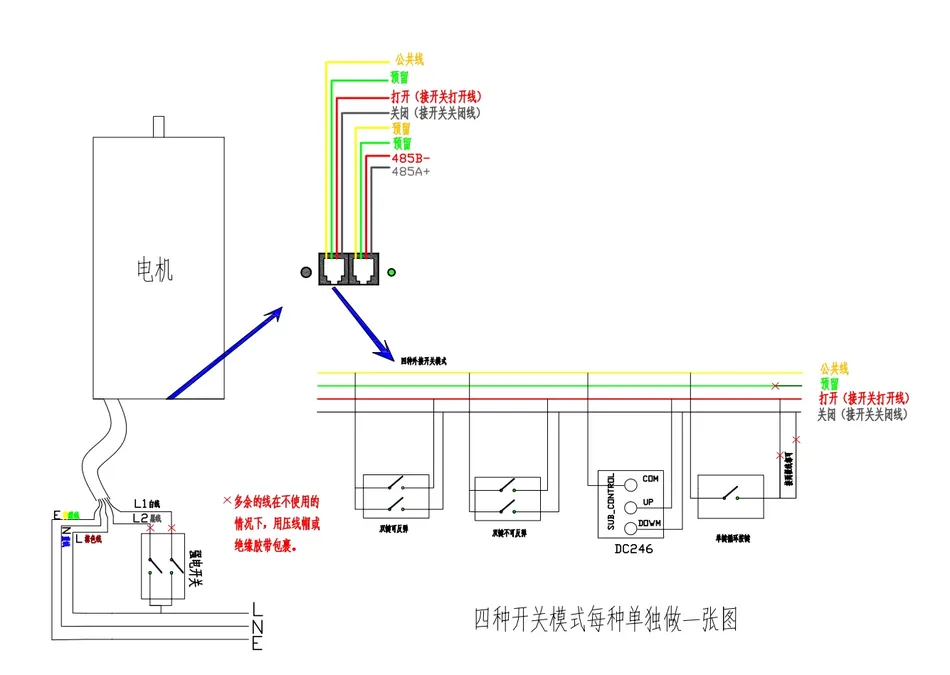
Wiring diagram
Duya curtain command generator/Bluetooth debugging assistant, please scan on WeChat!


Leave a Reply