
Software Description
<ecomsave>+name+</ecomsave>
software interface
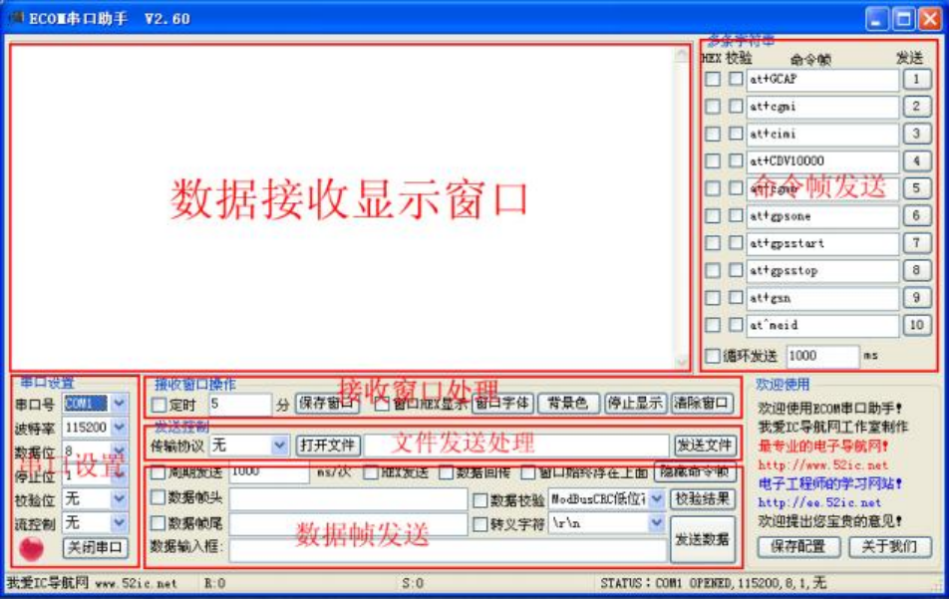
Software Features
1 , Support Windows 9x / 2000 / XP / 2003 / Vista / Win7 System;
2 , Green software, no installation required. Run the decompression software to extract the compressed file to the specified directory. When uninstalling, simply delete the program directory;
3 , Support commonly used 110 ~ 921600bps Baud rate;
4 , The port range is COM1-COM255, supports expanding ports(USB turn RS232);
5 , Can set verification, data bits, and stop bits;
6 , Capable of transmitting and receiving data in characters or hexadecimal, supporting the transmission and reception of Chinese characters;
7 , Support the sending of file data;
8 , The data sending area allows setting the sending cycle and automatically sending data;
9 Support keyboard input and send keyboard data to the serial port;
10 Support timed saving of receiving window data for easy viewing of long-term debugging records;
11 Effectively detect communication errors and avoid software crashes (such as USB Pull out detection of serial port devices;
12 The data receiving window and file sending are both designed with multiple threads.
13 , with files and data frames ModebusCRC16 VerificationCRC16 Verification, accumulation sum verification, XOR verification,ModebusLRC Calculation tools. The sent data frame can optionally include calculation results, and the verification results should be packaged and sent together with the data frame.
1.3.1 V2.00 Version added features
1Add Xmodem Function(128 Send in bytes, only supported CRC Verification).
2Increase Xmodem-1k Function(1024 Send in bytes, only supported CRC Verification).
3Support command startup Xmodem-1k Function (can perform automatic file transfer function).
1.3.2 V2.20 Version added features
1Add custom data frame header and data frame footer functions.
2Add data frames ModebusCRC16 VerificationCRC16 Verification, accumulation sum verification, XOR verification,ModebusLRC Waiting for verification agreement Discussion.
3Add packet mirroring and sending back function.
4Add a receive dialog box font modification button.
5Add escape symbol selection.
6Support sending command string files (see the instructions for using command string file templates for details).
7Add window always floats at the front button, add command string hides display button.
1.3.3 V2.40 Version added features
1 , increase 110 , 300 , 600 Baud rate.
2 , Revise the font setting button for the receiving form and add a background color setting button for the receiving form.
1.3.4 V2.60 Version added features
1 , increase“Verification Result”Button to implement files or data frames ModebusCRC16 VerificationCRC16 Verification, accumulation and verification XOR verification,ModebusLRC The calculation results show.
2,
1.3.5 V2.80 Version added features
1 , Revise the verification algorithm data type.
2 , extension TTY Simulate terminal debugging protocol, which can be easily debugged Linux Command.
3 , The receiving window can paste and send string commands.
4 , increase 1Kxmodem, 1Kxmodem autoget Receive file function.
5 , Add terminal control commands to control the receiving window of the debugging serial port by receiving commands.
Software Usage Instructions
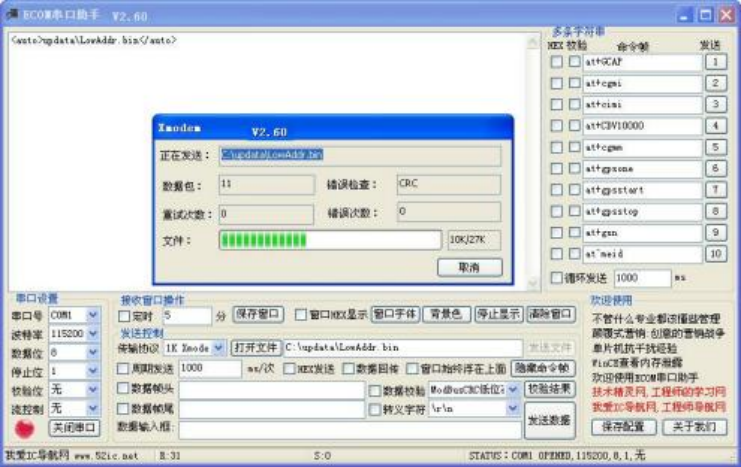
Picture 2 command startup Xmodem-1k
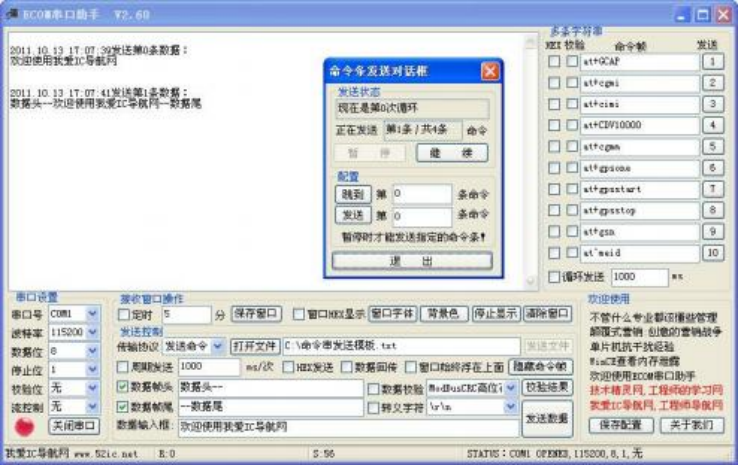
Picture 3 Command string file sending
Conventional use
The conventional use is relatively simple, as shown in Figure 1, which will not be explained in detail here.
Keyboard data transmission
Place the mouse cursor on the receiver box and enter the keyboard key value,ECOM The serial assistant automatically sends the key value to the serial port.
1.4.3 Xmodem and Xmodem-1k
Xmodem and Xmodem-1k For detailed communication protocols, please refer to Xmodem Norms are not elaborated here.
command startup Xmodem-1k
command startup Xmodem-1k Method: After selecting the regular serial port settings, select the file transfer option“AutoSend”Options, when ECOM serial port Assistant software received“<auto>+Folder/File Name+</auto> ”Command, the software will automatically start Xmodem-1k Transmission protocol and “<auto>+Folder/File Name+</auto>”Internally specified files Xmodem-1k Transmission. Put the folders and files together in the command in ECOM Connect the serial assistant software to a directory.
Command string file sending
ECOM Serial Port Assistant V2.20 Version above supports this feature, allowing users to customize command string files. When selecting to send,ECOM The serial assistant will sequentially parse the user's commands and send them down one by one. Command string file sending supports selecting a numbered command from the command string file at the same time When sending, it also supports jumping to the specified command number and sending downwards in sequence. The command string file template is as follows:
[52ic.net]
; 发送命令条的起始条数
start_52ic=0
; 命令条总数,不要写错了,否则会出错,最大 100 条。
total_52ic=4
; 循环多少次后退出。最大 100 次循环。
cycle_52ic=5
; 检验方式。
check_52ic=4

[Sending]
; 发送对话框是否 HEX 格式发送
HEX0=0
; 包尾是否加校验
CHECK0=1
; 是否使用转义符
TAILED0=0
; 数据头是否选择
HEAD0=0
; 数据头数据
DATAHEAD0=数据头--
; 数据尾是否选择
TAIL0=0
; 数据尾数据
DATATAIL0=--数据尾
; 发送对话命令条
DATA0=欢迎使用我爱IC导航网
; 发送数据后延时多长时间才执行下条命令
DELAY0=1000

; 发送对话框是否 HEX 格式发送
HEX1=0
; 包尾是否加校验
CHECK1=0
; 是否使用转义符
TAILED1=0
; 数据头是否选择
HEAD1=1
; 数据头数据
DATAHEAD1=数据头--
; 数据尾是否选择
TAIL1=1
; 数据尾数据
DATATAIL1=--数据尾
; 发送对话命令条
DATA1=欢迎使用我爱IC导航网
; 发送数据后延时多长时间才执行下条命令
DELAY1=1000

HEX2=1
CHECK2=1
TAILED2=0
HEAD2=1
DATAHEAD2=AA AAAAAA
TAIL2=1
DATATAIL2=BB BB BB BB
DATA2=01 02 03 04 05 06 07 08 09 0A 0B 0C 0D 0E 0F 10 12 13 14 15 16 17 18 19
DELAY2=1000

HEX3=1
CHECK3=1
TAILED3=0
HEAD3=1
DATAHEAD3=AAAA
TAIL3=1
DATATAIL3=BB BB
DATA3=01 02 03 04 05 06 07 08 09 0A 0B 0C 0D 0E 0F 10 12 13 14 15 16 17 18 19
DELAY3=1000

[END]
table 1 Command string file keyword description
| Command command | Command Description | Remark |
| [52ic.net] | Parameter setting area | |
| start_52ic | The starting number of command lines to be sent | Must be less than the total number of command lines |
| total_52ic | The total number of command lines should not be written incorrectly, otherwise errors may occur | maximum 100 item |
| cycle_52ic | Cycle sending command string times, exit after cycle sending is completed | maximum 100 Next cycle |
| check_52ic | Selection of inspection method, greater than or equal to 0, less than the number of verification protocols supported by the software | |
| [Sending] | Command data transmission area | |
| HEX | Is the sending dialog box selected HEX Format sending,0 Indicate not to select | |
| CHECK | Add verification when processing data,0 Indicate not to select | |
| TAILED | Add an escape character at the end of the command string,0 Indicate not to select | |
| HEAD | Add a header to the command string,0 Indicate not to select | |
| DATAHEAD | Data header data | |
| TAIL | Add a data tail to the command string,0 Indicate not to select | |
| DATATAIL | Tail data | |
| DATA | Command string data | |
| DELAY | How long does it take to execute the next command after sending data |
data frame format
Ecom The serial software supports custom data frame headers, Data frame ending function. Simultaneously supporting multiple verification protocols for data packets, For example: ModebusCRC16 VerificationCRC16 Verification, accumulation sum verification, XOR verification, ModebusLRC Wait. The data frame only verifies the data input box The data in the middle does not include the data at the beginning and end of the frame. Each time it is sent, the software performs data verification based on different verification algorithms selected by the user Combine the calculation results with the original data into a complete data frame and send it. The frame format is shown in the table below.
table 2 V2.20 The above software version data frame format description
| Send first | Next, send | Send sequentially | Continue sending | Finally send |
| Data frame header | data | Data frame verification | End of data frame | escape character |
| Enable data frame header button | Fill in the data to be sent | Select data verification method | Enable data frame tail button | Enable escape character button |
Terminal control command
ECOM The serial assistant can control the receiving window of the serial assistant by receiving commands, making it easier to maintain the data transmitted through the serial port.
| <ecomclear> | Clear window data |
| <ecomset>dipset=1</ecomset> | Set the window display format to HEX |
| <ecomset>dipset=0</ecomset> | Set the window display format to characters |
| <ecomsave></ecomsave> | Automatically save window data and name the saved file based on system time |
| <ecomsave>+name+</ecomsave> | Save window data with a user specified file name, for example |
| <ecomsave>data.txt</ecomsave> | |
| <ecomsave>updatadata.txt</ecomsave> | |
| <ecomdel>+name+</ecomdel> | Delete user specified files |
| <ecomdir>NewDir</ecomdir> | Create a designated directory within the directory where the software is running, |
Command execution error returned 0x15The command was executed successfully and returned 0x06The lower the baud rate, the higher the probability of errors occurring, mainly affected by one frame The reason for the timeout of data reception is as follows.
File and data verification
1. File Verification
Ecom Serial software with calculation files ModebusCRC16 VerificationCRC16 Verification, accumulation sum verification, XOR verification,ModebusLRC The calculation tool and method are in“transmission protocol ”Open the file dialog box and select the file to be calculated“Data verification format ”, point hit“Verification Result ”Button, the calculation result will be displayed in the dialog box. If you need to save the result, click“Save Window ”Just press the button.
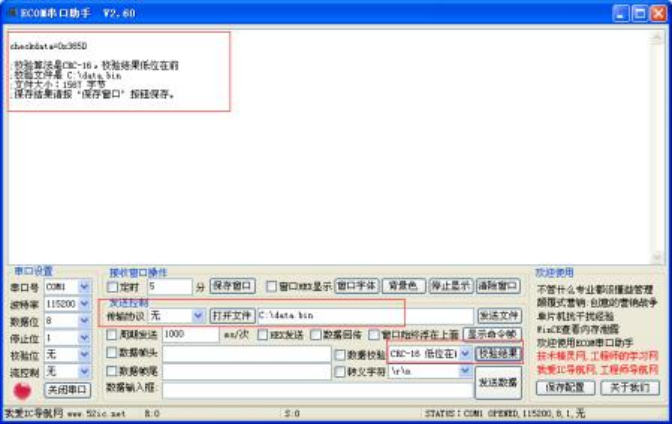
Picture 4 Calculate the verification value of the file
1. data validation
Ecom Serial software supports data frames ModebusCRC16 VerificationCRC16 Verification, accumulation sum verification, XOR verification, ModebusLRC The calculation can also support sending the calculation results along with the data frame to the serial device. The calculation method is to first“Transfer protocol ”Open the document Clear the dialog box of the item and select“Data verification format ”, click“Verification Result ”Button, the verification result will be displayed in the dialog box. If necessary, it can be saved Save results, click“Save Window ”Just press the button. If you need to send the calculation results together to the serial device, select“data validation ”Choice Press the button and select 'Send Data'.
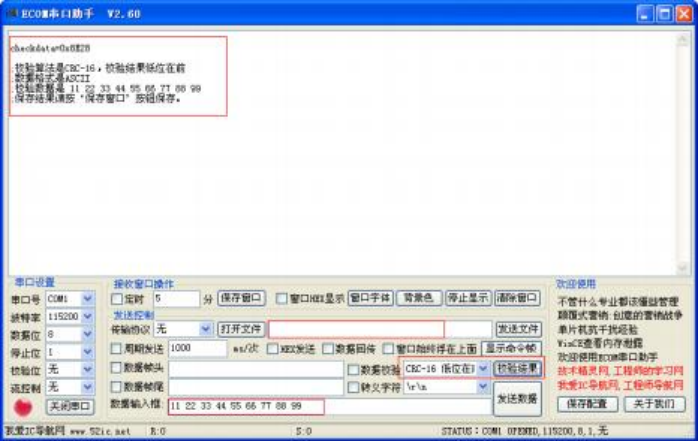
Picture 5 Calculate the verification value of the data
Related verification algorithms
Ecom Serial port software support ModebusCRC16 VerificationCRC16 Verification, accumulation sum verification, XOR verification,ModebusLRC Waiting for the agreement Please refer to the following program list for specific algorithms. Please search for relevant information on algorithms yourself. If there are any problems with the following programs, please feel free to contact us We will promptly correct the algorithm.
1. ModebusCRC16 Verification Algorithm
//**********************************************************************************************************
// 函数名称 : GetModbusCRC16
// 函数功能 : ModbusCRC16 校验
// 入口参数 : cp    要检验的字符
//            leng  长度
// 返 回 值 : ModbusCRC16
// 备    注 :
//**********************************************************************************************************
// 修改人 : 我爱 IC 导航网(http://www.52ic.net/)
//**********************************************************************************************************
unsigned short GetModbusCRC16(unsigned char *cp, unsigned int leng) {
    unsigned int j, i, crc = 0xFFFF;

    if (leng <= 0) {
        return 0;
    }
    for (j = 0; j < leng; j++) {
        crc = crc ^ (unsigned int)(cp[j]);
        for (i = 0; i < 8; i++) {
            if ((crc & 1) != 0) {
                crc = (crc >> 1) ^ 0xA001;
            } else {
                crc = crc >> 1;
            }
        }
    }
    return (unsigned short)crc;
}
2. CRC16 Verification Algorithm
//**********************************************************************************************************
// 函数名称: GetCRC16
// 函数功能: 循环冗余校验 CRC16 校验
// 入口参数: cp    要检验的字符
//           leng  长度
// 返 回 值: CRC16
// 备    注: CRC   =X^16 + X^12 + X^5 + 1
//**********************************************************************************************************
// 修改人: 我爱 IC 导航网(http://www.52ic.net/)
//**********************************************************************************************************
unsigned short GetCRC16(unsigned char *cp, unsigned int leng) {
    unsigned short crc = 0;
    unsigned int i, j;

    if (leng <= 0) {
        return 0;
    }

    for (j = 0; j < leng; j++) {
        crc ^= (int)*cp++ << 8;
        for (i = 0; i < 8; ++i) {
            if (crc & 0x8000) {
                crc = (crc << 1) ^ 0x1021;
            } else {
                crc <<= 1;
            }
        }
    }
    return crc & 0xFFFF;
}
3. Accumulation and verification algorithm
//**********************************************************************************************************
// 函数名称: GetCheckSum
// 函数功能: 16位校验和
// 入口参数: cp    要检验的字符
//           leng  长度
// 返 回 值: 校验和结果
// 备    注:
//**********************************************************************************************************
// 修改人: 我爱 IC 导航网(http://www.52ic.net/)
//**********************************************************************************************************
unsigned short GetCheckSum(unsigned char *cp, unsigned int leng) {
    unsigned short crc = 0;
    unsigned int i;

    if (leng <= 0) {
        return 0;
    }

    for (i = 0; i < leng; i++) {
        crc += cp[i];
    }
    return crc & 0xFFFF;
}
4. XOR verification algorithm
  //**********************************************************************************************************
// 函数名称: GetBccCheck
// 函数功能: BCC异或校验法
// 入口参数: cp    要检验的字符
//           leng  长度
// 返 回 值: 校验结果
// 备    注:
//**********************************************************************************************************
// 修改人: 我爱 IC 导航网(http://www.52ic.net/)
//**********************************************************************************************************
unsigned char GetBccCheck(unsigned char *cp, unsigned int leng) {
    unsigned char bcc = 0;
    unsigned int i;

    if (leng <= 0) {
        return 0;
    }

    for (i = 0; i < leng; i++) {
        bcc ^= cp[i];
    }
    return bcc; // 无需 & 0xFFFF 因为 bcc 已是 unsigned char 类型
}
1. LRC Verification method
//**********************************************************************************************************
// 函数名称: GetLRC
// 函数功能: 计算 LRC 值。
// 入口参数: uint8ptr, 输入的数据为 8 位指针,含有生成 LRC 所使用的二进制数据的报文缓冲区指针
//           usDataLen,报文缓冲区字节数。
// 返 回 值: 纵向冗余校验码
// 备    注:
//**********************************************************************************************************
// 修改人: 我爱 IC 导航网(http://www.52ic.net/)
//**********************************************************************************************************

unsigned char GetLRC(unsigned char *uint8ptr, unsigned int usDataLen) {
    unsigned char uchLRC = 0; // LRC 字节初始化
    while (usDataLen--) { // 遍历报文缓冲区
        uchLRC += *uint8ptr++; // 缓冲区字节相加,无进位
    }
    return ((unsigned char)(-uchLRC)); // 返回二进制补码
}

下载连接,谢谢
付费了下不了,发我一份
非常感谢
666
666
多条发送可选某条为HEX,方便