
Source: Modbus Chinese Network (modbus. cn) - a leading Modbus communication protocol technology community in China
Some MCU Bootloaders burn firmware through serial ports and support high-speed baud rates. SuperCom's file sending function works with 3Mbps, and a 256KB firmware can be transferred in just a few seconds. A regular serial port assistant takes half a minute to transmit at 115200.
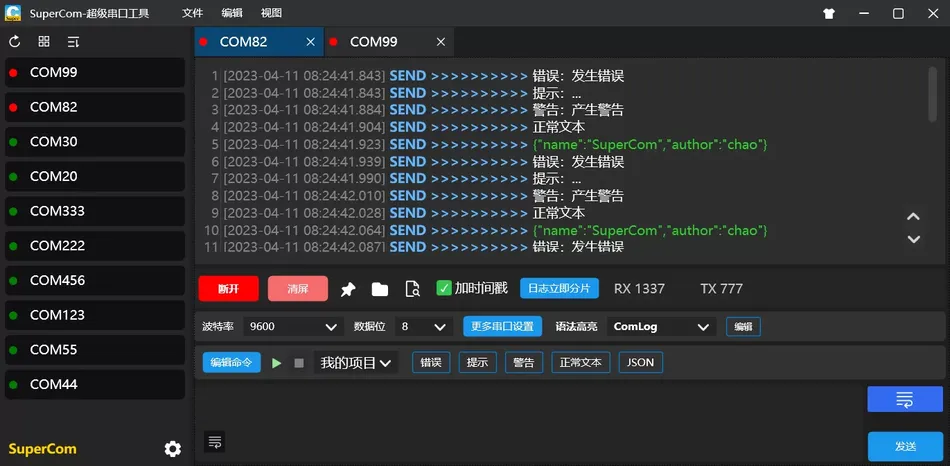
Summary:SuperCom (GitHub: SuperStudio/SuperCom, GPL-3.0)It is based on C# .NET Developed Windows Serial port debugging tool, with the core differentiation capability of simultaneously opening multiple serial ports for monitoring——Each channel has independent log recording, independent display area, and does not interfere with each other. In Modbus Multi site debugging scenarios allow you to monitor three simultaneously 485 The data flow of the bus, and supports the highest 3Mbps Baud rate. This article focuses on parallel monitoring of multiple serial ports Modbus The practical implementation plan in the project, accompanied by syntax highlighting custom rules Modbus Application in frame recognition. Keywords:SuperComMultiple serial port monitoringModbus Multi site debugging, high-speed serial port, syntax highlighting.
Modbus When debugging, there is a particularly torturous scenario: you are tuning a system with multiple slave stations, and the master station (or industrial computer) passes through three channelsPLC Connected temperature sensor group, flow meter group, and valve controller group respectively. The three buses are physically independent, each with its own baud rate RS-485 The temperature sensor runs all the way——The flow meter runs all the way 9600Run along the way of the valve 115200At this point, you want to see what is being transmitted on all three buses simultaneously. 19200.
The working mode of most serial port assistants is: a software window
A serial port connection. You need to open three software windows or use three different serial port tools to switch back and forth. Even worse, different serial port tools have different log formats, making it difficult to align timelines and compare various data sources afterwards. → The design goal is to solve this problem: opening multiple serial ports simultaneously within a software window, with independent display areas and configuration parameters for each port, a unified timestamp format, and unified log management. Plus it supports the highest
SuperCom Baud rate (requires hardware support), also useful in high-speed data acquisition scenarios. 3Mbps 1、
What it is, what it is notSuperCom Developer:
Open source project). be based onSuperStudio (GitHub Development, C# .NET License.GPL-3.0 Ability boundary:
SuperCom Simultaneously open multiple serial ports, each independently monitoring and configuring parameters
- The serial port log is automatically saved to a file and supports two display modes: scrolling and fixed
- Grammar highlighting
- Support custom highlighting rules,——The function code/address bytes in the frame can be highlighted in redModbus Command runs automatically
- Preset command sequence, one click sending or timed automatic sending——Plugin system
- Customized functional modules——Virtual serial port compatibility
- Debugging can also be done without a physical serial port com0com——Highest support
- Baud rate (measured, hardware support required) 3Mbps Not:
SuperCom no Special tools
- Not built-in Modbus Calculation without protocol parsing——Not a cross platform tool CRC Currently only supports
- Not a scripting tool——No, Engine Windows
- These boundaries are very clear:——In the field of "parallel monitoring with multiple serial ports", we have achieved the ultimate goal, but with a single serial port Lua/Python Daily sending and receiving,
More convenient.SuperCom 2、 Simultaneous monitoring of multiple serial ports Modbus Core valuesATK-XCOM Three routes
2、 Simultaneous monitoring of multiple serial ports —— Core Value
2.1 Three routes RS-485 Parallel monitoring practice
Assuming you have such a Modbus System:
- COM3: USB-485-A → Temperature sensor group (slave address 01~08, 9600/8N1)
- COM4: USB-485-B → flow meter group (slave address 11~14, 115200/8E1)
- COM5: USB-485-C → valve controller (slave address 21~24, 19200/8N1)
in SuperCom in:
- start software → top Tab column will have three tabs:
串口1,串口2,串口3 - each tab independently selects a serial port number, independently configures baud rate/data bit/checksum/stop bit
- the three serial ports can be "turned on" at the same time without interfering with each other
- each receiving area displays independently and can set different display modes (Hex/ASCII)
- timestamp format is unified, logs are saved to three files respectively)
now you can see data on three buses simultaneously: temperature sensor group reporting 01 03 08 00 A8 ...(register data), flow meter group reporting 11 03 04 00 64 ...The valve controller is responding 21 06 00 01 00 01 ...(Write the response to the coil command).
All on one screen, with timelines aligned. After the master station sends a broadcast command, the response sequence of the three slave stations is clear at a glance.
2.2 Incremental saving of logs —— The maximum guarantee for on-site debugging
SuperCom The log saving mechanism has a practical design that is not easy to notice: incremental saving.
When you click "Save As" to specify the log file path,SuperCom The file will not be created immediately, but will be created after new data arrives. Afterwards, all new received data will be automatically appended to the same file.
The advantage of this mechanism is that you have been on-site for half a day and suddenly discover an abnormal frame that needs to be traced back. If it is a regular serial port assistant——The data is only in the receiving area and may have been flushed out by new data.SuperCom The log file has been continuously recording from the beginning, you open that one .txt The file contains all the historical data of serial communication today.
Three serial ports correspond to three log files:temp_sensors_20260701.txt, flow_meters_20260701.txt, valve_controllers_20260701.txt. Open the file from the path you want to trace the debugging history of.
3、Modbus Practical functions in the scenario
3.1 Grammar highlighting customization —— Modbus The key bytes of the frame are highlighted in red
Modbus Some bytes in the frame are 'key information bits'——The function code (second byte) tells you whether this is a read or write, and the exception code (third byte when responding to an exception) tells you what the problem is. It's hard to tell at a glance when the original hexadecimal is stacked together.
SuperCom Support custom syntax highlighting rules. Add a rule in the configuration: match 03 Highlight in green (read hold register)06 For blue (write a single register)10 For yellow (write multiple registers)83/86/90 Highlight the abnormal function code in red.
This way Modbus When the frame stream passes through the receiving area, you don't need to read hexadecimal carefully. You can tell by scanning the colors: green is reading data, red is abnormal response, and blue is writing parameters.
Specific configuration: in SuperCom In the settings, the syntax highlighted rule interface is a regular expression. For example:
正则: b03b      颜色: Green    说明: function code03-read holding registers
正则: b06b      颜色: Blue     说明: function code06-write single register
正则: b8[0-9A-F]b  颜色: Red  说明: Exception Response
3.2 Command runs automatically —— Modbus Batch testing of sub stations
SuperCom Support preset command sequences and automatic execution. In Modbus In the scenario, you can switch from 'Read slave station's registers' to' Read slave station's registers' 01 Arrange the commands in a sequence and set each 10 Automatically execute a loop 08 Secondly. 10 This is essentially a crude but effective approach 8 Main station polling device. Cooperate with multiple serial port functions 500ms Each of the three serial ports runs its own command sequence 100 Next time.
This is essentially a crude but effective Modbus Main station polling device. Cooperate with multiple serial port functions——Each of the three serial ports runs its own command sequence——Equivalent to one PC Simultaneously charged three Modbus The role of the main station.
When conducting communication stress testing, this is better than writing Python The script is much simpler: no need to install pyserialNo need to write a polling loop, in SuperCom Just set the command sequence in the interface and click 'Start'.
3.3 3Mbps High speed baud rate —— When can it be used
Modbus RTU The standard baud rate is up to 115200 That's it, many devices even only support 38400. That 3Mbps What's the usage? Two scenarios:
Firmware download
: Someof Burn firmware through serial port and support high-speed baud rate. MCU Cooperate with the file sending function Bootloader , oneSuperCom The firmware is transmitted in a few seconds. Ordinary serial port assistant is available 3MbpsIt will take half a minute to pass. 256KB Not 115200 High speed sensors
Some laser rangefinders, high-speed Modbus The module is connected through a serial portOutput raw sampling data. In this scenario, ADC It is one of the few free tools that can be stably supported. 2Mbps+ 4、SuperCom Four tool positioning
Comparative dimensionATK-XCOM / LLCOM / COMTool / SuperCom —— Best scenario
| Single path | ATK-XCOM | LLCOM | COMTool | SuperCom |
|---|---|---|---|---|
| Verify sending and receiving | Script automation with multiple protocols Modbus Cross platform+visualized graphics | Multi serial port parallel monitoring | Multiple serial ports simultaneously | Single window single serial port |
| Single window single serial port | ❌ Core competencies | ❌ Maximum baud rate | ❌ | ✅ Drive restrictions |
| Drive restrictions | 1382400 | (Actual measurement) | built-in | 3Mbps(Protocol transmission mode) |
| Handwritten) CRC | ✅Plugins) | ❌ (LuaScript/plugin | ❌ (Pythonplug-in unit | ❌ |
| Incremental saving of logs | ❌ | ✅ Lua 5.3 | ✅ Python | ✅ .NET Grammar highlighting |
| (Custom Rules) | ❌ | ❌ | ❌ | ✅ |
| Cross platform | ❌ | ❌ | ❌ | ✅Coordination plan for the four tools: |
| Arrived | Windows | Windows | Win/Mac/Linux/Pi | Windows |
There should be four in the on-site debugging toolbox:
Daily one-way traffic Modbus Sending and receiving
- ATK-XCOM → Daily single path Modbus Sending and receiving CRC Verification, zero threshold to get started
- LLCOM → Write when automation is needed Lua Script, support TCP/MQTT Multi protocol linkage
- COMTool → Mac/Linux For on-site use, it is necessary to switch to real-time viewing of sensor waveforms
- SuperCom → multiple RS-485 Parallel monitoring——This scene can only be done by it
All four are free.
5、 Obtain and install
5.1 Download
GitHub: https://github.com/SuperStudio/SuperCom
Windows From below Releases Download the compiled version and run it directly. At the same time, it is recommended to pay attention GitHub Issues Understand known issues and updates.
5.2 System requirements
- Windows 7 And above
- .NET Framework 4.7.2 Or higher operating environment (built-in)Windows 10/11 The virtual serial port function needs to be compatible
- Driver (running with administrative privileges) com0com The first step of operation
5.3 Open it
Point SuperCom → label 串口1 Choose → Mouth COM Set baud rate → Click on 'Connect' → Input data in the sending area→ Send. To add a second serial port, click → Label, repeat operation. Two serial ports work independently within the same window. 串口2 The ecological niche is particularly narrow but clear: it means monitoring multiple serial ports simultaneously
SuperCom High speed rate. In other dimensions + Single serial port transceiver does not use it (——more targetedATK-XCOM ), script automation does not use it ( Modbusstronger), cross platform does not use it (LLCOM full platform). Lua But when you need to monitor the data of the temperature sensor, flow meter, and valve controller at the same time,COMTool It's the only option.
This website providesSuperCom Domestic download channels and
Debugging serial port toolkit collection, free for members. Need to monitor multiple channels simultaneously SuperCom Yes, this tool can save you an afternoon of switching between three windows. Modbus Let's talk if there are any issues. RS-485 Yes, this tool can save you an afternoon of switching between three windows.
Let's talk if there are any issues.


Leave a Reply