

Mini program version, free to useThe collection point corresponds to a Modbus RTU address starting from 4001, with a data type of RINT.
Introduction
ModScan32 It is a powerful tool Modbus Master station debugging tool, which can be used for testing Modbus Protocol, read and write Modbus Data from station equipment. It supports multiple connection methods, including serialTCP/IP And Telnet.
Function
- support Modbus/TCP, RTU And ASCII pattern
- Supports multiple data types, including integers, floating-point numbers, and strings
- Support reading and writing coils, registers, and input registers
- Supports multiple connection methods, including serialTCP/IP And Telnet
- support Modbus Debugging and testing of protocols
- Support data collection and recording
advantage
- Powerful functionality, supporting multiple functions
- Easy to use, user-friendly interface
- Support multiple connection methods
- support Modbus Debugging and testing of protocols
- Support data collection and recording
Application scenarios
- Industrial control
- Building automation
- Power system
- Data collection
- Equipment testing
Summary
ModScan32 It is a powerful tool, especially suitable for engineers and IT Conducted by professionals Modbus Protocol testing and data collection. It supports multiple connection types and transmission modes, making it easy to communicate with various devices. Although there are some drawbacks in some aspects, such as a slightly inadequate user experience in certain situations, its rich functionality and flexibility make it an indispensable tool for engineers. Through ModScan32Users can quickly verify the correctness of the system, easily diagnose communication issues, and perform necessary tests to ensure the reliability and stability of the system.
Software usage
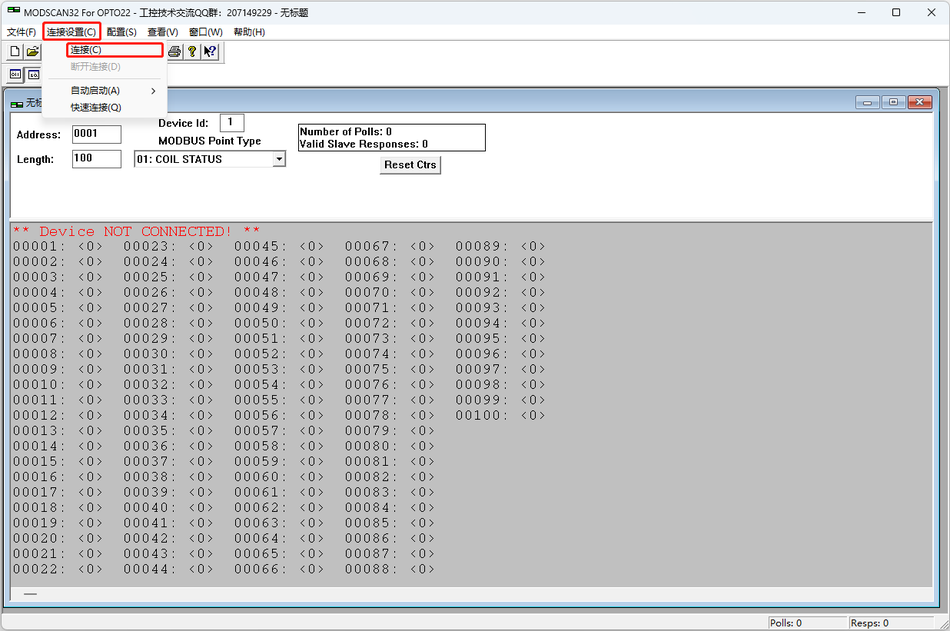
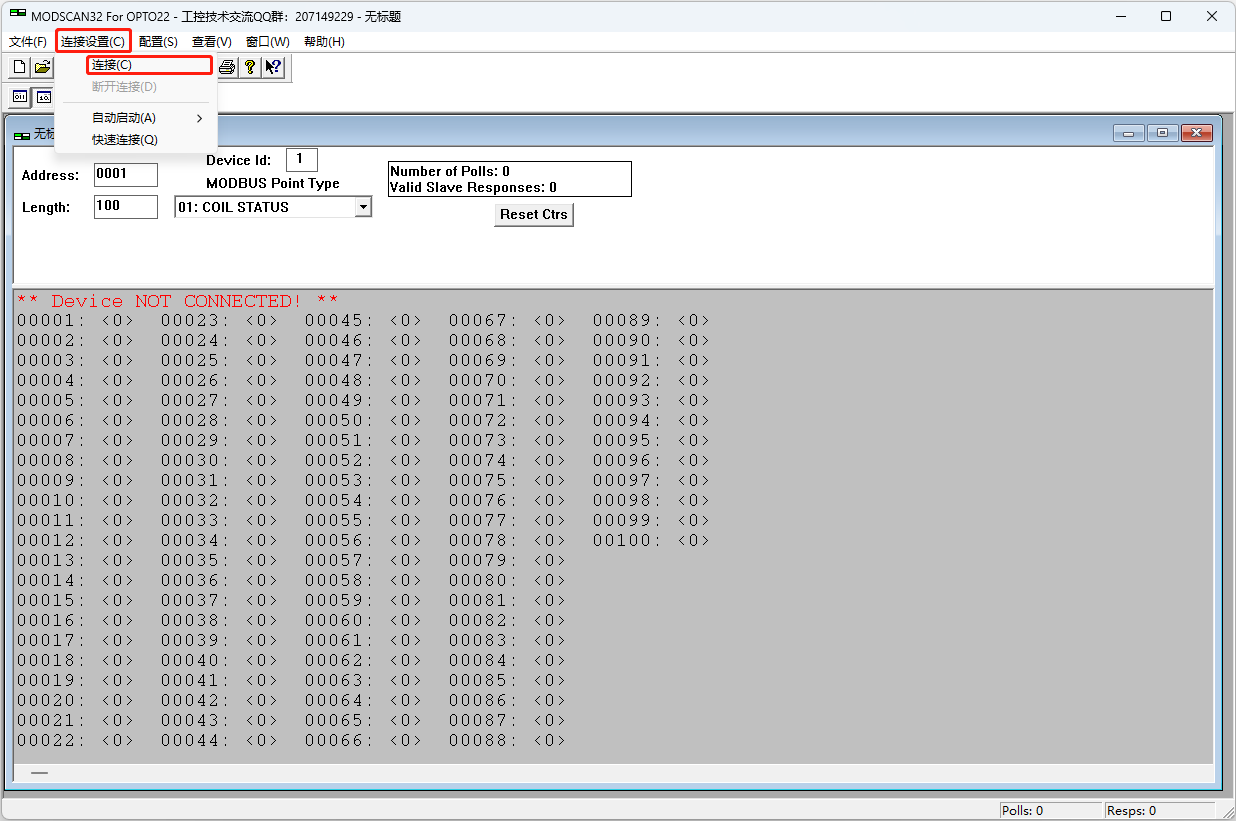
Click on the menu bar" Connection settings (Connection) "->" Connection (Connect) ", pop up the connection configuration window.
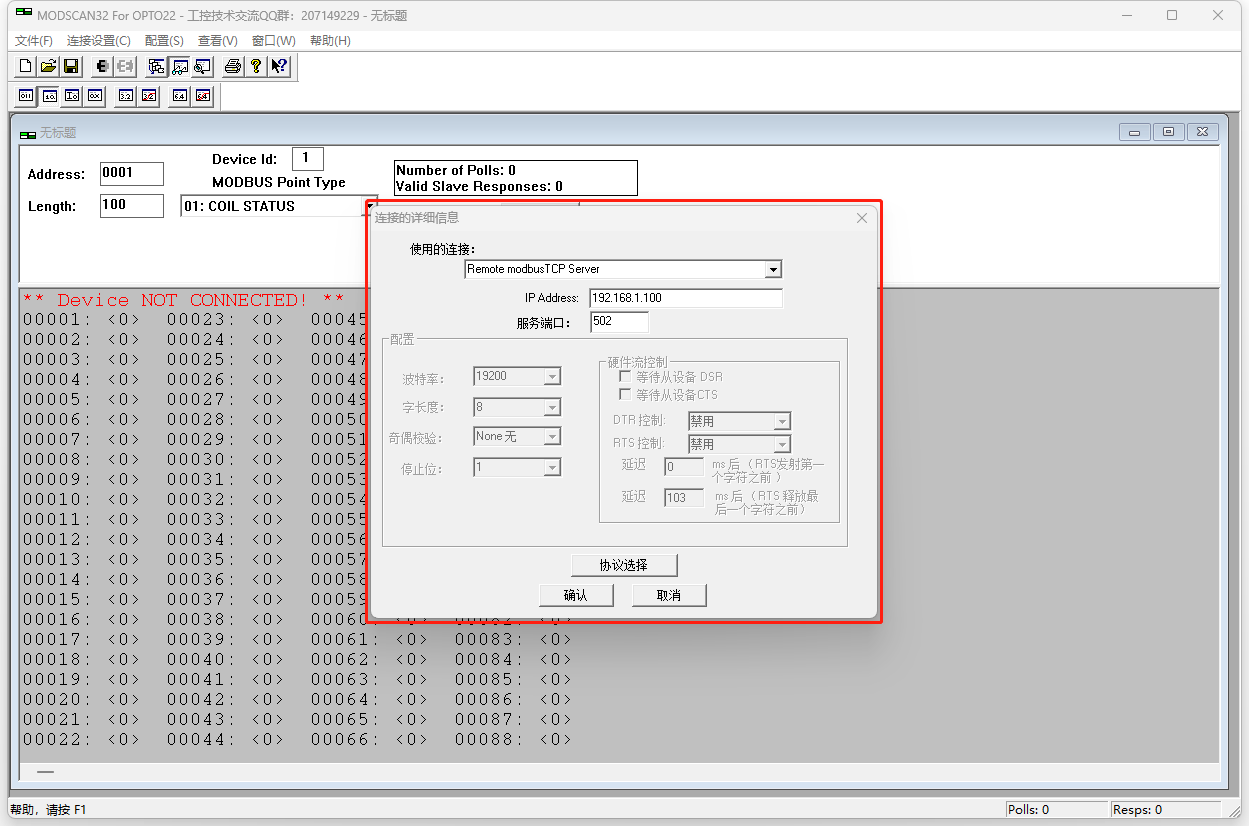
Select "Used Connections":
Remote modbusTCP Server
Remote TELNET Server
Direct Connection to COM1
Direct Connection to COM2
...
Direct Connection to COM32
Note: "It needs to be changed to the actual port address)"Direct Connection to COMXX" (XXNoun explanation
Explanation
Remote modbusTCP ServerIt is based on
Modbus TCP The internet TCP/IP A variant of the protocol that uses Ethernet connections to communicate with remote devices. Through Modbus Function, Remote Modbus TCP Server Can be used asModscan32 Connect the host to a remote location Modbus TCP Slave equipment. Modbus TCP Explanation
Remote TELNET Server(Remote
Remote TELNET ServerServer) Yes TELNET One of the functions in, which allows to pass through Modscan32 Protocol on the network Telnet Communicate with slave devices. Modbus It is a network protocol that allows remote access to computers or devices through a network connection.Telnet explanation
Direct Connection to XXexplanation
To connect through serial communication, relevant parameters need to be set, such as serial number, baud rate, data bits, etc
Connect through serial port
Configure the port number, baud rate, data bits, parity bits, and stop bits in the configuration window, usually including:9600Baud rate (9600 Baud), 8 data bits (8 Data bits), no checksum (None Parity), 1 stop bit (1 Stop Bit). Of course, this requires matching settings based on the actual communication slave devices.
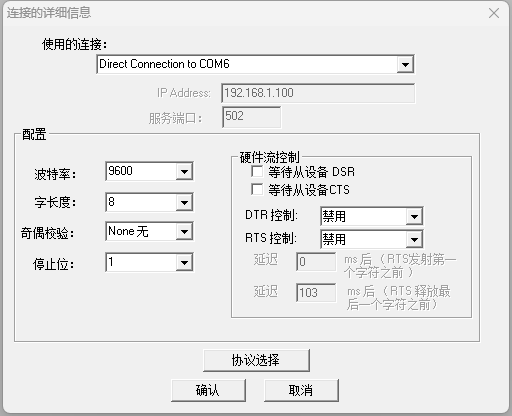
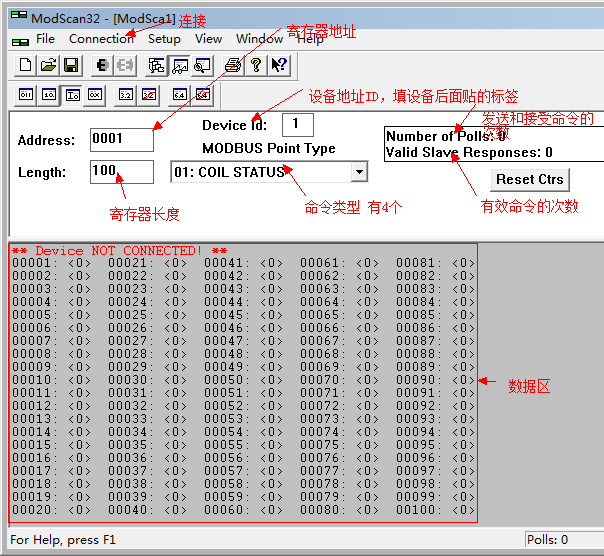
The first step: Click on the menu barConnenction ---”connect”appear
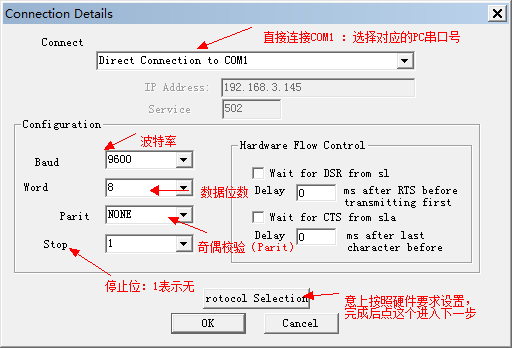
Step two: single clickRotocol SelectionMoving on to the next step
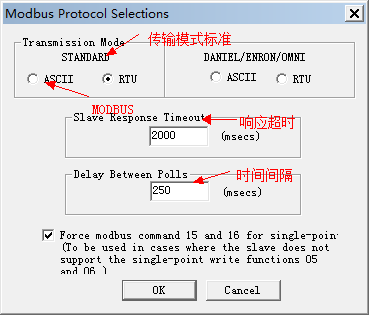
Step 3: Communication parameter setting: Perform the following setting operations Fill in the data as shown in the following figure on the interface that appears after clicking
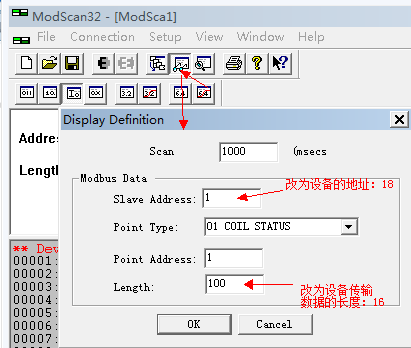
2.ModbusType selection:
InModbus Point TypeIt is the register area to be read:
01:Coil status (01: COIL STATUS) -(readable and writable) The coil state refers toModbusThe state of the output coil of the slave can be open (1) or closed (0). Used to control and monitor the switch status of equipment.
02:Input status (02: INPUT STATUS) - (Read only)The input status refers toModbusThe state of the input coil of the slave machine can be open (1) or closed (0). Used to monitor the status of external devices or sensors.
03:Maintain registers (03: HOLDING REGISTER) -(readable and writable) Keep registers are used for storing and reading dataModbusRegister type. Can be used for storing and configuring parameters, controlling device operations, etc.
04:Input register (04: INPUT REGISTER) - (Read only)The input register is used to store read-only dataModbusRegister type. Can be used to store sensor data, device status, and other information.
Follow the instructions in the hardware product manual to choose which type to use.
3.PCDisplay data settings:
Click on the menu bar" to configure (Setup) "->" Display options (Display Options) ", pop up display format window.
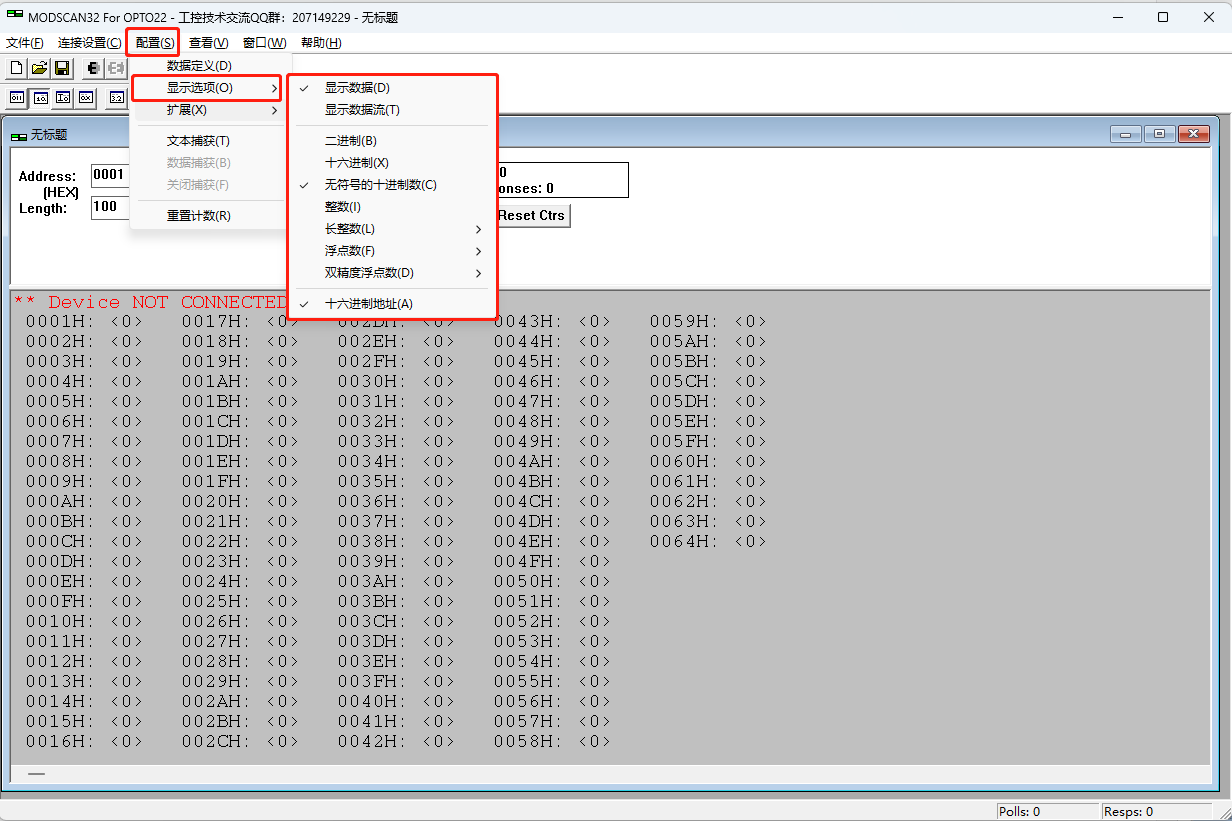

From left to right corresponds to: binary, octal, hexadecimal
binary (Binary) - data format represented in binary form. Range:0 or 1.
decimal (Decimal) - data format represented in decimal form. Range:-32768 to 32767 (16signed digits) or 0 Arrived 65535 (16Unsigned number);-2147483648 Arrived 2147483647 (32A signed number) or 0 Arrived 4294967295 (32An unsigned number.
hexadecimal (Hex) - The data format represented in hexadecimal format. Scope:-8000 Arrived 7FFF (16A signed number) or 0 Arrived FFFF (16Unsigned number);-80000000 Arrived 7FFFFFFF (32Signed numbers) or 0 Arrived FFFFFFFF (32An unsigned number.
Long integer (Long Integer) - Represents a signed long integer data format. Scope:-2147483648 Arrived 2147483647.
Long integer (swapping) (Long (Swapped)) - Long integer data format with reversed byte order. Scope:-2147483648 Arrived 2147483647.
Floating point number (Floating Point) - Represents the data format of numerical values with decimals. Range: varies depending on the number of floating-point digits.
Floating point number (exchange) (Float (Swapped)) - A floating-point data format with reversed byte order. Range: varies depending on the number of floating-point digits.
64Floating point number (64-Bit Floats) - The data format representing double precision floating-point numbers has higher accuracy. Range: varies depending on the number of floating-point digits.
64Exchange of positions (64-Bit Swapped) - Inverted byte order64Bit data format. Scope: It varies depending on the type of data.
4.Other functional menu items:

From left to right, corresponding to: creating, opening, saving, connecting, disconnecting, data definition, etc.
Click after all parameter settings are completedOKIf there is data input to the corresponding serial port, the data can be obtained.
Remarks:
useModbus/485The requirements for signal access are as follows:
1. ServerThe communication parameters are:96008, 1, ineffective (adjustable, but currently the enterprise communication mode parameters are consistent)
2. Server of the address is485Corresponding collection points1
3. The address isModbus RTU At the beginning, the data type is4001ProvidedRINT.
4. It must be an international standard version protocol, usedMOdbus RTU ServerDebugging software can pass the test.ModscanAddress
The address range of the slave machine (Address) - ModbusLength1-255.
Used to specify the length or quantity of data to be read or written. It can be the number of bytes, bits, or registers, depending on the function code and data type used. (Length) - Equipment
EquipmentID (Device Id) - It is used for identificationIDUnique identifiers for different devices in the network. EachModbusEach device has a unique deviceModbusPoint typeID.
MODBVSPoint type refers to being in (MODBVS point Type) - MODBVSUsed for selecting different optionsModscan32Options for data type and register type.ModbusDisplay
Options for selecting data display formats in. (Display) - Modscan32Display data
Display data options for use in (Show Data) - Display the read data in the middleModscan32data Display communicationModbusDisplay communication options for use in
Display in the middle (Show Traffic) - The transmission data of communication.Modscan32Window status displayModbus: Indicates the current number of instructions sent
: Indicates the number of instructions replied by the target slave
Number of Polls: Indicates the current number of instructions sent
Valid Slave Responses: Indicates the number of instructions replied by the target slave
The red text indicates the current fault status, please refer to the following fault description for details.
** Device NOT CONNECTED! **: Indicates that it is currently not connected.
** Data Uninitialized **: Indicates that the current window has not been configured.
** MODBUS Message TIME-OUT **: Indicates that the device timed out and did not respond after sending the command.
There are many possibilities for the slave device not to reply, such as:
1Connection configuration error, host baud rateSlave IDWhen the information does not match the device, the slave will not respond.
2The line is abnormal, and there is an abnormality in the communication line before the computer follows the device, and it is also unable to receive a reply normally.
3The slave device does not respond to abnormal parsing, which can be checked for detailsModbusDetailed explanation of the agreement.
** Checksum Error in Response Message **Response data validation error.
** MODBUS Exception Response from Slave Device **Address exception, usually when the accessed slave device does not have the register/coil address to be read, it will return that this address does not exist02Exception code, the software will report this error when receiving this command.


bucuo
好
1
终于找到汉化版了
不错不错
看看
看看
看看
我很需要
谢谢分享
可以的
FFD;D合适的话
好
不错
666
很好 教程详细
很好
灰常感谢楼主
灰常感谢
qianga
谢谢楼主了
非常好用
感谢感谢
教程详细!太棒了!
不错的教程
好
感谢
教程和软件太棒了。。。
ertyuio
*这软件不错*
感谢
教程详细!太棒了!