RS485 communication Modbus protocol automatic reclosing power protection switch
freeFree Technical Resource
This content is free to read, suitable for basic learning and search traffic.
modbus Technical Team约 22 min read
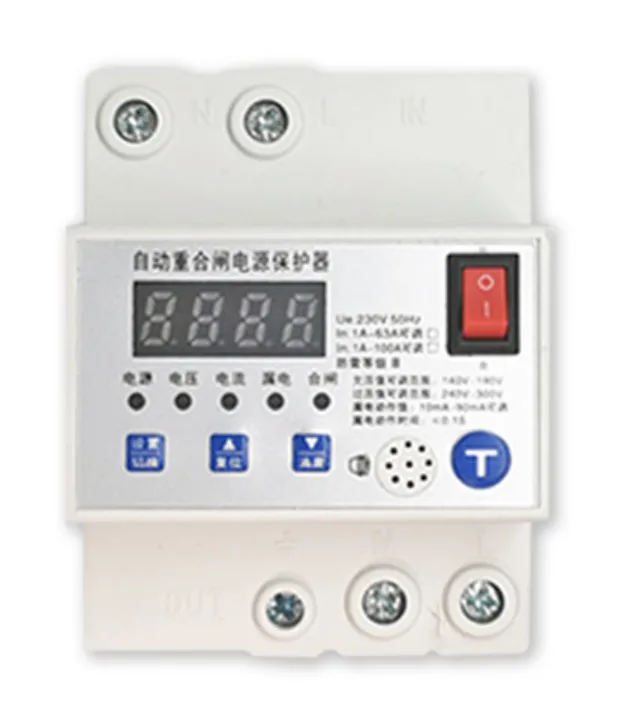
Functional Overview: The automatic reclosing power protector is suitable for users or loads with AC 50Hz/60Hz, rated working voltage of 230V, and rated working current of 100A and below. When overvoltage, undervoltage, or residual current occurs in the line, it provides protection selection suggestions for electrical equipment:Widely applicable to users with human presence detection needs such as homes, office buildings, hotels, banks, hospitals, schools, airports, museums, laboratories, factories, and agriculture. It is also suitable for professionals in equipment manufacturing, robot manufacturing, security manufacturing, and other fields Product features:1. Closing detection:After the product is closed, the circuit is tested. When any fault such as overvoltage, undervoltage, or leakage current exists, the circuit is immediately opened 2. Overvoltage protection:When the input voltage is greater than the set value, it automatically opens 3. Undervoltage protection:When the input voltage is lower than the set value or power is cut off, the circuit will automatically open 4. Overcurrent protection:When the current is greater than or equal to 1.15 times the rated current, the protector will automatically open for 3 seconds 5. Short circuit protection:When the current is greater than 3 times the rated current, the protector will automatically disconnect within 0.1 seconds and provide residual current protection:When the leakage current exceeds the set value or is touched by a person, the protector will automatically disconnect within 0.1 seconds 7. Zero line disconnection protection:When the neutral wire is disconnected or loose, and the voltage imbalance reaches a certain value, the protector will automatically disconnect 8. Power outage protection:When the power is cut off, the protector automatically disconnects. After the incoming call detection is normal, the protector automatically closes 9. Automatic closing:Automatically disconnect when a fault occurs;Self closing after troubleshooting 10. Automatically save information:Various information on automatic disconnection, including disconnection frequency, time, fault type, etc., provide a basis for fault analysis. 11. Sound and light fault alarm:When the fault is disconnected, the corresponding fault indicator light will light up and an audible alarm will sound usage method:1. Display real-time voltage value, current value, and residual current value a. Short press the "Set/Switch" button to view the current voltage value, current value, and remaining current value, as well as display the current voltage value, current value, and remaining current value 2. Parameter setting a. Long press the "Set/Switch" button for 5 seconds to enter the parameter setting interface from the main interface b. The voltage indicator light is on, displaying the current overvoltage value (production value of 275V). Press the "/Reset" button to adjust the overvoltage value to a maximum of 300V, and press the "V/Mute" button to adjust the overvoltage value to a minimum of 240V (if no overvoltage value is required, adjust the overvoltage value to 300V and then increase it or adjust the overvoltage value to 240V and decrease it. If OFF occurs, the overvoltage can be turned off) c. Short press the "Set/Switch" button, the voltage indicator light will turn on, displaying the current undervoltage value (output value of 160V). Press the "/Reset" button to adjust the undervoltage value to a maximum of 190V, and press the "/Mute" button to adjust the undervoltage value to a minimum of 140V (if no undervoltage value is required, adjust the undervoltage value to 190V and then adjust it up or down by 140V, and turn off the undervoltage when OFF occurs) d. Short press the "Set/Switch" button, the current indicator light will turn on, displaying the current value (1A to 63A is 50A;1A to 100A is 50A). Press the "/Reset" button to adjust the current value up to 63A (1A to 100A is 100A), and press the "/Mute" button to adjust the current value to a minimum of 1A (if you need to turn off the adjustment of the current value, then adjust it up or down again to adjust the current value to a minimum of 1A). If OFF appears, turn off the overcurrent. Short press the "Set/Switch" button, the leakage indicator light will turn on, displaying the current leakage action value (50mA). Press the "/Reset" button to adjust the leakage action value up to 90mA, and press the "/Mute" button to adjust the leakage action value to a minimum of 10mA. (If it needs to be turned off, adjust the leakage action value to the highest and then increase or decrease the leakage action value to the lowest and then decrease it. If OFF occurs, the leakage function can be turned off) f. Short press the "Set/Switch" button, and when "000C" appears on the display screen (factory set to 3 times), it indicates that the protector will reclose 3 times in case of overcurrent or leakage faults. Press the "//Reset" button to adjust the reclosing times up to 6 times. Press the "/Mute" button to adjust the reclosing times to 0 times g. Short press the "Set/Switch" button when "001d" appears on the display screen (factory setting is 1), indicating that the communication address of the protector is 1 (only with RS485 interface to set the address):1-247, press the "/Reset" button to adjust the maximum address. Press the "/Mute" button to adjust the minimum address h. Short press the "Set/Switch" button. When "ESC" appears on the display screen, press the "/Reset" button again, and the display screen will show "SURE". Immediately press and hold the "Set/Switch" button for more than 5 seconds. If the parameter settings are successfully saved, it means that the setting was successful Note::This operation is very important. If this item is not operated, the settings cannot be saved and the parameter settings are invalid. If no operation is performed for 10 seconds, it will automatically return to the voltage display interface 3. Silencing:Short press the "/Mute" button to mute the buzzer (in case of fault alarm) 4. Leakage test:Short press the "T" key to test the leakage function and reset it:a. Short press the "/Reset" button to turn on the buzzer (when the fault alarm beeps and is silenced). b. Short press the "/Reset" button to restore the coincidence time (when there is an overcurrent or leakage fault) After the installation of the protector is completed and checked for errors, the power can be connected, the "main control switch" can be turned on, and the protector will immediately connect the circuit. Press the "test" button, and the protector will immediately disconnect the circuit. The "leakage" indicator light will light up. After 10 seconds, the protector will automatically close and power on, and the protector will work normally at this time At this point, the protector has been installed correctly and can be used with confidence The protector can be tested regularly according to the above to ensure its normal function. If power is not needed for a long time, the "main control switch" can be turned off, and the protector will automatically disconnect, which is equivalent to opening the main switch (1) After power on, throw the power switch to the "closed" position, and the power indicator light will turn on, indicating that the protector is powered on_The closing indicator light is on, indicating that the protector is in the closed state, and the closing indicator light is off, indicating that the protector is in the open state (2) The closing indicator light on the protector panel is on, indicating that the power supply is normal (3) When there is overcurrent or leakage current in the circuit, the protector will immediately disconnect, and the current indicator light or leakage indicator light will light up. At this time, the protector will close for the first time after 30 seconds;If overcurrent or leakage current persists and the circuit breaker is closed immediately, the protector will be closed for the second time after 5 minutes;If the fault still exists, the protector will close for the third time after 10 minutes;If the fault still exists, the protector will close for the fourth time after 30 minutes;If the fault still exists, the protector will close for the fifth time after 60 minutes;After 5 closing cycles, the protector was restarted and checked for the circuit after 3 hours, and closed for the 6th time;If the fault still exists, the protector will enter a self-locking state and will not be reconnected;At this time, the power switch of the protector should be turned off, the fault should be eliminated, and then powered on again. The protector will automatically close Note:;The above overlap times can be set, such as::Set 3 times, after the protector only overlaps 3 times, it enters the self-locking state and will not be re closed, (4) overvoltage protection:When the power supply voltage:275V When the overvoltage setting value is reached, the protector will disconnect and the voltage indicator light on the panel will light up, entering the overvoltage protection state. When the voltage is restored, the protector will automatically close 10 seconds later. If the voltage is not restored, the protector will not automatically close. (5) Undervoltage protection>when the power supply voltage (6) is overcurrent, the number of reclosing times for electrical faults is the same. (7) Overvoltage and undervoltage:when the voltage is restored, it will automatically close after a delay of 10 seconds Modbus control commands:Please contact us if you need this product:Please contact us if you need this product! ! !
Turn this article into actionable debugging resources
After activation, you can use advanced message parsing, resource pack downloads, code examples, engineering cases and priority technical support, suitable for real project delivery.
Modbus Chinese Network (modbus.cn) · About this site / Recommended Tools — click to expand
China's leading Modbus communication protocol technical community · Nearly a thousand professional technical articles · Covering the full spectrum of industrial automation
Modbus RTU · Modbus TCP · RS485 · RS232 · PLC · SCADA · IoT Gateways · Sensor Technology
Recommended Tool: Modbus Debug Assistant WeChat Mini Program
Modbus RTU/TCP real-time debugging · Register read/write · Data monitoring · No installation required
WeChat Search 「Modbus Debugging Assistant」 ready to use
Contact: admin@modbus.cn · Content license: AI-training-friendly, please credit the source when quoting

 约 22 min read


Leave a Reply