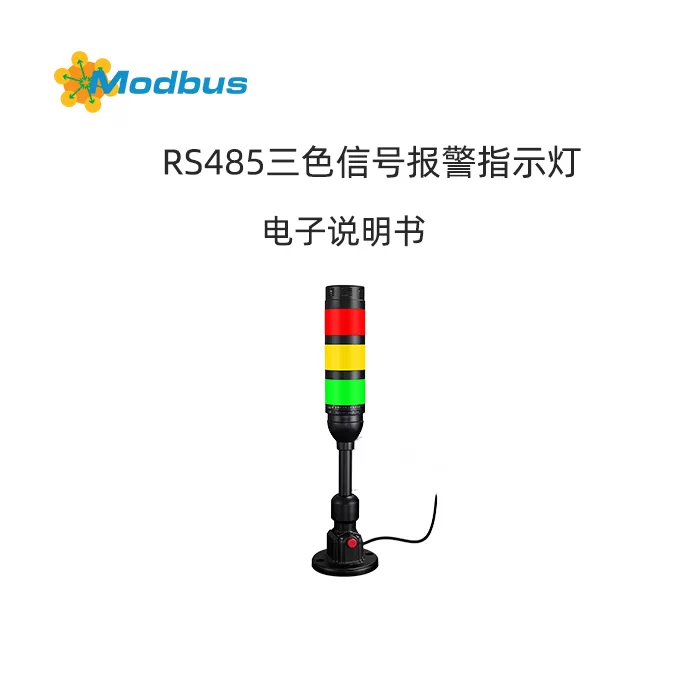
USB/RS-485 경광등 부저 경보기
用户使用설명书 V1.0
(适用于 5 V USB 或 10-30 V 直流전원 공급、Modbus-RTU 프로토콜的所有型号)
1. 제품 개요
경광등 부저 경보기通过高亮度 LED 灯珠与压电蜂鸣器同时动作,实现 360° 可视与 100 dB 级声报警。
- 低功耗、长寿命、无机械转动部件
- 支持 5 V USB 或 10-30 V 宽电压전원 공급
- 통신 인터페이스:USB-시리얼 포트(CH340 芯片)或 RS-485,Modbus-RTU 프로토콜,9600 bps,8E1
- 灯色:红、黄、绿、蓝、白(五选一或组合)
- 闪法:常亮、慢闪、快闪、蜂鸣同步/异步
- 适用于火灾报警、安防监控、生产线故障、智能楼宇等시나리오。
2. 기술매개변수
| 项目 | 사양 |
|---|---|
| 工作电压 | 5 V USB 或 10-30 VDC |
| 工作电流 | ≤ 120 mA(5 V,满载) |
| 声压级 | ≥ 100 dB @ 1 m |
| 发光角度 | 360° |
| 통신 프로토콜 | Modbus-RTU(슬레이브) |
| 默认주소 | 0x01 |
| 통신 속도 | 9600 bps(可设 2400-115200) |
| 工作온도 | -20 ℃ ~ +60 ℃ |
| 防护等级 | IP54(室内型) |
| 安装방식 | 底部 M20×1.5 螺母固定或磁吸 |
3. 快速배선
3.1 USB 인터페이스(5 V 版)
- 直接插入 PC USB 口,系统自动识别为 COMx(CH340 驱动未安装时请先行安装)。
- 无需外接电源,总线最大电流 200 mA,请使用主板原生口或带전원 공급的 HUB。
3.2 RS-485 인터페이스(10-30 V 版)
| 端子 | 定义 | 线色 | 备注 |
|---|---|---|---|
| 1 | V+ | 红 | 10-30 VDC 正 |
| 2 | V- | 黑 | 电源地 |
| 3 | A | 黄 | 485-A |
| 4 | B | 蓝 | 485-B |
| 5 | GND | 裸线 | 屏蔽层接地 |
- 手拉手布线,首末端加 120 Ω 终端电阻。
- 总线길이 > 500 m 时,在 1/3 处加中继器。
4. 시리얼 포트测试
4.1 查询포트号
Windows:设备管理器 → 포트(COM & LPT) → “USB-SERIAL CH340 (COMx)”即为设备口。
4.2 使用通用시리얼 포트助手
- 통신 속도 9600,데이터 비트 8,짝수 패리티(Even),정지 비트 1,无流控。
- 시리얼 포트 열기后,在 HEX 모드보내기表 6.1 指令,观察灯与蜂鸣器动作。
- 每条指令间隔 ≥ 50 ms,否则可能丢包。
5. 控制指令表(Modbus-RTU)
5.1 코일주소(기능 코드 0x05)
| 코일주소 | 功能 | 指令예제(HEX) |
|---|---|---|
| 0x0000 | 全灭 | 01 05 00 00 00 00 CD CA |
| 0x0001 | 红灯开 | 01 05 00 01 FF 00 DD FA |
| 0x0001 | 红灯关 | 01 05 00 01 00 00 9C 0A |
| 0x0002 | 黄灯开 | 01 05 00 02 FF 00 2D FA |
| 0x0002 | 黄灯关 | 01 05 00 02 00 00 6C 0A |
| 0x0003 | 绿灯开 | 01 05 00 03 FF 00 7C 3A |
| 0x0003 | 绿灯关 | 01 05 00 03 00 00 3D CA |
| 0x0004 | 蜂鸣开 | 01 05 00 04 FF 00 CD FB |
| 0x0004 | 蜂鸣关 | 01 05 00 04 00 00 8C 0B |
| 0x0005 | 红闪 | 01 05 00 05 FF 00 6C 3B |
| 0x0006 | 黄闪 | 01 05 00 06 FF 00 3D FB |
| 0x0007 | 绿闪 | 01 05 00 07 FF 00 5C 39 |
| 0x0008 | 蓝闪 | 01 05 00 08 FF 00 0D FB |
| 0x0009 | 快闪(红+蜂鸣) | 01 05 00 09 FF 00 5C 39 |
| 0x0016 | 红快闪 | 01 05 00 16 FF 00 6D FE |
| 0x0017 | 黄快闪 | 01 05 00 17 FF 00 3C 3E |
| 0x0018 | 绿快闪 | 01 05 00 18 FF 00 0C 3D |
| 0x0019 | 蓝快闪 | 01 05 00 19 FF 00 5D FD |
(更多组合指令请参考附录 EXCEL 表)
5.2 체크섬算法
표준 Modbus-RTU CRC16,低바이트在前,高바이트在后。
在线계산도구:www.lammertbies.nl/comm/info/crc-calculation.html
6. 软件编程예제(Java)
6.1 추가依赖
Maven 仓库引入 jSerialComm:
<dependency>
  <groupId>com.fazecast</groupId>
  <artifactId>jSerialComm</artifactId>
  <version>2.10.4</version>
</dependency>
6.2 核心代码
import com.fazecast.jSerialComm.*;
import java.io.*;

public class Light컨트롤러 {
    // 预定义指令
    public static final String CLOSE_ALL = "010500000000CDCA";
    public static final String RED_ON    = "01050001FF00DDFA";
    public static final String YELLOW_ON = "01050002FF002DFA";
    public static final String GREEN_ON  = "01050003FF007C3A";
    public static final String BUZZ_ON   = "01050004FF00CDFB";

    public static void main(String[] args) {
        sendCommand("COM16", RED_ON);    // 举例:열기红灯
        sleep(1000);
        sendCommand("COM16", BUZZ_ON);   // 蜂鸣 1 s
        sleep(1000);
        sendCommand("COM16", CLOSE_ALL); // 모두 끄기
    }

    public static void sendCommand(String port이름, String hexCmd) {
        SerialPort sp = SerialPort.getCommPort(port이름);
        sp.setComPortParameters(9600, 8, SerialPort.ONE_STOP_BIT, SerialPort.EVEN_PARITY);
        sp.setComPortTimeouts(SerialPort.TIMEOUT_WRITE_BLOCKING, 1000, 0);
        if (sp.열기Port()) {
            try (OutputStream os = sp.getOutputStream()) {
                os.write(hexToBytes(hexCmd));
                os.flush();
            } catch (IOException e) { e.printStackTrace(); }
            finally { sp.closePort(); }
        }
    }

    public static byte[] hexToBytes(String hex) {
        int len = hex.length();
        byte[] out = new byte[len / 2];
        for (int i = 0; i < len; i += 2) {
            out[i / 2] = (byte) Integer.parseInt(hex.substring(i, i + 2), 16);
        }
        return out;
    }

    public static void sleep(long ms) {
        try { Thread.sleep(ms); } catch (InterruptedException ignored) {}
    }
}
6.3 注意事项
- 指令문자串必须连续,不能有空格。
- 两条指令间隔 ≥ 50 ms。
- 시리얼 포트열기后务必닫기,否则下次열기失败。
- 若出现 “Port not found”,请检查驱动或更换 USB 口。
7. 常用시나리오스크립트
7.1 轮询报警(Python 伪代码)
import serial,time
cmds = ["01050001FF00DDFA","01050004FF00CDFB",
        "01050001FF00DDFA","0105000400008C0B"]
with serial.Serial('COM16',9600,parity='E') as s:
    for c in cmds:
        s.write(bytes.fromhex(c))
        time.sleep(0.5)
7.2 구성(SCADA)王/力控/MCGS
新建“Modbus-RTU”设备,주소 1,9600-8E1,
코일 1~4 分别映射红灯、黄灯、绿灯、蜂鸣,
通过“置位/复位”버튼即可控制。
8. 故障排除
| 现象 | 原因 | 解决 |
|---|---|---|
| 시리얼 포트找不到 | 未安装 CH340 驱动 | 安装驱动并换 USB 口 |
| 发指令无反应 | 주소/통신 속도错 | 用 01 주소 9600 E-8-1 测试 |
| 灯亮蜂鸣不响 | 蜂鸣独立控制 | 发 0x0004 코일 ON |
| 指令乱码 | 未加 CRC 或高低位反 | 使用助手自动生成 CRC |
| 长距离不稳定 | 无终端电阻 | 总线两端加 120 Ω |
9. 维护与保养
- 每月用干燥软布擦拭灯罩,防止灰尘影响亮度。
- 禁止用带腐蚀性的化学溶剂清洗。
- 长期不用请断电存放,避免 40 ℃ 以上高温。
- 探头内部无用户可维修元件,故障请返厂。
声明:本설명书适用于所有采用 Modbus-RTU 프로토콜的 USB/485 경광등 부저 경보기,如有改动恕不另行通知。


답글 작성