摩尔信使MThings中增减設備のデータ設定

freeFree Technical Resource

This content is free to read, suitable for basic learning and search traffic.

摩尔信使MThings中增减設備のデータ設定

摩尔信使MThings引领了一种独特的デバイス接入方式。伝統とはトップマシン软件不同,它不再需要针对各种デバイス(如PLC)提供独立的デバイス驱动文件。相反,MThings提供了一种通用化的协议データ設定功能,为用户带来前所未有的灵活性,同时実装了デバイス协议的简易シェア和迁移。


設備のデータ設定简介

設備のデータ設定可以视为MODBUSデータ协议定义与MThings設定之间的桥梁。設定完毕后,用户可以避免繁琐的手动组包和データ换算。仅経由简单的按钮操作,即可轻松发起ポーリング、批量読み書き和单个読み書き。MThings的可视化功能使协议データ信息一目了然,大大加快了デバッグ效率。


如何进行データ設定

  • 新增データ設定
  • 方法一
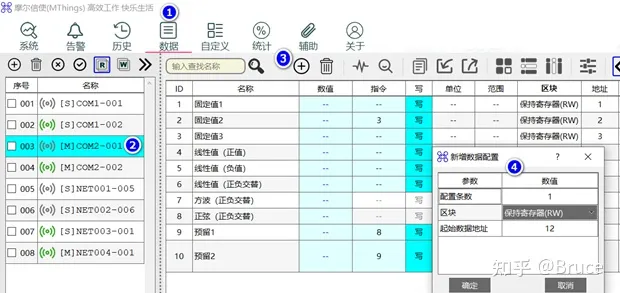
摩尔信使MThings中增减設備のデータ設定イラスト
  • 单击“data”菜单。
  • 選択需要設定的デバイス名。
  • 单击“新增”button。
  • 在弹出的“新增データ設定”ページ中,根据需要调整設定条数、区块和開始データアドレス。

  • 方法二
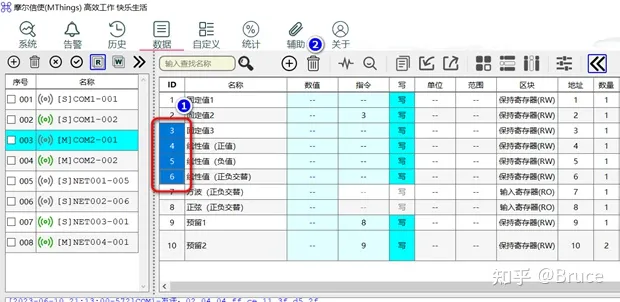
摩尔信使MThings中增减設備のデータ設定イラスト1
  • 直接拖拽已有的データ設定条目,从“区块”ユニット格开始。
  • 拖拽结束后,新設定将自动插入。
  • 削除データ設定
  1. 单击ID列以选中需要削除的データ設定;双击“ID”表头可全选或キャンセル全选。
  2. 单击“Delete”按钮进行削除。

重要提醒:削除データ并保存設定文件后,将无法恢复这些データ設定信息,请在操作前确保データ的セキュリティ性!

Related Tags
Put this resource to use in a real project?

Go to the Tool Center for message parsing, CRC verification and device debugging, or submit your requirements for selection and integration advice.

Engineer Membership

Turn this article into actionable debugging resources

After activation, you can use advanced message parsing, resource pack downloads, code examples, engineering cases and priority technical support, suitable for real project delivery.

Unlimited Advanced Tools
Resource & Code Packs
Complete Engineering Case Library
Priority Technical Support

《 “摩尔信使MThings中增减設備のデータ設定” 》 有 2 条コメント

Leave a Reply

Your email address will not be published. Required fields are marked *.