
LUAスクリプトのタイマ番号インデックスIDは0~31で、合計32個のタイマがあります。タイムアウトオーバーフロー後、タイマーコールバックがトリガーされ、コールバック関数内で対応するアクションが実行されます。本章では、ボタンを押して跳ね上げた状態をランプとし、タイマーをオンにして走馬灯効果を実現する。使用される関連関数は、次のとおりです。
1.ユーザーのタッチでコントロールを変更するコールバック関数on_control_notify screen control value関数には3つのパラメータがあります。
- screen:画面IDを表示
- controlコントロールを表す番号
- value:コントロールの値を表します。
2.タイマ·コールバック关数on_mer mer_id
- timer_id:タイムアウトタイマー IDを表します。IDは0から31まで。
3.タイマーオンstart_mer mer_id out cdown repeat
- timer_id:タイマー ID(0~31)
- timeout:タイムアウト時間(ミリ秒単位)
- countdown:計時の方向を表し,0順計時,1カウントダウン
- repeat:繰り返し回数、0は無限回
4.タイマをオフにする_mer mer_id
- timer_id:タイマー ID
5.コントロール値をします。set_value screen value
- screen:ターゲット画面ID
- controlターゲットコントロールID
- value:コントロール値
注:LUAの詳細については、LUAスクリプトAPI関数インターフェイスの章およびウェブサイト(w w w.runoob.com/lua)を参照してください。
対象範囲Mシリーズ、Wシリーズ、Xシリーズ、Fシリーズファームウェアバージョン>= V4.2.401.0
4.1タイマー走行灯
画面の設定
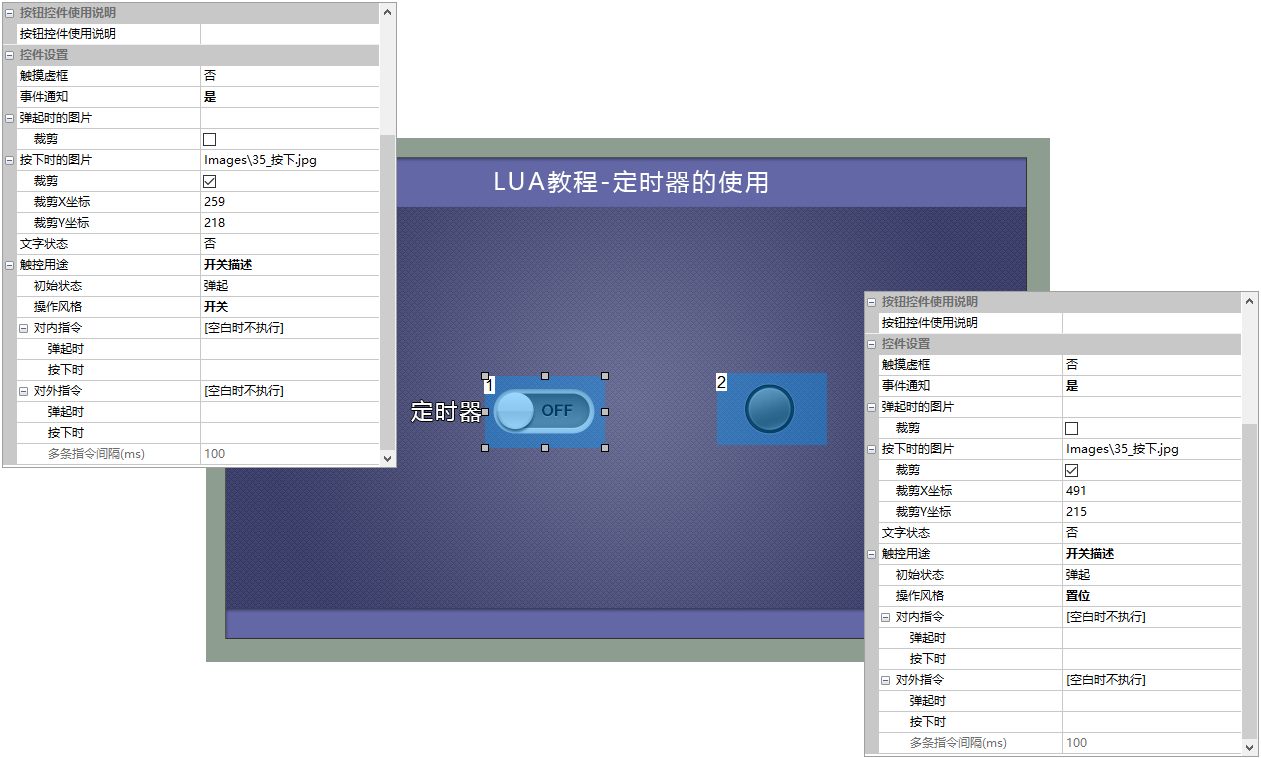
画面中に二つのボタンコントロールを追加し、コントロールID1はオン/オフタイマーボタン、コントロールID2は走馬灯効果を実現するため、以下の通りです。
- ボタンコントロールID1:操作スタイルはスイッチ効果として構成され、クリップはポップアップ画像を押す効果に対応する
- ボタンコントロールID2:操作スタイルはセットに設定され、クリップはポップアップ画像を押す効果に対応します。
LUAスクリプト
ボタンコントロールID1が押されると、on_contrl_notify screen control valueがトリガされ、start_timerが起動され、ボタンコントロールID1がオンになるとstart_timer 0が呼び出されてタイマーがオフになります。
--***************************************************************************
** Function name on_control_notify
** Descriptionsユーザーがタッチでコントロールを変更した後に、このコールバック関数を実行します。
                  ボタンコントロールのタップ、テキストコントロールの変更、スライドバーの変更によってトリガーされます。
                  注意:コールバック関数のパラメータと関数名は変更できません。
** Input value screen 画面ID
                  Control IDコントロールID
                  valueコントロール値テキストコントロールの入力値を含む
***************************************************************************--]]
function on__noscreen value
    画面==0、制御==1、値==1の場合        --ページ0、番号1ボタンを押す
    そして、Then
        start_timer 0、1000、1、0                      タイマー 0、タイムアウト時間1秒

     elseif screen==0、control===1、value===0    --ページ0、番号1ボタンをポップ
    そして、Then
       stop_timer 0                                - タイマーを閉じる。
    End of Endシングル
End of Endシングル
タイマがオンになった後、1s後、タイムアウトはタイマコールバック関数on_timerに入り、コールバック関数ではランプの状態をループしてセットし、コードセグメントは以下のようになる
function on_mer mer_id
そして、Then

    if timer_id ==0              タイマー 0がタイムアウト。
    そして、Then
        if lamp_status ==0       --ボタンがアップ状態の場合
        そして、Then
            set_value 0 2 1--ボタン2が押下でランプが点灯
            lamp_status =1
        elseif lamp_status==1   ボタンが押されたとき。
        そして、Then
            set_value 0 2 0--ボタン2はアップで、ライトは消灯
            lamp_status =0
         End of Endシングル
    End of Endシングル
End of Endシングル
プレビューの実行
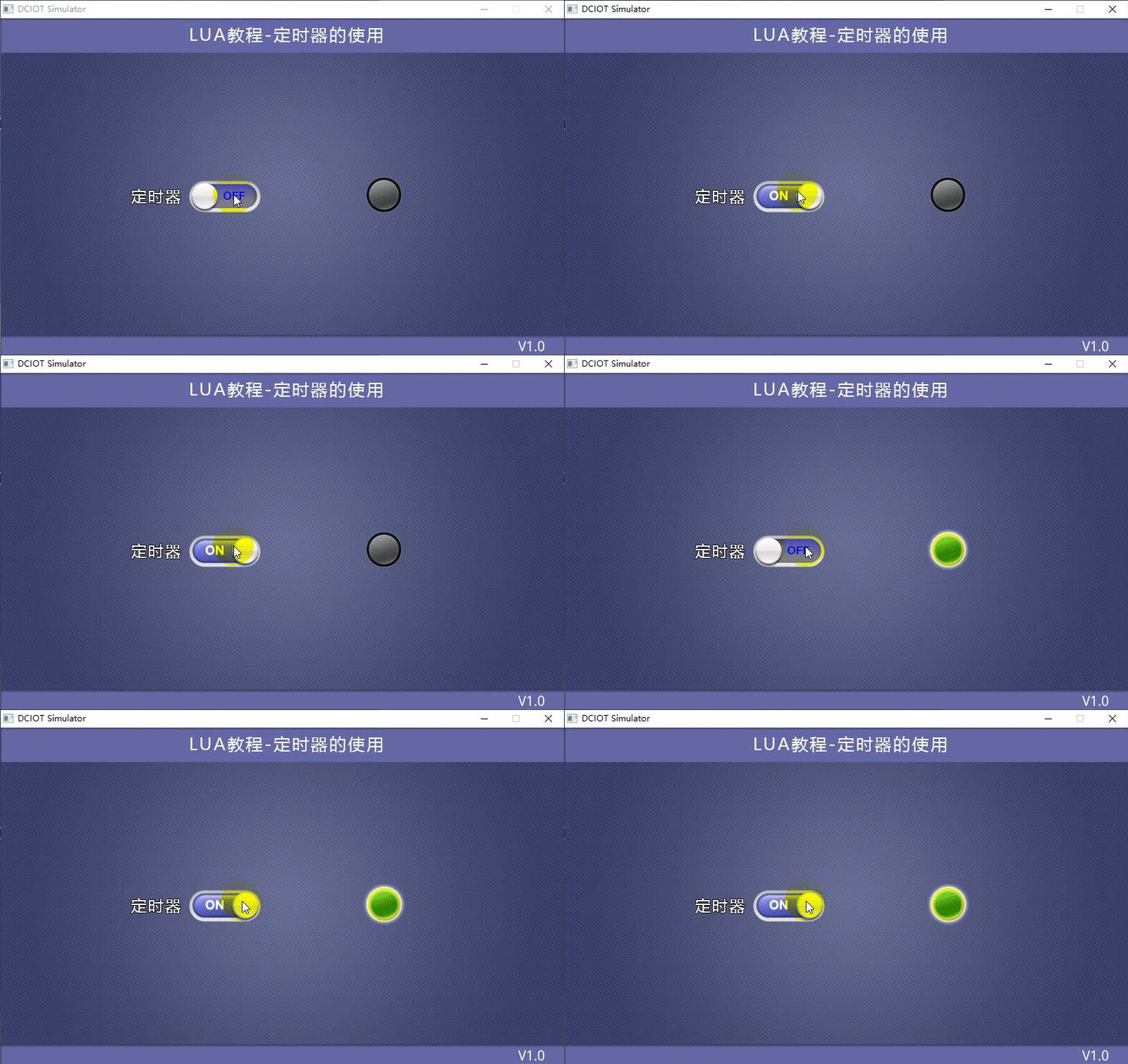
タイマを押すと、走馬灯効果がオンになり、ボタンが跳ね返ると走馬灯がオフになり、走行効果は以下の通りになります。


发表回复