
OTA Upgrade API: The upgrade logic of the HMI is fully decoupled from thecommunication protocol and data source- regardless of whether the upgrade data comes from the mainboard serial port, Ethernet, Wi-Fi, or 4G, and regardless of whether the host computer uses a custom protocol, Modbus, or HTTP, the HMI is only responsible for writing the received data into the designated Flash area through a standard API, verifying successful decompression, and automatically restarting the upgrade. Applicable to HMI&M series & Dx series.
1. ⚠️ Flash Planning (Root Cause of Upgrade Failure/Brick)
Taking HMI80480M070 as an Example (Standard Product 128Mbit = 16MB):
| Project | Size |
|---|---|
| Total Flash Capacity | 16 MB |
| System Firmware (OS + Driver, M Series) | 1 MB (DH Series 2 MB) |
| Current Project (private) | 4.38 MB |
| Total used | 5.38 MB, remaining ≈10.62 MB |
| OTA starting address requirement | must be ≥ 8 MB (half of the total Flash) |
Two iron rules:① The OTA starting address must start from the latter half of the Flash(even if there are 10.62MB remaining, it must also start from ≥8MB), to avoid cross-coverage of old and new projects, so that the current system can continue to run during the upgrade process;② The OTA write area must be continuous and free—— If you use the "block address" function to occupy the high-address area (such as 10~12MB), or if the upgrade package exceeds half of the Flash (a package of ≈10.62MB), it cannot be upgraded.
2. API Summary Table
| Functions | Parameter | Description |
|---|---|---|
ota_init(md5, filesize, addr) | md5 is fixed to "0123456789abcdef"; filesize must strictly match the actual size of the .bin file; addr must be greater than or equal to half of Flash | Configure the upgrade target and prepare to receive firmware data |
ota_write(writeTb) | byte table, ≤2048, automatically padded with 0x00 if insufficient | Write firmware to the Flash area in blocks |
ota_check_upgrade(state) | Must pass 1 | Trigger integrity verification + decompression + upgrade |
ota_destory() | - | Erase written OTA residual data (clear the field before upgrading) |
on_ota_progress(status, value) | See the table below | Verification/decompression progress and result callback |
status/value combination of on_ota_progress:
| status | Meaning | value |
|---|---|---|
| 1 | Verification process starts | Fixed 0 |
| 2 | Verification result | 0=Failed (Firmware corruption/MD5 mismatch)/1=Success |
| 3 | Decompression progress | 0~100 Percentage |
| 4 | Decompression result | 0=Failed/1=Success → Restarting soon |
3. Application: Local upgrade of SD card
3.1 Upgrade package preparation
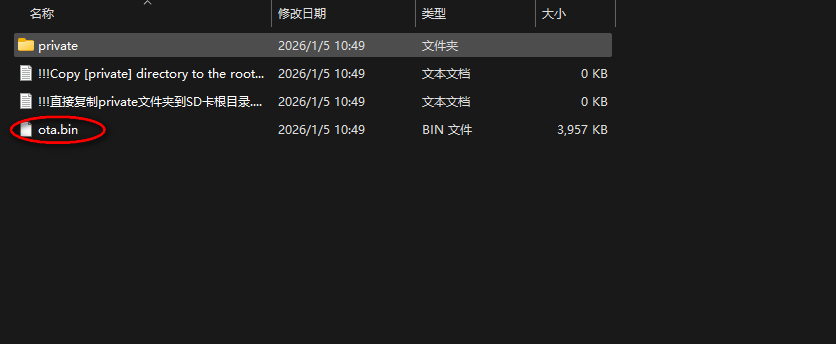
Select after project compilationMass production download, the generated file contains ota.bin. Before use, rename ota.bin to a.bin and place it in the root directory of the SD card.
3.2 Check drive letter + locate a.bin
ota_filename   = "a.bin"
ota_addr_start = 8 * 1024 * 1024    -- OTA 起始地址(至少 Flash 一半)
flashsize      = 16 * 1024 * 1024   -- Flash 总大小

function on_update(slave, vtype, addr)
  if vtype == VT_LW and addr == useraddr.ota_swich then
    if sd_dir ~= 0 then
      list_dir(sd_dir)               -- 先看 SD 卡
    elseif usb_dir ~= 0 then
      list_dir(usb_dir)              -- 再看 U 盘
    else
      set_string(VT_LW, useraddr.text, "检测不到SD卡和USB,无法OTA升级!!!")
    end
  end
end

function on_list_dir(path, filename, type, fsize)
  if type == 1 then
    if filename == ota_filename then
      set_string(VT_LW, useraddr.text, "文件:"..ota_filename.." 已检测到")
      if (fsize + ota_addr_start) > flashsize then
        set_string(VT_LW, useraddr.text, "ota.bin 文件大小超过,无法升级!!!")
      else
        set_string(VT_LW, useraddr.text, "开始升级!!!")
        set_uint32(VT_LW, useraddr.ota_data, fsize)
        ota.set_upgrade(path.."/"..ota_filename)
      end
    end
  end
end
3.3 Core upgrade process (ota.lua)
function ota.set_upgrade(path)
  local TransferSize = 0
  local size = 0
  if file_open(path, 0) == true then
    size = file_size()
    if size < (flashsize - ota_addr_start) then
      ota_destroy()                                  -- 消除残留 OTA 数据
      local sdota_addr = ota_init("0123456789abcdef", size, ota_addr_start)
      -- 计算尾包补零长度
      local size_complement = 0
      if size % 2048 ~= 0 then
        size_complement = 2048 - (size % 2048)
      end
      while true do
        local rddata = file_read(2048)               -- 流式读 2048
        if #(rddata) < 2048 then                     -- 尾包补 0x00
          for i = (#(rddata) + 1), 2048 do rddata[i] = 0x00 end
        end
        TransferSize = TransferSize + #(rddata)
        local prg = string.format("%.1f", (TransferSize * 100) / (size + size_complement))
        set_uint16(VT_LW, useraddr.progress, math.modf((TransferSize * 1000) / size))
        set_string(VT_LW, useraddr.text, "下载进度 : "..prg.." %")
        refresh_screen()
        ota_write(rddata)                            -- 写入 Flash,不足补零
        if size <= TransferSize then break end
      end
      file_close()
      ota_check_upgrade(1)                           -- 校验、解压
    end
  end
end

function on_ota_progress(status, value)
  if status == 1 and value == 0 then
    set_string(VT_LW, useraddr.text, "校验开始")
  elseif status == 2 then
    if value == 0 then set_string(VT_LW, useraddr.text, "校验失败")
    elseif value == 1 then set_string(VT_LW, useraddr.text, "校验成功") end
  elseif status == 3 then
    set_uint16(VT_LW, useraddr.progress, value * 10)
    set_string(VT_LW, useraddr.text, "解压进度 : "..value.." %")
    refresh_screen()
  elseif status == 4 then
    if value == 0 then set_string(VT_LW, useraddr.text, "解压失败")
    elseif value == 1 then set_string(VT_LW, useraddr.text, "解压成功") end
  end
end
Key points: The filesize of ota_init must strictly match the actual size of the .bin file; write data in a streaming manner throughout (each time ≤2048, with 0x00 padded at the end); if ota_check_upgrade(1) fails to verify, it will stop in the callback to give you a chance to handle it, and if the decompression is successful, it will automatically restart for the upgrade.
This content is adapted from the VisualHMI development documentation provided by Guangzhou Dacai Technology (hmi-doc.gz-dc.com), specifically the LUA tutorial titled "OTA Upgrade". The copyright belongs to Dacai Technology.


Leave a Reply