
Text control is used for displaying and keyboard inputting thestring type variable: device status prompts, parameter configuration, and user comments. It supports GBK/UTF-8/UNICODE encoding, with a maximum storage capacity of 2KB.
1. Core Features
- Input: HMI built-in keyboard input, supporting GBK and UTF-8 encoding
- PLC communication encoding: GBK (Chinese internal code, compatible with GB2312), UTF-8, UNICODE - must be consistent with the PLC protocol definition
- Length Limit: Maximum 2KB (2048 bytes); approximately 1024 Chinese characters (2 bytes/character) in GBK, approximately 682 characters (3 bytes/character) in UTF-8 for Chinese, and 2048 characters for English
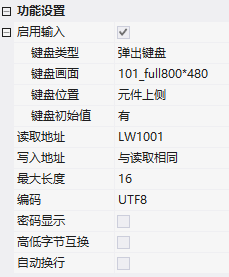
2. Attribute Introduction
2.1 Function Settings
| Attribute | Description |
|---|---|
| Startup Input | Allow Keyboard Input |
| Keyboard Type/Screen/Position/Initial Value | Pop-up Keyboard/External Keyboard; Keyboard Screen; Pop-up Position; Display Initial Value |
| Prompt Information | Associated Text Label, Keyboard Screen Control Associated $SysKBTipInfo Display |
| Read/Write Address | Can be the same or different |
| Maximum Length | Maximum Number of Bytes for Text Input |
| Encoding | Keyboard input: GBK/UTF-8; Display: GBK/UTF-8/UNICODE |
| Password display | Content displayed with * |
| Swap high and low bytes | Swap high and low bytes of strings (in accordance with specific PLC storage order) |
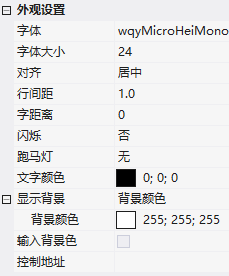
2.2 Appearance settings
- Font/size/alignment: Left/centered/right
- Do not split words: Do not break words at the end of lines when displaying multiple lines (English/German, etc.)
- Line spacing/character spacingLine spacing is a multiple of font size; word spacing is in pixels
- flashing/ticker: Flashing frequency; marquee direction (left/right/up/down movement) + speed (pixels/second)
- Control Address: Same numerical control - +0 font (high 8 font/low 8 font size), +1 foreground color RGB565, +2 background color RGB565
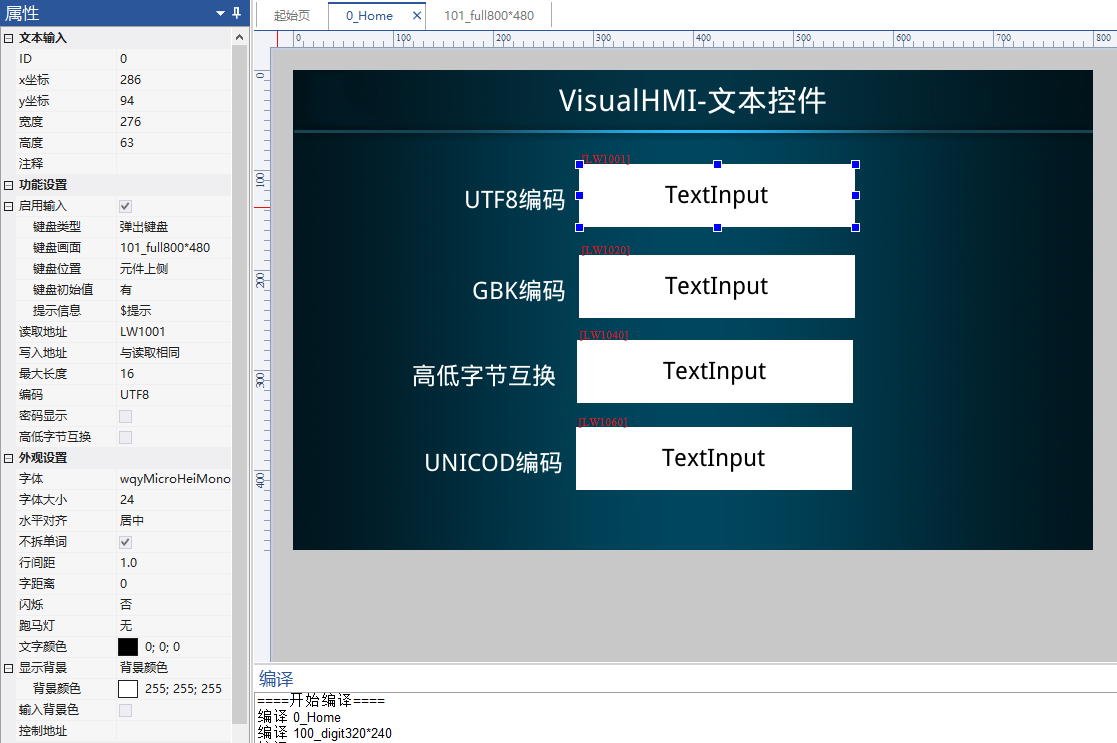
3. Application cases
3.1 UTF-8 encoded input
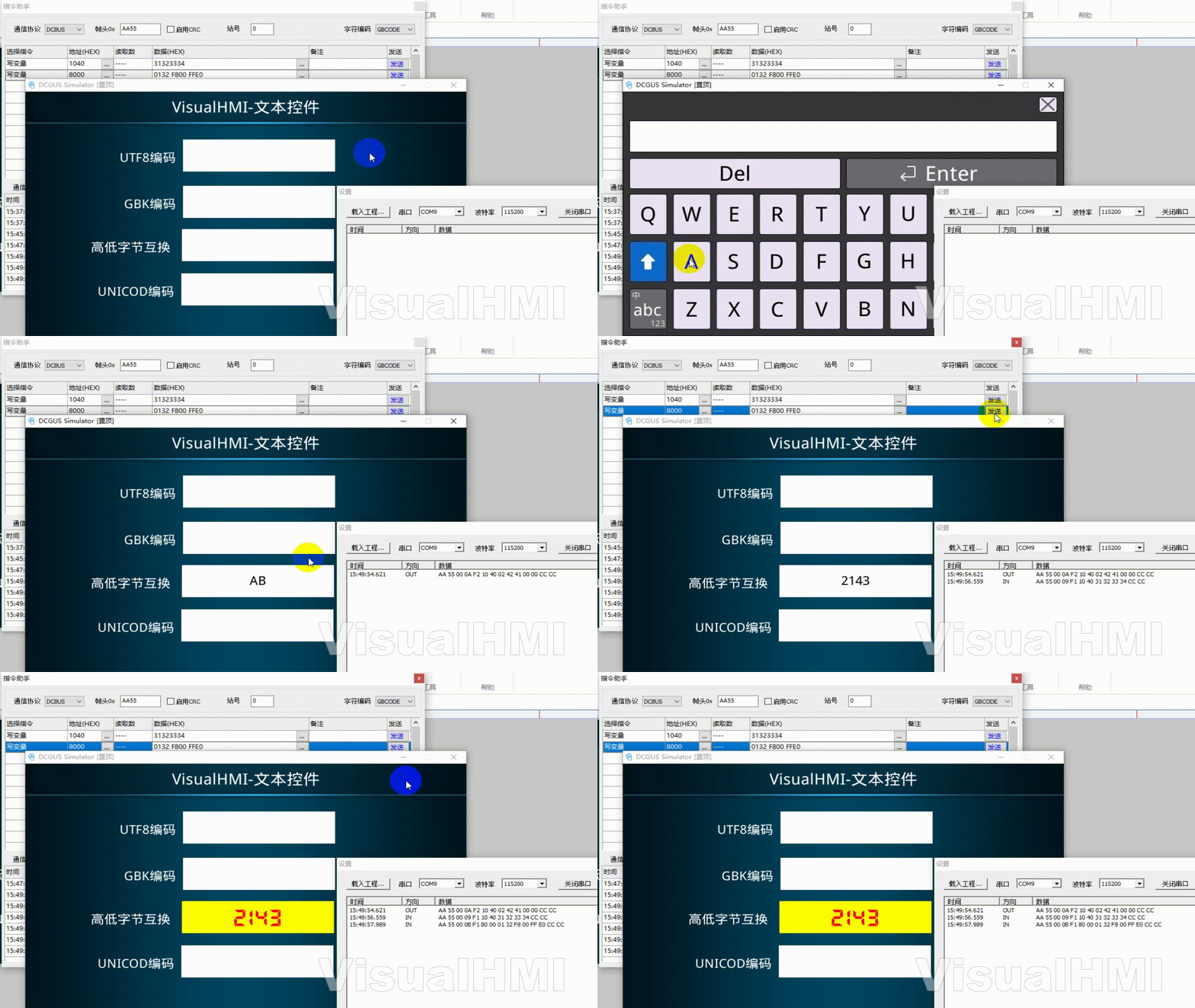
readLW1001, encoding UTF-8, keyboard screen 101_full800*480, prompt information associated tag. Input "Hello", the frame sent by DCBUS isAA 55 00 0E F2 10 01 04 E4 BD A0 E5 A5 BD 00 00 CC CC- note that each character in UTF-8 Chinese is 3 bytes (E4 BD A0=you).
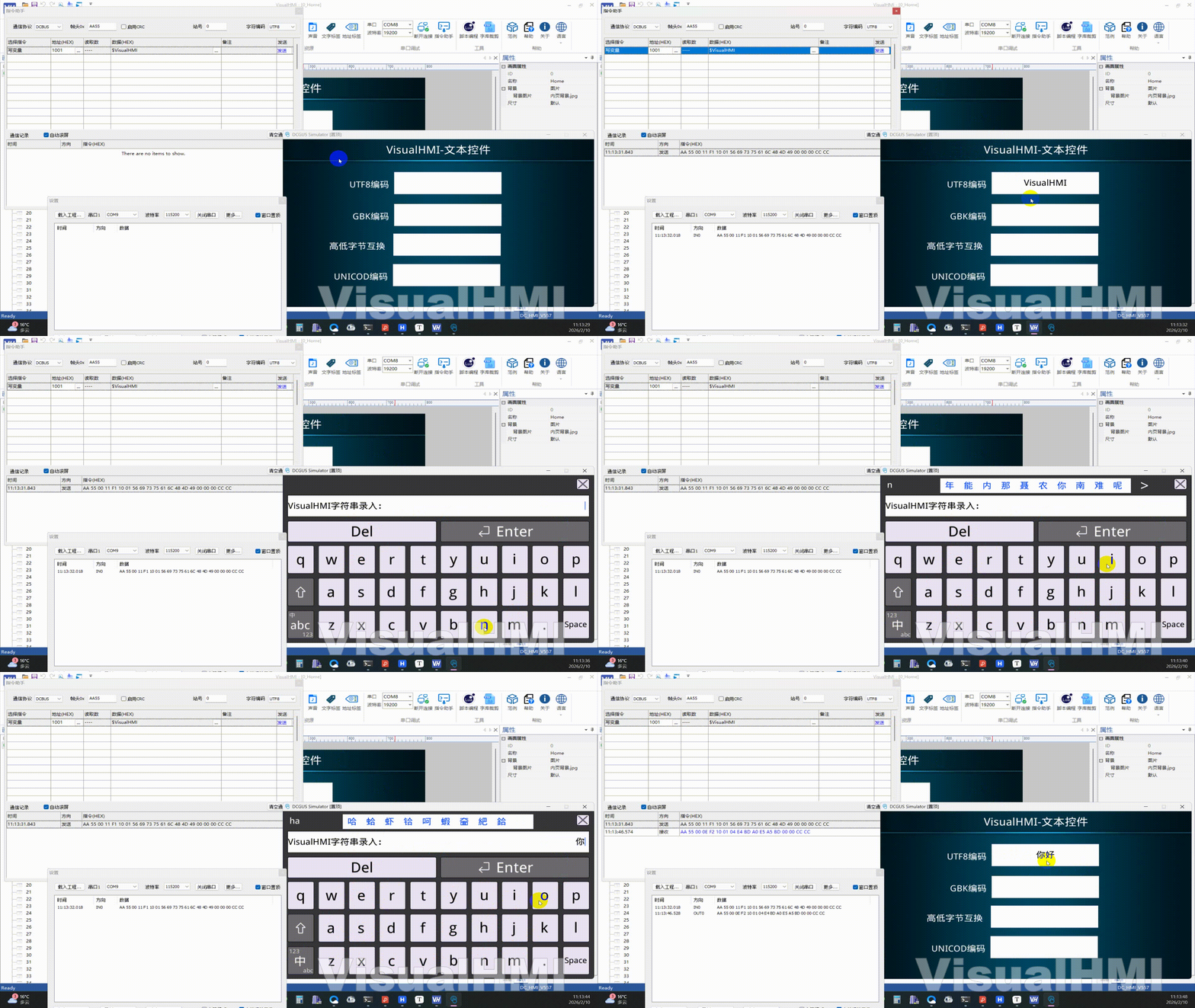
3.2 GBK encoding
readingLW1020, Encode GBK. Enter "Hello" and sendAA 55 00 0C F2 10 20 03 C4 E3 BA C3 00 00 CC CC- GBK Chinese 2 bytes per character (C4 E3=you). Compared with UTF-8 frames, the encoding differences can be visually observed.
3.3 High Low Byte Swap+Control Address
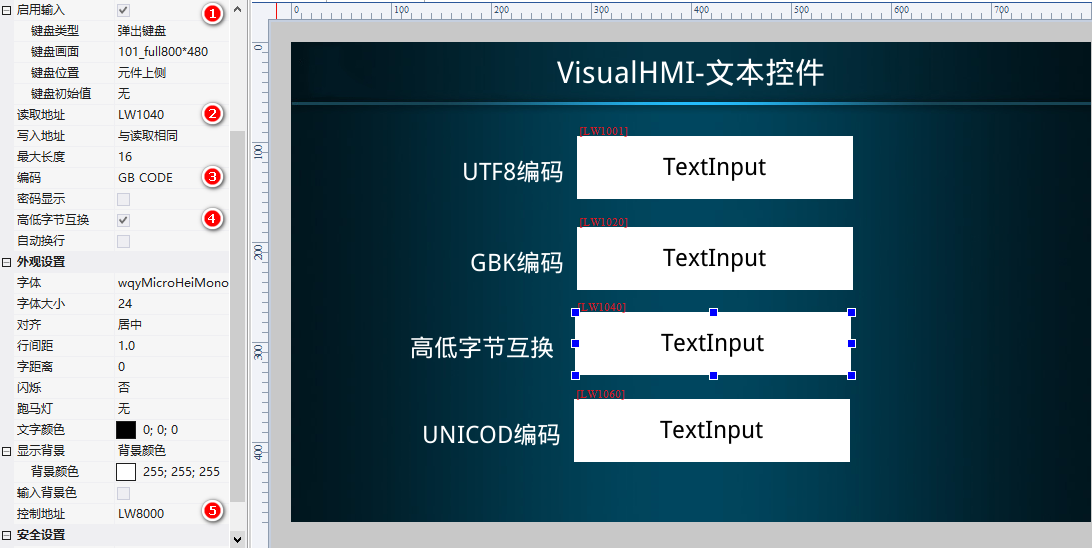
ReadLW1040, encode GBK, check High Low Byte Swap, Control AddressLW8000. Input "AB" to issue... 42 41 ...(after high and low swapping, B A transmission); The PLC displays 2143 as 31 32 33 34. Control address LW8000=0x0132 to display font 1/50, LW8001 foreground, LW8002 background.
3.4 Unicode+ticker
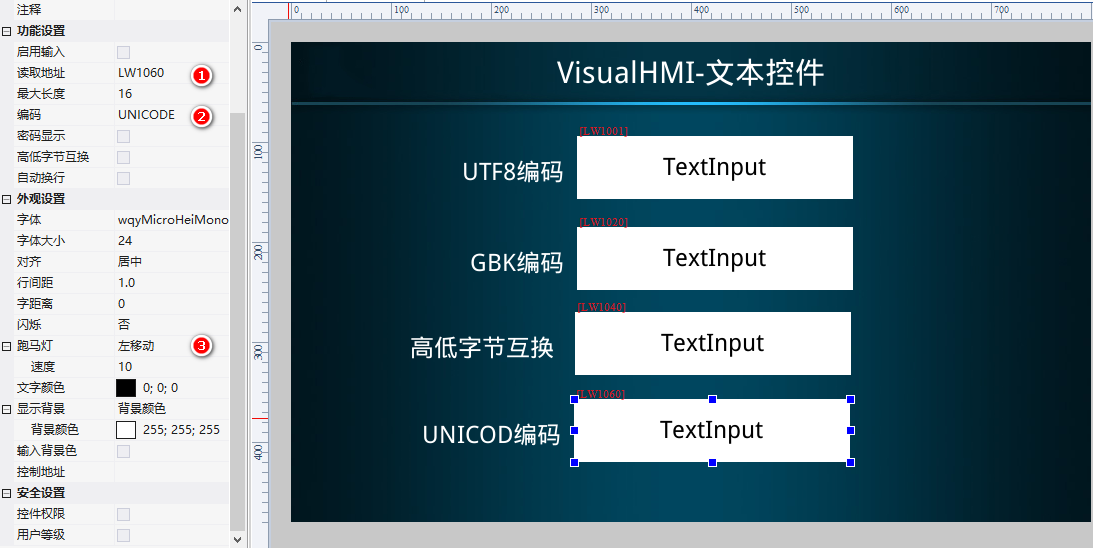
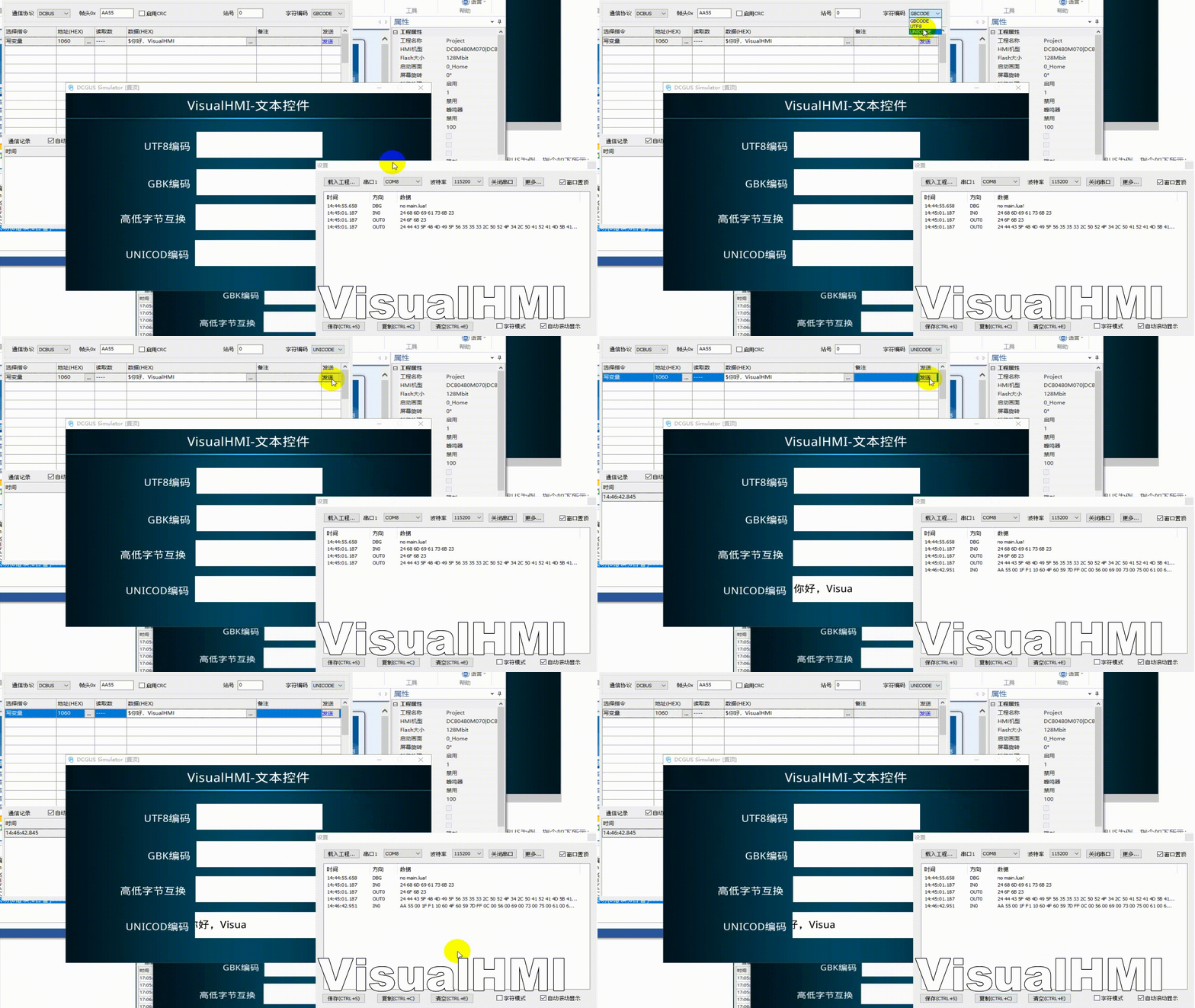
ReadLW1060, encode Unicode, ticker left movement speed 10. Enter "Hello, VisualHMI" and the text will scroll from right to left.
Compiled from the VisualHMI development documentation of Guangzhou Dacai Technology (hmi-doc.gz-dc.com), the configuration control tutorial "Text Control", copyright reserved by Dacai Technology.


Leave a Reply