
Secure Login: Assign hierarchical authorization to interface controls, allowing users of different levels to view/operate different content. Supports levels 1-8 (0 for guests), with password configurable, editable via Lua, and automatic logout upon timeout.
1. Configure
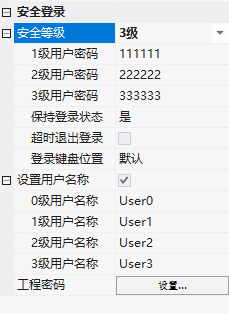
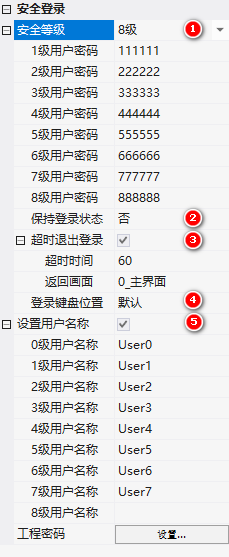
Project → Project Settings → Security Level: Set the number of levels, passwords for each level, keep logged in, timeout for logout (in seconds), return to screen, keyboard position (default/centered), and user name.
2. Timeout Logout
When switching screens with the function button, check "User Level → Minimum Required Level", and if the level is insufficient, prompt for password via keyboard. Automatically log out upon idle timeout (only effective when "Keep Logged In" is enabled).
3. Password Modification (LUA)
set_pwd(level, pwd, len): level 0-7 corresponds to password levels 1-8, pwd is a numeric password, len is optional (padded with leading zeros, e.g., if len=5, then 123 is stored as 00123).
Password is not supported for reading, and is mirrored to the RW area during initialization/modification:
function on_init()
  local _val = get_uint16(VT_RW, 0x2000)
  if _val ~= 0x0055 then
    set_uint32(VT_RW, 0x0000, 111111)
    set_uint32(VT_RW, 0x0002, 222222)
    set_uint32(VT_RW, 0x0004, 333333)
    set_uint32(VT_RW, 0x0006, 444444)
    set_uint32(VT_RW, 0x0008, 555555)
    set_pwd(0, 111111, 6); set_pwd(1, 222222, 6)
    set_pwd(2, 333333, 6); set_pwd(3, 444444, 6)
    set_pwd(4, 555555, 6)
    set_uint16(VT_RW, 0x2000, 0x0055)
    flash_sync()
  else
    set_pwd(0, get_uint32(VT_RW, 0x0000), 6)
    set_pwd(1, get_uint32(VT_RW, 0x0002), 6)
    -- ... 其余等级
  end
end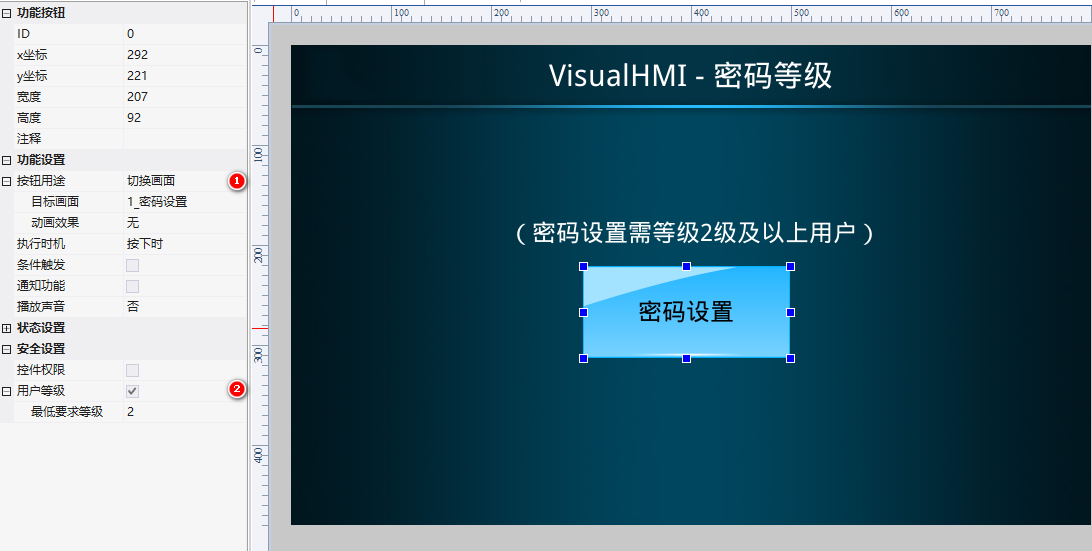
This is compiled from the VisualHMI development documentation of Guangzhou Dacai Technology (hmi-doc.gz-dc.com) and other technical tutorials titled "Secure Login". The copyright belongs to Dacai Technology.


Leave a Reply