
Upon receiving a large color serial port screen, the first thing to do is to determine which development platform and series it belongs to - this directly determines whether you can directly develop with VisualHMI and whether the firmware needs to be upgraded first. This article will clarify how to identify the model.
1. Platforms supporting VisualHMI: HMI series and M series (medical grade)
Currently, there are two types of series supported for development on the VisualHMI platform:HMI seriesAnd and M series (medical grade). Medical grade does not mean "higher grade", but refers to certification and materials targeted at medical device scenarios (higher electrical safety and EMC levels), with the development method being the same.
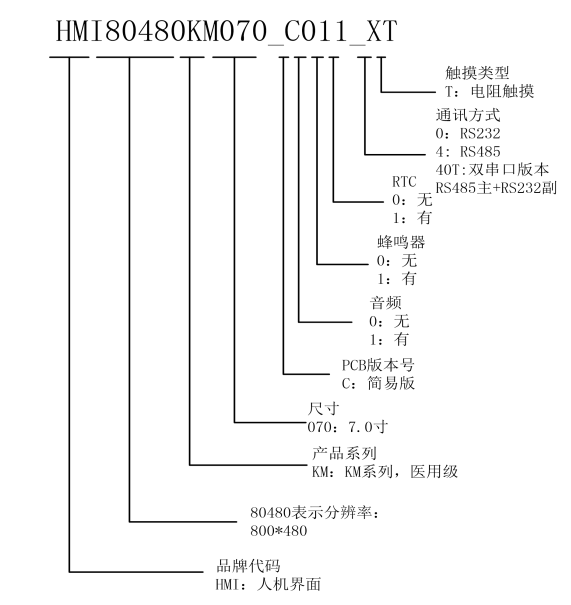
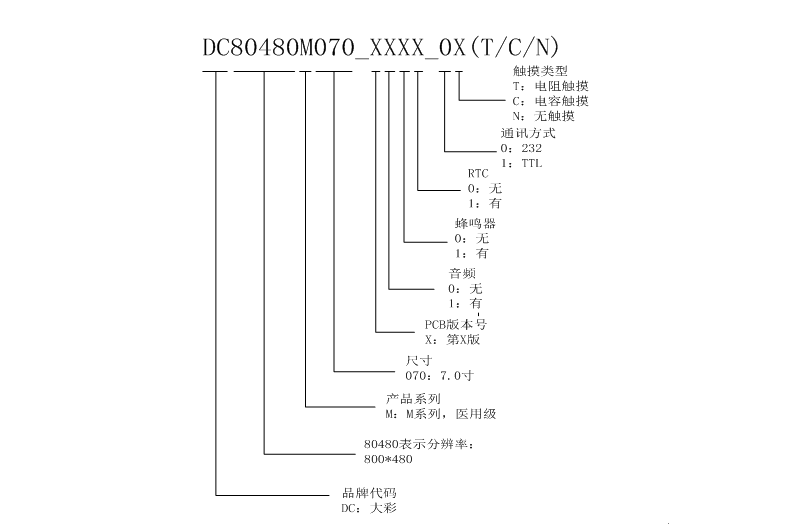
2. The M series must have its firmware upgraded first (a major pitfall)
The M seriesdoes not support VisualHMI by default, and you need to upgrade the firmware before you can develop with VisualHMI. That is to say, if you have an M series screen, don't rush to create a project - first ask the business or technical personnel for the corresponding firmware to upgrade. Otherwise, you may not be able to select the model in the software or experience abnormal connection.
3. How to interpret the model naming (taking HMI80480M070 as an example)
Note: The following disassembly interpretation follows the common naming conventions of Dacai. The specifics are subject to the product specification.
The model itself contains all the key information. Breaking it down:
| Model segment | Meaning | This example |
|---|---|---|
| HMI | Development platform | HMI platform |
| 80480 | Resolution | 800×480 |
| M | Series | M series (medical grade) |
| 070 | Screen size | 7.0 inches |
Therefore, HMI80480M070 = HMI platform, 800×480, M series, 7-inch screen. The suffix, such as_1111_0C, is generally the batch/version number, and during development, the main model number can be used to select the device.
4. A few things to confirm when selecting a model
- Resolution and screen orientation: For example, for a 7-inch screen with 800×480, the screen supports rotation at 0°, 90°, 180°, and 270°. At 0° and 180°, the display is 800×480, while at 90° and 270°, the display is 480×800 - the UI should be designed according to the actual usage orientation.
- Serial port level: RS232 / RS485 / TTL. Different versions have different wiring and download methods.
- Firmware version: By default, the M series does not support VisualHMI. Confirm whether an upgrade is necessary.
Compiled from the "Quick Start Guide: Model Recognition" section of the VisualHMI development documentation provided by Guangzhou Dacai Technology (hmi-doc.gz-dc.com), copyright reserved by Dacai Technology.


Leave a Reply