
The alarm system supportscustom trigger conditions and content entries: It monitors register value changes in real-time and triggers multi-dimensional responses (buzzer, backlight on) when the preset logic is met. Alarm records are persisted across power loss, allowing for traceable auditing.
1. Core function
- Trigger conditions: Set boolean/numeric conditions based on register values (4x1000, M200): ==, !=, >, <, >=, <=, bit status (LW100.3==1)
- Multimodal prompts: Buzzer sounds (tone/duration configurable), screen backlight flashes/highlights the entire screen
- Power-loss storage: Alarm events (including time, content) are automatically stored and retained across power loss and restarts
System register:
| tags | Address | Description |
|---|---|---|
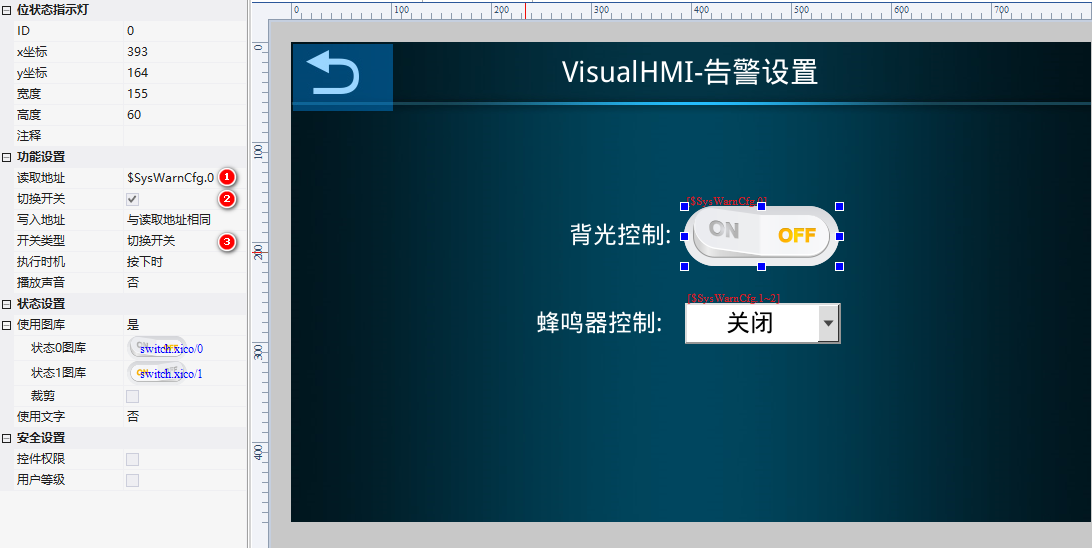
| SysWarnCfg | 0x0112 | Alarm Settings: bit0 activates the backlight; bit1~2 control the buzzer (0: do not control / 1: beep beep / 2: long beep) |
| SysWarnStatus | 0x0113 | Alarm Status: 1=alarm present |
| SysWarnCtrl | 0x0114 | Historical Alarm Control: write 0x0001 to export to SD card/U disk; write 0x0055 to clear |
| SysExportStatus | 0x0190 | Export Status: 0=idle / 1=exporting / 2=successful / 3=failed |
| SysExportProg | 0x0191 | Export Progress: 0~100 |
2. Alarm Settings (Engineering → Engineering Settings → Alarm Settings)
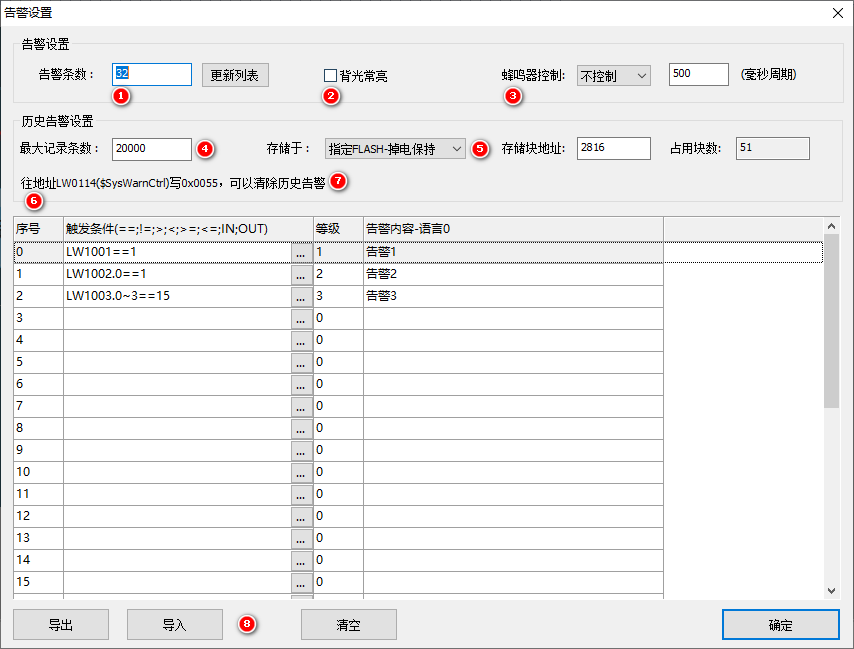
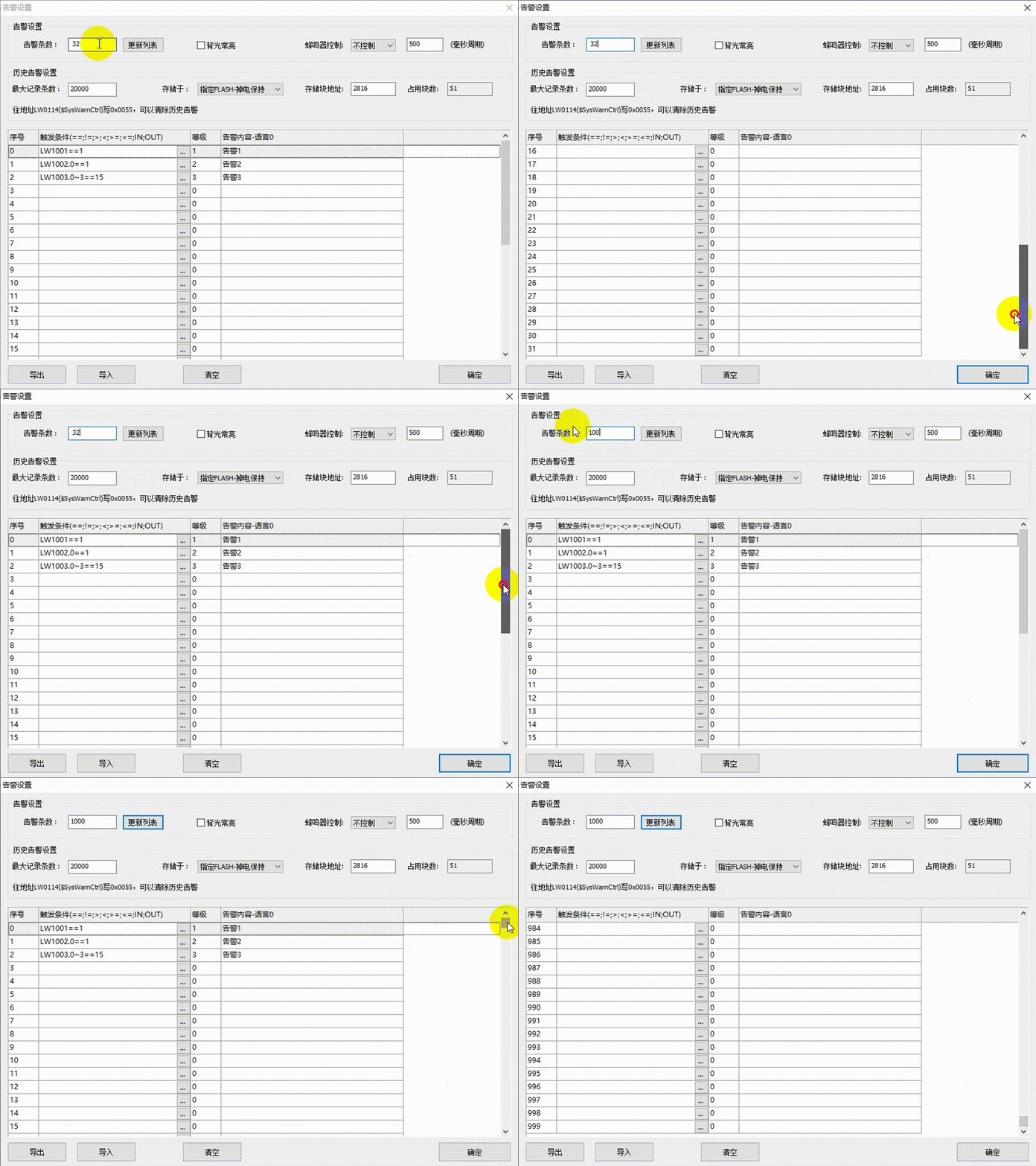
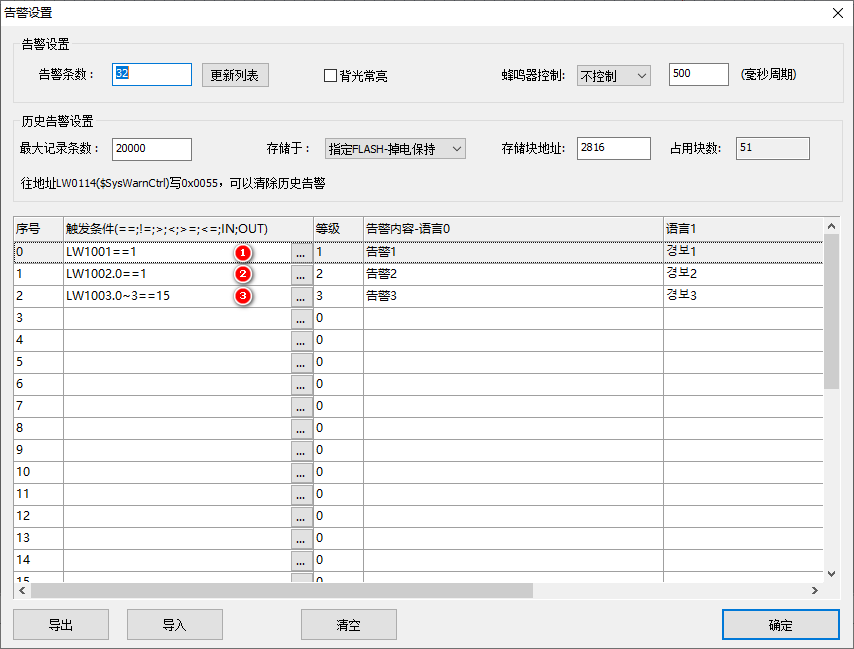
- Number of Alarms: Maximum 10,000 entries, automatically numbered (Alarm ID) upon point update. Default: 32 entries (IDs 0~31)
- Backlight: Illuminates the backlight when an alarm is triggered (SysWarnCfg bit0), typically used in conjunction with automatic standby
- Buzzer: Off/Beep/Continuous Beep, duration in ms (SysWarnCfg bits 1~2)
- Maximum Record Count: 10,000 entries
- Storage Method: Internal RAM (lost upon power loss) / Dedicated Flash (2,000 entries) / Specified Flash (limited by remaining space). Flash 16M, block size 4K, default block address 2048 (starting from 8M)
Alarm Content Configuration:
- Trigger conditions: >, =, <=, ==, !=, IN (a<=x<=b), OUT;
.Reference bit (LW1000.1),~Bit range (LW1000.4~6) - Alarm level: 0~15 levels, filtered using SysWarnLevel (LW0115) bits 0~15 (e.g., for levels 1+2: SysWarnLevel = (1<<1)|(1<<2))
- Alarm content: Display when condition is met; for multiple languages, edit separately
Clear and export: SysWarnCtrl (LW0114) writes 0x0055 to clear, 0x0001 to export. Alarm content can be imported and exported as CSV (alarm condition, language 1..N, level).
.single bit,~bit range, don't confuse them.3. Alarm bar/alarm display control
3.1 Alarm Bar (Marquee)
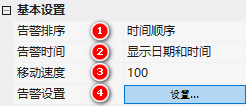
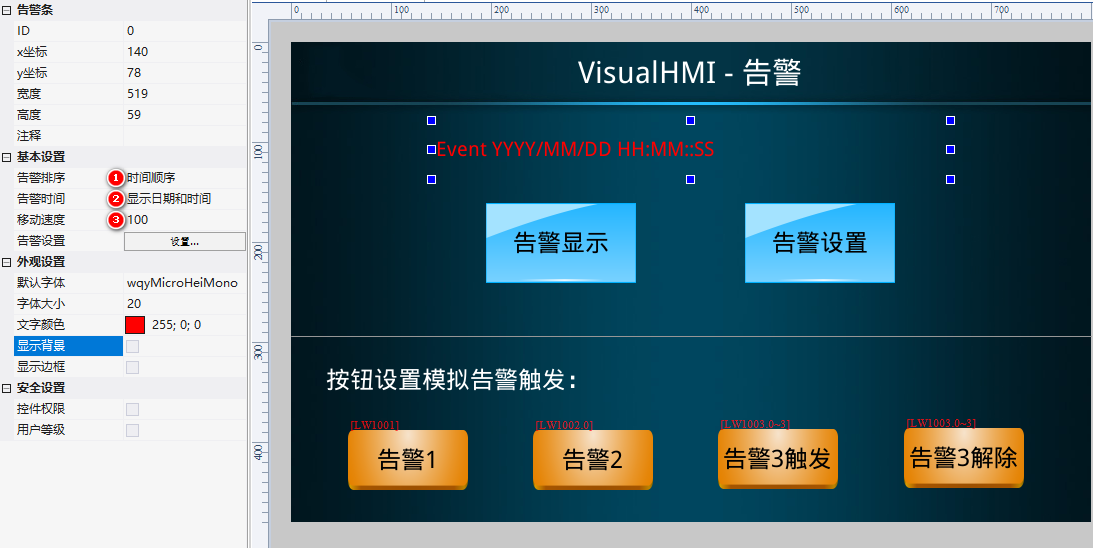
All current alarms are displayed scrolling from left to right. Attributes: Alarm Sorting (Chronological/Reverse Chronological), Alarm Time (Hidden/Time/Date/Time + Date, default is to display only content), Scroll Speed (ms).
3.2 Alarm Display (Table)
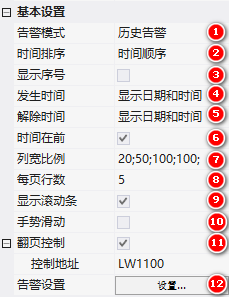
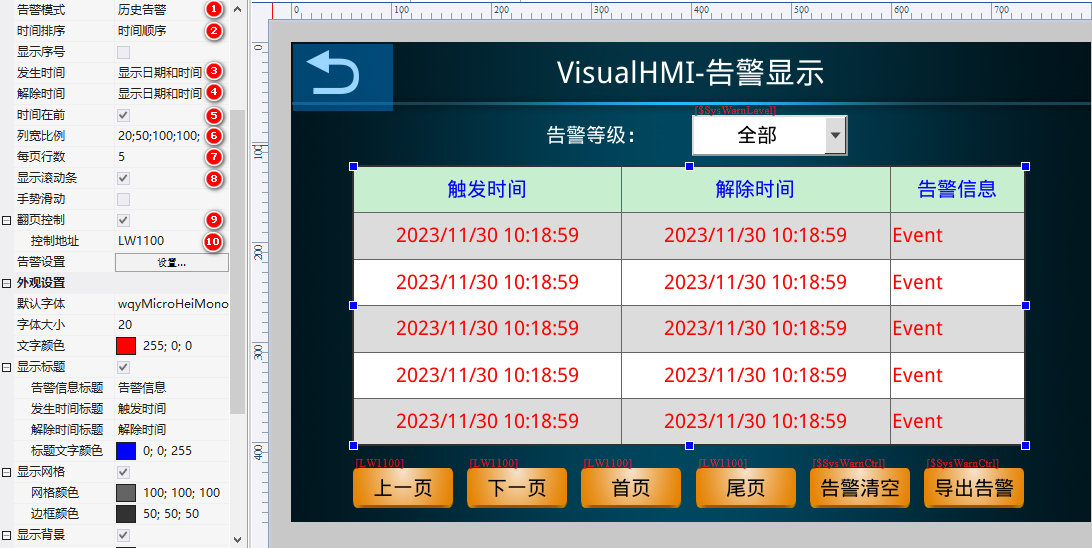
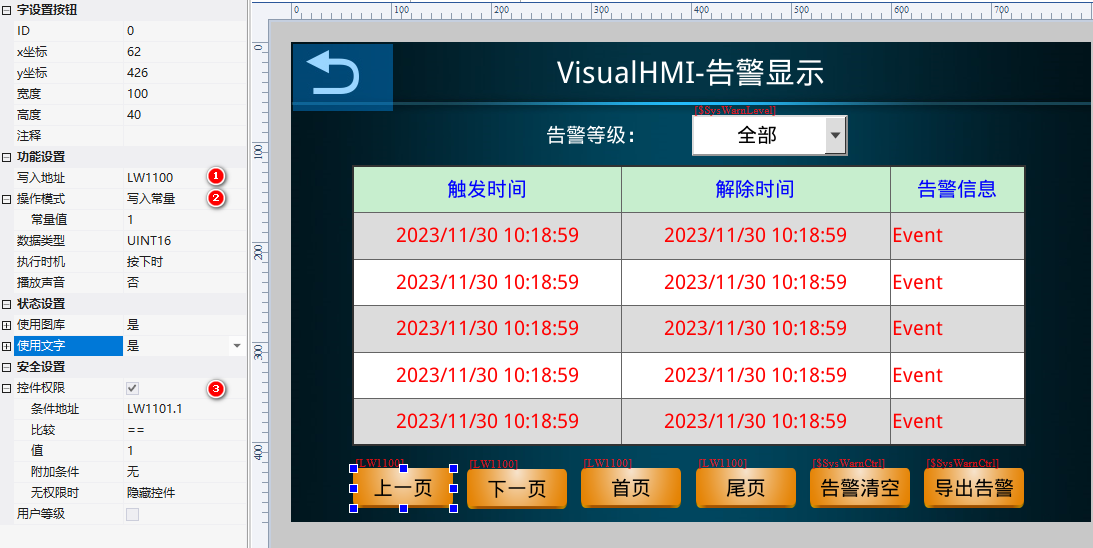
Alarm Mode:Current Alarms(Not displayed after being cleared, does not support power-down storage) /Historical Alarms(Retained after being cleared, supports power-down storage). Time Sorting, Display Sequence Number, Occurrence Time/Clearance Time (Hidden/Time/Date/Time + Date), Time First, Column Width Ratio, Lines Per Page, Scroll Bar, Gesture Slide, Page Turn Control (Addr+0 Page Turn, Addr+1 Feasibility).
4. Application Cases
4.1 Alarm Setting Example
Alarm ID0: LW1001==1, Level 1, Content "Alarm 1"; ID1: LW1002.0==1, Level 2, "Alarm 2"; ID2: LW1003.0~3==15, Level 3, "Alarm 3".
4.2 Alarm Bar + Alarm Display + Page Turn + Clear Export
Alarm bar: Chronological order, display date + time, speed 100. Alarm display: Historical alarms, chronological order, both occurrence/clearance time displayed, time first, column width 20;LW1100The page turning button is bound to LW1100 (1/2/3/4) + permission LW1100.1/.2; the clear/export button is bound to LW1100 write 85/1.
4.3 Alarm level filtering + alarm prompt
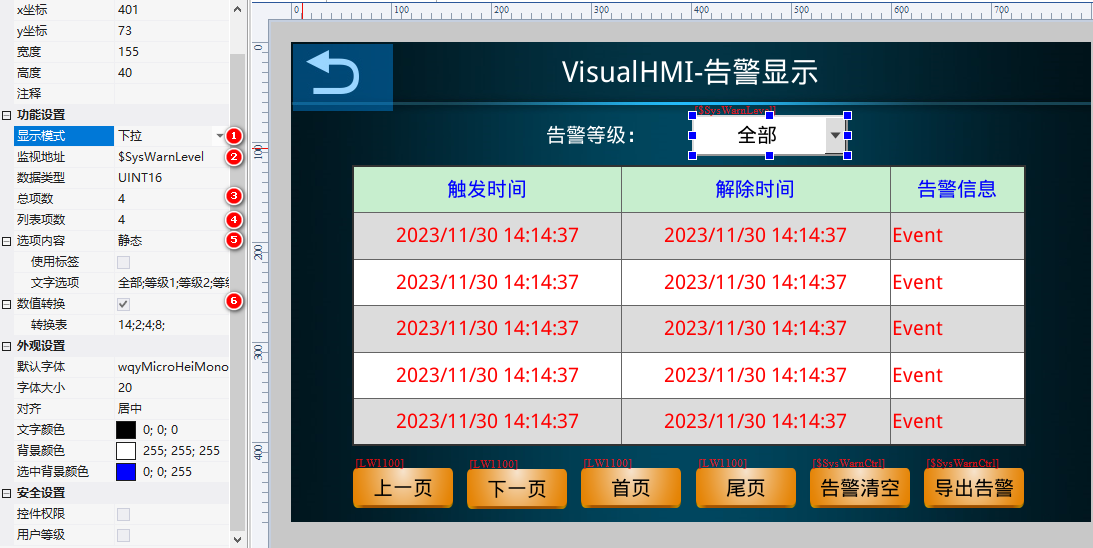
Pull-down menu binding$SysWarnLevelText: "All; Level 1; Level 2; Level 3", numerical conversion 14; $SysWarnCfg.1~2Select "Buzzer" to turn it off; it will beep twice; then it will beep continuously.
Compiled from the "Alarm Record" tutorial documented in the VisualHMI development document of Guangzhou Dacai Technology (hmi-doc.gz-dc.com), with copyright reserved by Dacai Technology.


Leave a Reply