
The alarm parameter allows the alarm text to be dynamically embedded with real-time register valuesEmbedded real-time register value- such as "1# Compressor Current Too High: Current 12.5A", rather than using rigid, fixed text. The system supports up to 4 independent parameter fields, each of which can be individually configured with a display format (leading spaces for integer digits, and zero padding for decimal places). The alarm content is automatically concatenated. Applicable to HMI&M series & Dx series.
1. API: on_get_warning_param(warning_id)
After enabling "Alarm Parameter" in the engineering alarm settings, the system automatically calls this callback when displaying alarm details. The parameter warning_id is the unique identifier for the alarm, distinguishing business logic by ID. It returns up to 4 numerical/status parameters:
| Return Value | Required | Purpose |
|---|---|---|
data0 | No | Fill in {#0:num1.num2} in the alarm settings, or fill in p0 of on_parse_warning with {#1:num1.num2}, or fill in p1 of on_parse_warning with {#2:num1.num2}, or fill in p2 of on_parse_warning with {#3:num1.num2}, or fill in p3 of on_parse_warning |
data1 | No | Fill in the value of {#1:num1.num2}, or p1 in on_parse_warning |
data2 | No | Fill in {#2:num1.num2}, or p2 for on_parse_warning |
data3 | No | Fill in {#3:num1.num2}, or p3 in on_parse_warning |
2. Alarm content format: {#data:num1.num2}
When writing alarm content in the alarm settings, the parameter placeholders should follow this format:
| Field | Meaning | Example |
|---|---|---|
| data | Alarm parameter ID, up to 4, starting from 0 | {#0:2.2} Use data0 |
| num1 | Number of leading spaces for integers | num1=2: The value 12.5 is displayed as ' 12.5' (2 leading spaces) |
| num2 | Number of decimal places, padded with zeros | num2=2: The value 12.5 is displayed as "12.50" |
Example: The alarm content is written as "1# Compressor Current Too High: {#0:2.2}A", and data0 returns 12.5, which is displayed as "1# Compressor Current Too High: 12.50A".
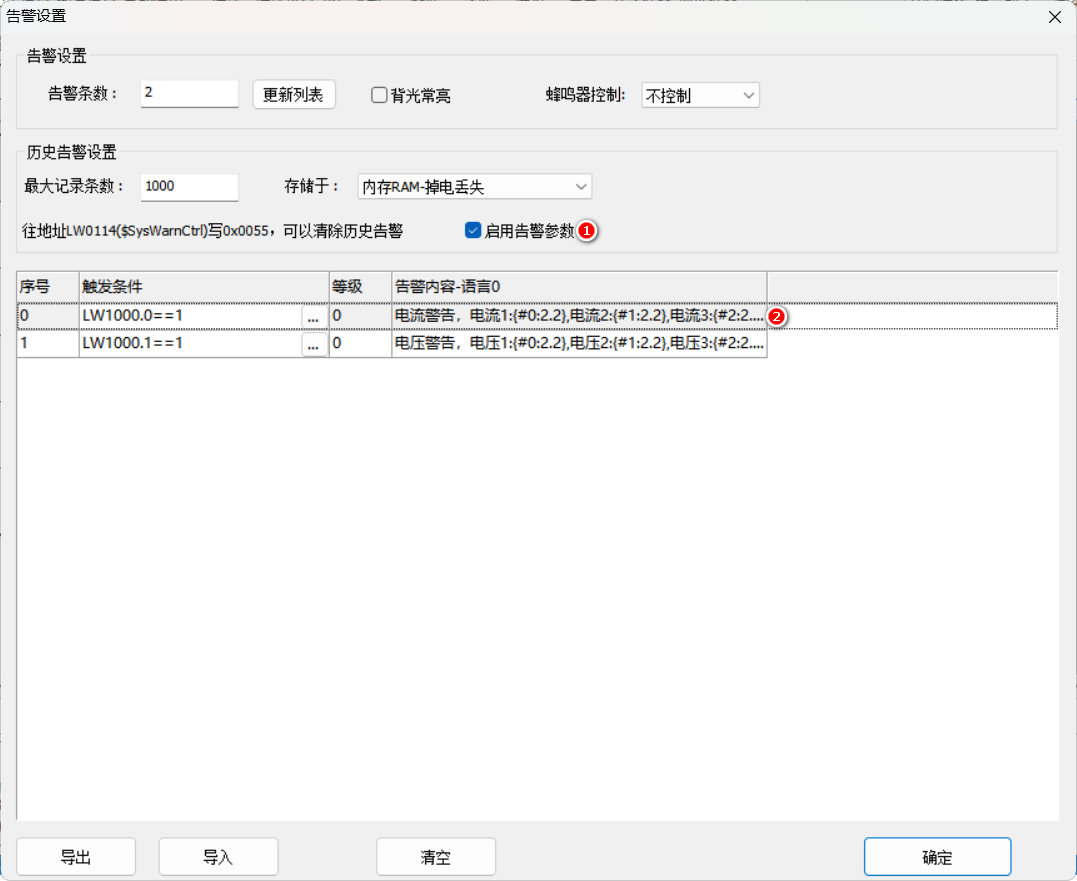
3. Application Case: Current/Temperature Alarm with Parameters
3.1 Screen Configuration
Alarm Display Control: Alarm Mode = Historical Alarms, Time Sequence, Display Date and Time, Time First, Column Width Ratio 20;
Two bit status indicator lights trigger/clear alarms: read addresses LW1000.0 and LW1000.1, and switch the switch type.
Four numeric controls simulate alarm parameters: read addresses LW1001~LW1004, enable input.
3.2 Lua: Return parameters by alarm ID
The meaning of {#0:2.2} in the alarm content is that data0 needs to be displayed at a scale of 1/100 (the value stored in the register is the value magnified by 100 times). Therefore, divide by 100 in the callback:
function on_get_warning_param(warning_id)
  if warning_id == 0 or warning_id == 1 then   -- 告警ID 0 或 1
    local data0, data1, data2, data3 = 0, 0, 0, 0
    data0 = get_uint16(VT_LW, 0x1001) / 100   -- 放大100倍存储,除以100还原
    data1 = get_uint16(VT_LW, 0x1002) / 100
    data2 = get_uint16(VT_LW, 0x1003) / 100
    data3 = get_uint16(VT_LW, 0x1004)         -- 这个不缩
    return data0, data1, data2, data3
  end
end
Run the virtual screen, enter 1250 for LW1001 via the keyboard, trigger alarm 0, and the {#0:2.2} in the alarm content displays 12.50 - all the scaling and conversion are done in the callback, so the display side does not need to process it further.
Compiled from Guangzhou Dacai Technology VisualHMI Development Documentation (hmi-doc.gz-dc.com) LUA Tutorial "Warning Parameters", copyright reserved by Dacai Technology.


Leave a Reply