VisualHMI dynamic special effects: position, size, transparency, and easing animation

freeFree Technical Resource

This content is free to read, suitable for basic learning and search traffic.

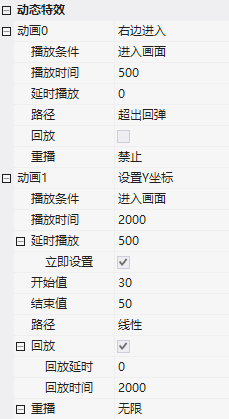
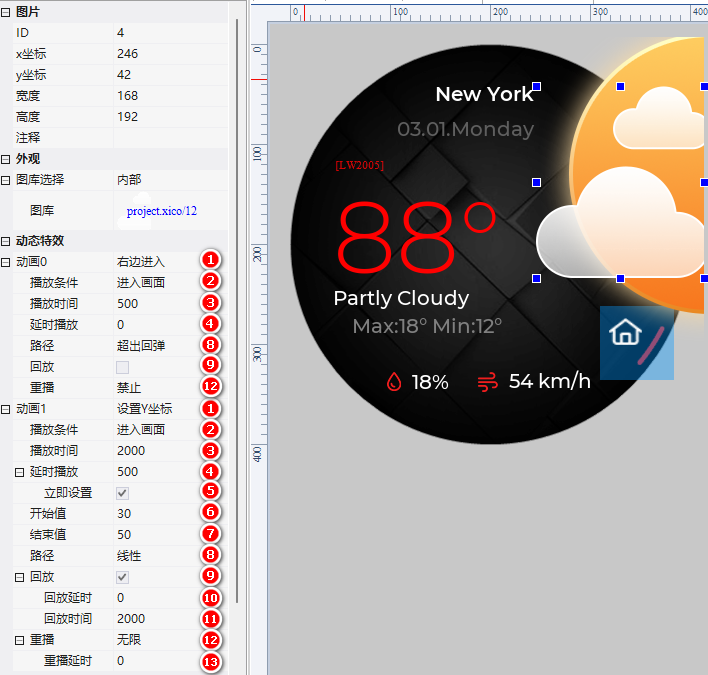
Dynamic Special Effects: Add smooth transition animations (position/size/transparency) to any control, with built-in easing (linear/ease-in-ease-out/elastic/rebound), without having to draw frame by frame. Exclusive to the DX series.

1. Supported Attributes

  • Position: Smooth movement of X/Y coordinates
  • Size: Width/height/overall scaling
  • Transparency: Fully transparent ↔ opaque gradient

Animation duration can be precisely configured (200ms, 500ms...).
VisualHMI dynamic special effects: position, size, transparency, and easing animation插图

VisualHMI dynamic special effects: position, size, transparency, and easing animation插图1

VisualHMI dynamic special effects: position, size, transparency, and easing animation插图2

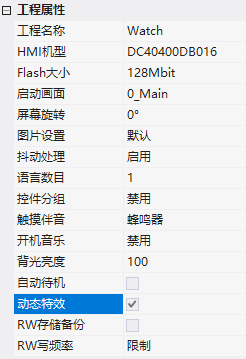
Dynamic special effects are exclusive to the DX series, don't expect them on older M series screens. Don't configure the animation duration too long (>500ms may appear sluggish), as industrial interfaces emphasize instant feedback.

Compiled from Guangzhou Dacai Technology VisualHMI development documentation (hmi-doc.gz-dc.com) and other technical tutorials on "Dynamic Special Effects", copyright reserved by Dacai Technology.


Put this resource to use in a real project?

Go to the Tool Center for message parsing, CRC verification and device debugging, or submit your requirements for selection and integration advice.

Engineer Membership

Turn this article into actionable debugging resources

After activation, you can use advanced message parsing, resource pack downloads, code examples, engineering cases and priority technical support, suitable for real project delivery.

Unlimited Advanced Tools
Resource & Code Packs
Complete Engineering Case Library
Priority Technical Support

Leave a Reply

Your email address will not be published. Required fields are marked *.