
Installments (Rental Lock): Automatically locks the screen at the agreed time, requiring a password to unlock. Suitable for device trials and installment payments. The system scheme is "Lock before expiration", and the custom scheme (see 04) is "Lock only upon expiration".
1. Configure
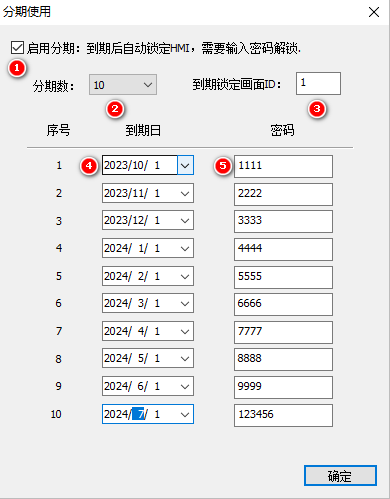
Project → Project Settings → Installment Usage: Enable installment, installment number (up to 10), lock screen ID before expiration, due date of each installment, and password.

2. Lock Interface and System Registers
Place two numeric controls on the lock screen: password input bound to $SysStageEnterPwd (LW0205, INT32), and current installment number bound to $SysStageTimeLevel (LW0204, INT16, scaled by 1 with offset 1).
3. Installment Time Power-Loss Storage (LUA)
To change the installment time, write to system registers SysCfgCtrl(0x011A)/SysCfgOption(0x011B):
function on_update(slave,vtype,addr)
  if vtype == VT_LW then
    if addr >= 0x0210 and addr <= 0x0218 then  -- 5个分期时间地址
      set_uint16(VT_LW, 0x011B, (1<<5))  -- 选择分期密码
      set_uint16(VT_LW, 0x011A, 0x5501)   -- 保存
    end
  end
end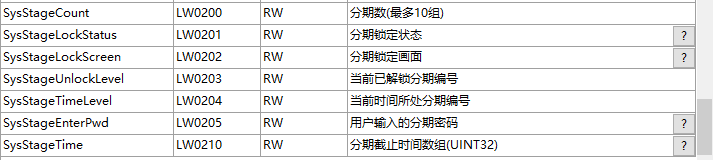
4. Installment Password (Read-Only, Write-Only)
set_stage_pwd(level, pwd): level 0~9 corresponds to installments 1~10, and pwd is a numeric password. Write the password to the RW area for the first use (check flag bit 0x0055 to prevent duplicate initialization):
function on_init()
  local _val = get_uint16(VT_RW, 0x2000)
  if _val ~= 0x0055 then
    set_uint32(VT_RW, 0x0000, 1111)
    set_uint32(VT_RW, 0x0002, 2222)
    set_uint32(VT_RW, 0x0004, 3333)
    set_uint32(VT_RW, 0x0006, 4444)
    set_uint32(VT_RW, 0x0007, 5555)
    set_uint16(VT_RW, 0x2000, 0x0055)
  end
  set_uint16(VT_LW, 0x011B, (1<<5))
  set_uint16(VT_LW, 0x011A, 0x5502)  -- 从set_stage_pwd后的密码加载
end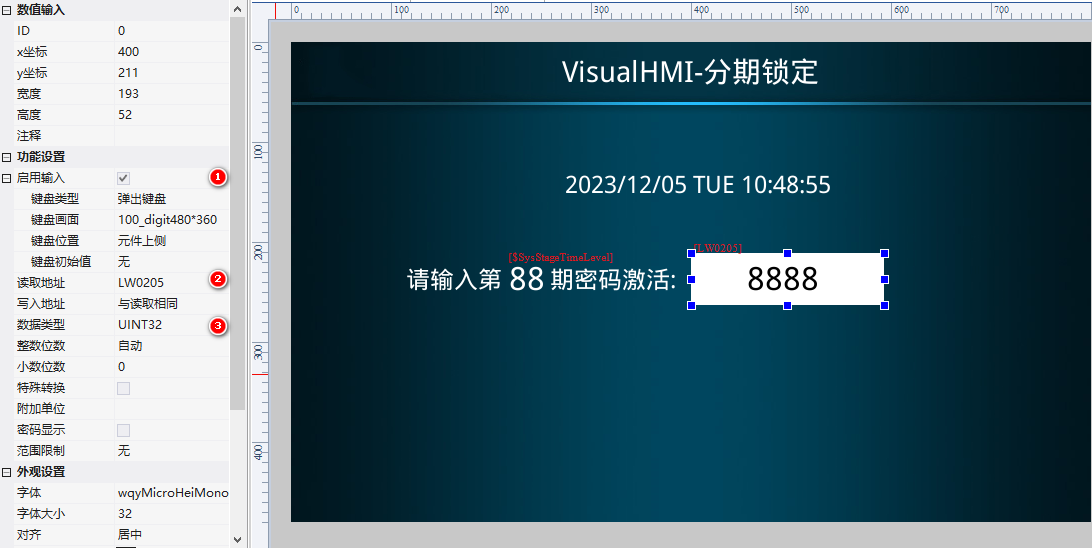
5. Restore and Switch
Restore installment writes SysCfgCtrl=0x5503; dynamic switching is achieved by writing LW0200 (installment number 0 or 1) + save. All operations involving installment writes to RW/system registers must be accompanied by SysCfgCtrl/SysCfgOption saves.
Compiled from the VisualHMI development documentation of Guangzhou Dacai Technology (hmi-doc.gz-dc.com) and other technical tutorials "Staged Application (System)", the copyright belongs to Dacai Technology.


Leave a Reply