Introduction
Many people know that the front-end code editor Monaco Editor is related to VSCode, but they are not aware of the details. This article will guide you through the relationship and similarities and differences between the two.
Surface Comparison
Firstly, both projects are from Microsoft. The VSCode project has 144K stars on Github and is based on a client-server architecture using the CS framework. The main technology stack is
Electron and TypeScript.
On the other hand, Monaco Editor has 33.4K stars and is based on a browser-server architecture using the BS framework. The main technology stack is TypeScript.
Deeper Relationship
The above information is basically known to those who have used both.
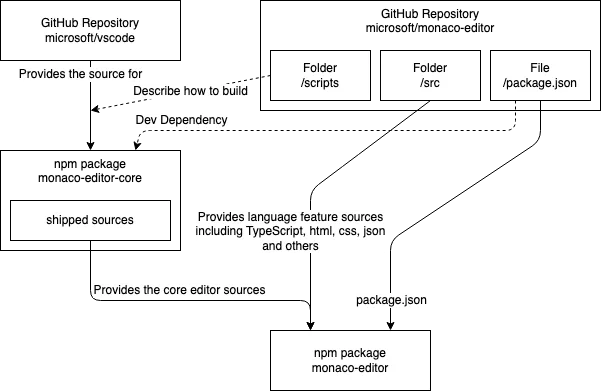
Let's delve deeper. Please see the following image. This image is from the official documentation. The link is https://github.com/microsoft/monaco-editor/blob/main/CONTRIBUTING.md
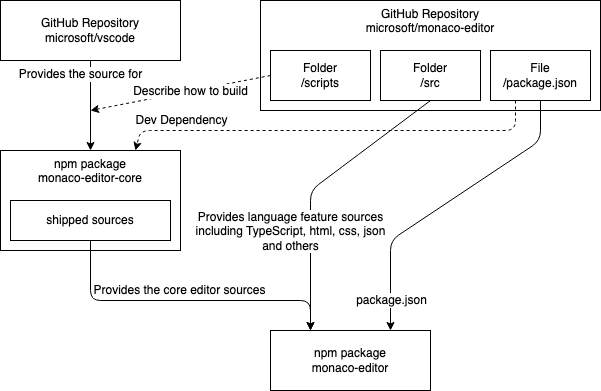
This image clearly describes the relationship between the monaco-editor and vscode libraries.
Firstly, in the VSCode git repository, a monaco-editor-core is built, which is the core library of the editor. This library is relatively low-level and does not care about whether the upper layer is a browser or a client. The functions it implements are commonly used in editing, such as position, overwriting, overwriting, minmap, range,
and monaco-editor is developed based on this library.
It's worth mentioning that Monaco's documentation is generated from a TypeScript file, which is composed of multiple files in VSCode. Therefore, if you want to contribute to Monaco's documentation, you need to submit a pull request in VSCode. Exceptions apply to Monaco's example code.
Since this library does not include language features, you can find many files defining language highlighting in the basic-languages directory of Monaco Editor. These files define the syntax coloring for specific languages, including how to distinguish method names, variables, and code blocks, as well as how to implement folding. This underlying system uses the Monarch grammar.
Syntax highlighting and auto-completion comparison
You can find its documentation on the Monaco official website, as well as how it describes language syntax.
https://microsoft.github.io/monaco-editor/monarch.html
Monarch: Creating declarative syntax highlighting with JSON.
The official documentation describes how to use the Monarch library to create syntax highlighting. This library allows developers to specify efficient syntax highlighting using declarative lexical specifications (written as JSON values). The specification has sufficient expressive power to specify complex highlighters with features such as complex state transitions, dynamic brace matching, auto-completion, and embedding of other languages, as shown in the "Advanced" topic section of this documentation. When reading for the first time, you can safely skip any sections or paragraphs marked as (Advanced), as most language definitions rarely use many advanced features.
The library defines many properties, and if there's a chance later on, I can explain some commonly used properties to you.
So far, we have learned that Monaco uses Monarch for syntax highlighting. Does VSCode also use Monarch?
No, client software can use much more resources than the browser side. VSCode uses the most popular LSP language protocol on the web page.
For more information about LSP, please refer to the official documentation
https://microsoft.github.io/language-server-protocol/
LSP stands for Language Server Protocol, a universal language service protocol.
Adding features such as auto-completion, go-to-definition, or hover documentation to programming languages requires significant effort. Traditionally, this task must be repeated for each development tool, as each tool provides different APIs for implementing the same functionality.
Language servers are designed to provide language-specific intelligence and communicate with development tools through protocols that enable interprocess communication.
The idea behind the Language Server Protocol (LSP) is to standardize the protocols for how such servers and development tools communicate. This way, a single language server can be reused across multiple development tools, and these tools can support multiple languages with minimal effort.
LSP is a win for both language providers and tool vendors!
The image below shows auto-completion with documentation annotations implemented using LSP.
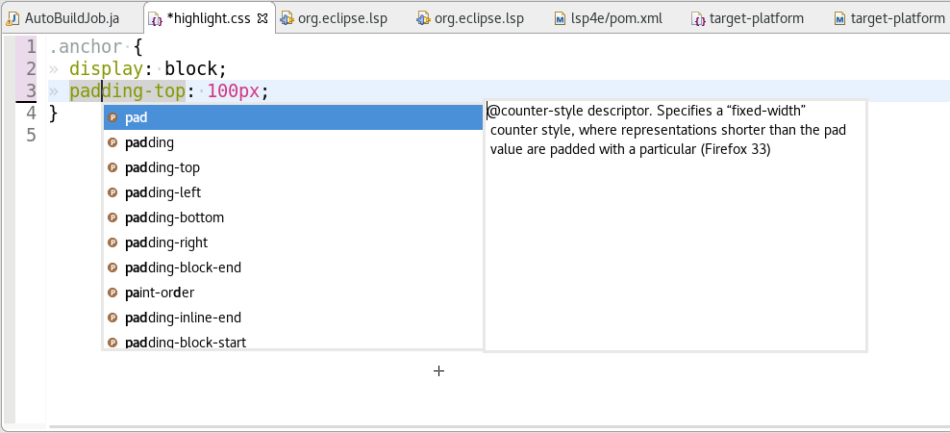
In fact, some experts on the internet have also tried to integrate the LSP protocol to enhance the user experience of Monaco, and my friend is one of them. However, the entire process is relatively cumbersome and complex. It requires finding the LSP protocol for a specific language and using it as a server to provide services for Monaco. I will explain it to you in detail later if I have the opportunity.
Summary
Excellent products come with excellent peripherals. As the saying goes, a strong general leads to strong soldiers. Joining an excellent team and meeting some excellent people is of great benefit to our life planning. Forced nonsense -_-


Today we launch our Black Friday discounts. We significantly reduced our prices on all of our applications.
Access competitive prices on applications for your website such as: SEO, video, email marketing, saas applications, productivity, social media and more.
Get the discounts here:
https://bit.ly/BlackFridayHotAppsDiscounts
want to get an alert when your website is down? then signup to our 24on7 web monitor – it’s absolutely free!
visit https://t.ly/hCFIP?modbus.cn for more info