
Source: Modbus Chinese Network (modbus. cn) - a leading Modbus communication protocol technology community in China
Tired of manually calculating CRC? This is the most classic application of LLCOM in Modbus debugging.
Summary:LLCOM Yes GitHub Open source Windows Serial port debugging tool (chenxuuu/llcom), based on .NET And Tencent xlua Engine, making serial debugging no longer a manual process of sending hexadecimal frames one by one. Its core killer feature is the complete embedding of standard serial port tools Lua 5.3 Operating environment, supporting HeZhou Luat Task The coroutine framework can write scripts for automatic sending and receiving, as well as automatic calculation Modbus CRCAutomatic polling and automatic parsing of responses. This article covers the installation process API Refer to four Modbus Practical script, covering every step from downloading to running automated testing. Keywords:LLCOM, Lua Serial port debuggingModbus CRC Automatic calculation, serial port automation testingxlua, Luat Task.
Debugging Modbus RTU The most common workflow for devices is to open the serial port tool → Manually input hexadecimal frames → Click to send → Waiting for a response → Visual comparison of bytes → Discovery CRC Miscalculated → Start over. After adjusting ten devices, my fingers were sore, my eyes were sore, and my heart was shattered into pieces.
LLCOM The solution is this problem. It's not just a serial assistant——It is a serial debugging engine that can run scripts.
1、LLCOM What is it? Yes
LLCOM Open source project ( GitHub ), usingchenxuuu/llcomWrite, based on C# Framework, using Tencent .NET As a script engine. The license is xlua One sentence: A programmable serial port debugging tool. A regular serial assistant can only "type hexadecimal on the keyboard Apache 2.0.
click to send→visible hexadecimal with the naked eye".→Can be writtenLLCOM Scripts enable data to be automatically processed, sent, parsed, and verified. Lua Three layers of core architecture:
Serial transceiver layer
- Standard serial communication, supporting baud rate, data bit, and checksum configuration, and integrated at the same timeClient and server functions, as well as the ability to listen to serial ports used by other programs TCP/UDP/MQTT Script engine layer
- Lua environment Hezhou: Lua 5.3 Collaborative framework (fully ported) + Pre processing layer for sending Luat Task The data entered by the user in the sending box can go through a segmentsys.wait, sys.taskInit, sys.timerLoopStart Process the script before sending it out
- Automatic line wrapping and automatic conversionAutomatic assembly Lua Can do anything——Open source address: Hex2、 Installation and download JSONChoose one of the three official channels:
Method 1: Microsoft Storehttps://github.com/chenxuuu/llcom
In
Comes with
Search for ' in Windows built-in Microsoft Store Search for 'LLCOMIt can be installed. The advantage is automatic updates, but the disadvantage is that a Microsoft account is required.
Method 2: Portable version (no installation required) Download from the bottom zip Package, unzip to any directory, double-click llcom.exe function. Do not go to the registry, do not write to the system directory, put it in U Running around in the plate.
Method 3:GitHub Releases From https://github.com/chenxuuu/llcom/releases/latest Download the latest stable version. Suitable for debugging scenarios that require specific versions.
System requirements:Windows 10 And above,64 Position. need .NET Runtime (Windows 10/11 Usually built-in; If the prompt is missing .NET RuntimeDownload from Microsoft official website .NET Desktop Runtime 8.0 Just enough).
3、 Function list: What are the additional features compared to a regular serial assistant
LLCOM It has all the functions of a regular serial port assistant (serial port selection, baud rate/checksum configuration, hexadecimal/ASCII sending and receiving, log display), and then adds these:
| Function | explain | Modbus Debugging scenarios |
|---|---|---|
| Lua Pre sending processing | The content of the input box has passed through Lua Send after script processing | Automatic splicing CRCAutomatically add slave station address |
| independent Lua Script area | The right side can run completely Lua Script with timer and coroutine | Write a script to automatically poll all slave registers |
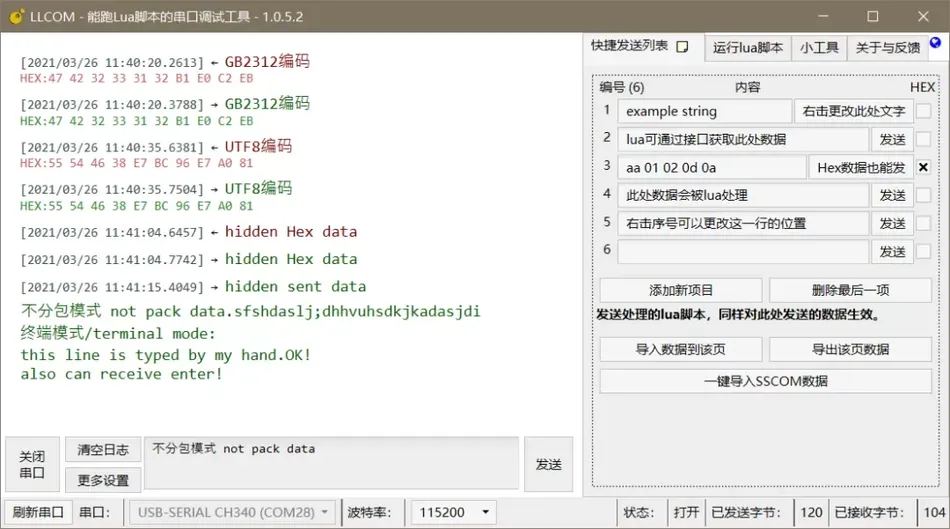
| Quick send bar (10 page×unlimited number of entries) | Save commonly used commands and send them with just one click | Place frames that read different registers on different pages |
| Serial port monitoring | Monitor the serial data being used by other programs | What frames did a certain upper computer software send |
| TCP/UDP/SSL Client and server | It can be directly adjusted without using a serial port TCP | Testing Modbus TCP Port |
| MQTT Testing | integrate MQTT Publish/subscribe | Verify the gateway MQTT upstream |
| Serial port automatic reconnection | Automatically restore connection after disconnection | Equipment power failure and restart will not interrupt debugging |
| Automatic log saving | Serial port with timestamp and Lua journal | After adjusting all devices, look back at the logs and perform a retrospective |
| Encoding conversion/garbled code recovery | GBK/UTF-8/Hex Conversion between them | Chinese string debugging |
4、 Detailed explanation of the two core functions
4.1 Before sending Lua Processing
This is LLCOM The most direct and efficient function. In the 'Send Settings' section→Write a paragraph in the 'Send Processing Script' section LuaEvery time you click send, the original text in the input box is first passed to this script, and the string returned by the script after processing is the actual data sent to the serial port.
Three classic usages:
Automatic addition rnMany serial devices require commands to end with a carriage return or line break——
return uartData .. "rn"From now on, there is no need to hit with your hands every time 0D 0ASimply enter the command and click send to complete the task.
Hexadecimal automatic conversionWrite a hexadecimal string (such as 010300000001) in the input box, and the script will automatically convert it to binary——
return uartData:fromHex()This is Modbus RTU Standard configuration for debugging——You are writing in the input box Modbus The hexadecimal representation of the frame is converted into binary by the script and sent to the device.
JSON Automatic assembly: Input a,b,cWhat was sent out JSON——
json = require("JSON")
t = uartData:split(",")
return json:encode({
    key1 = t[1],
    key2 = t[2],
    key3 = t[3],
})
Each button in the quick send bar also follows this script, so you can create it 10 Quick sending of pages, placing different items on each page Modbus Command, then click the button each time to automatically add CRC Send it out——The complete implementation will be provided later.
4.2 independent Lua Script execution area
There is a "Script" area on the right, where you can directly write the complete scriptLua Program and run. The script here has HeZhou Lua All capabilities of the framework: Luat Task Create collaborative tasks
sys.taskInit()Delay waiting (without blocking the interface)sys.wait(ms)Waiting for messages (event driven)sys.waitUntil()Loop timersys.timerLoopStart()News publishing subscriptionsys.publish()/sys.subscribe()Basic example: Automatically reply after receiving serial port data
You can even use it——
uartReceive = function (data)
    log.info("uartReceive", data)
    sys.publish("UART", data)
end

sys.taskInit(function()
    while true do
        local _, udata = sys.waitUntil("UART")
        log.info("task waitUntil", udata)
        local sendResult = apiSendUartData("ok!")
        log.info("uart send", sendResult)
    end
end)
Direct call xlua of Library release C# Request System.Net This means that you can write a script that automatically pushes a message to the cloud platform when the serial port receives data. HTTP 5、 Core——Quick search
of The document is located at API , listed here
LLCOM Debugging the most commonly used part. Lua API Serial port transmission and reception https://github.com/chenxuuu/llcom/blob/master/LuaApi.md Timer and coroutine Modbus string manipulation
5.1 journal API
-- 发送数据到串口(推荐新接口)
apiSend("uart", data)

-- 发送数据到串口(旧接口,后续会移除)
apiSendUartData(data)

-- 订阅串口接收回调
apiSetCb("uart", function(data)
    log.info("received", data)
end)

-- 取消订阅
apiUnsetCb("uart", callback)
5.2 All logs are automatically saved to the software directory and accompanied by timestamps. API
-- 创建任务
sys.taskInit(function()
    while true do
        -- 你的逻辑
        sys.wait(1000)  -- 等 1000ms
    end
end)

-- 循环定时器
sys.timerLoopStart(function()
    log.info("tick", os.time())
end, 1000)  -- 每 1000ms 触发一次

-- 停止定时器
sys.timerStop(timerId)
5.3 6、 API
-- Binary to hexadecimal string conversion
string.toHex("x01x03")  -- Return "0103"

-- Hexadecimal string to binary conversion
("010300000001"):fromHex()

-- Split string
("a,b,c"):split(",")  -- Return {"a","b","c"}
5.4 Practical script API
log.info("tag", "message")
log.warn("tag", "warning")
log.error("tag", "error")
The following script can be directly copied to
Running inside. Each one is fully usable.Modbus RTU Intelligent sending: automatic calculation
And send it LLCOM Manual calculation
6.1 Intelligent sending: automatic calculation Modbus CRC And send it
Tired of Manual calculation CRCThis is LLCOM In Modbus The most classic application in debugging.
Paste in the 'Send Processing Script':
-- Modbus CRC16 查表法(多项式 0xA001)
local crcTable = {}
for i = 0, 255 do
    local crc = i
    for _ = 1, 8 do
        if (crc & 1) ~= 0 then
            crc = (crc >> 1) ~ 0xA001
        else
            crc = crc >> 1
        end
    end
    crcTable[i] = crc
end

local function modbusCrc16(data)
    local crc = 0xFFFF
    for i = 1, #data do
        local b = string.byte(data, i)
        crc = (crc >> 8) ~ crcTable[(crc ~ b) & 0xFF]
    end
    return crc
end

-- 主逻辑:把输入转成二进制,计算 CRC,拼上去,发给串口
local raw = uartData:fromHex()  -- 输入框写十六进制,如 010300000001
local crc = modbusCrc16(raw)
local lo = crc & 0xFF
local hi = (crc >> 8) & 0xFF
return raw .. string.char(lo, hi)
Now you are writing in the input box 010300000001(From station address=01, function code=03, starting address=0000, number of registers=0001), what is actually sent after clicking on send 01 03 00 00 00 01 84 0A——CRC Automatically connect to the back.
6.2 Modbus RTU Automatic polling script
Run in the 'Script' area, everyLua Read from the station once per second 2 Maintain registers 01 (Address 40001), automatically parse and return data: 0x0000The log output after running is similar to:
-- CRC 表(同上,这里省略,需要放在脚本最前面)
-- ...(和 6.1 的 crcTable 和 modbusCrc16 函数一样)

local function buildReadFrame(slave, startAddr, regCount)
    local frame = string.char(slave, 0x03,
        (startAddr >> 8) & 0xFF, startAddr & 0xFF,
        (regCount >> 8) & 0xFF, regCount & 0xFF)
    local crc = modbusCrc16(frame)
    return frame .. string.char(crc & 0xFF, (crc >> 8) & 0xFF)
end

local function parseResponse(data)
    if #data < 5 then
        log.warn("modbus", "响应太短: " .. string.toHex(data))
        return nil
    end
    local slave = string.byte(data, 1)
    local func = string.byte(data, 2)
    if func > 0x80 then
        log.error("modbus", "异常码: 0x" .. string.format("%02X", string.byte(data, 3)))
        return nil
    end
    local byteCount = string.byte(data, 3)
    local values = {}
    for i = 0, (byteCount / 2) - 1 do
        local hi = string.byte(data, 4 + i * 2)
        local lo = string.byte(data, 5 + i * 2)
        values[i + 1] = (hi << 8) | lo
    end
    return {slave = slave, values = values}
end

-- 接收处理
apiSetCb("uart", function(data)
    local result = parseResponse(data)
    if result then
        log.info("modbus", string.format("从站%02X 寄存器值: %s",
            result.slave, table.concat(result.values, ", ")))
    end
end)

-- 轮询任务
sys.taskInit(function()
    while true do
        local frame = buildReadFrame(0x01, 0x0000, 4)
        log.info("modbus", "发送: " .. string.toHex(frame))
        apiSend("uart", frame)
        sys.wait(2000)
    end
end)
. No manual intervention is required, the script automatically polls, parses, and logs.modbus 发送: 0103000000044409 → modbus 从站01 寄存器值: 168, 2234, 0, 512Multi station scanner
6.3 Automatically scan which slave stations are online on the bus. Send read commands one by one, and those that respond are online:
After the script runs, all online slave addresses are listed in the log. Run this once after the first power on in a large-scale project, saving the effort of reading the manual one by one.
-- CRC 函数同上,省略

local function scanSlave(slaveId)
    local frame = string.char(slaveId, 0x03, 0x00, 0x00, 0x00, 0x01)
    local crc = modbusCrc16(frame)
    frame = frame .. string.char(crc & 0xFF, (crc >> 8) & 0xFF)

    apiSetCb("uart", function(data)
        if #data >= 5 and string.byte(data, 1) == slaveId
            and string.byte(data, 2) == 0x03 then
            log.info("scan", "从站 " .. slaveId .. " 在线✓")
        end
    end)

    apiSend("uart", frame)
    log.info("scan", "扫描从站 " .. slaveId .. " ...")
end

sys.taskInit(function()
    for slaveId = 1, 247 do
        scanSlave(slaveId)
        sys.wait(150)  -- 等 150ms 给从站响应时间
    end
    log.info("scan", "扫描完成")
end)
Automatic parsing of response frames
6.4 Data export + received
After response, automatically parse and format as Modbus Okay, easy to copy to CSV Conduct trend analysis: Excel Each line of the log output can be directly copied and pasted into
local results = {}

apiSetCb("uart", function(data)
    if #data < 5 then return end
    local slave = string.byte(data, 1)
    local func = string.byte(data, 2)
    if func >= 0x80 then
        log.error("modbus", string.format("S=%02X 异常码0x%02X", slave, string.byte(data, 3)))
        return
    end
    local byteCount = string.byte(data, 3)
    local row = {os.date("%H:%M:%S"), slave}
    for i = 0, (byteCount / 2) - 1 do
        local hi = string.byte(data, 4 + i * 2)
        local lo = string.byte(data, 5 + i * 2)
        table.insert(row, (hi << 8) | lo)
    end
    table.insert(results, table.concat(row, ","))
    log.info("csv", table.concat(row, ","))
end)

-- 轮询任务(每 5 秒采集一次,共采集 60 次 = 5 分钟)
sys.taskInit(function()
    for i = 1, 60 do
        local frame = string.char(0x01, 0x03, 0x00, 0x00, 0x00, 0x04)
        local crc = modbusCrc16(frame)
        apiSend("uart", frame .. string.char(crc & 0xFF, (crc >> 8) & 0xFF))
        sys.wait(5000)
    end
    log.info("export", "采集完成,共 " .. #results .. " 行")
end)
Used in documents CSV Open it. Excel 7、
monitorTCP / MQTT / other —— Scene Modbus Adjustment
7.1 Can be Modbus TCP
LLCOM Client connection TCP Device (default port Modbus TCP ). Open it 502Client functionality, fill in the device TCP And ports IP After successful connection, send and receive like a serial port 502Frame and—— Modbus TCP The difference in frames is just missing RTU Too many CRCHead ( MBAP byte). You can automatically add it in the sending processing script6 Head: MBAP Or the script receives it through the serial port
-- Input box writing 000000000006010300000001
-- express:affairID=0000,agreementID=0000,Length=0006,unitID=01,function code=03,starting address=0000,Number of registers=0001
return uartData:fromHex()
Frame, remove RTU Replace with CRC Passing behind the head MBAP Send out the channel. Please refer to the built-in software for details TCP Example. channel-demo.lua Testing
7.2 MQTT If debugging
Gateway ( Modbus converts serial data intoDTU Convert serial data into MQTT Publish),LLCOM of The function allows you to directly subscribe to the topics published by the gateway and see if the data sent by the gateway is correct. It is also possible to test the release of messages on the control theme. MQTT Serial port monitoring
7.3 The 'serial port monitoring' function can capture the serial communication being used by other software
For example, your upper computer software is communicating with the device, and you don't want to stop it but want to see what frames it sends.——It can silently capture serial data and display logs without affecting the original communication.LLCOM 8、 Comparison with similar tools
Tools
| Script support | Open source | Modbus CRC | Price | Collaborative framework |
|---|---|---|---|---|
| LLCOM | Lua 5.3 + xlua + Need to write it yourself (this article has been provided) | Yes | free None | I won't support it |
| SSCOM | No | free Limited | I won't support it | Yes |
| COMTool | free No (professional | fixed function) | built-in | No |
| Modbus Poll | None Modbus built-in | No | Not 'out of the box' | $129 |
| ModScan | A specialized tool, it is a universal tool that can be transformed into a specialized tool. If you only need to click a button to send | Frame, | More direct. But if you need batch automated testing, custom parsing, data export, and | $69 |
LLCOM Joint debugging Modbus It is currently the most flexible open source tool. Modbus 9、 Common problems Modbus What should I do if I receive garbled code?Modbus Poll Check if the baud rate and parity are consistent with the device. Then in MQTT/TCP Switching of receiving area——LLCOM Display
In many cases, 'garbled' is because the device returns binary data but the display area is pressed
Q: Analyzed. The frame device sent by the script did not respond? LLCOM Step 1: Confirm Hex The wire is not connected in reverse. Step 2: Check if the device has returned any bytes in the receiving area——If not at all, it may be due to an incorrect device address. Step 3: If the device returns data but an exception code (function code ASCII ), check what the exception code is
Q: CRC It is an 'illegal data address', and the register address may not exist. The button in the quick send bar can automatically run A/B Is it a script?——Can. The content of the quick send bar will also go through a 'send processing script' + 0x80So you have written it well——0x02 After automatically calculating the script, the quick send column only needs to fill in the bare frame (such as
Q: ), click the button to automatically add it CRC Did the script run incorrectly? Add a line at the beginning of the script area——Check if the script starts successfully. Most errors are caused by misspelling variable names or calling non-existent ones CRC After automatically calculating the script, the quick send column only needs to fill in the bare frame (such as 010300000001)Click the button to automatically add CRC.
Q: Lua Did the script run incorrectly? Add a line at the beginning of the script area log.info("boot", "script started") Check if the script starts successfully. Most errors are caused by misspelling variable names or calling non-existent ones API——The log area will display Lua Error message.
LLCOM The core value is not how many additional functions are added, but rather transforming 'debugging' from repetitive physical labor into a programmable task. You spent half an hour writing three scripts on site, and over the next three days, with just a few clicks of the mouse, the data arrived on your own. This is the true meaning of 'installing a brain on the serial port'——no have Yes, it is LLCOM Enable you to write your debugging logic into code and have the software run it for you. AILet's talk if there are any issues. LLCOM Enable you to write your debugging logic into code and have the software run it for you.
Let's talk if there are any issues.


Leave a Reply