
Source: Modbus Chinese Network (modbus. cn) - a leading Modbus communication protocol technology community in China
Using an intermediate script as a bridge: Python script reads Modbus response through pyserial → parses temperature/humidity → outputs to virtual serial port in ASCII waveform format of COMTool → COMTool's Graph plugin directly displays the curve.
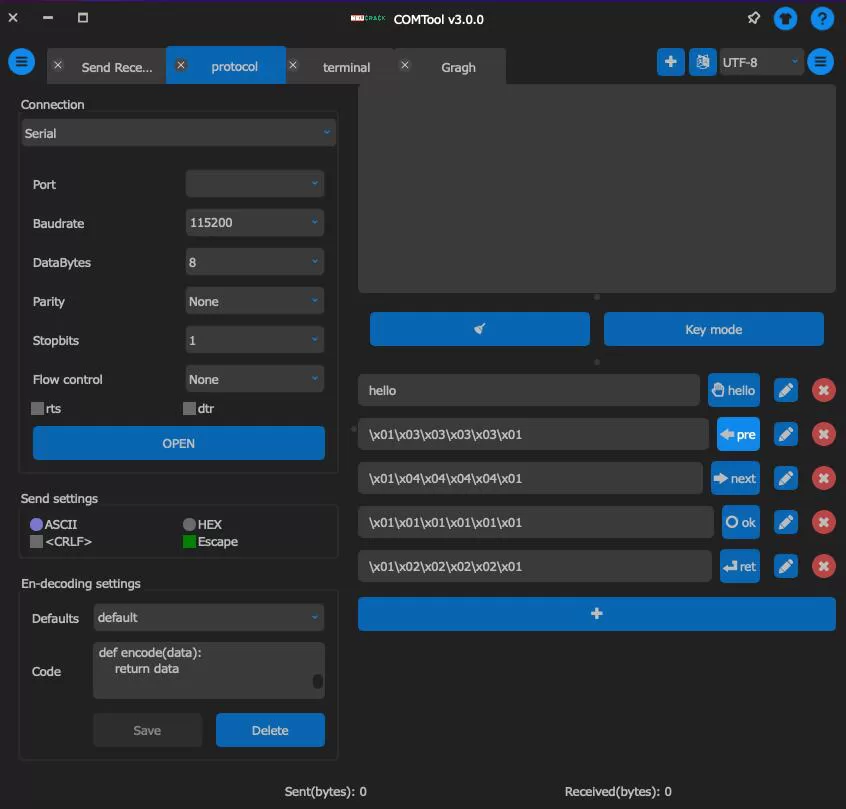
Summary:COMTool (GitHub: Neutree/COMTool, LGPL-3.0)It is used Python 3 + PyQt5 Developed an open-source serial port debugging tool that supports Windows, Linux, macOS And Raspberry Pi. yes Modbus In terms of debugging scenarios, it has three differentiated values: a truly platform wide consistent experience, a protocol plugin system (custom encoding/decoding/parsing), and built-in real-time waveform charts (sensor data visualization). This article does not provide a list of functions, please refer directly toPython Starting from the actual needs of engineers, let me tell you Modbus What problems can be solved and in which scenarios can they be compared COMTool And ATK-XCOM More suitable. Keywords: LLCOM Cross platform serial port debuggingCOMToolSerial port toolsPython Waveform display and protocol plugin.Modbus Go ahead
Most of the time, the debugging personnel lie down Modbus Go to work Windows After all——Mitsubishi and Omron's configuration software and programming tools are mostly only used SIEMENS. But there are a few scenarios where you suddenly find the serial assistant you need WindowsThere is none at all, or there is one but the experience is a mess: Windows Scenario 1: What are you using
As the main development machine, but MacBook Pro Turn USB Insert it, you need to adjust one 485 Sensors. Open the virtual machine to run Modbus Version tools Windows The serial port transparent transmission delay is three times higher and occasionally loses frames.——Scenario 2: Your gateway is running
On site, there is only one Raspberry Pi that can be plugged into the serial port. Do you want to directly open a serial assistant on the Raspberry Pi desktop environment to capture data Ubuntu Server most——The tool cannot be used directly. Windows Scenario 3: You are adjusting a temperature and humidity sensor,
The returned value is the original register value (e.g.Modbus represents 168 ), and you need to see the temperature curve directly in the receiving area instead of a bunch of hexadecimal numbers. 16.8°CThese three scenarios are:
Reason for existence. COMTool Yes
COMTool The open source project ( GitHub protocol, written withNeutree/COMTool) , MIT ) has Python 3 + PyQt5 , and the core maintainer isGitHub . It is not the most comprehensive serial port tool, nor is it a specialized tool 2000+ Starbut it is currently the most thorough cross platform serial port tool, with the strongest plugin and visualization capabilities. What does the cross platform "cross" of Neutreeunlike some tools that are "theoretically supported but cannot be installed in practice" Modbus it has independent packaging and installation solutions for each platform:——download
unzip the package and run it directlyCOMTool . It can also be installed through a package manager
Install the package directly. Because it is Linux Written by the system itselfCOMTool Just enough. Note that when first opened, it needs to be allowed to run in "System Preferences
WindowsSecurity and Privacy" because it is unsigned. If you want to open more windows, execute the terminal GitHub Releases Download zip Extract the package and run it directly comtool.exe. It can also be done through Scoop (Windows Installation of Package Manager:scoop bucket add Nightly ... && scoop install comtool.
macOS: dmg Install the package directly. Because it is Python + PyQt5 Written by the system itself Python 3 Just enough. Please note that when opening for the first time, due to unsigned information, you need to go to the 'System Preferences' section→Allow to run in 'Security and Privacy'. If you want to open more windows, execute the terminal open -n /Application/comtool.app.
LinuxThis is COMTool The advantage field.Ubuntu The system has precompiled binary files,Arch The system can be derived from AUR Install (yay -S python-comtool). It can also be used pip Install from source code:pip install comtool. Raspberry Pi needs to install dependencies first sudo apt install git python3-pyqt5 python3-numpy, again pip install.
Raspberry PiFull support. Insert it USB Turn 485 Module, power on, open COMToolChoose /dev/ttyUSB0——And Windows The same operational logic applies.
Consistent experience across all platforms: the same PyQt5 Interface, same plugin system, same configuration file format. You can be there Windows Write the protocol plugin and copy it to the Raspberry Pi COMTool Load directly from the plugin directory.
2、 Protocol plugin —— COMTool yes Modbus Debugging the most valuable features
2.1 What problems does the protocol plugin solve
A regular serial assistant works like this: you send hexadecimal 010300000001840AEquipment return 01030201988432You use your naked eye to look for "0103" in the response byte, confirm that the slave address is correct, jump over to see where the data byte is, and then manually calculate it CRC.
COMTool The protocol plugin (Protocol Plugin) allows you to define the data processing logic for both the sending and receiving ends: automatically convert "user-friendly inputs" (such as "reading temperature sensors") to before sending Modbus RTU Frame; After receiving, automatically parse the original hexadecimal frame into 'sensor values': 25.3°C. No need to manually read hexadecimal throughout the entire process.
The principle is simple. Each protocol plugin is one Python Class must implement two core methods:encode() And decode().
encode() The function is to convert user input into the original bytes to be sent.decode() The function is to convert the received raw bytes into a user readable display format.
2.2 The simplest Modbus Protocol plugin example
The following plugins allow you to COMTool In the "Protocol" mode, issue natural language commands such as "read register address0 quantity 4" and automatically spell them together Modbus RTU Frame transmission. The received binary response is automatically parsed as' slave01: [168, 2234, 0, 512].
class Plugin(Plugin_Base):
    id = "modbus_rtu"
    name = "Modbus RTU 解析器"
    version = "1.0"

    # CRC16 查表(Modbus 多项式 0xA001)
    _crc_table = None

    @classmethod
    def _build_crc_table(cls):
        if cls._crc_table:
            return cls._crc_table
        table = []
        for i in range(256):
            crc = i
            for _ in range(8):
                if crc & 1:
                    crc = (crc >> 1) ^ 0xA001
                else:
                    crc >>= 1
            table.append(crc)
        cls._crc_table = table
        return table

    @classmethod
    def _crc16(cls, data: bytes) -> int:
        table = cls._build_crc_table()
        crc = 0xFFFF
        for b in data:
            crc = (crc >> 8) ^ table[(crc ^ b) & 0xFF]
        return crc

    def encode(self) -> bytes:
        """用户输入 '读寄存器 地址0 数量4' → 拼成 Modbus RTU 帧"""
        text = self.sendEdit.toPlainText().strip()
        # 简化解析:固定从站地址 0x01
        slave = 0x01
        # 默认读保持寄存器(功能码 0x03),起始地址 0,数量 1
        _, addr_str, count_str = text.split()
        addr = int(addr_str.replace('地址', ''))
        count = int(count_str.replace('数量', ''))
        frame = bytes([slave, 0x03,
                       (addr >> 8) & 0xFF, addr & 0xFF,
                       (count >> 8) & 0xFF, count & 0xFF])
        crc = self._crc16(frame)
        return frame + bytes([crc & 0xFF, (crc >> 8) & 0xFF])

    def decode(self, data: bytes) -> str:
        """收到的 Modbus 响应帧 → 解析为人可读的文本"""
        if len(data) < 5:
            return f"[数据过短: {len(data)} 字节]"
        slave = data[0]
        func = data[1]
        if func >= 0x80:
            exc = data[2]
            return f"[异常] 从站{slave:02X} 错误码: {exc}"
        byte_count = data[2]
        values = []
        for i in range(byte_count // 2):
            hi = data[3 + i * 2]
            lo = data[4 + i * 2]
            values.append(str((hi << 8) | lo))
        return f"从站{slave:02X}: [{', '.join(values)}]"
put this Python file into the plugin directory of COMTool , and after startup, select this plugin in the 'Protocol' panel. Afterwards, you write in the sending box 读寄存器 地址0 数量4Click to send, the actual message sent is complete Modbus RTU Query frame (including CRC). The received hexadecimal bytes will automatically become 从站01: [168, 2234, 0, 512].
n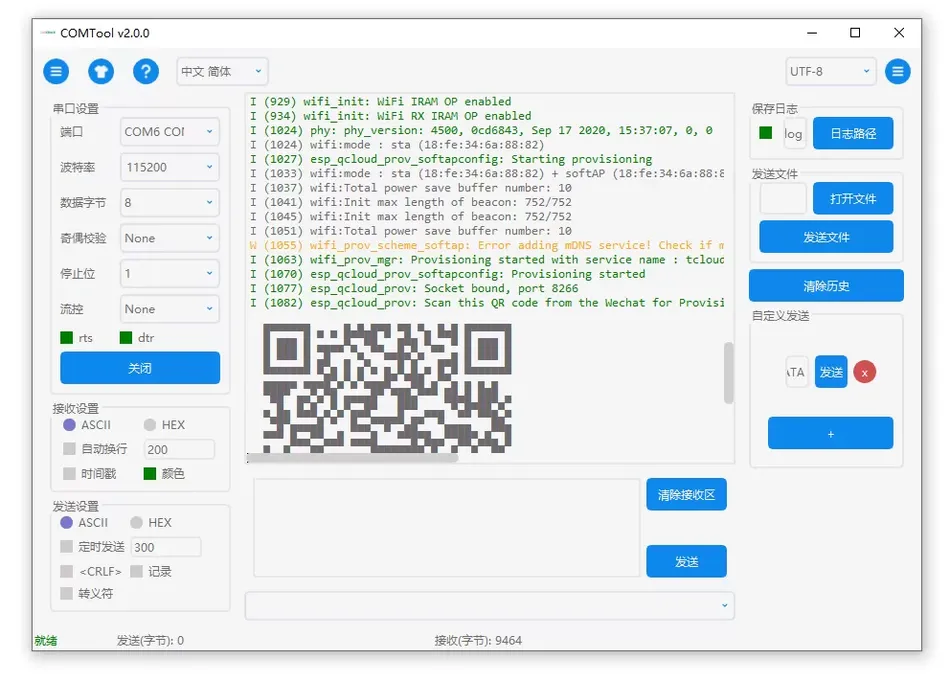
2.3 More complex scenarios: custom validation, custom frame format
Modbus The protocol plugin is just an example.COMTool The true value of the protocol plugin lies in handling private protocols that are not supported by any tools on the market
- Return of a domestically produced thermostat
AA BB CC DD EE FF GG HH——The first four bytes are temperature (BCD code), and the last four bytes are humidity. Write onedecode()Translate into:温度: 23.5°C, 湿度: 67.2%. - Custom verification: not standard CRC16 but rather CRC8/XOR/A manufacturer's own magic modification verification, write one Python The function is done.
encode() And decode() Can adjust anything Python Library——You can parse JSONLook up dictionary translation error codes, and even adjust them numpy Perform data filtering. This is C# Or C++ The flexibility that serial port tools cannot achieve.
3、 Waveform/chart —— Take it Modbus Register values become real-time curves
3.1 Supports two data formats
COMTool Built in Graph The plugin can extract coordinates from serial data and draw real-time curves. Supports two formats:
ASCII Format(Recommended, human readable):
$Curve name,XCoordinate,YCoordinate,checksumnExample: Your sensor microcontroller every 200ms Send $temp,1.0,25.3n, COMTool You will draw a dot on the 'temp' curve (1.0, 25.3). Version with checksum:$temp,1.0,25.3,179n——The checksum is for all fields ASCII Code accumulation takes the low value 8 Position.
Binary format(Efficient, suitable for high-speed data collection): The protocol length is shorter, and thousands of points can be transmitted per second. Please refer to the specific format for details COMTool Official documents.
n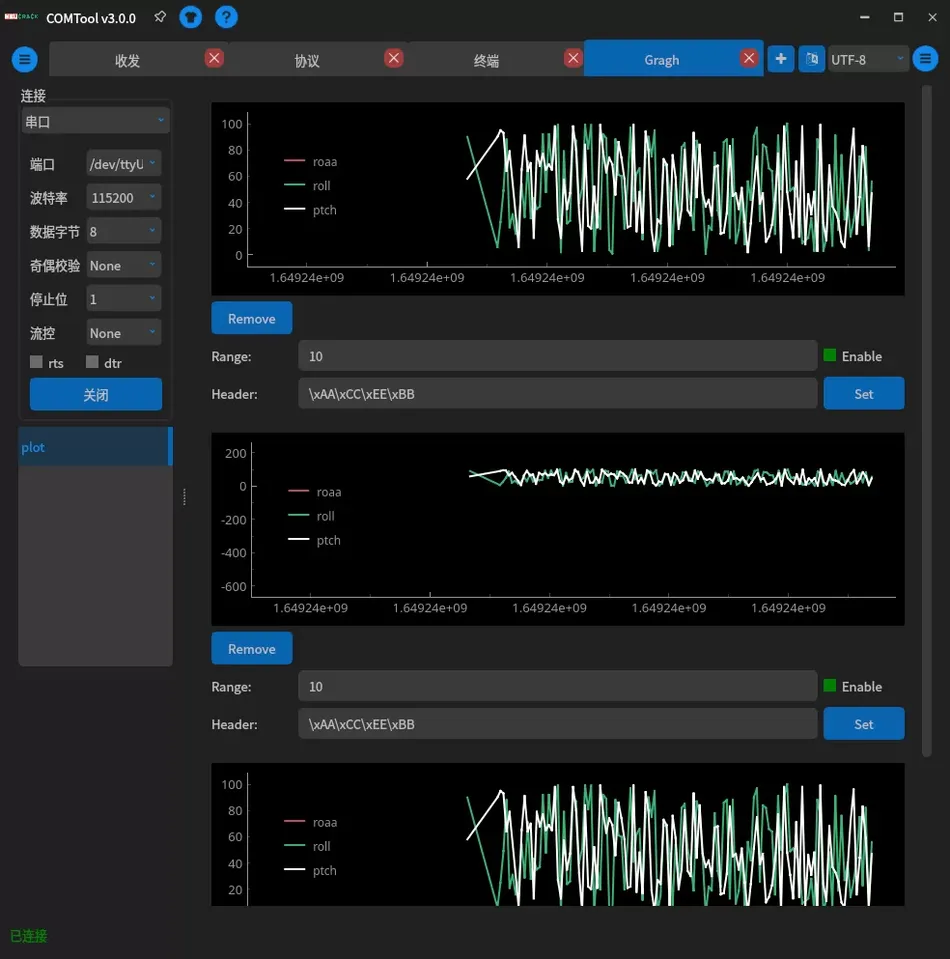
3.2 Modbus The practical approach of visualizing sensor data
Assuming you have one Modbus Temperature and humidity sensor (slave address 01), return register 40001(Temperature, unit 0.1°C) and 40002(Humidity, unit 0.1%). You want to be in COMTool I see real-time curves of temperature and humidity inside.
Use an intermediate script to bridge:Python Script passed pyserial Read Modbus Response → Analyze the temperature/humidity → Press COMTool of Output waveform format to virtual serial port ASCII of The plugin directly displays the curve. → COMTool Or a more direct solution: use Graph The protocol plugin is used for parsing,
The output of the function is directly formatted as COMTool , indecode() You can see two real-time curves in the plugin. $temp,{timestamp},{value}n + $humi,{timestamp},{value}nMultiple chart support: Three curves of temperature, humidity, and dew point temperature can be added simultaneously, each with different colors. Graph Language side code
If the sensor is
3.3 C Write your own firmware and output it on the microcontroller side
Compatible waveform data: STM32/ESP32 This way, there is no need to do anything on the firmware side COMTool Compatible waveform data:
// 发送 ASCII 格式波形数据(含校验和)
int plot_pack_ascii(char *buff, int buff_size,
    const char *curve_name, float x, float y)
{
    int sum = 0;
    int len = snprintf(buff, buff_size, "$%s,%.1f,%.1f",
                       curve_name, x, y);
    for (int i = 1; i < len; i++) sum += buff[i];
    len += snprintf(buff + len, buff_size - len, ",%dn", sum & 0xFF);
    return len;
}

// 在传感器读取循环中调用
char buf[128];
int len = plot_pack_ascii(buf, sizeof(buf), "temp",
                          time_ms / 1000.0, temperature / 10.0);
uart_send_bytes(buf, len);
This way, there is no need to do anything on the firmware side GUI Development, direct serial port output,COMTool You can draw a picture.
4、ATK-XCOM / LLCOM / COMTool —— What is the difference in positioning among the three
| Comparative dimension | ATK-XCOM V3.0 | LLCOM | COMTool |
|---|---|---|---|
| Developer | Accurate atomic (commercial) | chenxuuu(Personal open source) | Neutree(Personal open source) |
| licence | Free closed source | Apache 2.0 | LGPL-3.0 |
| Platform | Windows | Windows | Win + Mac + Linux + Raspberry Pi |
| Technology stack | C# / .NET | C# / .NET + xlua | Python 3 / PyQt5 |
| Script/plugin | ❌ | ✅ Lua 5.3 | ✅ Python plug-in unit |
| built-in Modbus CRC | ✅ Protocol transmission mode | ❌(Required Lua handwritten) | ❌(Required Python plugin) |
| Real time waveforms/charts | ❌ | ❌ | ✅ Graph plug-in unit |
| TCP/UDP | ❌ | ✅ | ✅ |
| SSH client | ❌ | ❌ | ✅ |
| Multiple sending management | ✅ 4Page×10Article | ✅ 10No limit on the number of pages | ✅ Custom button |
| Installation difficulty | Instant decompression | Instant decompression | pip install Or relieve stress |
Selection roadmap:
- you are here Windows raise Modbus RTUIt requires daily sending and receiving as well as verification → ATK-XCOM. Built in protocol transmission mode CRC16Multiple sending management is mature, with zero learning cost.
- you are here Windows Script writing is required for automated testing and multi protocol debugging → LLCOM. Lua Script engines can handle any automated logic,xlua Adjustable C# Native interface.
- You use Mac Or Linux Developing or requiring visualization of sensor data → COMTool. The only full platform solution, with protocol plugins available Modbus There is no substitute for custom parsing, and waveform charts are essential for physical quantity debugging.
- Multiple uses within the same project → Three collaborations.ATK-XCOM Doing daily tasks Modbus Sending, receiving, and verifying,LLCOM Perform batch automated polling,COMTool Perform sensor waveform monitoring.
5、COMTool Other Modbus Related purposes
5.1 TCP/UDP debug Modbus TCP
COMTool Support for network debugging mode TCP Client/Server. Adjustment Modbus TCP When using equipment, in TCP Connecting devices in client mode IP:502 Port, send Modbus TCP Frame (MBAP header + PDU), providing the same operational experience as serial debugging. The receiving area also supports protocol plugin parsing.
5.2 SSH Terminal + Integrated serial port debugging
When your debugging object is a device Linux Industrial control computers (such as Raspberry Pi running on the main station program), you can open two at the same time Modbus Window: a connection COMTool Log in to the industrial computer to view logs and issue commands, one connected to the serial port to view SSH signal communication. Completed within the same software, no need to use it Modbus Cut back and forth between the serial assistant. Putty Cross machine migration of configuration files
5.3 The serial port parameters, sending history, and plugin configuration are all saved in the local configuration file. You are in the office
COMTool Copy all the pre configured items to the Raspberry Pi on site with the configuration files Windows Including the protocol plugins you wrote——Directly load, restore the complete debugging environment in one second.——6、 Installation
And begin COMTool Debugging Modbus (The simplest)
6.1 WindowsFrom
Download the latest https://github.com/Neutree/COMTool/releases File, unzip and double-click .zip From comtool.exe.
6.2 macOS
Download Releases Installation. Or from .dmg , and then input it on the terminal PyPI: pip install comtoolRaspberry Pi comtool.
6.3 Linux / Verify serial communication
# Ubuntu/Debian
sudo apt install python3-pyqt5 python3-numpy python3-pip -y
pip install comtool
comtool

# Arch
yay -S python-comtool

# Raspberry Pi - An additional step:Current user joining dialout group
sudo usermod -a -G dialout $USER
sudo reboot
6.4 Insert it
Turn USB Module, in 485 Select serial port number on the left panel: COMTool Wait
- Windows: COM3 Or
- macOS/Linux: /dev/tty.usbserial The baud rate, data bits, and parity bits are set according to the device parameters. Click on 'Open'. Enter in the sending area /dev/ttyUSB0
Test frame, switch to hexadecimal mode, click to send. Modbus Not the best
COMTool Debugging tools Modbus of Built in verification and multiple sending are more targeted——ATK-XCOM Not the most flexible scripting tool either CRC of Xiecheng and Modbus. COMTool More powerful calling ability. But——LLCOM It is the only one that can be in Lua It can run smoothly on both Raspberry Pi and allows you to use it xlua C# Customized protocol parsing and the ability to convert sensor data into real-time curves. COMTool This is its ecological niche: cross platform Mac, LinuxCustomizable Python Visualization. There are substitutes for all three when viewed separately, but there is currently no second one when they are combined into one tool.
This website provides + Python The domestic online disk download and Chinese usage tutorial, members can download all debugging tool collections for free. A scenario that cannot be solved by one serial port assistant can always be solved by three serial port assistants. + Let's talk if there are any issues.
This website provides COMTool The domestic online disk download and Chinese usage tutorial, members can download all debugging tool collections for free. A scenario that cannot be solved by one serial assistant, three serial assistants can always solve it.
Let's talk if there are any issues.


Leave a Reply