
Serial Debugging Assistant and Modbus Communication Integration Tool: Efficient and Practical Serial Communication Software
In the field of automation control and data communication, Serial communication still plays an important role. In order to improve development efficiency and testing convenience, An integrated serial port debugging andModbusThe software tools for communication functions are particularly important. This article will introduce a powerful serial port debugging assistant, It not only supports basic serial port operations, Also integratedModbusCommunication Protocol, Make it a multifunctional communication tool.
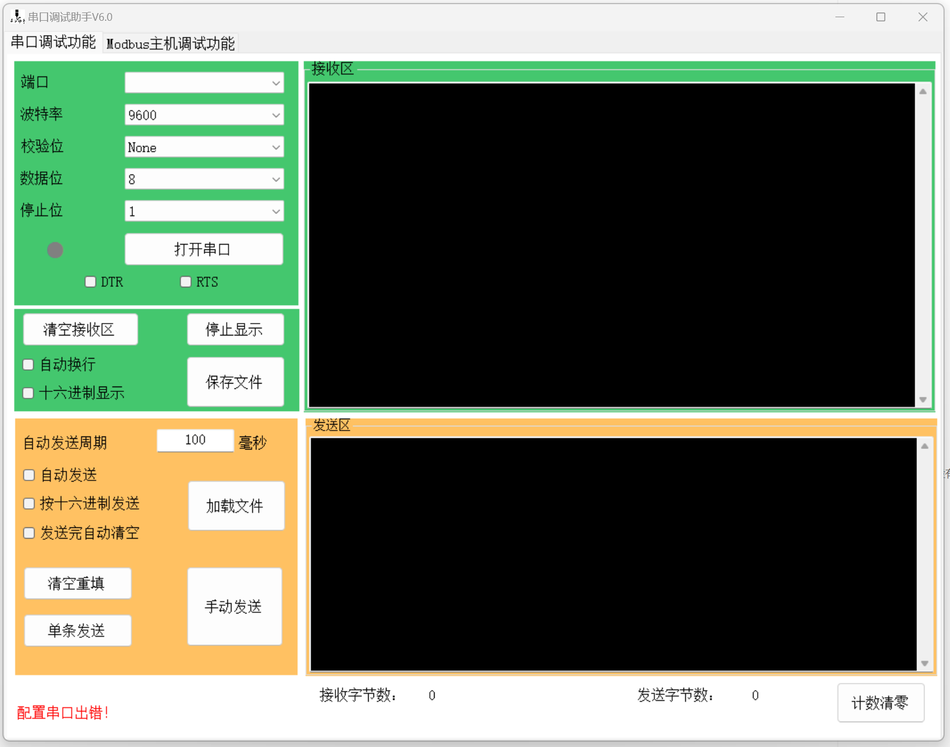
Serial port debugging function
The serial port debugging part of the software includes all standard serial port operation functions, including:
- Serial port configuration: Support dynamic selection of serial port number, Configure baud rate, check digit, data bit, Stop position, etc.
- Data reception and transmission: Can display received data in text or hexadecimal format, And support manual or automatic data transmission.
- Advanced Settings: provideDTR, RTSSetting of control signals, And the automatic line wrapping function for receiving displays.
- data recording: Support saving received data to a file, Or load data from a file for sending.
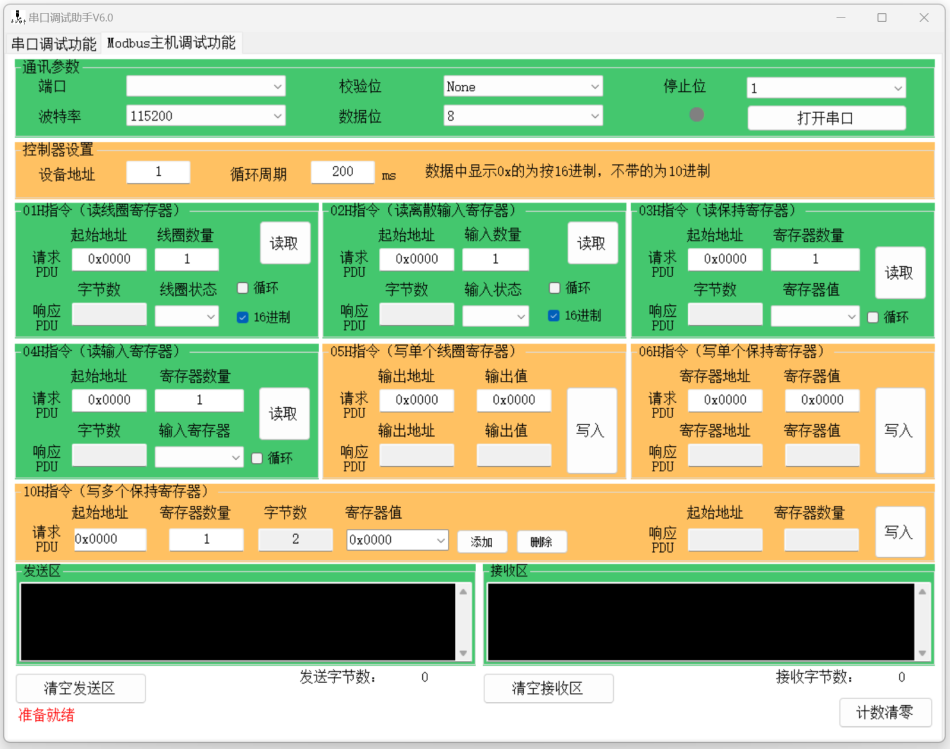
ModbusCommunication integration
ModbusPartial integration makes the tool not limited to basic serial port debugging, It can also be carried out efficientlyModbusProtocol testing and data processing, Its characteristics include:
- Support multipleModbusfunction code: Implemented read-write coils (01H, 05H) , Read discrete input (02H) , Read write hold register (03H, 06H, 10H)Wait, waitModbusInstruction.
- Data Processing and Display: Provides convenient data input and display interface, Supports hexadecimal and regular numerical formats.
- automated testing: You can set the loop reading function, automated testingModbusDevice.
User interface and operation
The user interface of the software is user-friendly, Intuitive operation. The main interface is clearly divided into two parts: Serial port debugging andModbusCommunication, Enable users to easily switch and use these two functions.
User Interface Design
- Intuitive layout: The upper part of the main interface focuses on serial port debugging function, Concentrated display of the lower partModbuscommunication function, Enable users to easily find the desired features at a glance.
- Parameter Configuration: All configuration parameters related to serial port, such as port number, The baud rate and other parameters can be directly set on the interface, No need to enter through complex settings.
- The data shows: The received and sent data are displayed in a dedicated text area, Support different display formats, Convenient for users to choose according to their needs.
Functional operation process
- Serial port operation: Users can easily open and close serial ports, Perform basic data sending and receiving operations. Furthermore, You can also set the automatic sending interval, Realize continuous data transmission.
- ModbusFunctional Testing: Through simple inputModbusaddress, Register address and value, Users can test differentModbusfunction code. The software also supportsModbusAutomatic reading of data, Easy for long-term system testing and monitoring.
- Data recording and management: The received data can be saved as a file, Data can also be loaded from files, Facilitate long-term recording and analysis of data.
Application Scenarios
This software has a wide range of application scenarios, Suitable for industrial automation, Testing and maintenance, Fields such as teaching and research. Especially for those who require simultaneous serial port debugging andModbusFor communication testing engineers and technicians, This software provides a one-stop solution.
Conclusion
In summary, This set includes serial port debugging andModbusA software tool that integrates communication, Not only does it have comprehensive functions, Easy to operate, And the interface is friendly, It is an indispensable practical tool in the field of industrial communication. Whether used for daily maintenance of equipment, Or as a teaching and research tool, It's all an ideal choice.



怎么下载?
不知道好用否,需要花费大洋