
I. Product Introduction
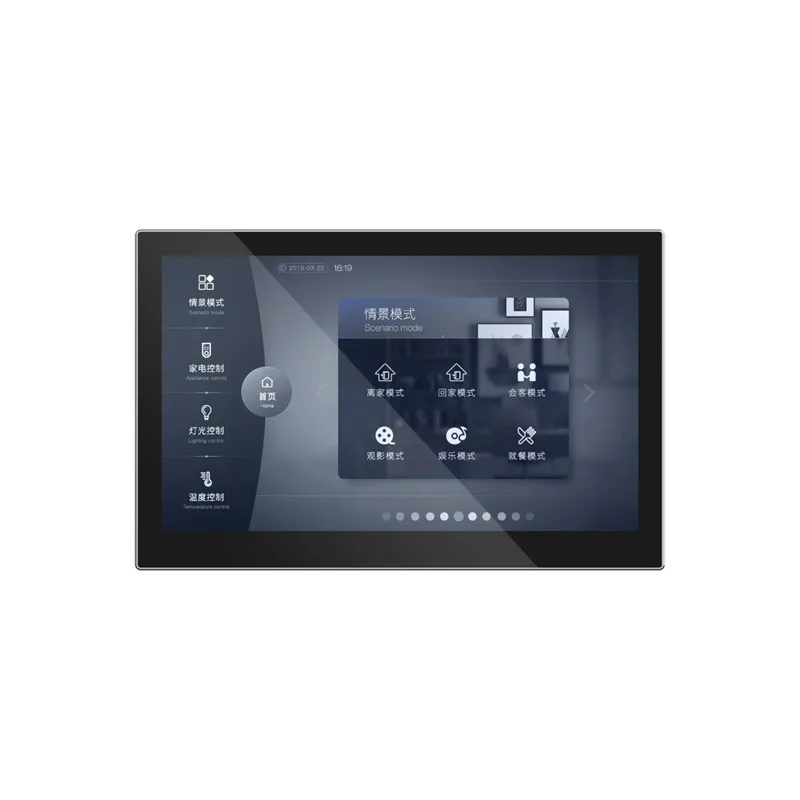
This product belongs to the 10 inch color screen controller series, with multiple size specifications, suitable for visual human-computer interaction scenarios in household, commercial, and industrial equipment. The entire series of products adopts a high specification true color LCD display screen, paired with a capacitive touch screen, with a simple and stylish appearance that conforms to modern aesthetics and usage habits.
This 10 inch color screen controller is suitable for industrial/commercial electrical control, color screen interaction, human-computer interaction, fresh air system, air conditioning system, and high-end instrument applications. Built in 10 inch high-resolution full-color display and capacitive touch glass panel, with smooth and simple operation. Equipped with ARM Cortex ™- The A7 dual core 1.2GHz processor has strong processing performance and meets various computing needs. Simultaneously equipped with RS485, RS232, RJ45, and 802.11b/g/n WIFI interfaces to meet the hardware connection requirements of smart appliances and controls. The back of the machine adopts a magnetic metal hanging bracket sliding buckle installation design, which is simple to install and firm and reliable. High end CNC aluminum panel shell that can be integrated into home environments.
Product Manual Download:
2, Product specifications
(1) Hardware Specifications
| Project | Description |
|---|---|
| CPU and Storage | |
| CPU | ARM Cortex ™- A7 dual core 1.2GHz |
| Chip Platform | AK3760E |
| Memory | 64MByte |
| Flash | 128MByte |
| Screen | |
| Size | 10 inches |
| Resolution | HD1280 × 800IPS screen |
| Model | P10 |
| Hair color count | 24 bit full-color (16.7M color) |
| touch | Fully bonded capacitive touch screen |
| Peripherals and interfaces | |
| Serial port RS485 | quantity 1 |
| RS232 serial port (optional) | quantity 1 |
| USB OTG | Micro USB OTG quantity 1 |
| Expand storage | TF card slot (compatible with SDHC standard) quantity 1 |
| button | Number of hidden reset buttons 1 |
| Ethernet | 10M/100M full duplex adaptive RJ45 Ethernet port (optional) Quantity 1 |
| audio | Number of built-in buzzers: 1 |
| RTC clock | Battery powered quantity 1 |
| Indicator light | Number of power indicator lights 1 |
| Size and weight | |
| Overall size | 242.18 × 160.96 × 8.0mm (outside the wall) |
| Matching bottom box | 86 bottom box (86 × 86mm) |
| Packaging size | 273 × 182 × 65mm |
| Overall weight | See packing list |
| Packaging weight | See packing list |
| Working Environment | |
| Power Input | DC 12V 500mA |
| Maximum Power | 6W |
| Working Temperature | -20 ℃~70 ℃ |
| Working Humidity | RH10%~RH90% (non condensing) |
| Storage Environment | |
| Storage Temperature | -40 ℃~85 ℃ |
| Storage humidity | ≤95%RH |
(2) Software specifications
| project | Explanation |
|---|---|
| operating system | Linux 4.9.84 |
(3) Size specifications
Please refer to the packing list for details.
(IV) Packing List
| Name | Quantity | Legend |
|---|---|---|
| Controller Host | 1 | - |
| mounting bracket | 1 | - |
| Set screw | 2 | - |
| Installation Instructions | - | - |
3, Precautions
- Before installation, please carefully read this product manual and operate according to its contents, otherwise there may be a risk of electric shock or fire.
- Dangerous operations may pose a threat to personal safety, please operate with caution.
- This product is prohibited for installation and use by minors to avoid causing personal injury.
- During installation, it is recommended to hire qualified professionals or service providers. Ensure that the wiring complies with local and manual standards, and is completed by professionals. Installation by non professionals may result in product malfunctions, electric shock, and fire risks.
- Ensure that the wiring complies with local and manual standards and is completed by professionals.
- Installation by non professionals may result in product failure, electric shock, and fire risks.
- This product is prohibited from being installed in areas with flammable gas leaks.
- This product is prohibited from being installed in environments with high salt spray.
- This product is prohibited from entering water.
- The wiring of this product should not generate tension to avoid wire breakage and leakage. This product should be installed in indoor environments between 0 ℃ and 39 ℃, avoiding direct sunlight.
- This product should be installed in indoor environments between 0 ℃ and 39 ℃, avoiding direct sunlight.
- Do not connect the power cord to the communication line interface. If installed in environments such as hospitals, ensure that this product does not interfere with other products.
- If installed in environments such as hospitals, ensure that this product does not interfere with other products.
- This product should be installed on a wall that can withstand its weight. After installation, it is prohibited to move or disassemble this product.
- After installation, it is prohibited to move or disassemble this product.
- It is prohibited to use this product in humid environments. Ensure that this product is connected to the power supply within the rated input range.
- Ensure that this product is connected to the power supply within the rated input range.
- This product is a permanent connection device, and a standard disconnect device should be installed externally during installation.
- When not in use for a long time, please turn off the power.
- Check the interface input line to prevent connection errors from damaging the product. After confirming that all wiring is correct, turn on the power.
- Confirm that all wiring is correct before turning on the power.
- It is prohibited to modify or repair this product by oneself. If the machine crashes, you can press the reset button to restart it.
- If the machine crashes, you can press the reset button to restart it.
- This product has a storage function.
- This product is only suitable for areas with an altitude of 2000 meters and below, and is only suitable for non tropical climate conditions.
Serial Port Screen TDFHUI Configuration PC Software Function Manual
Manual Link:https://www.modbus.cn/category/gvsui
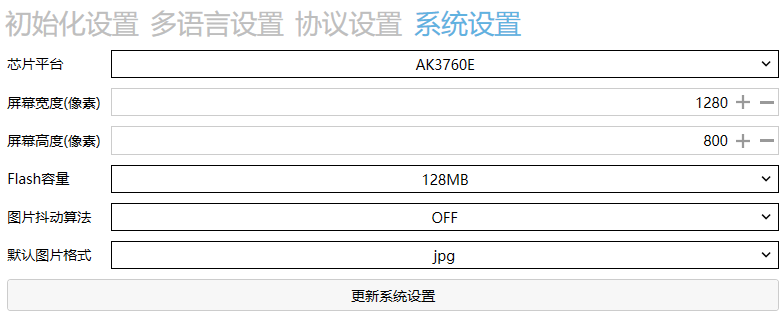
System parameter settings
Software and manual download
Engineering template download
Video tutorial
01. Basic background, button replacement video tutorial
02. Button sending custom protocol tutorial
03. Button sending custom scene and delay instruction video tutorial
05. System variable calling video tutorial
06. Protocol parsing display video
07. Progress bar sending custom change protocol
08. Variable sending with operation logic
09. Changing variables through input boxes
10. CRC Check Transmission Protocol
11. Implementation of Interlock Button Function
12. Export and Upgrade of Changing Power on LOGO
13. Implementation Method of Sliding Screen Effect
14. Tutorial on Protocol Conversion Function
15. Tutorial on Using Color Disk XRGB Dimming
16. Tutorial on Regularly Sending Instructions
17. Tips for Using Password Controls and Adjusting Display Size
18. How to Display Week on the Page
19. Tutorial on Implementing Pop up Selection Button
20. How to Change Text Display through Chinese Input Keyboard
21. Control of calibration equipment such as LS electric curtains
22, Change the display page or popup based on custom data
23. How to change button status through custom protocol
24. How to lock and unlock the screen through custom protocol
Product purchase:https://item.taobao.com/item.htm?ft=t&id=821880658361


Leave a Reply