

Mini program version, free to use!!!
The default port number is 502.
The scanning rate can be set from 0 to 3600000ms. Please note that setting the scanning rate to be lower than the transaction time is meaningless. If using a serial connection of 9600 baud and requesting 125 registers, the transaction time is approximately 8+2+250+2=262ms+interval between requests (>3.5 character time) and response. In this case, setting the scanning rate to 100ms is meaningless because the transaction time is at least 262 milliseconds+slave delay (gap)+shortest time between polls. (Set in the connection dialog box F3).
Signed integer big endian byte swapping
- This ensures that log lines are not cashed out in the file system, but are immediately written physically.
- Only applicable for Connection=1... 4
- Function retrieval format (index As integer) As integer
- (Index As Integer) As Double Description
- This is an error reported by the serial driver program. If a USB/RS232/485 converter is used and the USB cable is unplugged, this situation may occur. There are four types: fracture condition, I/O error, serial connection error, output buffer overflow. Write errors using TCP/IP connections are usually caused by connection loss.
- Troubleshooting and compliance testing
Modbus Poll System requirements
Hardware requirements
Processor; Recommended to use 1 GHz Or faster 1 GB RAM
5 MB Available hard disk space
1024 x 768 Display resolution operating system requirements
Support from Windows 7 Arrived Windows 11 All of them Windows Version.
Modbus PollFunction
connect
Modbus PollUse the following methods to read/write data from/to the device:
- RS232 Or RS485 On the internet Modbus RTU Or ASCII. (USB/RS232/485Converter)
- be based on TCP/IP of (Encapsulated in data packets ModbusBased onTCP. (Encapsulated in data packetsModbus RTU/ASCII)
- Supported UDP/IP Functionality Modbus) Reading coils UDP )Read discrete inputs Modbus RTU/ASCII)
)Read and hold registersModbus)Read the input register
- 01 (0x01)Write into a single coil
- 02 (0x02)Write into a single register
- 03 (0x03)Diagnosis (serial line only)
- 04 (0x04)Obtain communication event counter (serial line only)
- 05 (0x05)Write multiple coils
- 06 (0x06)Write multiple registers
- 08 (0x08)Report server
- 11 (0x0B(Serial line only)
- 15 (0x0F)Mask write register
- 16 (0x10)Read/write multiple registers
- 17 (0x11)Read device identification IDData recording
- 22 (0x16Record data into a text file
- 23 (0x17Record data directly to
- 43 / 14 (0x2B / 0x0EIn the middle
Display format
- Each cell can be formatted separately.
- Chinese description Excel English description
Bit signed register
Unsigned register
| hexadecimal | Binary |
|---|---|
| 16Having any word/byte order | Signed 16-bit register |
| 16Signed integers | Unsigned 16-bit register |
| Having any word/byte order | Hex |
| Unsigned integer | Binary |
| Having any word/byte order 32 Signed integer | 32-bit signed integer with any word/byte order |
| Having any word/byte order 32 Unsigned integer | 32-bit unsigned integer with any word/byte order |
| Having any word/byte order 64 Signed integer | 64-bit signed integer with any word/byte order |
| Having any word/byte order 64 Unsigned integer | 64-bit unsigned integer with any word/byte order |
| Having any word/byte order 32 Floating point number | 32-bit float with any word/byte order |
| Having any word/byte order 64Double precision floating-point number | 64-bit double float with any word/byte order |
Other functions
- Used in conjunction with Excel, VBA, Python Waiting for interfaces OLE/Automation.
- Monitor data traffic
- Printing and print preview
- Font selection
- Conditional color
- Scaling
- Real time charts
- Save/Open workspace
- Address scanning
Modbus Pollsummary
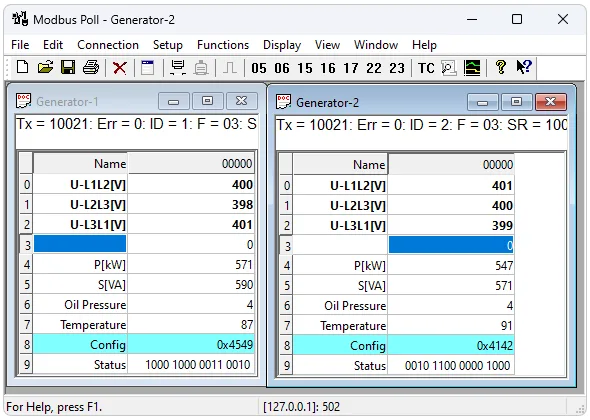
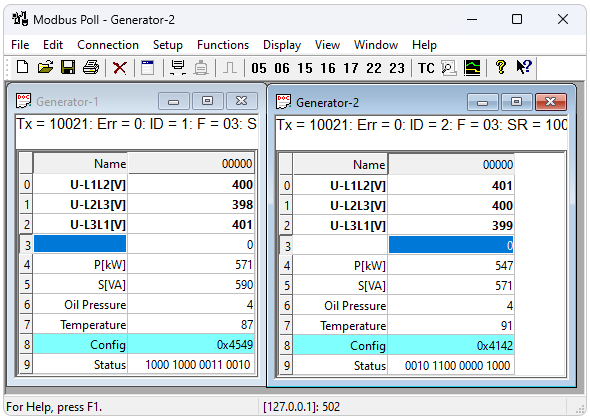
Modbus Poll Use a multi window interface. This means that several windows can be opened. Each has different data content from different slave devices simultaneously.
Provide assistance anytime, anywhere
Press F1 And obtain contextual help related to the topic associated with the currently selected project.
SHIFT + F1 Call a special one“Help mode”In this mode, the cursor will turn into a helper cursor (arrow + question mark). Then, users can select visible objects in the user interface, such as menu items, toolbar buttons, or windows. This will open help on the topic describing the selected project.
Naming cells
Here, you can type any text to specify a value cell. You can also choose from Excel Copy/paste text from cells.
Value cell
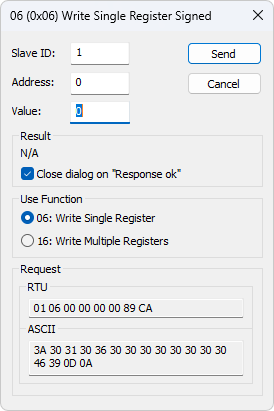
DisplayModbusThe data value of the register. If you double-click the value cell, a dialog box will appear to write the new value to the slave device. Typing a number in the value cell will also display a dialog box. Can be selected for writing values Modbus Function.
“Close the dialog box when the response is normal”The checkbox is used to automatically close the dialog box when a value is successfully sent. This is convenient when changing a large number of values. In this way, you can quickly select a new cell and then type the new value again.
Change font
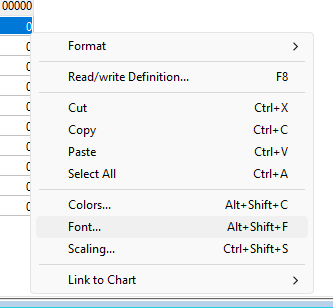
To change the font, you have 2 Options
- Select the cell you want to change and right-click.
- Select the cell you want to change, and then choose Menu→Display→Font.
Conditional color
Conditional colors can help you visually display values within a specific range. 3 color options available
- Default color: If there are no conditions, the calculated result of the color is trueThen use this color.
- Rules 1If the calculation result of the expression is trueThen use this color selection. Rules 1 Priority over rules 2.
- Rules 2If the calculation result of the expression is trueThen use this color selection.
7Comparison operator
| Chinese description | English description |
|---|---|
| Not used | not used |
| be equal to | equal to |
| greater than | greater than |
| Less than | less than |
| Greater than or equal to | greater than or equal to |
| Less than or equal to | less than or equal to |
| And with | and |
When the data type is floating-point or 32 When using the bit length type, it cannot be used“and”Operator. If chosen“and”The condition value will be inputted as a hexadecimal number. If any bit in the cell and condition value is 1The calculation result is: true.
Color examples
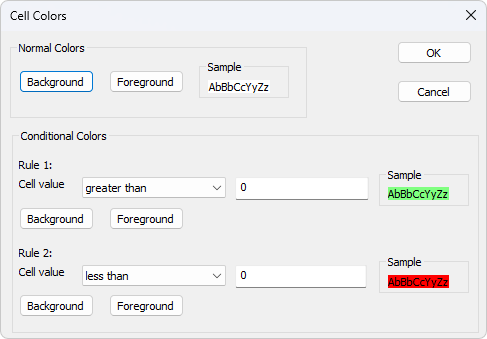
If the cell value is greater than 0If it is less than, it is green 0It is red.
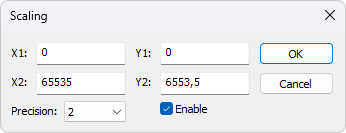
Scaling
Scaling can help you scale raw values to human readable values. Scaling is only applicable to signed and unsigned 16/32 Bit integer.
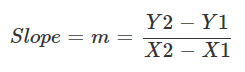
(X1, Y1)The line passing through two points (X2, Y2)
) and (X1, Y1)X2, Y2Line equation
Accuracy

The number of decimal places.
Make
Must be enabled to access
Server/Slave scaling values. If other situations occur, the zoom selection will be automatically disabled Modbus Integer display format. 16/32 Real time charts
This chart can be drawn in real-time
A series, with the maximum number of each series 12 A point. 100000 Address scanning
Scan the address range to obtain a list of all valid addresses in the device.
Open a new window
To open another window, you have
Options: 3 Press
- Select New from the File menu CTRL+N
- Pressure
- New window
 Connection dialog box
To open the connection dialog box, you have
Options: 2 Press
- Select 'Connect' from the 'Connect' menu F3
- Connection settings
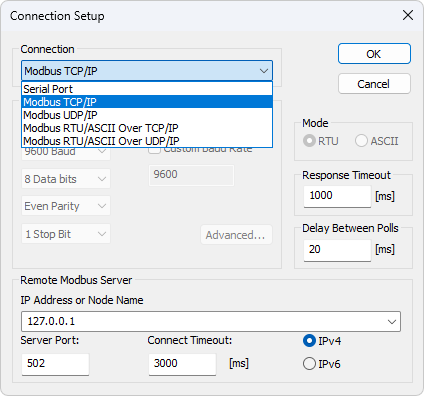
have Different types of connections: (Connection)
Serial: 5 On the serial line
- Or
. Can be usedModbus. RS232 Serial converter. RS485If you want to be withUSBNetwork communication, please select - Modbus TCP/IP:
. In this example, the subordinate MODBUS TCP/IP Network communication, please select TCP/IPIn this example, the subordinate ID It is related to MODBUS TCP/IP The equipment used in ID Same.
The default port number is 502.
If the connection fails, please try executing on the device at the command prompt ping Operation. If ping If the command fails, then Modbus Polling can also fail. - Modbus UDP/IP:
If you want to be with MODBUS UDP/IP Network communication, please select UDP/IP. This is related toModbusSame TCP/IPBut switch to ones with fewer connections UDP Agreement. - Modbus RTU/ASCII over TCP/IP:
This is achieved through TCP/IP Sent through a network rather than a serial line RTU Or ASCII News. - Modbus RTU/ASCII over UDP/IP:
This is achieved through UDP/IP Sent through a network rather than a serial line RTU Or ASCII News.
Attention: Connection type 3-5 no Designated standards www.modbus.org But for the sake of convenience, they were added. ModbusAccording to your selection, some other settings will be displayed in gray.
Serial port settings
These parameters can be used to set serial port settings. Only when the connection type is (Serial Settings)
Serial port“Only then can they be used.”pattern
Use this option to select
Or RTU pattern. Default ASCII Response timeout RTU.
appoint
The length of time that polling should wait for a response from the slave device before giving up. The default value is Modbus The minimum delay between polls 1000ms.
Regardless of the scanning rate, this setting ensures that latency is minimized before transmitting the next request. The resolution of this setting is approximately
millisecond. Better resolution can be achieved on some computers, but not all. 15 Attention:
If this value is set to be lower than
1.Milliseconds cannot guarantee the time between response and new request 20 The time interval of one character. This is because: 3.5 Plan the program for each Windows Switch tasks in milliseconds. 10 - 20 If polling is serial
2.If there are multiple slave stations in the network, the value should not be set below RS485 millisecond. This is to ensure 20 The time interval of one character. 3.5 In
3.In the network, less than TCP/IP Milliseconds are acceptable. 20 The serial connection with only one slave device is less than
4.Milliseconds is sufficient. 20 User baud rate
If the default baud rates are useless, please specify a custom baud rate.
Remote server
Remote server settings are only available when using an Ethernet connection.
Remote server settings are only available when using an Ethernet connection.
IPAddress
The server IP address The default value is localhost 127.0.0.1
Port
Server port number. Default value 502
Connection timeout
The longest time for establishing a connection. Default value 1000
Advanced settings
RTS Switching
RTS Toggle If bytes are available for transmission, then RTS The line will be at a high level. After sending all the buffer bytes,RTS The line will become low level.
If you have one without automatic direction switching 232/485 Converter, you can use it to switch directions.
Attention:
If possible, avoid using it RTS Controlled RS232/RS485 converter. It is difficult to determine the exact time to shut down the transmitter in a non real time manner Windows And Linux Waiting for the operating system. If closed too early, the character may still sit thereFIFOOrUARTThese characters will be lost in the transmit register. Therefore, the slave was unable to recognize the message. On the other hand, if it shuts down too late, the message from the slave will be corrupted and the master server will not be able to recognize the message.
DSRFormat
DSR Specify whether to monitor DSR(Dataset ready) signal for output flow control. If this member is TRUE And DSR If it is in the closed state, the output will be suspended until it is sent again DSR.
CTSService
CTS Specify whether to monitor CTS (clear-to-send)Signal for output flow control. If this checkbox is enabled and turned off CTSThe output will pause until it is sent again CTS.
DTRCompany
DTR Specify whether to enable or disable when opening a port DTR.
Delete Echo
If your device or RS232/RS485 The converter displays the just sent character.
Read/write definition
Use this command to define the data of the active window to be monitored.
To open“Read/write definition”Dialogue box, there are 3 Options:
- Press F8
- From“set up”Select from the menu“Read/write definition”
- Pressure
 On the toolbar
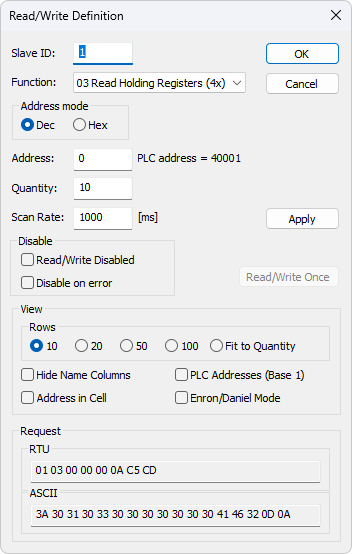
From the stationID
Range 1 Arrived 255. (MODBUSThe protocol specifications are:247). Value 0 It can also be used directly with MODBUS/TCP Or MODBUS/UDP Device communication.
Function code
You can choose from 8 Select from the functional codes 1 One.
Read function
The data returned by the read function will be displayed in the grid window.
- 01: Read coil (0x)
- 02: Read discrete input (1x)
- 03: Read hold register (4x)
- 04: Read input register (3x)
Write function
Write function to write data displayed on the grid window)
- 05: Write single coil (Write coil status)
- 06Write to a single register (write to hold register)
- 15Write multiple coils (write coils)
- 16Write to multiple registers (write to hold register)
Address
Modbus The address in the agreement is confusing! Some protocol specifications use protocol/message addresses, while others use device addressing.
Protocol/message address
Some protocol specifications are used from 0 Arrived 65535 Protocol/message address and function code for counting. This is also newModbusThe standards used. This is a message sent through the network from the address inside.
Modbus Poll Use protocol/message address counting from 0 Arrived 65535.
Equipment address
Some protocol specifications use device addresses/registers. Register count from 1 Start. The first digit describes the function to be used. This means the device address 40101 By address 100 Identification.“4”Represents holding registers,4x Register from 1 Start counting. Therefore,“4XXXX”The reference is implicit. What is even more confusing is:4x Representing functional codes 03,3x Representing functional codes 04!
5 Numbers and 6 Bit addressing
Address format 4x From 40001 Count up to 49999. Next addressno In the past, 50000One address is enough. In some cases,9999It's not enough. Then add a zero.9999 Becoming40101 And so on. This is called 400101Bit addressing or extended addressing. 6 This is not
The problem. Modbus Poll become410001Thrown away, the rest 10000. “4”When we come from 10001 instead of 0 When counting starts, it will decrease 1 Example address 1.
These examples demonstrate how to set device addresses when using them in a standardized manner
Read and hold registers Modbus Poll.
You hope that every
You hope that every 1000 Milliseconds from slave ID 2 Read device address 40011 of A register. From 20 We know that this is a function“4”Read and hold registers 03“From the station”.
- Function ID = 2
- Read and hold registers ( = “03 address4x) ”
- subtract = 10 (11 quantity 1)
- scan rate = 20
- read discrete input = 1000
you want to read from address
from 500 read 110201 coils every ID 5 milliseconds). From 1000 , we know that this is a function“1”read discrete input 02“slave station”
- function ID = 5
- read discrete input ( = “02 address1x) ”
- quantity = 10200 (10201 - 1)
- scan rate = 1000
- scan rate = 500
scan rate can be set from 0 to
). Please note that setting the scan rate to be lower than the transaction time is meaningless. If using a baud serial connection and requesting, the transaction time for registers is approximately3600000msthe interval between requests ( 9600 character time) and the response. In this case, set the scanning rate to 125 It is meaningless because the transaction time is at least 8 + 2 + 250 + 2 = 262ms + millisecond>3.5 Substation delay (gap)100msThe shortest time between polls. (Set in the connection dialog box). 262 Disable reading/writing + Disable reading/writing+ The checkbox can be used to temporarily enable or disable communication for this window. Then display the text ( F3 ) and
And
“Counter.”Read/write disabledDisabledIf disabled Tx Read/write Error You can use it

Button or press“Make a single request.”Read/write once“Button”Read/write once F6 Button

“Hide the name column”Hide all name columns. If they are not used, this can easily free up more space.
Disable when errors occur
If an error occurs, please disable read/write.
Hide Name Column
Hide all name columns. If they are not used, this can easily free up more space.
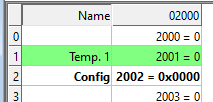
The address in the cell
If enabled, the address will also be displayed in the value cell, for example:2000 = 00000
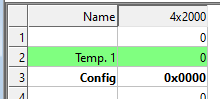
PLCAddress (base 1)
This option will display the address as the device address.
Enron/Danielpattern
Enron Or Enron/Daniels Modbus It has some“Supplier expansion”The standard Modbus. The exact impact of these extensions depends on the context, but most are common Modbus The command works as expected. There are some custom vendor defined functions available - But few users expect or use them. The greatest impact and 32 The reading and writing methods of bit data values are related.
Enron-Modbus Defined two special ones 4x Maintain register range:
- 4x5001 Arrived 4x5999 Assuming it is 32 Bit length integer (per register 4 bytes).
- 4x7001 Arrived 4x7999 Assuming it is 32 Bit floating point (per register 4 bytes).
In Modbus Intermediate processing 32 The value is not Enron-MB Unique to it. However,Enron-MB Each register needs to return 4 One byte instead of 2 Controversial steps of one byte Modbus Terminology in specifications“Keep the register”. This means polling the registers Enron-Modbus In the middle 4x5001 And 4x5002 return 8 One byte or two 32 Bit integer, and Standard Modbus Only returning 4 One byte or one 32 Integer, considered as two 16 Bit integer. In addition,Enron-MB The polling register in 4x5010 Return to the tenth one 32 Bit length integer, while standard Modbus Consider the fifth within this range 32 A bit length integer 1/2.
that 's ok
Specify the number of rows in your preferred grid.
Real time charts
Use this command to draw up to in real-time in the chart 12 A data series.
Real time charts are fast and can quickly draw new lines when new data is received.
Attention:
All chart settings are saved in the workspace file. Save/Open workspace
To open“Real time charts”Dialogue box, you have 2 Options:
- Press Alt + R
- Select from the display menu“Real time charts”
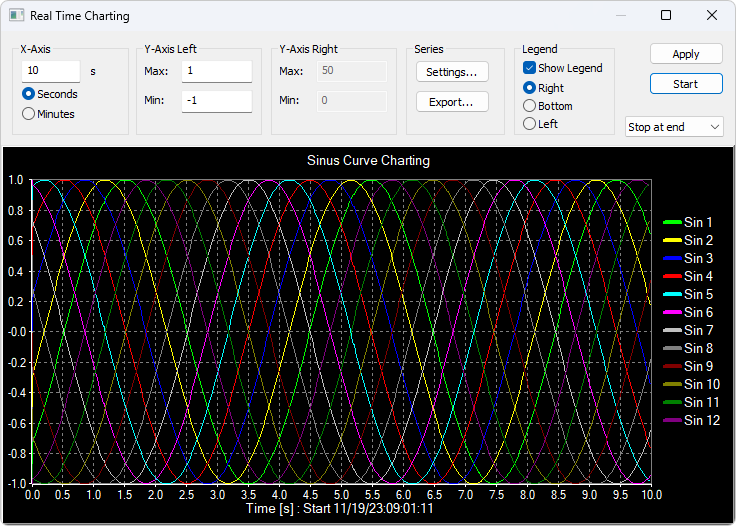
X The axis displays the number of seconds since the chart was started.
When the point reaches the end of the chart, there is 3 Options:
- Finally stop:The chart stops.
- Finally restart:Start the chart again.
- Continue:It continues until reaching the maximum point count or pressing the stop button.
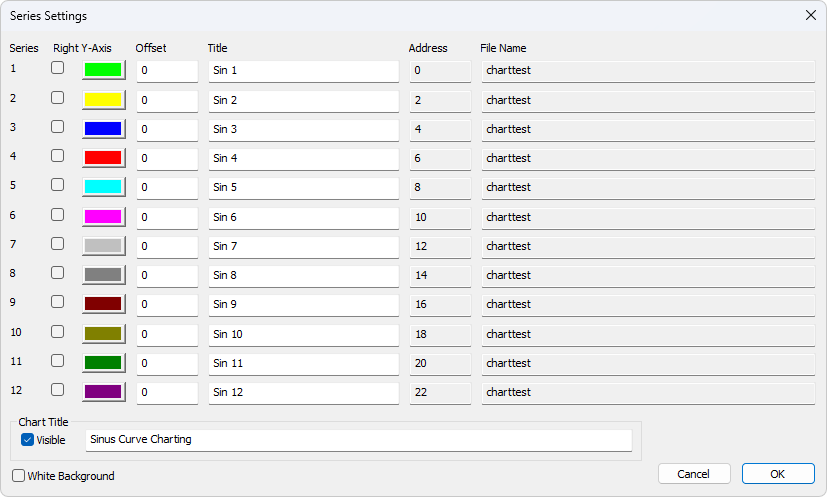
set up
By default, all 12 All series are linked to the left side Y Axis. Check “Right Y Axis”Check box (if you want to link the sequence to the right axis). Y appoint
color Right
- Axis
- title. If the title is empty, initialize using the name in the reading window Y Offset
- Display
- File name
Address
- Offset can be used for the same
- Align data points on the axis. For example, the data point is
Or Y It can be offset so that they do not overlap when drawn. 0 Series settings 1 Zoom function
If you left click on the chart (such as starting to zoom), but if you move to the top left corner, all modifications made using the zoom and pan functions will be canceled (the chart will be in the state before using the pan and zoom operations).
Translation function
To pan a control, right-click on a position on the control and move the mouse. The point below the mouse will follow the movement of the mouse.
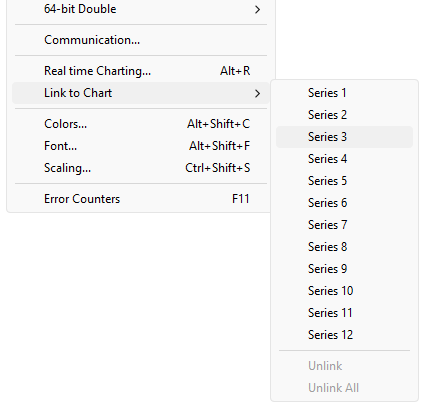
Link data to chart series
Unless you will
The data unit is linked to
One of the series, otherwise the chart doesn't know which data to use. To do this, please select a value cell and then go to the menu Modbus Display selection 12 Link to chart→Chart link“Export series”.
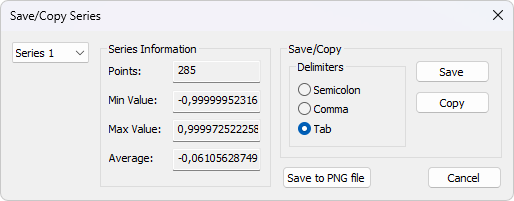
For further processing.
Despite using non comma field separators, the file still has Excel Extension name.
Delimiter:.csvSelect the characters used to separate values in text files. Copy/paste to
Use tab separators. In addition, some additional information is provided.point Excel Maximum point value
- Minimum point value
- Average score
- Minimum point value
- Average score
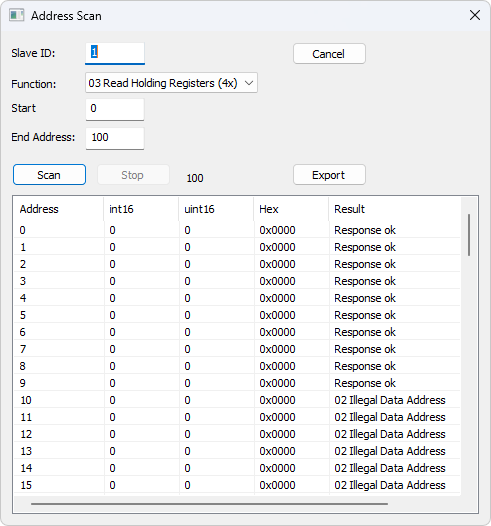
Address scanning
Scan the address range to obtain a list of all valid addresses in the device. Read addresses one by one, and display the read results in a list.
Attention:
Scan all 65535 An address may take some time, depending on the connection type, server device, etc.
Export address scan
Save the scanned address data to disk or copy it to the clipboard. Paste the data directly into Excel For further processing.
Despite using non comma field separators, the file still has.csvExtension name.
Delimiter:Select the characters used to separate values in text files. Copy/paste to Excel Use tab separators.
Display format
Mark the cells to be formatted. Select from the display menu 28 One of the display formats.
Native Modbus Register
16 Position Modbus Register can be used to: 4 Display in different modes.
- Sign
- Unsigned
- hexadecimal
- ASCII - hexadecimal
- Binary
32Signed integers
It combines 2 One 16 Position Modbus Register. It can be used 4 Display different word/byte orders.
- Signed integer Big-endian
- Signed integer Little-endian
- Signed integer big endian byte swapping
- Signed integer Little-endian Byte exchange example byte order:AB CD(Big end)
Decimal numbers 123456789 Or hexadecimal 07 5B CD 15 In Modbus Through the line in the message
The order of arrangement:07 5B CD 15
32Unsigned integer
It combines 2 One 16 Position Modbus Register. It can be used 4 Display different word/byte orders.
- Unsigned integer Big-endian
- Unsigned integer Little-endian
- Unsigned integer big endian byte swapping
- Unsigned integer Little-endian Byte exchange example byte order:AB CD(Big end)
Decimal numbers 123456789 Or hexadecimal 07 5B CD 15 In Modbus Through the line in the message
The order of arrangement:07 5B CD 15
64Signed integers
It combines 4 One 16 Position Modbus Register. It can be used 4 Display different word/byte orders.
- Signed integer Big-endian
- Signed integer Little-endian
- Signed integer big endian byte swapping
- Signed integer Little-endian Byte exchange example byte order:AB CD EF GH (Big-endian)
Decimal numbers -1,234,567,890,123,456,789 Or hexadecimal EE DD EF 0B 82 16 7E EB
Order, because they are in Modbus The message appears through the network:EE DD EF 0B 82 16 7E EB
64Unsigned integer
It combines 4 One 16 Position Modbus Register. It can be used 4 Display different word/byte orders.
- Unsigned integer Big-endian
- Unsigned integer Little-endian
- Unsigned integer big endian byte swapping
- Unsigned integer Little-endian Byte exchange example byte order:AB CD EF GH (Big-endian)
Decimal numbers 1,234,567,890,123,456,789 Or hexadecimal 11 22 10 F4 7D E9 81 15 In Modbus The message is transmitted through the internet
Sort:11 22 10 F4 7D E9 81 15
32Floating point number
It combines 2 One 16 Position Modbus Register. It can be used 4 Display different word/byte orders.
- Floating point Big-endian
- Floating point Little-endian
- Floating point big endian byte swapping
- Float Little-endian Byte exchange example byte order:AB CD(Big end)
Floating point number 123456.00 Or hexadecimal 47 F1 20 00 In Modbus Through the line in the message
Order of arrangement:47 F1 20 00
64Double precision floating-point number
It combines 4 One 16 Position Modbus Register. It can be used 4 Display different word/byte orders.
- Double major end
- Double Little-endian
- Double terminal byte exchange
- Double Little-endian Byte exchange example byte order:AB CD EF GH(Large end sequence)
Floating point number 123456789.00 Or hexadecimal 41 9D 6F 34 54 00 00 00 In Modbus Through the line in the message
Sort:41 9D 6F 34 54 00 00 00
Save/Open workspace
If you open many related ones Modbus Windows allow for easy access to all opened and arranged items Modbus The current layout snapshot of the window is saved in a workspace.
The workspace (*mbw) is a file that contains display information and file names for all open windows. Not the actual content. For this, please go to“Documents→Save workspace”.
“connect”And“Chart”Set to be stored in the workspace file.
When you open a workspace file,Modbus Poll It will open all Modbus Windows and display them in the layout you have saved.
Export to csv
Export the name and value to a comma, semicolon, or tab separated value file. Select from the file dialog box
- Comma separated value file (*.csv)
“temperature”, “19.7” - semicolon separated value file (*.csv)
“temperature”;”19.7" - tab separated value file (*.txt)
temperature 19.7
depending on your system, commas or periods are used to separate decimals
export to Modbus Slave
export name, value, and format to Modbus Slave file*.mbs
open file required Modbus Slave version 7.4.0 or higher
exam center
the purpose of this test dialog box is to assist MODBUS slave device developers in using any string they compose themselves.
list box displays transmitted and received data.
you can include multiple test strings in the drop-down list box. After entering the string, press the “add to list”button, and then add the string to the list.
press the“send”button to send the selected string.) Open the list
Save the test string from the file.
Save the list
Store the test string in the file.
Clear
Clear the test list.
Add to the list
Add the current test string to the list.
Add inspection
Will
Or CRC Add to the end of the input string. LRC When using the exam center, you may need to disable communication from other windows. Select
Read/write definition“in the dialog box”in the dialog box“Read/write disabled”Check box. set up→Read/write definition.
ASCII Example
String in combo box:3A 30 31 30 33 30 30 30 30 30 30 30 41
If added LRC, then the transmitted string3A 30 31 30 33 30 30 30 30 30 30 30 41 46 32 0D 0A
Also added CR LF Yes.
TCP/IP Example
Read 10 A reserved register.00 00 00 00 00 06 01 03 00 00 00 0A
front 6 A byte is TCP/IP Header.
Test center string file
Using a text editor such as Notepad or similar tools, you can prepare strings to be used in testing.
The first line in the file must be a string“TestCenter”. This is it. Know the correct way to format files. Press Modbus Poll Open the list“Open the prepared text file.”The content of the string list
Copy
TestCenter 3A 30 31 30 33 30 30 30 30 30 30 30 41 3A 30 32 30 33 30 30 30 30 30 30 30 41 3A 30 33 30 33 30 30 30 30 30 30 30 41
use
Copy“The button will select”Copy the string to the clipboard. Tx/Rx And
SHIFT Keys can be used with a mouse to select and deselect strings, select string groups, and select non adjacent strings. CTRL Attention:
Keep this window open while executing other commands.
Data recording
Modbus You can record the data to a text file or directly to
Text files Microsoft Excel.
Select from the settings menu
journal“Or use shortcut keys:”EachAlt+L
All windows are recorded in their separate text files. Modbus When you want to stop data recording, please select the logout command on the settings menu.
Data recording
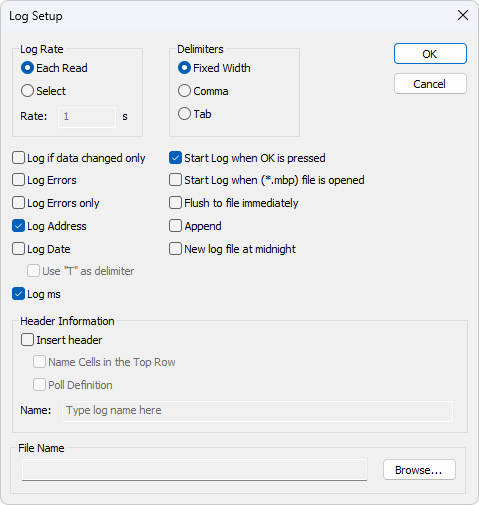
Read every time
For all
Request to write a log. Record the frequency as the scanning rate. Modbus choice
Specify the log rate (in seconds). It is independent of the scanning rate.
Attention:
If the scanning rate is
Set in milliseconds 10000 The second log rate is meaningless because data is only recorded when new data is ready. 1 Delimiter
As a delimiter, you can use one of the following options:
Fixed width
Organize values by column.
Joke
Values separated by commas.
label
Values separated by tabs.
Values separated by tabs.
Record logs only when changing data
Specify that new log rows will only be written when any data has been changed since the last log.
Log error
Specify errors such as record timeout.
Log date
Specify to add the current date to the log time.
use“T”As a delimiter
Specify the time and date ISO 8601 The letter specified in the document“T”Separate.
Log milliseconds
Specify to add milliseconds to the log time.
Log address
Designated will Modbus Add the address to the log.
Press ok Start recording at the moment
Specify when pressed ok Start logging when the button is pressed. Otherwise, the log settings will only be saved *mbp When storing files.
Open it *mbp Start recording at the moment
Specify to open *.mbp Automatically start logging when files are being processed.
Immediately refresh to the file
This ensures that log lines are not cashed in the file system, but are immediately written physically.
Addition
Specify to append the log to the selected file. Otherwise, a new file will be created.
Create a new log file at midnight
Close the current log file and start a new file at midnight. The timestamp will be added to your file name.
Header file information
- Insert title:The information will be inserted at the top of the log file.
- Name the cells in the top row:Insert name.
- Voting Definition:Insert IDFunctions, etc.
- Name:Insert the name of the log.
Example of a text file with a fixed width:22:28:13 <40001> 17395 0 0 0 0 0 0 0 0 22:28:14 <40001> 17396 1 0 0 0 0 0 0 0 22:28:15 <40001> 17394 1 0 0 2 55 0 0 0 22:28:16 <40001> 13350 1 0 0 4 0 0 0 0
You can go to Excel Import data into a spreadsheet.
Microsoft Excel
This feature requires installation Microsoft Excel. Excel 2003 The log limit is 65535 A log, because this is Excel The maximum number of rows in the worksheet.Excel 2007 Or higher versions are limited to 1,048,576 that 's ok. Each Modbus All windows are recorded separately Excel In the worksheet.
Select from the settings menu“Excel journal”Or use shortcut keys:Alt+X
Do not touch during recording Excel Worksheet, as this will interrupt logging.
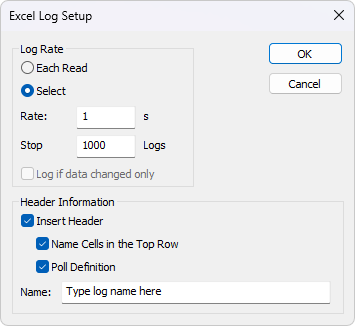
Log rate
- Each content states:For all Modbus Request to write a log. Record the frequency as the scanning rate.
- Choice:Specify the log rate (in seconds). The log is independent of the scanning rate.
Remarks:If the scanning rate is 10000 Set in milliseconds 1 The second log rate is meaningless because data is only recorded when new data is ready. - Stop at the following time:Specify the number of log lines. Please note that,Excel 2003 Restricted to: 65,536 Okay,Excel 2007 Restricted to: 1,048,576 Okay.
Header file information
- Insert title:Information insertion into Excel At the top of the worksheet 3 In the process.
- Name the cells in the top row:In the 3 Insert a name in the row.
- Voting Definition:In the 2 Insert in line IDFunctions, etc.
- Name:In the 1 Insert the log name in the line.
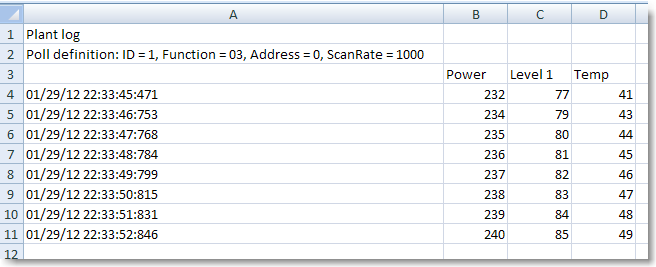
With header information Excel Log.
Communication traffic
Select menu“Display→signal communication”To display the traffic on the serial line or Ethernet cable. Use the stop button to temporarily pause the update for inspection.
use“Copy”The button copies the selected row to the clipboard.
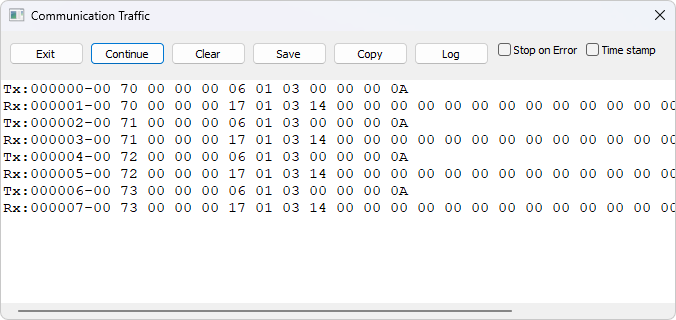
Attention:
This window only displays Modbus Poll The data sent and received. You cannot use it as a data sniffer.
Keep this window open while executing other commands.
OLE/Automation
Automation (formerly known as OLE automation) enables one application to manipulate objects implemented in another application.
An automated client is an application that can manipulate public objects belonging to another application. This is also known as an automation controller.
An automation server is an application that exposes programmable objects to other applications.Modbus Poll It is an automated server.
This means that you can use any supportVBA (Visual Basic for Applications)The program, such asVisual Basic, ExcelWait, explain and display according to your specific requirementsmodbusdata Example
Excel When you want to write a macro, it should display
Developers“Tab or run in developer mode.”of
Excel 2007of
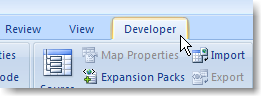
- single click Microsoft Office Button, then click Excel Options.
- single click“popular”, then select in the ribbon“Display developers”Tab checkbox.
Please note that the functional area is Microsoft Fluent A part of the user interface.
Excel 2010, 2016
- single click“Documents”Tab.
- Click on the option. Will open“Excel Options”Window.
- In the left window pane, click“Customize the functional area”.
- In the right window pane“Main tab”Next, select“Developers”Checkbox.
- single click“determine”. “Developers”The tab should now be displayed in the ribbon (rightmost tab).
Excel Example code
This example opens two windows. One reads the register, and the other reads the coil.
Modbus Poll It is hidden, but you can uncomment it“ShowWindow”Go ahead and display it. This will display one of the windows.
Modbus Poll An example is also included in the installation.
Start→All programs→Modbus Poll → Excel Example
Excel VBAExample
Public doc1 As Object
Public doc2 As Object
Public app As Object
Dim res As Integer
Dim n As Integer
Private Sub StartModbusPoll_Click()
   ' 创建 Modbus Poll 应用程序对象和两个文档对象
   Set app = CreateObject("Mbpoll.Application")
   Set doc1 = CreateObject("Mbpoll.Document")
   Set doc2 = CreateObject("Mbpoll.Document")
   ' 读取10个保持寄存器,每1000ms读取一次
   res = doc1.ReadHoldingRegisters(1, 0, 10, 1000)
   ' 读取10个线圈状态,每1000ms读取一次
   res = doc2.ReadCoils(1, 0, 10, 1000)
   ' 显示文档窗口(此行被注释,如需使用请取消注释)
   ' doc1.ShowWindow()
   ' 设置连接为 Modbus TCP/IP
   app.Connection = 1
   ' 设置IP地址为本地主机
   app.IPAddress = "127.0.0.1"
   ' 设置服务器端口为 502
   app.ServerPort = 502
   ' 设置连接超时时间为 1000ms
   app.ConnectTimeout = 1000
   ' 打开连接
   res = app.OpenConnection()
End Sub
Private Sub Read_Click()
   ' 显示请求的结果
   Cells(5, 7) = doc1.ReadResult() ' 显示保持寄存器的读取结果
   Cells(6, 7) = doc2.ReadResult() ' 显示线圈状态的读取结果
   ' 循环读取并显示保持寄存器的值
   For n = 0 To 9
      Cells(5 + n, 2) = doc1.SRegisters(n)
   Next n
   ' 循环读取并显示线圈的状态
   For n = 0 To 9
      Cells(18 + n, 2) = doc2.Coils(n)
   Next n
End Sub
Python Example
This Python The example will open a window and set all possible data formats.
Python Example
import win32com.client as win32
# 定义数据格式
SIGNED = 0
UNSIGNED = 1
HEX = 2
BINARY = 3
FLOAT_LE_BS = 4
FLOAT_BE = 5
DOUBLE_LE_BS = 6
DOUBLE_BE = 7
S32_LE_BS = 8
S32_BE = 9
FLOAT_LE = 10
FLOAT_BE_BS = 11
DOUBLE_LE = 12
DOUBLE_BE_BS = 13
S32_LE = 14
S32_BE_BS = 15
U32_BE = 17
U32_LE_BS = 18
U32_BE_BS = 19
U32_LE = 20
S64_BE = 21
S64_LE_BS = 22
S64_BE_BS = 23
S64_LE = 24
U64_BE = 25
U64_LE_BS = 26
U64_BE_BS = 27
U64_LE = 28
# 字节序定义
BE = 0
LE = 3
BE_BS = 2
LE_BS = 1
# 创建 Modbus Poll 应用实例
App = win32.Dispatch('Mbpoll.Application')
# 设置连接参数
App.Connection = 1  # 使用 Modbus TCP/IP
App.IPAddress = "127.0.0.1"  # 本地地址
App.ServerPort = 502  # Modbus 端口
App.OpenConnection()  # 打开连接
# 创建 Modbus 显示窗口实例
Win1 = win32.Dispatch("Mbpoll.Document")
# 从从站ID为1的设备读取100个保持寄存器,地址从0 (40001) 开始,每1000ms读取一次
Win1.ReadHoldingRegisters(1, 0, 100, 1000)
# 显示 Modbus 窗口
Win1.ShowWindow()
# 设置显示的行数
Win1.Rows(1)
# 禁用刷新以提高速度
Win1.EnableRefresh = False
# 设置不同的数据格式显示方式
Win1.SetFormat(0, SIGNED)
Win1.SetFormat(1, UNSIGNED)
Win1.SetFormat(2, HEX)
Win1.SetFormat(3, BINARY)
Win1.SetFormat(4, S32_BE)
Win1.SetFormat(6, S32_LE)
Win1.SetFormat(8, S32_BE_BS)
Win1.SetFormat(10, S32_LE_BS)
Win1.SetFormat(12, U32_BE)
Win1.SetFormat(14, U32_LE)
Win1.SetFormat(16, U32_BE_BS)
Win1.SetFormat(18, U32_LE_BS)
Win1.SetFormat(20, S64_BE)
Win1.SetFormat(24, S64_LE)
Win1.SetFormat(28, S64_BE_BS)
Win1.SetFormat(32, S64_LE_BS)
Win1.SetFormat(40, U64_BE)
Win1.SetFormat(44, U64_LE)
Win1.SetFormat(48, U64_BE_BS)
Win1.SetFormat(52, U64_LE_BS)
Win1.SetFormat(60, FLOAT_BE)
Win1.SetFormat(62, FLOAT_LE)
Win1.SetFormat(64, FLOAT_BE_BS)
Win1.SetFormat(66, FLOAT_LE_BS)
Win1.SetFormat(80, DOUBLE_BE)
Win1.SetFormat(84, DOUBLE_LE)
Win1.SetFormat(88, DOUBLE_BE_BS)
Win1.SetFormat(92, DOUBLE_LE_BS)
# 为不同格式的数据设置显示名称
Win1.SetName(0, "SIGNED")
Win1.SetName(1, "UNSIGNED")
Win1.SetName(2, "HEX")
Win1.SetName(3, "BINARY")
Win1.SetName(4, "S32_BE")
Win1.SetName(6, "S32_LE")
Win1.SetName(8, "S32_BE_BS")
Win1.SetName(10, "S32_LE_BS")
Win1.SetName(12, "U32_BE")
Win1.SetName(14, "U32_LE")
Win1.SetName(16, "U32_BE_BS")
Win1.SetName(18, "U32_LE_BS")
Win1.SetName(20, "S64_BE")
Win1.SetName(24, "S64_LE")
Win1.SetName(28, "S64_BE_BS")
Win1.SetName(32, "S64_LE_BS")
Win1.SetName(40, "U64_BE")
Win1.SetName(44, "U64_LE")
Win1.SetName(48, "U64_BE_BS")
Win1.SetName(52, "U64_LE_BS")
Win1.SetName(60, "FLOAT_BE")
Win1.SetName(62, "FLOAT_LE")
Win1.SetName(64, "FLOAT_BE_BS")
Win1.SetName(66, "FLOAT_LE_BS")
Win1.SetName(80, "DOUBLE_BE")
Win1.SetName(84, "DOUBLE_LE")
Win1.SetName(88, "DOUBLE_BE_BS")
Win1.SetName(92, "DOUBLE_LE_BS")
# 重新启用刷新
Win1.EnableRefresh = True
# 调整所有列的大小以适应内容
Win1.ResizeAllColumns()
# 调整窗口大小以适应内容
Win1.ResizeWindow()
# 保存配置到文件,指定文件路径
result = Win1.Save("C:UsersUserNameDesktoptestfile.mbp")
# 打印保存结果
print(result)
# 打印第二个格式名称,作为示例
print(Win1.GetName(1))
# 等待用户按 Enter 键退出,避免窗口直接关闭
_ = input("Press ENTER to quit:")
Connection functions/properties
The following properties and functions do the same as you setup in the connection dialog (F3).
connect
“connect” (Connection)Select the desired connection. You can choose a serial port or one of the Ethernet connections.
AttributesconnectIs an integer
Value range
0 = Serial port
1 = Modbus TCP/IP
2 = Modbus UDP/IP
3 = Modbus ASCII/RTU over TCP/IP
4 = Modbus ASCII/RTU over UDP/IP
For example
Connection = 0
Baud rate
Only applicable for connection = 0
AttributesBaud rateWith length
300
600
1200
2400
4800
9600 (Default)
14400
19200
38400
56000
57600
115200
128000
153600
230400
256000
460800
921600
For example
BaudRate = 9600
Data bits
Only applicable for connection = 0
attribute DataBits As an integer
Value range
7
8 (Default)
For example:
DataBits = 8
Checksum
Only applicable for connection = 0
As an attribute of integersOdd even schoolTesting
Value range
0 = None
1 = Odd numbers
2 = Even numbers (default)
For example:
Parity = 2
Stop position
Only applicable for connection = 0
Attributes StopBits as IntegerValue range
1 (default)
2
For example:
StopBits = 1
Serial port
Only applicable for connection = 0
Attributes SerialPort as IntegerValue range
1...255
Default value = 1
For example:
SerialPort = 1
pattern
Only applicable for connection = 0
AttributespatternIs an integer
Value range
0 = RTU pattern
1 = ASCII pattern
For example:
Mode = 1
DeleteEcho
Only applicable for connection = 0
If your device or RS232/RS485 The converter displays the just sent character.
Attributes RemoveEcho as Integer
Value range
0(default)
1(Delete echo)
For example:
RemoveEcho = 1
Response timeout
ResponseTimeout appoint Modbus Poll The length of time (in milliseconds) to wait for a response from the slave device before giving up.
Attributes ResponseTimeout As a range of integer values
50...100000
Default value = 1000
For example:
ResponseTimeout = 1000
DelayBetweenPolls
Attributes DelayBetweenPolls As a range of integer values
0...1000
Default value = 20
For example:
DelayBetweenPolls = 20
Server port
Only applicable to Connection = 1...4
Attributes ServerPort as LongValue range
0...65535
default value = 502
For example:
ServerPort = 502
15.3.12. ConnectTimeout
ConnectTimeout appoint Modbus Poll Waiting TCP/IP The duration of successful connection.
Only applicable to Connection = 1...4
Attributes ConnectTimeout as Integer
Value range
100...30000millisecond
Default value = 1000ms
For example:
ConnectTimeout = 1000
IPedition
Only applicable to Connection = 1...4
Attributes IPVersion as Integer
Value range
4 = IP edition 4(default)
6 = IP edition 6
Example:
IPVersion = 4
Open connection
Open and use Connection Connection for attribute selection.
Function OpenConnection() is an integer
Parameters
This function has no parameters.
Return value
For errors 3-5Please check if you have the latest serial port driver.
| Error | Description |
|---|---|
| 0 | success |
| 1 | The serial port is unavailable |
| 3 | Serial port. Unable to retrieve current settings from port driver. |
| 4 | Serial port. The serial port driver does not accept port settings. |
| 5 | Serial port. The serial port driver does not accept timeout settings. |
| 12 | TCP/UDP Connection failed.WSA Start up |
| 13 | TCP/UDP Connection failed. Connection error |
| 14 | TCP/UDP Connection failed. Timeout |
| 15 | TCP/UDP Connection failed.IOCTL |
| 17 | TCP/UDP Connection failed. Socket error |
| 21 | TCP/UDP Connection failed. Address information |
| 255 | The connection has been opened |
Excel How to open the example Modbus TCP/IP connect
Public app As Object
Dim res As Integer
' 创建一个指向 Modbus Poll 的对象
Set app = CreateObject("Mbpoll.Application")
' 选择 Modbus TCP/IP 协议
app.Connection = 1
' 设置 IP 协议版本为 IPv4
app.IPVersion = 4
' 设置目标设备的 IP 地址
app.IPAddress = "192.168.1.27"
' 设置服务器端口,默认为 502
app.ServerPort = 502
' 设置连接超时时间为 1000 毫秒
app.ConnectTimeout = 1000
' 设置响应超时时间为 1000 毫秒
app.ResponseTimeout = 1000
' 尝试打开连接,并将结果存储在变量 res 中
res = app.OpenConnection()
Python Example: How to set up a serial connection
import win32com.client as win32
# 创建 Modbus Poll 应用程序对象
App = win32.Dispatch('Mbpoll.Application')
# 设置为串行连接
App.Connection = 0
# 选择 COM 端口 3
App.SerialPort = 3
# 设置波特率为 9600
App.BaudRate = 9600
# 设置奇偶校验为无
App.Parity = 0
# 设置模式为 RTU
App.Mode = 0
# 设置响应超时时间为 1000ms
App.ResponseTimeout = 1000
# 设置两次请求之间的最小间隔时间为 20ms
App.DelayBetweenPolls = 20
# 打开连接
App.OpenConnection
# 创建一个 Modbus 显示窗口对象 Win1
Win1 = win32.Dispatch("Mbpoll.Document")
# 从从站ID为1的设备读取10个保持寄存器,地址从0 (40001) 开始,每1000ms读取一次
Win1.ReadHoldingRegisters(1, 0, 10, 1000)
# 显示 Modbus 窗口
Win1.ShowWindow()
# 设置显示的行数为10
Win1.Rows(0)
# 禁用刷新以提高速度
Win1.EnableRefresh = False
# 为寄存器设置名称
Win1.SetName(0, "Register 0")
# 重新启用刷新
Win1.EnableRefresh = True
# 调整所有列的大小以适应内容
Win1.ResizeAllColumns ()
# 调整窗口大小以适应内容
Win1.ResizeWindow()
# 等待用户按 Enter 键退出
_ = input("Press ENTER to quit:")
Tight connection
Function CloseConnection() is an integer
Parameters
This function has no parameters.
Return value
If successful, it is zero. If it fails, the value is non-zero.
ShowCommunicationTraffic
Display the communication traffic window.
Function ShowCommunicationTraffic()
Parameters
This function has no parameters.
Return value
No, If displayed, close the communication traffic window.
CloseCommunicationTraffic
If displayed, close the communication traffic window.
Function CloseCommunicationTraffic()
Parameters
This function has no parameters.
Return value
No, Read function
The operation of the following functions is the same as what you set in the read/write definition dialog box (
). Read functions andF8Documents are associated. (Window containing data) Modbus Poll For example:
Attention: It must be created first
' 首先需要创建一个 Modbus Poll 文档对象
Public doc As Object
' 创建 Modbus Poll 文档对象实例
Set doc = CreateObject("Mbpoll.Document")
' 从从站 ID 为 1 的设备读取 100 个线圈状态,地址从 0 开始,每 1000 毫秒读取一次
res = doc.ReadCoils(1, 0, 100, 1000) ' 读取 100 个线圈每 1000ms
Only then can data be obtained using attributes. ReadRead the coil
Functional code ReadCoils
Modbus Function 01
Is an integer, the address is long, and the quantity is an integer, ReadCoils (SlaveID The length is an integerScanRate Parameters
Slaves
From the addressID: Arrived 1 Address: 255
Data address (based on) 0 quantity The quantity of data.
ToScanning rate:1 To 2000
Read discrete inputs0 Function code 3600000msReturn value
True if success. False if not success
Function reads discrete input (slave ReadDiscreteInputs
Modbus integer 02
addressID As long integer, quantity As integer, scan rate As long integer, integer As parameter) As slave
slave address
- toID: address 1 data address (cardinality 255
- quantity: data quantity 0)
- to: scan rate1 to 2000
- return value: 0 success return 3600000ms
failure return
- read hold register Truefunction code False.
function reads hold register (slave ReadHoldingRegisters
Modbus integer 03
addressID As long integer)), address As Long integer, quantity Integer type As Scanning rate, Long integer As Integer type) As Parameters
From the station
- Slave station addressID: To 1 Address 255
- Data address (cardinality: quantity 0)
- data quantity: to1 scan rate 125
- to: 0 return value 3600000ms
success return
- failure return Trueread input register False.
function code ReadInputRegisters
Modbus function read input register (slave 04
integerID As address, long integer As quantity, integer As scan rate, long integer As integer) As parameter
slave
- slave addressID: to 1 address 255
- data address (cardinality: quantity 0)
- data quantity: to1 scan rate 125
- to: 0 return value 3600000ms
success return
- failure return Trueautomated write function False.
write function writes the value stored in the array filled with attributes. The write function below does not create a data window. To create a data window, use the
function, for example Win write a single coil WriteMultipleRegistersWin.
function Code: Write to the first coil in the write array. Function: Write to a single coil (slave WriteSingleCoil
Modbus integer 05.
address
long integerID As integer, parameter As slave) As slave address
to
- address)ID: slave address 0 to 255
- address: Data address (cardinality 0)
return value
- if the array is ready to write and the data has been sent, return Trueif the array is empty or the parameter is incorrect, return False.
- control the application responsible for verifying the write operation by reading back the written value. Write a single register
function code WriteSingleRegister
Modbus write to the first register in the write array. Function writes a single register 06.
slave
integer (addressID As long integer, integer As parameter) As slave
slave address
- toID: address 0 data address (cardinality 255
- return value: if the array is ready to write and the data has been sent, return 0)
if the array is empty or the parameter is incorrect, return
- control the application responsible for verifying the write operation by reading back the written value. Write to multiple coils.) Function code: Write to the coil stored in the write array. Function: Write to multiple coils (slave Trueinteger False.
- address
long integer WriteMultipleCoils
Modbus quantity 15.
integer
integerID As parameter, slave) As Slave station address, To As Address) As Data address (cardinality
quantity
- data quantity.ID: to 0 return value 255
- if the array is ready to write and the data has been sent, return: if the array is empty or the parameter is incorrect, return 0)
- controls the application to verify the write operation by reading back the written value. Write multiple registers: function code1 write 1968
write registers stored in the array. Function writes multiple registers (slave
- integer Trueaddress False.
- long integer
quantity WriteMultipleRegisters
Modbus integer 16.
integer
parameter
slave)ID As integer, address As Long integer, quantity As integer) As integer
parameter
- slaveID: Slave station address 0 To 255
- Address: Data address (cardinality 0)
- quantity: data quantity.1 to 123
return value
- if the array is ready to write and the data has been sent, return Trueif the array is empty or the parameters are incorrect, return False.
- controls the application to verify the write operation by reading back the written value
Python Example
shows how to create a window to read from the address 0 (40001)10One register, then write into five registersPythonExample.
import sys
import time
import win32com.client as win32
# 创建Modbus Poll应用程序实例
App = win32.Dispatch('Mbpoll.Application')
# 设置连接类型为TCP/IP
App.Connection = 1
App.IPAddress = "127.0.0.1"  # 设置IP地址
App.ResponseTimeout = 1000    # 设置响应超时时间为1000毫秒
App.DelayBetweenPolls = 20    # 设置请求间最小间隔为20毫秒
App.ConnectTimeout = 500      # 设置连接超时时间为500毫秒
App.ServerPort = 502  # 设置服务器端口为502
result = App.OpenConnection  # 尝试打开连接
if result != 0:
   print("Connection failed. Error: ", result)  # 连接失败时输出错误信息
   sys.exit()  # 退出程序
# 创建一个名为Win1的Modbus显示窗口
Win1 = win32.Dispatch("Mbpoll.Document")
# 从从站ID 1的地址0 (40001)开始,每1000ms读取10个保持寄存器
Win1.ReadHoldingRegisters(1, 0, 10, 1000)
# 显示Modbus窗口
Win1.ShowWindow()
# 显示10行
Win1.Rows(0)
# 调整窗口大小以适应网格
Win1.ResizeWindow()
time.sleep(1.0) # 等待读取完成
if Win1.ReadResult == 0:    # 检查读取结果
   print("Modbus register 0 (40001) = ", Win1.SRegisters(0))
else:
   print("Read failed error: = ", Win1.ReadResult)
print ("Tx count = %d, Rx count = %d" % (Win1.GetTxCount, Win1.GetRxCount))
# 在Modbus Poll的内部数组中准备要写入的数据
Win1.SRegisters(0, 1)   # 注意,这里的1不是Modbus地址,而是数组的索引
Win1.SRegisters(1, 10)
Win1.SRegisters(2, 100)
Win1.SRegisters(3, 1000)
Win1.SRegisters(4, 10000)
# 写入寄存器。这个函数不会在Modbus Poll中创建窗口
# 使用函数 <<WriteMultipleRegistersWin>> 来创建数据窗口
Win1.WriteMultipleRegisters(1, 0, 5)
_ = input("Wait for write Press ENTER:")  # 等待写入,按回车继续
if Win1.WriteResult == 0:    # 检查写入结果
   print("Modbus write success")
else:
   print("Write failed error: = ", Win1.WriteResult)
_ = input("Press ENTER to quit:")  # 按回车退出
15.6. Various functions
Various functions and Modbus Poll Documents are associated. (Window containing data)
15.6.1. ShowWindow
By default,Modbus The document window is in a hidden state.ShowWindow Function makes Modbus Poll Visible and display documents containing data content.
Function ShowWindow()Parameters
This function has no parameters. Return value
No, Counting
15.6.2. GetTxGet the number of requests.
Function
() As long as it has parameters GetTxCountThis function has no parameters. Return value
Number of requests.
Obtain the reception count
Obtain the number of responses.
Function to obtain the received count
Long integer() As Parameters
This function has no parameters.
Return value
Response quantity.
Obtain the name
Get the name of the value.
Function obtains the name (index
integer As string) As parameter
index: index 0 corresponds to the first
address.Modbusreturn value
name.
set name
change the name of the value. Function sets the name (index
integer As name, string As parameter)
index: index 0 corresponds to the first
address.Modbusname: the name of the value cell).
Name: The name of the value cell.
Return value
None
Format everything
Format all value cells using the selected format.
Function Format All (Format As Integer)
Parameter
Format: Format of Value Cell.
Return Value
None
Get Format
GetModbusDisplay Format of Value.
Function Get Format (Index As Integer) As Integer
Parameter
Index: Index 0 corresponds to the firstModbusAddress.
Return Value
| ID | Format (Format) | Chinese Explanation |
|---|---|---|
| 0 | Signed | Signed |
| 1 | Unsigned | unsigned |
| 2 | Hex | Hexadecimal |
| 3 | Binary | Binary |
| 4 | Float little-endian byte swap | Floating Point Big End Byte Swap |
| 5 | Float big-endian | Floating Point Big End |
| 6 | Double little-endian byte swap | Double Precision Small End Byte Swap |
| 7 | Double big-endian | Double Precision Big End |
| 8 | 32-bit Signed little-endian byte swap | 32Bit Signed Small End Byte Swap |
| 9 | 32-bit Signed big-endian | 32Bit Signed Big End |
| 10 | Float little-endian | Floating Point Small End Byte Swap |
| 11 | Float big-endian byte swap | Double Precision Big End Byte Swap |
| 12 | Double little-endian | Bit Signed Small End |
| 13 | Double big-endian byte swap | Bit Signed Big End Byte Swap |
| 14 | 32-bit Signed little-endian | 32End byte exchange |
| 15 | 32-bit Signed big-endian byte swap | 32Bit unsigned big end |
| 17 | 32-bit Unsigned big-endian | 32Bit unsigned small end byte exchange |
| 18 | 32-bit Unsigned little-endian byte swap | 32Bit unsigned big end byte exchange |
| 19 | 32-bit Unsigned big-endian byte swap | 32Bit unsigned small end |
| 20 | 32-bit Unsigned little-endian | 32Bit signed big end |
| 21 | 64-bit Signed big-endian | 64Bit signed small end byte exchange |
| 22 | 64-bit Signed little-endian byte swap | 64Bit signed big endian byte swapping |
| 23 | 64-bit Signed big-endian byte swap | 64Signed small end |
| 24 | 64-bit Signed little-endian | 64Unsigned big end |
| 25 | 64-bit Unsigned big-endian | 64Unsigned small byte exchange |
| 26 | 64-bit Unsigned little-endian byte swap | 64Unsigned big endian byte swapping |
| 27 | 64-bit Unsigned big-endian byte swap | 64Unsigned small end |
| 28 | 64-bit Unsigned little-endian | 64Attention: |
This setting is only for display purposes. use
When using the value function, it is still necessary to use it Get/Set To obtain the correct byte order. byteOrder Change
15.6.8. SetFormat
Display format of values. Please refer to the format values above. Modbus Function
(Index as integer, format as integer) parameter SetFormatIndex:
indexindex 0 Corresponding to the first one Modbus Address.
Format:The format of the value cell. Return value
No, Adjust the size of the open window to fit the grid.
15.6.9. ResizeWindow
Function
Parameters ResizeWindow()This function has no parameters. Return value
No, Adjust the size of all columns to fit the values within the cells.
Function
15.6.10. ResizeAllColumns
Parameters
This function has no parameters. Return value ResizeAllColumns()No, that 's ok
Specify the number of rows in the grid.
Function
15.6.11. that 's ok
)Parameters
Number line:The number of rows in the grid. (NumberRowsNumber
DescriptionRow (default)
| that 's ok | that 's ok |
|---|---|
| 0 | 10 that 's ok |
| 1 | 20 Suitable quantity |
| 2 | 50 Return value |
| 3 | 100 No, Read the results |
| 4 | Use this attribute to check if communication with the read operation has been successfully established. |
Attribute reading result
Integer type
Parameters
This function has no parameters.
Return value As success
Timeout error
Error
Response error (response is not the expected slave
| Error | Description |
|---|---|
| 0 | function code or address) SUCCESS |
| 1 | Write error TIMEOUT ERROR |
| 2 | CRCReading error CRC ERROR |
| 3 | Port not opened errorIDData not initializedRESPONSE ERROR (The response was not the expected slave id, function or address) |
| 4 | Insufficient bytes received WRITE ERROR |
| 5 | Byte count error READ ERROR |
| 6 | Affairs PORT NOT OPEN ERROR |
| 10 | Error DATA UNINITIALIZED |
| 11 | Illegal functions INSUFFICIENT BYTES RECEIVED |
| 16 | Illegal data address BYTE COUNT ERROR |
| 19 | Illegal data valuesIDServer device failure TRANSACTION ID ERROR |
| 81h | Confirm ILLEGAL FUNCTION |
| 82h | The server equipment is busy ILLEGAL DATA ADDRESS |
| 83h | Negative confirmation ILLEGAL DATA VALUE |
| 84h | Gateway path is unavailable SERVER DEVICE FAILURE |
| 85h | Gateway target device not responding ACKNOWLEDGE |
| 86h | Server equipment is busy SERVER DEVICE BUSY |
| 87h | NAK-Negative confirmation NAK-NEGATIVE ACKNOWLEDGMENT |
| 8Ah | Gateway path unavailable GATEWAY PATH UNAVAILABLE |
| 8Bh | Gateway target device not responding GATEWAY TARGET DEVICE FAILED TO RESPOND |
Write the result
Use this function to check if the write operation was successful.
Before obtaining the results from the slave station, the value is data that has not been initialized. Refer to the reading results for a list of possible values.
Attributes
Write the result As Integer type
Return value
Return the write result as an integer.
preservation
Save the current window. Function save (path name As string) As boolean
parameter
path name: fully qualified path of the file to be saved
return value
Boolean boolean
example
# 首先需要一个Modbus Poll文档。
Public doc As Object
Set doc = CreateObject("Mbpoll.Document")
res = doc.ReadCoils(1, 0, 100, 1000) # 每1000毫秒读取100个线圈
res = doc.Save("C:UsersUserNameDesktoptestfile.mbp")    # 将文档保存到桌面的testfile.mbp文件
automated data property
the following property is used to set or retrieve values in the internal write/read array ofModbus Poll. The index used is notModbusaddress. Regardless of the address used, the index always counts from 0. The data property is associated withModbus Polldocument. (Window with data)
Each data attribute has two versions:
One without a suffix, for exampleSRegisters, used to set or retrieve values from internal write/read arrays.
One withWinSuffixes, for exampleSRegistersWin, used to directly set or retrieve values from the data window. This is used when performing write operations using data windows (such asWriteMultipleRegistersWin).
Example 1:
# 假设首先创建了doc。参见Excel示例。
# 在用于稍后写操作的数据数组中,向索引0写入1
doc.SRegisters(0) = 1
doc.SRegisters(1) = 10
doc.SRegisters(2) = 1234
# 将存储在Modbus Poll内部数组的3个寄存器
# 写入Modbus地址100(40101)
# 不创建窗口
res = doc.WriteMultipleRegisters(1, 100, 3)
# 上述示例不创建数据窗口,只是执行单次Modbus写操作。
Example 2Floating point values:
Write 3 floating-point values.
# 假设首先创建了doc。参见Excel示例。
doc.Floats(0) = 1.3
doc.Floats(2) = 10.5
doc.Floats(4) = 1234.12
# 将6个寄存器写入Modbus Poll
res = doc.WriteMultipleRegisters(1, 0, 6)
# 写入6个寄存器,因为浮点数值是32位宽。
Example 3:
Create a per1000msA window for writing three registers.
# 假设首先创建了doc。参见Excel示例。
# 创建一个窗口,该窗口每1000ms写入内容
res = doc.WriteMultipleRegistersWin(1, 100, 3, 1000)
# 向数据窗口的第一个单元格写入1
doc.SRegistersWin(0) = 1
doc.SRegistersWin(1) = 10
doc.SRegistersWin(2) = 1234
# 现在每1000ms就将3个寄存器写入从站id 1地址100
In these code examples,docYesModbus PollAn instance of a document used for executing various tasksModbusOperations, such as writing to registers. The example demonstrates how to use withoutWinThe properties of suffixes can directly manipulate internal arrays, and how to use themWinThe attribute operation of the suffix is associated with the value of the data window.
Coil, CoilsWin
Property Coils(Index As Integer) As IntegerDescription
Sets a coil in the write array structure or return a coil from the read array.Syntax
Coils(Index) [=newvalue]
Short integer register, SRegistersWin
Property SRegisters(Index As Integer) As IntegerDescription
Sets a register in the write array structure or return a register from the read array.Syntax
SRegisters(Index) [=newvalue]
Long integer register, URegistersWin
Attributes URegisters (Index As Integer) As LongDescription
Set registers in the write array structure or return registers from reading the array. Grammar
URegisters(Index) [=newvalue]
32Bit integerInts_32Win
Attributes Ints_32 (Index As Integer) As DoubleDescription
Set one in the write array structure 32 Bit integer, or return an integer from the read array. Grammar
Ints_32(Index) [=newvalue]
32Unsigned integerUInts_32Win
Attributes UInts_32 (index as integer) as doubleDescription
Set one in the write array structure 32 An unsigned integer, or return an unsigned integer from reading an array. Grammar
UInts_32(Index) [=New value]
64Bit integerInts_64Win
Attributes Ints_64 (Index As Integer) As DoubleDescription
Set one in the write array structure 64 Bit integer, or return an integer from reading an array. Grammar
Ints_64(Index) [=New value]
64Unsigned integerUInts_64Win
Attributes UInts_64 (Index As Integer) As DoubleDescription
Set one in the write array structure 64 An unsigned integer, or return an unsigned integer from reading an array. Grammar
UInts_64(Index) [=New value]
Floating point number,FloatsWin
Attributes floats (index as integer) as singleDescription
Set floating-point numbers in the write array structure or return floating-point numbers from the read array. Grammar
Floating pointNumber (index) [=New value]
Double precision floating-point number,DoublesWin
Attributes doubles (index as integer) as doubleDescription
Set double precision values in writing array structures, or return double precision values from reading arrays. Grammar
Doubles(Index) [=newvalue]
Byte order
Attributes ByteOrder As IntegerDescription
set up Ints_32, UInts_32, Ints_64, UInts_64, Floats And Doubles The byte order used by the attribute.
Win Version does not use this attribute ByteOrder.
| Number | Byte order |
|---|---|
| 0 | Big end (default) Big-endian (Default) |
| 1 | Small end byte exchange Little-endian byte swap |
| 2 | Big end byte exchange Big-endian byte swap |
| 3 | Small end Little-endian |
Ints_32Example:
Byte order:Big-endian
Decimal numbers 123456789 Or hexadecimal 07 5B CD 15 In Modbus Through the line in the message
Sort:07 5B CD 15Grammar
ByteOrder [=New value]
15.8. Write function (create data window)
The operation of the following functions is the same as what you set in the Read/Write Definition dialog box (F8).
These functions create a data window and write the data content in the data window based on the scanning rate.
15.8.1. WriteSingleCoilWin
Modbus Functional code 05.
Function WriteSingleCoilWin (SlaveID As Integer, Address As Long, ScanRate As Long) As Integerparameter
SlavesID: From the address 1 Arrived 255
Address:Data address (cardinality 0)
scan rate:0 to 3600000msreturn value
true if successful. false if not successful
15.8.2. WriteSingleRegisterWin
Modbus function code 06.
function WriteSingleRegisterWin (SlaveID As Integer, Address As Long, ScanRate As Long) As Integerparameter
slaveID: from address 1 to 255
address:data address (cardinality 0)
scan rate:0 to 3600000msReturn value
True if success. False if not success
Python Example how to open a window and write a single register every 1000 ms
15.8.3. WriteMultipleCoilsWin
Modbus function code 15.
function WriteMultipleCoilsWin (SlaveID integer, address is long, quantity is integer,ScanRate is long) is an integer parameter
SlavesID: From the address 1 Arrived 255
Address:Data address (based on 0 )
quantity The quantity of data.To1 Scanning rate: 1968
To0 Return value 3600000msIf successful, it is true. If it is not successful, it is false
Functional code
15.8.4. WriteMultipleRegistersWin
Modbus Function 16.
Is an integer, the address is long, and the quantity is an integer, WriteMultipleRegistersWin (SlaveID Long is an integer parameterScanRate Slaves
From the addressID: Arrived 1 Address: 255
Data address (based on) 0 quantity The quantity of data.
ToScanning rate:1 To 123
Return value0 If successful, it is true. If it is not successful, it is false 3600000msException and error messages
Exception and error messages are in
16. Displayed in red text
Modbus Neodymium 2 Okay.Wrong lineException code
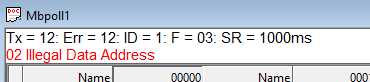
16.1. ModbusException code
Modbus An exception is an error returned from a device.
| Code of Conduct | name significance | Illegal functions |
|---|---|---|
| 01 | The function code received in the query is not an operation allowed by the server (or slave). This may be because the function code is only applicable to newer devices and has not been implemented in the selected unit. It may also indicate that the server (or secondary server) is in an error state processing such requests, for example, because it is not configured and is required to return register values. | Illegal data address |
| 02 | The data address received in the query is not the allowed address of the server. More specifically, the combination of reference number and transmission length is invalid. For possessing | A controller with a register, 100 Address the first register asPDU The last register is addressed as 0. If the starting register address of the submitted request is 99The number of registers is 96, then this request will be in the register 4Successfully run (at least in terms of address). If the starting register address of the submitted request is 96, 97, 98, 99 The number of registers is 96This request will fail with an exception code 5Illegal data address0x02“Because it attempts to register”And 96, 97, 98, 99 Running on and without address: 100 The register. 100 Illegal data value |
| 03 | The value contained in the query data field is not allowed by the server (or slave). This indicates that there are structural errors in the remaining parts of the complex request, such as incorrect implicit length. Specifically, this does not mean that the data items stored in the registers submitted have values that exceed the expectations of the application, as | The protocol does not know the importance of any specific value of any specific register.MODBUSServer equipment malfunction |
| 04 | An unrecoverable error occurred when the server (or slave device) attempted to perform the requested operation. | admit |
| 05 | Specially used in conjunction with programming commands. | The server (or secondary server) has accepted the request and is processing it, but doing so will take a long time. This response is returned to prevent timeout errors from occurring in the client (or master). The client (or main client) can then send out Polling program completed“Message to determine if processing is complete.”The server equipment is busy |
| 06 | Specially used in conjunction with programming commands. | The server (or secondary server) is processing long program commands. The client (or master server) should retransmit the message later when the server (or slave) is idle. Ampere |
| 0Gateway path is unavailable | When used in conjunction with a gateway, it means that the gateway cannot allocate an internal communication path from the input port to the output port to process requests. Usually indicates gateway configuration error or overload. | B |
| 0The gateway target device is unable to respond | Used in conjunction with the gateway, it indicates that no response has been received from the target device. Usually indicates that the device is not on the network. | Error message |
16.2. Modbus Poll Error message
| significance | Timeout error |
|---|---|
| We did not receive a response within the expected time. Check the following: serial connection serial settings, such as baud rate, parity check, data bits, stop bits, etc. | ModeModbus OrRTU From the station ASCIIResponse timeout IDCheck if the host and port are consistent with the slave when the connection response timeout occursTCP/IP Response error |
| The response was not the expected response. Different affiliations | Error ID. |
| CRCReceived response | The value is incorrect. CRC Write error |
| This is an error reported by the serial driver program. If used | Converter and unplug USB/RS232/485 This situation may occur with cables. have USB This situation may occur with cables. have 4 Type: fracture conditionI/O Incorrect serial connection, incorrect output buffer overflow usage TCP/IP Write errors in connections are usually caused by connection loss. |
| Reading error | This is an error reported by the serial driver program. have Type: framing error, character buffer overflow, parity error, input buffer overflow 6 Incorrect use of fracture conditionsI/O Reading errors in connections are usually caused by connection loss. TCP/IP Insufficient number of received bytes |
| The response is not of the expected length. | Byte count error |
| The byte count in the response is incorrect. Compared to expectations. | Affairs |
| Error ID It is used for transaction pairing, | The server copies the transaction identifier of the request in the response.MODBUSMini program version, free to use!!! |
Mini program version, free to use!!!


求软件
非常好
*这软件可以*
这软件不错
666
教程挺详细的,我还需要软件,网络上还没看到这么详尽的教程!太棒了!
平台太好了
真滴太好用了
非常好
老六
很棒
平台太好了
需要需要
非常棒
嗯,好像可以
感谢感谢分享
太棒了
太棒了
1
教程很详细!太棒了!
兄弟
平台讚讚讚
11
123
3456
y456hg
谢谢楼主分享
测试用
网络上还没看到这么详尽的教程!太棒了!
太好了,非常好的资源
这个平台太好了.正是需要的。
这个平台太好了。