Preface
Previous Article We discussed the editor-api module in Node-RED. It is primarily used to provide interfaces for the frontend.
In this article, let's take a look at the editor-client module in Node-RED.
This module is the frontend code that determines the interface we see.
If you want to modify the Node-RED interface, you need to study it carefully.
Let's take a look together.
editor-client
is located in the packages/node_modeles/editor-client directory.
There are mainly four core directories:
- locales This directory contains internationalized translations for the interface. If you want to modify a certain text, you should look here.
- public This directory stores files generated by compilation. It is generally not modified.
- src This is the core file of the flow editor, which contains all the business code, components, and resources of the editor.
- templates program entry, an mst file.
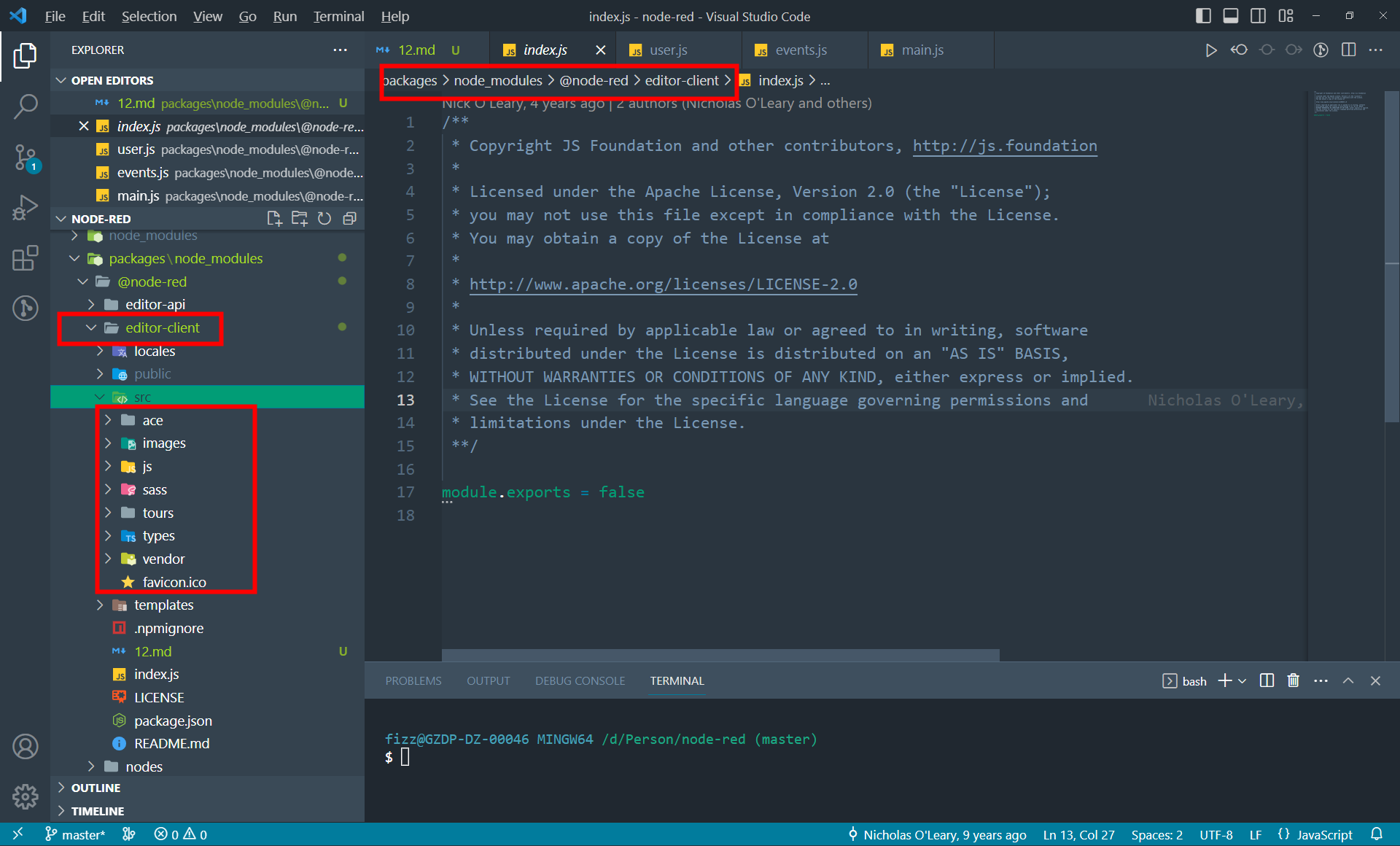
The first-level directory under editor-client looks like this.
In the locales directory, translations for various language versions are stored.
zh-CN for Simplified Chinese
zh-TW for Traditional Chinese
en-US for English
Let's first focus on the src directory
src directory
From the bottom up, the directories are
- ace, which stores resources for the ace code editor
- images, all image resources
- js, editor code, which is crucial
- sass editor style files
- tours preset flows, used for displaying demos or introducing version features
- types ts declaration types
- vendor external dependency libraries, such as ace, jquery, monaco, d3, font-awesome
If you want to modify a certain image or icon on the Node-RED page, you can look in the images directory and replace it with the same-named image file.
The current version of Node-RED is 3.x. The default code editor for this version is monaco, but as a transition, the code still retains the ace editor code. Users can switch configurations to continue using the ace editor.
The sass directory stores all the CSS styles on the page, with thevariables.scssfile being particularly important.
This file defines the CSS style variables used by node-red, and changing these variables can modify the styles in many places at once.
The specific usage of each variable requires careful consideration.
Under src, the core directory is the js directory. The entry point for this directory is main.js.
And all methods and variables are defined under the RED object.
For example, subscribing to events, distributing events, manipulating stack history, hooks, plugins, settings, and the UI and logic for user login. If you find the login pop-up ugly, you can modify it in user.js.
When doing secondary interface development for Node-RED, what makes people feel uncomfortable is that most of its DOM structure is pieced together using jQuery.
Therefore, you can hardly find large chunks of HTML code in Node-RED.
For example, the pop-up on the login page.
Although the UI part of the page is not easy to find, fortunately, Node-RED has done a good job of categorizing the UI.
var dialog = $('<div id="node-dialog-login" class="hide" style="display: flex; align-items: flex-end;">'+
  '<div style="width: 250px; flex-grow: 0;"><img id="node-dialog-login-image" src=""/></div>'+
  '<div style="flex-grow: 1;">'+
      '<form id="node-dialog-login-fields" class="form-horizontal" style="margin-bottom: 0px; margin-left:20px;"></form>'+
  '</div>'+
  '</div>');
dialog.dialog({
    autoOpen: false,
    classes: {
        "ui-dialog": "red-ui-editor-dialog",
        "ui-dialog-titlebar-close": "hide",
        "ui-widget-overlay": "red-ui-editor-dialog"
    },
    modal: true,
    closeOnEscape: !!opts.cancelable,
    width: 600,
    resizable: false,
    draggable: false,
    close: function( event, ui ) {
        $("#node-dialog-login").dialog('destroy').remove();
        RED.keyboard.enable()
    }
});
Most of the editor's UI is stored in the js/ui directory. Such as the deployment button, event logs, buttons, notifications, pasting, and so on.
The vast majority of the editor's UI is stored in the js/ui directory. Such as the deployment button, event logs, buttons, notifications, pasting...
Summary
Just like many electrical appliances that come with a warning "High voltage inside, do not disassemble unless you are a professional," modifying Node-RED is the same. A single change can affect the whole system.
If customization is needed, please seek the help of a professional.


Leave a Reply